Posts with «arduino» label

Crayolascope hacks toys into foot-thick 3D display

Artist Blair Neal, as many other great creators have before him, turned to children's toys as the source of inspiration for his latest project. Crayolascope is a rudimentary 3D display hacked together from several Glow Books, a light-up play on a flip-book from the titular company. The installation, currently housed at the New York Hall of Science in Flushing, layers 12 of its component clear plastic sheets to create a roughly one-foot deep display that plays a simple pre-drawn animation. The whole thing is controlled by an Arduino Mega, that can either play back the neon scribbles at varying speeds (controlled by a knob built into the console) or scrub through frame by frame. Neal isn't quite done tweaking the Crayolascope either. As it stands he's limited to between 14 and 18 frames, before it becomes too difficult to see through the sheets. And it requires near total darkness for optimal operation. To see it in action check out the video after the break.

Continue reading Crayolascope hacks toys into foot-thick 3D display

Crayolascope hacks toys into foot-thick 3D display originally appeared on Engadget on Mon, 25 Jun 2012 16:59:00 EST. Please see our terms for use of feeds.

Permalink | Email this | Comments

Crayolascope: an Analog Depth Display

With a desire to find out how a deep display would look, video artist Blair Neal created the Crayolascope, a fantastic 3D depth display out of a dozen hacked Crayola Glow Books. An Arduino Mega is driving the display and the user can adjust the speed of the pre-drawn animation or scrub through the frames. The unconventional display was exhibited at The New York Hall of Science (home of World Maker Faire New York) as part of the animation exhibit and he says that it’s a big hit with kids. He also has a few plans for the next version:

I’d like to play with more powerful lighting and more full edge lighting, as well as solve the issue of internal reflectivity between panels degrading the quality of the “image”. Once the animation goes in about 14-18 frames, it becomes very difficult to see from one side unless it is in a very dark space. I would love to get it much deeper than that, or at least make a finer Z-space resolution.

[Thanks, Blair!]


Temperature lab, part 3: voltage divider

In Temperature lab, part2, I carefully measured the resistance vs. temperature curve for the Vishay BC Components NTCLE413E2103F520L thermistor, finding that either my thermometer was badly miscalibrated, or the manufacturer’s data sheet was misleading.  I got a resistance of 9.7kΩ (not 10kΩ±1%) at 25° C and a B-value of 3174°K, not 3435°K±1%.  A big part of the discrepancy is that I calibrated over a different temperature range, and the measured values deviated most from the manufacturer’s spec at low temperatures.

Actually, the manufacturer’s data sheet is not as bad as all that.  They give specs for the ratio of the resistance at various temperatures to the resistance at 25° C, and their numbers do not fall along a simple curve.  The report the B-value as a 2-point fit for T=25° C and T=85° C, but they also report resistance values every 5° C from –40° C to 105° C.  One can compute the B-value for any pair:

But even if I use their calibration data down to 0° C, I don’t get as small a B-value as I get from my measurements. My calibration curve does not fit their spec, even if I look at the table, rather than the simple B-value model (though the table is closer to my measurements, it doesn’t match).

How big a difference would if make if I used their curve rather than mine?  At R=6685Ω, we get the same temperature either way (96.446° F).  At the resistance they claim for 0° C (27348Ω), their B-value model would give 33.90° F and mine would give 29.37° F.  At the resistance I measured for 0° C (25.5kΩ), their model would give 36.67° F, while mine gives 32.32° F (which is closer than the measurement error I had on temperatures).  So it looks like relying blindly on their B-value model introduces an error of over 4° F at low temperature, but in a digital thermometer for human body temperature, one would get nearly the same result with either calibration.

Voltage divider

The second part of the lab was to use the calibration curve to design a circuit to convert the resistance variation into a voltage variation that is nearly linear with temperature, at least over a small range.  The simplest circuit to convert a resistance to a voltage is a voltage divider, which just requires a voltage source and another resistor.

A simple voltage divider for converting the thermistor resistance to a voltage. Because I want the output voltage to increase with temperature, but the resistance R(T) decreases with temperature, I put the thermistor on the top branch and fixed resistance on the lower branch.
Circuit drawn with the Circuit Lab editor.

The formula for the output voltage is simple: , where we are approximating for temperature T in Kelvin. We’d like the voltage to be as linear as possible, which means we want the second derivative of Vout with respect to T to be zero. Obviously, we can’t do that for all values of T, but we might be able to do it for a particular value of T, and to have a small second derivative in that neighborhood.

We can take the derivatives by hand (or use a tool like Maple or Mathematica):


The second derivative is 0 if , that is if .

We can use this formula to set the value for any temperature, for example, if we want linearity around 98.6° F (310.15° K), we can set the series resistor to 4323.64Ω.

Expected voltage curve using a voltage divider with series resistor optimized for 98.6° F. Note that the curve is fairly linear from about 70° F to about 130° F (where the red non-linear curve and the green linear approximation at 98.6° F are quite close.

Of course, commercially available resistors don’t come in values like 4323.64Ω, so in doing a design one has to pick an available resistor, using the EIA table of standard resistor values.  A 4.7kΩ resistor looks pretty close, which would be color code yellow-violet-red.  Too bad that I don’t have one.  I do have a 5.1kΩ resistor, which would be optimal for linearizing at 90.06° F.  We should, of course, ask students to do the resistor selection for a different temperature than the one we use in an example, and they should be using their own B-value.

Testing the voltage divider

I set up the voltage divider on a breadboard.  Because I knew my wall wart had a huge ripple, I added a low-pass RC filter consisting of a 100Ω resistor and a 470µF electrolytic capacitor.  This slightly complicates the analysis of the voltage output, since the Vdd voltage is itself dependent on a voltage divider.

Low-pass filter to clean up the output of the wall wart. With the low-pass filter in place, we can model the power supply as a 5.166V source and 100Ω series resistor.
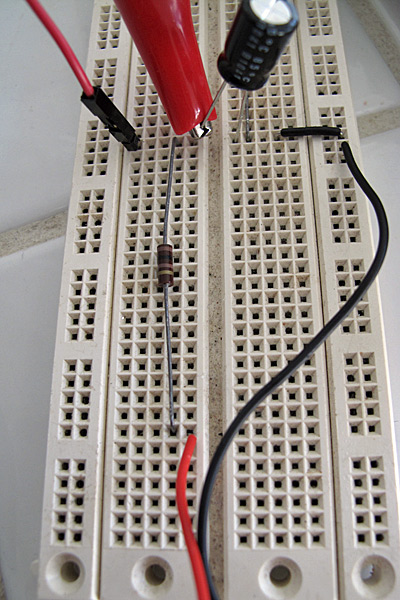
Here is what the low-pass filter looks like on the breadboard. The red and black wires from the bottom come from the connector to the wall wart. The 100Ω resistor runs vertically up the center, and the electrolytic capacitor connects across to the ground. The red clip lead is from the multimeter and is set up for measuring the voltage at the output of the filter.

Here is the full breadboard, showing the RC filter, the series resistor, the leads to the thermistor (the red and yellow lines with the crimp-on connectors), and the clip leads to the multimeter (the red and black alligator clips). I’ve found it very handy to have a number of double-sided header pins to make easy connection points on the breadboard for clip leads.
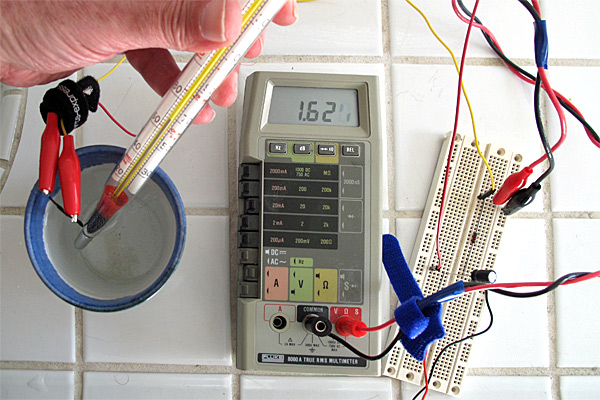
Here is the setup used for testing. The thermistor and thermometer are in the ceramic-cup water bath, with the thermometer held to keep the bulb in contact with the thermistor. You can see that the least-significant digit of the LCD display is a bit hard to read—applying some pressure to the display often makes it readable. Clip leads are essential to doing this experiment—holding the multimeter probes to test points would be a major hassle.

I only made 21 measurements of voltage, since I was not going to be fitting a model to the data, but just using the model I fit from the resistance measurements.

Plot of measured and theoretical voltage vs. temperature for the thermistor. The non-linear theoretical curve seems to be a pretty good fit (though it was not fit on this data, but on the previous series of resistance measurements).

The range of the voltages with the series resistor (from about 0.85v at freezing to 4.15v at boiling) is fairly reasonable for direct conversion to digital for the Arduino 10-bit ADC. In the middle of the range, the slope is about 0.0233 V/°F, which would give a resolution of about 0.2°F for Arduino readings.  (Of course, with the Arduino, we would not need the low-pass filter, and Vdd would be a well-regulated 5v, so this calibration curve would have to be redone.)  Even if we use the computational power of the Arduino to correct the non-linearity of the voltage curve, it is still useful to select the series resistor for the temperature we are most interested in, since that point gets the largest slope and hence the highest temperature resolution for fixed-size steps in voltage quantization.

Series-parallel

A lot of thermistor circuits on the web have a resistor in parallel with the thermistor, as well as the one in series. I wondered what the effect of this extra resistor was.

Circuit with resistor in parallel with the thermistor, as well as in series.

I tried analyzing this circuit also, using the same brute-force approach of computing the second derivative of the voltage and setting it to zero.  I got a result that surprised me initially:  the second derivative is zero if , where is the resistance one would get for putting the series and parallel resistors in parallel. This is exactly the same condition as before, but with replacing the series resistor .

After I thought about this for a while, I realized that I should have been able to get there directly. If you think of the circuit as connecting the thermistor to a voltage divider consisting of R2 and R1, then you can replace the ground and that voltage divider by the Thévenin equivalent, which would be a voltage source with voltage and a series resistor consisting of  R1 and R2 in parallel: .  The only reason to put in a parallel resistor would be to restrict the voltage range (which might be useful if the output were to be amplified, but is not useful if the output is going directly into an analog-to-digital converter whose full-scale range is 0 to Vdd).


Filed under: Circuits course Tagged: Arduino, bioengineering, circuits, course design, teaching, temperature measurement, Thévenin equivalent, thermistor, voltage divider

Using the Raspi as an Ethernet shield

[Alexandre] wanted to set up a web-based temperature logger with his Arduino, but found the Arduino Ethernet shield a little finicky. Since his Raspberry pi was just delivered, he figured he could use the Raspi as an Ethernet shield with just a little bit of coding.

After [Alexandre] set up his Arduino to send a thermocouple through the USB, the only thing left to do was to add node.js to the Raspi’s Debian installation. Every five minutes, the Arduino wakes up, takes a temperature reading, and sends it over to the Raspberry pi. From there, it’s easy parse the Arduino’s JSON output and serve it up on the web.

In the end, [Alexandre] successfully set up his Raspberry pi as an Ethernet shield to serve a web page displaying the current temperature (don’t F5 that link, btw). One interesting thing we have to point out is the cost of setting up this online temperature logger: the Arduino Ethernet shield sells for $45 USD, while the Raspberry pi is available for $35. Yes, it’s actually less expensive to use a Raspberry pi as an Ethernet shield than the current Arduino offerings. There you have it, just in case you were still on the fence about this whole Raspi thing.


Filed under: arduino hacks, Rasberry pi

Temperature lab, part2

The thermistors that I ordered (see More musings on circuits course: temperature lab and Buying parts for circuits course) arrived today, about 2.1 days after I ordered them.  So I’ll try playing with them today, and see whether I can do the lab I’m thinking of for the students.

My son is still working on the Arduino data logger.  The Arduino code has been done for a while, but he’s been working on the Python front end.  He’s decided to do two front ends: a minimal one with no GUI and a fancy one using PyGUI.  He’s run into some problems (like PyGUI not supporting autoscrolling in TextEditor components), but everything seems to be solvable at this point.  He had a GUI interface working, but decided he needed to refactor his code to have a proper API for the datalogger, so that the user interface and the datalogger core code were as independent as possible with a documented interface between them—he’s teaching himself a lot about software engineering for this project, which is the first one for which he has had an external client.

The action plan for testing out a temperature measurement lab that I posted in More musings on circuits course: temperature lab was

  • Get some thermistors and some thermometer probe sheaths and see if I can make adequate temporary waterproofing for pennies per student.  I’ll probably have to solder on wires to lengthen the leads.
  • Try calibrating thermistors using a multimeter, cups of hot and cold water, and an accurate thermometer.
  • Try reading the thermistor using a voltage divider and the Arduino ADC.  Plot the temperature and Arduino reading over a wide temperature range (say, as a cup of boiling water cools).
  • Try linearizing the thermistor readings  using a parallel resistor and voltage divider.
  • Try designing an amplifier to read the thermistor with much lower current through it (and so less self-heating).

I’ve got three types of thermistors (all 10kΩ nominal resistance at 25° C), none of which are intended for immersion:

  • Vishay BC Components NTCLE100E3103JB0 a very cheap (23.5¢ each in quantities of 10) with B-value 3977°K).  There is high variation in the resistance (±5%), but low variation in the B-value (±0.75%).  These are glass-bead thermistors with 2cm uninsulated leads, so will need waterproofing. I bought 10 of these, but am hoping that I don’t need them.
  • Vishay BC Components NTCLE413E2103F520L (34.9¢ each in quantities of 10) has 4cm leads and is epoxy coated, but with the warning “Not intended for fluid immersed applications or continuous contact with water.”  It has B-value 3435°K, both resistance and B-value ±1%.  I plan to find out today if it is waterproof enough for the relatively short duration of the labs. I bought 10 of these also, and have the highest hopes for these being the ones we use in the lab.
  • Murata Electronics North America NXFT15XH103FA2B100 (66¢ each in quantities of 10) with B-value 3431°K, both resistance and B-value ±1%. The 9.5cm leads make these likely to be the easiest to use with thermometer probe covers, but they are more expensive.  I bought 4 @ 87¢, so as to keep the cost per thermistor type below $3.50. Note: the specs give different B-values depending which pair of temperatures used—I’ll have to look to see if they have specs for higher-order models of the resistance as a function of temperature.

The setup at 110°F, showing 4.60kΩ as the resistance.

I’ll try the epoxy-coated ones with the 4cm leads first. The first step is calibrating one with an ohmmeter. I used clip leads to connect a cheap multimeter to the thermistor, then dunked the thermistor in a glass of warm water with a thermometer (note: we’ll need to get some thermometers for this lab). The thermometer I used is a pasteurizing thermometer that I’ve had for years—it is, unfortunately, calibrated in Fahrenheit, not Celsius. Of course, we ideally want temperature in Kelvin.

I put a table of the measurements on a separate page, to avoid cluttering up the post with a table of 28 measurements.

I don’t expect many of the students will have the patience to make 28 measurements, but if we provide some different hot water sources (water boiled in a teakettle and ice water in a thermos), they should be able to make 10 measurements across a wide range of temperatures. I stopped at 28 measurements, because the alligator clip broke the wire and I didn’t feel like stripping more of the insulation and reconnecting.

I tried to fit the Steinhart-Hart equation to the data, where R is the resistance in Ω and T is the temperature in degrees Kelvin. But gnuplot got as good a fit using just A and B as using the third order fit, with providing an excellent fit.

Fitting the first two terms of the Steinhart-Hart model for thermistor behavior.


Simple Arrhenius fit for the data. When I fit the equation , which is the equation most often used in thermistor specs, I get A=0.24Ω and B=3157°K, which is not that close to the spec (10kΩ @ 25°C, B=3435±35°K, so A=0.0992Ω). Note that the spec curve fits the data quite well for warm temperatures, but deviates badly for cold ones.

There could be systematic problems with either my temperature readings or my resistance readings. The multimeter is more suspect than the thermometer, but the readings would have to be off by 500Ω to get that sort of error in the B-value. The numbers look particularly bad around 110°F. I think I need to get some new batteries for my other other cheap multimeter (which I think is a bit better) and see if it gives more reasonable results.

Wait a minute! I have an old Fluke 8060A multimeter (between 26 and 30 years old) that has a bit of a wonky LCD display, and a blown fuse on the 10A input, but is otherwise still probably my most accurate meter. If its batteries aren’t dead, I may be able to use it to get better measurements.

I tried measuring some known resistors, to see if the meters are way off. I tried an 11.8kΩ ±1% resistor: Fluke meter says 11.77Ω and the suspect multimeter says 11.67kΩ, while for a 732Ω±1% resistor, the Fluke meter says 731.1Ω, while the suspect meter says 718Ω. So the suspect meter appears to be reading 1–2% low, while the Fluke meter is within the accuracy of the resistors. So I boiled up some more water and tried another series of readings (the 63 readings are in a table on a separate page to avoid clutter here.)

Note that there are three runs of data: cooling down from boiling, cooling down from hot tap water, and cooling with ice from room temperature. I found it easiest to do this work on the counter in the bathroom, where I could easily adjust the temperature by pouring out some water and adding more hot or cold water. I was also very careful to make sure that the bulb of the thermometer was in contact with the thermistor while making the measurement, so that they were as nearly the same temperature as I could make them.

Let’s see what sort of fit we can get with this data.

The second data set, with 63 data points, is much cleaner than the first data set, and is well fit by a simple 2-parameter model (leaving out the third term of the Steinhart-Hart equation. Because it is hard to read the thermometer to better than 0.5°F, the fit is really quite good.

The data once again does not match the specified B-value of 3435°K±1%, but B=3174°K, though the curves are quite close for warmer temperatures.

The data sheet reports the 3435°K B-value as a B25/85 measurement, that is, it is based on values at 25°C (77°F) and 85°C (185°F).  If we just fit over that range, we can get the B-value up to 3236°K, which is still a long way short of the specified B-value.

Since I now trust that the resistance measurements are fairly good, the large error in the B-value has to be either from the thermometer or the thermistor. Because I don’t have a more accurate thermometer, and I’m not inclined to get one, I’m a bit stuck at this point in determining whether the thermistor meets the spec or not.

Doing a large number of measurements like this took far too long for the first part of a lab.  A lot of the time was spent waiting for the temperature of the water bath to change (or trying to make change by adding water or ice). We’ll probably have to ask for just 5 or 6 values, perhaps providing them with 5 or 6 water baths in thermoses that they can run their thermistors through one after another, to get the measurements rapidly. We will need some decent thermometers, capable of reading to ±0.2°C, if they aren’t too expensive.

Tomorrow I’ll try doing the electronics part of the lab, adding series and parallel resistors and measuring the voltage with the Arduino.


Filed under: Circuits course Tagged: Arduino, bioengineering, circuits, course design, teaching, temperature measurement, thermistor

Standuino Sports Sketch Style Circuit Board


If you’re looking for an Arduino clone with a little bit of style, look no further than the Standuino. Its sketch style silk screen and goofy-sized vias give it a charming and playful aesthetic. While it’s named after artist Standa Filip, the creators say it also communicates what it’s best at: standalone applications. [via nerdstink]


MAKE » Arduino 24 Jun 03:30
arduino  

Red Bull Creation hardware (Bullduino) arrives

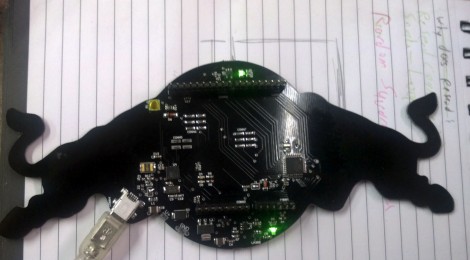
The Bullduino’s are starting to arrive. When [Arclight] received his in the mail the first thing he did was to share the hardware details. Of course this is the hardware that participants in the Red Bull Creation contest will be receiving ahead of this year’s contest.

The board is an ATmega328 Arduino clone. Instead of an FTDI chip for USB this one is sporting an ATmega8u2. That’s not too much of a surprise as it should translate to a cost savings. [Arclight] reports that the stock firmware flashes a message in Morse code. It seems the Hartford HackerSpace got their Bullduino several days ago and already decoded the message. It reads:

“Wouldn’t lou prefer a good game of chess?”

The guys that did the decoding speculate that this could be a type as ‘l’ and ‘y’ are inversions of each other in Morse code; or it could be some kind of clue. At any rate, if you want to do some disassembly and see if there’s anything lurking in the firmware, [Arclight] posted FLASH and EEPROM dumps from both ATmega chips along with his article.


Filed under: arduino hacks

Fijibot

Primary image

What does it do?

Seeks light to charge batteries (photovore) and avoids obstacles

Fijibot is an autonomous, self-charging photovore. I built him using a 1.5 liter Fiji Water bottle, an Arduino Uno, 6v solar panel (plus various other parts) from Radio Shack, an Arduino Proto Shield (plus various other parts) from Adafruit, and the wheels and steering arrangement from an RC car.

Cost to build

$150,00

Embedded video

Finished project

Complete

Number

Time to build

20 hours

Type

wheels

URL to more information

Weight

800 grams

read more

Audio Input to Arduino

The easiest way to connect audio signal to your arduino, is build a simple 3 components (2 resistors plus cap) circuitry shown on the first drawings on right side. Disadvantage: as there is no amplifier, sensitivity would be low, hardly enough to work with headphones jack output.  For low level signals, like electret microphone, amplifier is necessary. Here is the kit, which included board, electronic components and NE5532 Operational Amplifier IC:

  Super Ear Amplifier Kit

Other option, from SparkFun Electronics:

  Breakout Board for Electret Microphone

Note: I don’t recommend to replace NE5532 OPA with popular  LM358 or LM324 due their pure frequency response above > 10 kHz.

Configuring AtMega328 ADC to take input samples faster:

void setup() {

   ADCSRA = 0×87; // freq = 1/128, 125 kHz. 13 cycles x 8     usec =  104 usec.
// ADCSRA = 0×86; // freq = 1/64,   250 kHz. 13 cycles x 4     usec =   52 usec.
// ADCSRA = 0×85; // freq = 1/32,   500 kHz. 13 cycles x 2     usec =   26 usec.
// ADCSRA = 0×84; // freq = 1/16 ,    1 MHz. 13 cycles x 1      usec =   13 usec.
// ADCSRA = 0×83; // freq = 1/8,       2 MHz. 13 cycles x 0.5   usec =  6.5 usec.
// ADCSRA = 0×82; // freq = 1/4,       4 MHz. 13 cycles x 0.25 usec = 3.25 usec.

ADMUX    = 0×40;                          // Select  Analog Input 0

ADCSRA |= (1<<ADSC);                 // Start Conversion

Timer1.initialize(T_PERIOD);           // Sampling with TimerOne library
Timer1.attachInterrupt(iProcess);

}

Reading and storing samples to array via ISR ( Timer Interrupt Subroutine ), Timer1 in this example:

void iProcess()
{
static uint8_t n_sampl;
if (ADCSRA & 0×10)
{
int16_t temp = ADCL;
         temp += (ADCH << 8);
          temp -= sdvigDC;    
    ADCSRA |= (1<<ADSC);
xin[n_sampl] = temp;
}

if (++n_sampl >= FFT_SIZE )
{
n_sampl = 0;
process = 1;
}

}

Don’t like to solder all this components from the drawings above? Here is easy way around, if you, by chance, have a spare USB speakers around. Something like this:

Note: Speakers should use USB port as a power source, not AC power outlet!

1.  Open box up, and look  what kind of chip (IC) Power Amplifier inside, on the PCB board:

2.  TEA2025 in this example, but could be different in yours. Not big deal, just write down the name, than go on-line and try to find a data sheet for your particular chip. My favorite links:  1   and   2.  From the data sheet you will find pin numbers of two outputs, for left and right channels. Just solder couple of wires to ground and to one of the output and that’s it!

3. If printing on the IC body is unreadable, or couldn’t find a data sheet, it is possible to trace two wires from the speaker to IC. Most likely, there would be an electrolytic cap installed in series, between chip output and speaker. Solder a signal wire on the chip’s side of the cap, or near IC. There is a slim chance, of course, that IC configured in bridge configuration, and wouldn’t be any caps. It’s even better, just use ether of two speaker’s wires as a signal line, and ground as ??? a ground.

Be careful, use different color of wires for ground line and signal line. There would be no protection, and wrong polarity could damage an analog input of the arduino board, and in some occasions Power Amplifier IC. To prevent this, I’d strongly advise to install 10 kOHm resistor in series with signal wire.


New in the Maker Shed: Arduino Robot Shield Kit

My first hands-on experience with robotics and microcontrollers came from using a Parallax Boe-Bot kit with a Basic Stamp. I had no programming experience but using the included documentation and my PC, I was able to figure out how to build a robot that would react to obstacles and navigate its environment. Since then I’ve switched over to the Arduino but I still miss the experience I received from the Boe-Bot. Parallax must have read my mind because they released the Robotics Shield Kit for Arduino which is now available in the Maker Shed. They’ve taken their excellent Board of Education and transformed it into a shield (also available separately) which fits on top of an Arduino. The rest of the kit remains largely unchanged from the original Boe-Bot, which I consider a good thing.  Full documentation with over 40 activities is available online so you’ll be learning in no time. Simply add your own Arduino and a USB cable and enter into the fascinating world of robotics and Arduino!

Features

  • Board of Education Shield PCB
  • High-quality aluminum robot chassis, continuous rotation servos, and wheels
  • Boe-Boost Module
  • All the assembly hardware needed (nuts, screws standoffs)
  • Parallax screwdriver
  • Detailed online documentation and tutorials
  • All the electronic components and sensors needed for the tutorials
  • Note: Requires Arduino and USB cable