Posts with «featured» label

2025: As The Hardware World Turns

If you’re reading this, that means you’ve successfully made it through 2025! Allow us to be the first to congratulate you — that’s another twelve months of skills learned, projects started, and hacks….hacked. The average Hackaday reader has a thirst for knowledge and an insatiable appetite for new challenges, so we know you’re already eager to take on everything 2026 has to offer.

But before we step too far into the unknown, we’ve found that it helps to take a moment and reflect on where we’ve been. You know how the saying goes: those that don’t learn from history are doomed to repeat it. That whole impending doom bit obviously has a negative connotation, but we like to think the axiom applies for both the lows and highs in life. Sure you should avoid making the same mistake twice, but why not have another go at the stuff that worked? In fact, why not try to make it even better this time?

As such, it’s become a Hackaday tradition to rewind the clock and take a look at some of the most noteworthy stories and trends of the previous year, as seen from our rather unique viewpoint in the maker and hacker world. With a little luck, reviewing the lessons of 2025 can help us prosper in 2026 and beyond.

Love it or Hate it, AI is Here

While artificial intelligence software — or at least, what passes for it by current standards — has been part of the technical zeitgeist for a few years, 2026 was definitely the year that AI seemed to be everywhere. So much so that the folks at Merriam-Webster decided to make “slop”, as in computer-generated garbage content, their Word of the Year. They also gave honorable mention to “touch grass”, which they describe as a phrase that’s “often aimed at people who spend so much time online that they become disconnected from reality.” But we’re going to ignore that one for personal reasons.

At Hackaday, we’ve obviously got some strong feelings on AI. For those who earn a living by beating the written word into submission seven days a week, the rise of AI is nothing less than an existential crisis. The only thing we have going for us is the fact that the average Hackaday reader is sharp enough to recognize the danger posed by a future in which all of our media is produced by a Python script running on somebody’s graphics card and will continue to support us, warts and all.

Like all powerful tools, AI can get you into trouble if you aren’t careful.

But while most of us are on the same page about AI in regards to things like written articles or pieces of art, it’s not so clear cut when it comes to more utilitarian endeavours. There’s a not insignificant part of our community that’s very interested in having AI help out with tedious tasks such as writing code, or designing PCBs; and while the technology is still in its infancy, there’s no question the state of the art is evolving rapidly.

For a practical example we can take a look at the personal projects of two of our own writers. Back in 2023. Dan Maloney had a hell of a time getting ChatGPT to help him design a latch in OpenSCAD. Fast forward to earlier this month, and Kristina Panos convinced it to put together a customized personal library management system with minimal supervision.

We’ve also seen a uptick in submitted projects that utilized AI in some way. Kelsi Davis used a large language model (LLM) to help get Macintosh System 7 running on x86 in just three days, Stable Diffusion provided the imagery for a unique pizza-themed timepiece, Parth Parikh used OpenAI’s Speech API to bring play-by-play commentary to PONG, and Nick Bild used Google Gemini to help turn physical tomes into DIY audio books.

Make no mistake, an over-reliance on AI tools can be dangerous. In the best case, the user is deprived of the opportunity to actually learn the material at hand. In the worst case, you make an LLM-enhanced blunder that costs you time and money. But when used properly, the takeaway seems to be that a competent maker or hacker can leverage these new AI tools to help bring more of their projects across the finish line — and that’s something we’ve got a hard time being against.

Meshtastic Goes Mainstream

Another tech that gained steam this year is Meshtastic. This open source project aims to allow anyone to create an off-grid, decentralized, mesh network with low cost microcontrollers and radio modules. We fell in love with the idea as soon as we heard about it, as did many a hacker. But the project has reached a level of maturity that it’s starting to overflow into other communities, with the end result being a larger and more capable mesh that benefits everyone.

Part of the appeal is really how ridiculously cheap and easy it is to get started. If you’re starting from absolutely zero, connecting up to an existing mesh network — or creating your own — can cost you as little as $10 USD. But if you’re reading Hackaday, there’s a good chance you’ve already got a supported microcontroller (or 10) laying around, in which case you may just need to spring for the LoRa radio module and wire it up. Add a 3D printed case, and you’re meshin’ with the best of them.
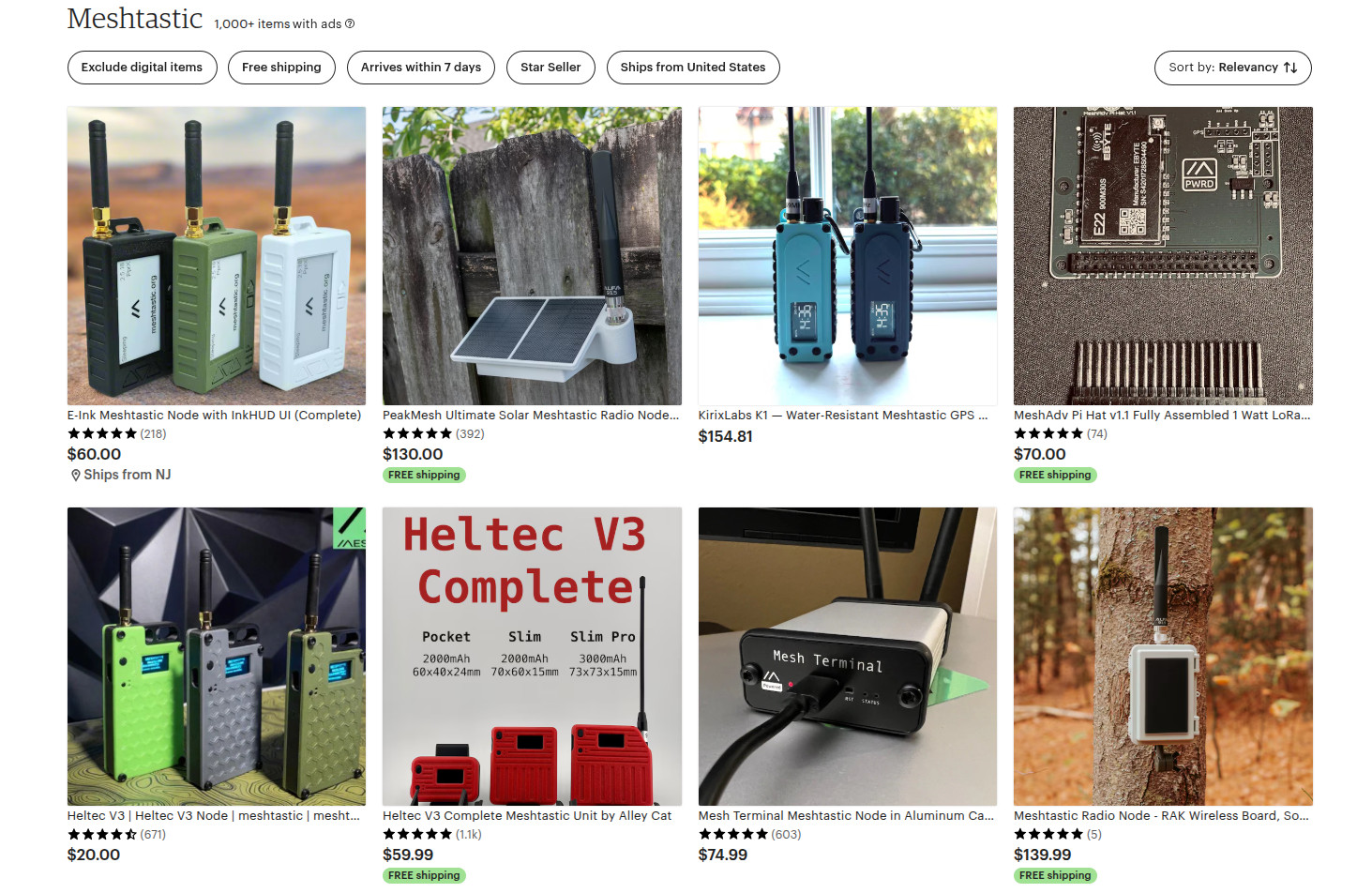
There are turn-key Meshtastic options available for every budget, from beginner to enthusiast.

If you’re OK with trading some money for time, there’s a whole world of ready to go Meshtastic devices available online from places like Amazon, AliExpress, and even Etsy for that personal touch. Fans of the retro aesthetic would be hard pressed to find a more stylish way to get on the grid than the Hacker Pager, and if you joined us in Pasadena this year for Hackaday Supercon, you even got to take home a capable Meshtastic device in the form of the Communicator Badge.

Whether you’re looking for a backup communication network in the event of a natural disaster, want to chat with neighbors without a megacorp snooping on your discussion, or are simply curious about radio communications, Meshtastic is a fantastic project to get involved with. If you haven’t taken the plunge already, point your antenna to the sky and see who’s out there, you might be surprised at what you find.

Arduino’s New Overlord

In terms of headlines, the acquisition of Arduino by Qualcomm was a pretty big one for our community. Many a breathless article was written about what this meant for the future of the company. And things only got more frantic a month later, when the new Arduino lawyers updated the website’s Terms and Conditions.

But you didn’t see any articles about that here on Hackaday. The most interesting part of the whole thing to us was the new Arduino Uno Q: an under $50 USD single-board computer that can run Linux while retaining the classic Uno layout. With  the cost of Raspberry Pi hardware steadily increasing over the years, some competition on the lower end of the price spectrum is good for everyone.
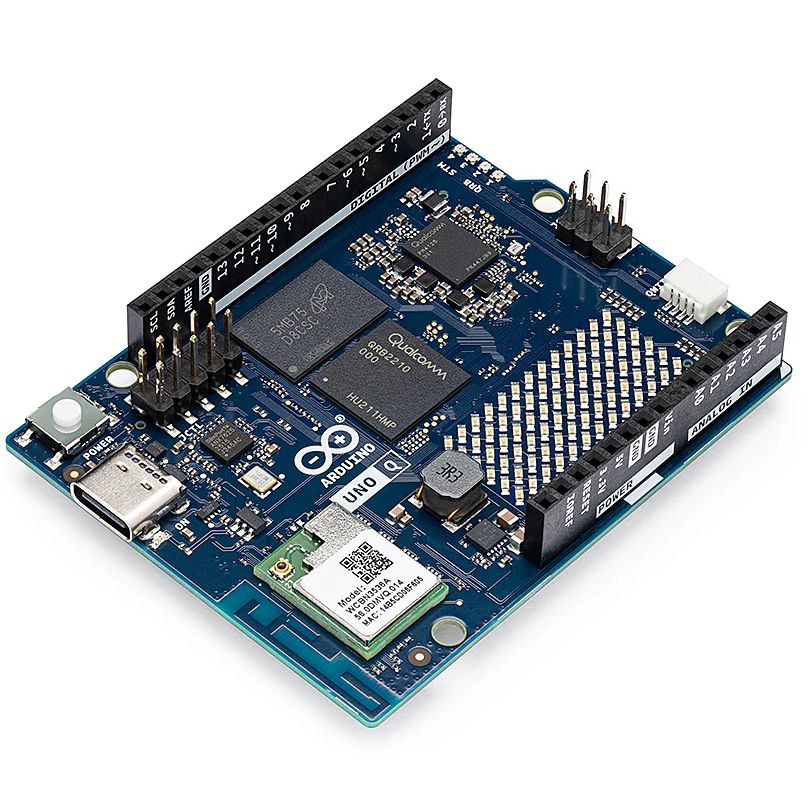
The Arduino Uno Q packs enough punch to run Linux.

As for the Qualcomm situation — we’re hackers, not lawyers. Our immediate impression of the new ToS changes was that they only applied to the company’s web services — “The Platform” in the contract — and had no bearing on the core Arduino software and hardware offerings that we’re all familiar with. The company eventually released a blog post explaining more or less the same thing, explaining that evolving privacy requirements for online services meant they had to codify certain best practices, and that their commitment to open source is unwavering.

For now, that’s good enough for us. But the whole debacle does bring to mind a question: if future Arduino software development went closed-source tomorrow, how much of an impact would it really have on the community at this point? Today when somebody talks about doing something with Arduino they are more likely to be talking about the IDE and development environment than one of the company’s microcontroller boards — the licenses for which mean the versions we have now will remain open in perpetuity. The old AVR Arduino code is GPLed, after all, as are the newer cores for microcontrollers like the ESP32 and RP2040, which weren’t written by Arduino anyway. On the software side, we believe that we have nothing to lose.

But Arduino products have also always been open hardware, and we’ve all gained a lot from that. This is where Qualcomm could still upset the applecart, but we don’t see why they would, and they say they won’t. We’ll see in 2026.

The Year of Not-Windows on the Desktop?

The “Year of Linux on the Desktop” is a bit like fusion power, in that no matter how many technical hurdles are cleared, it seems to be perennially just over the horizon. At this point it’s become a meme, so we won’t do the cliché thing and claim that 2025 (or even 2026) is going to finally be the year when Linux breaks out of the server room and becomes a mainstream desktop operating system. But it does seem like something is starting to shift.

That’s due, at least in part, to Microsoft managing to bungle the job so badly with their Windows 11 strategy. In spite of considerable push-back in the tech community over various aspects of the operating system, the Redmond software giant seems hell-bent on getting users upgraded. At the same time, making it a hard requirement that all Windows 11 machines have a Trusted Platform Module means that millions of otherwise perfectly usable computers are left out in the cold.

What we’re left with is a whole lot of folks who either are unwilling, or unable, to run Microsoft’s latest operating system. At the same time desktop Linux has never been more accessible, and thanks in large part to the efforts of Valve, it can now run the majority of popular Windows games. That last bit might not seem terribly exciting to folks in our circles, but historically, the difficulty involved in playing AAA games on Linux has kept many a techie from making the switch.

Does that mean everyone is switching over to Linux? Well, no. Certainly Linux is seeing an influx of new users, but for the average person, it’s more likely they’d switch to Mac or pick up a cheap Chromebook if all they want to do is surf the web and use social media.

Of course, there’s an argument to be made that Chromebook users are technically Linux users, even if they don’t know it. But for that matter, you could say anyone running macOS is a BSD user. In that case, perhaps the “Year of *nix” might actually be nigh.

Grandma is 3D Printing in Color

There was a time when desktop 3D printers were made of laser-cut wood, used literal strings instead of belts, and more often then not, came as a kit you had to assemble with whatever assistance you could scrounge up from message boards and IRC channels — and we liked it that way. A few years later, printers were made out of metal and became more reliable, and within a decade or so you could get something like an Ender 3 for a couple hundred bucks on Amazon that more or less worked out of the box. We figured that was as mainstream as 3D printing was likely to get…but we were very wrong.
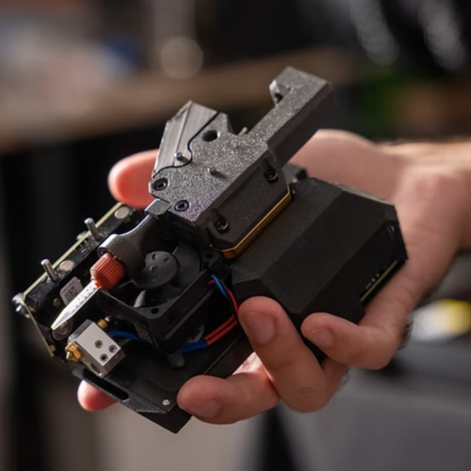
A Prusa hotend capable of printing a two-part liquid silicone.

Today 3D printing is approaching a point where the act of downloading a model, slicing it, and manifesting it into physical form has become, dare we say it, mundane. While we’re not always thrilled with the companies that make them and their approach to things that are important to us like repairability, open development, and privacy, we have to admit that the new breed of printers on the market today are damn good at what they do. Features like automatic calibration and filament run-out sensors, once the sort of capabilities you’d only see on eye-wateringly expensive prosumer machines, have became standard equipment.

While it’s not quite at the point where it’s an expected feature, the ability to print in multiple materials and colors is becoming far more common. Pretty much every printer manufacturer has their own approach, and the prices on compatible machines are falling rapidly. We’re even starting to see printers capable of laying down more exotic materials such as silicone.

Desktop 3D printing still hasn’t reached the sort of widespread adoption that all those early investors would have had us believe in the 2000s, where every home would one day have their own Star Trek style personal replicator. But they are arguably approaching the commonality of something like a table saw or drill press — specialized but affordable and reliable tools that act as a force multiplier rather than a tinkerer’s time sink.

Tariffs Take Their Toll

Finally, we couldn’t end an overview of 2025 without at least mentioning the ongoing tariff situation in the United States. While it hasn’t ground DIY electronics to a halt as some might have feared, it’s certainly had an impact.

A tax on imported components is nothing new. We first ran into that back in 2018, and though it was an annoyance, it didn’t have too much of an impact at the hobbyist scale. When an LED costs 20 cents, even a 100% tariff wouldn’t be much of a hit to the wallet at the scale most of us are operating at. Plus there are domestic, or at least non-Chinese, options for some jellybean components. The surplus market can also help here — you can often find great deals on things like partial reels of SMD capacitors and resistors on eBay if you keep an eye out for them.

We’ve heard more complaints about PCB production than anything. After years of being able to get boards made overseas for literal pennies, seeing a import tax that added at checkout can be quite a shock. But just like the added tax on components, while annoying, it’s not enough to actually keep folks from ordering. Even with the tariffs, the cost of getting a PCB made at OSH Park is going to be much higher than any Chinese board house.

Truth be told, if an import tax on Chinese-made PCBs and components resulted in a boom of affordable domestic alternatives, we’d be all over it. The idea that our little hobby boards needed to cross an ocean just to get to us always seemed unsustainable anyway. It wouldn’t even have to be domestic, there’s an opportunity for countries with a lower import tariff to step in. Instead of having our boards made in China, why not India or Mexico?

But unfortunately, the real-world is more complex than that. Building up those capabilities, either at home or abroad, takes time and money. So while we’d love to see this situation lead to greater competition, we’ve got a feeling that the end result is just more money out of our pockets.

Thanks for Another Year of Hacks

One thing that absolutely didn’t change in 2025 was you — thanks to everyone that makes Hackaday part of their daily routine, we’ve been able to keep the lights on for another year. Everyone here knows how incredibly fortunate we are to have this opportunity, and your ongoing support is never taken for granted.

We’d love to hear what you thought the biggest stories or trends of 2025 were, good and bad. Let us know what lessons you’ll be taking with you into 2026 down below in the comments.
The Dar es Salaam Hacker Scene and Gamut Detection

We’re on a sort of vacation in Tanzania at the moment and staying in a modest hotel away from the tourist and government district. It’s a district of small shops selling the same things and guys repairing washing machines out on the sidewalk. The guys repairing washing machines are more than happy to talk. Everybody’s amazingly friendly here, the hotel guy grilled us for an hour about our home state. But I really didn’t expect to end up in a conversation about computer vision.

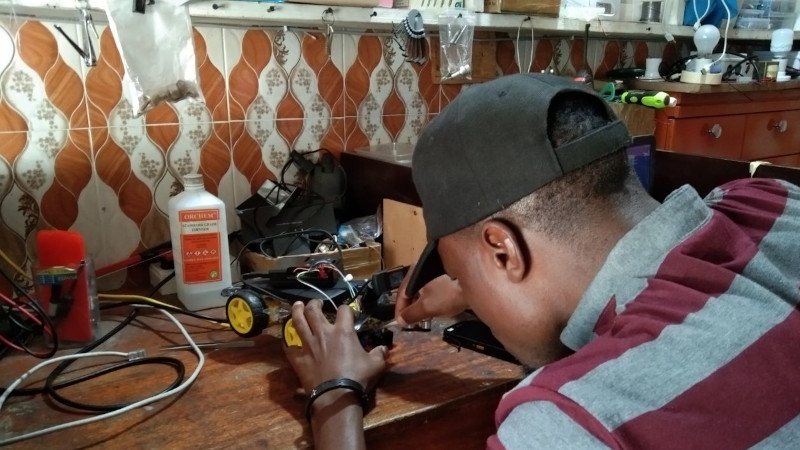
In search of some yogurt and maybe something cooler to wear, we went on a little walk away from the hotel. With incredible luck we found a robotics shop a few blocks away. Mecktonix is a shop about two meters each way, stuffed full of Arduinos, robots, electronics components, servos, and random computer gear, overseen by [Yohanna “Joe” Harembo]. Nearby is another space with a laser engraver and 3D printer. The tiny space doesn’t stop them from being busy. A constant stream of automotive tech students from the nearby National Institute of Transport shuffle in for advice and parts for class assigned projects.

In between students, Joe demos an autonomous car he’s working on. In classic hacker fashion, he first has to reattach the motor driver board and various sensors, but then he demos the car and its problem –  the video frame rate is very slow. We dive in with him and try to get some profiling using time.monotonic_ns(). He’s never done profiling before, so this is a big eye opener. He’s only processing one video frame every 4.3 seconds, using YOLO on a Pi 3, and yup, that’s the problem.  I suggest he change to gamut detection or a Pi 4.

Gamut Detection

If you’re not familiar with gamut detection, it’s one of the simplest of all computer vision techniques, so it’s easy to implement on slow processors and almost trivial to code. Basically, it’s “look for a color”.  If you want your robot to follow you, wear a lime green T shirt. Now the robot just has to look for lime green. Same for catching a ball or following a line. The algorithm is simple – convert each pixel to HSV, where hue corresponds to the direction around the color wheel,  saturation corresponds to how concentrated the color is, and value how bright. Brightness depends on the lighting, so you can throw value away and just set limits for H and S. Anything within those limits is part of our target. The box formed by those limits is our “gamut”.

There are a couple speedups you can apply as well. First, ask yourself how much resolution you need from the camera. If you only want to track a green T shirt that’s never less than 24 pixels on screen, turn the resolution down by a factor of six each way and look for four-pixel T shirts. You now have 1/36th as much data to process and your algorithm runs 36 times faster. If you can’t control the camera resolution, you can shrink the image or just sample every nth pixel. Second, you can often ask for a YUV or YIQ image from the camera. Discard Y and set your limits in IQ or UV coordinates. It’s about the same as HSV.

Joe’s eating this up – he’s had limited chances to talk with somebody else who is into computer vision. As we write this, he’s still trying with YOLO, but at lower resolution. If it doesn’t work he’ll try gamut detection. And it’s not his only project. Passenger carrying motorcycles called pikipikis are common here. A student has a project to enforce passengers wearing a helmet, and we fiddle with the student’s project.

The Dar es Salaam Scene

There’s other tech happening in Tanzania too. A few blocks away is [Ruta Electronics], a similar sugar cube sized shop developing smart meters. Everything from cases to PCB etching happens in the tiny shop. Downtown there are a few tech startups. There’s a fab lab, mostly oriented towards children. And on a quiet side street off the main drag, there’s a tiny shop with three guys who are hacking like crazy.

For us, we’ve had a chance to make a friend from a different culture and play with a robot car together — what could be better?  When you’re traveling, are you on the lookout for other hackers or hackerspaces? It’s worth the effort and brings our community together in a way that even the internet can’t.

How To Build Jenny’s Budget Mixing Desk

Jenny did an Ask Hackaday article earlier this month, all about the quest for a cheap computer-based audio mixer. The first attempt didn’t go so well, with a problem that many of us are familiar with: Linux applications really doesn’t like using multiple audio devices at the same time. Jenny ran into this issue, and didn’t come across a way to merge the soundcards in a single application.

I’ve fought this problem for a while, probably 10 years now. My first collision with this was an attempt to record a piano with three mics, using a couple different USB pre-amps. And of course, just like Jenny, I was quickly frustrated by the problem that my recording software would only see one interface at a time. The easy solution is to buy an interface with more channels. The Tascam US-4x4HR is a great four channel input/output audio interface, and the Behringer U-PHORIA line goes all the way up to eight mic pre-amps, expandable to 16 with a second DAC that can send audio over ADAT. But those are semi-pro interfaces, with price tags to match.

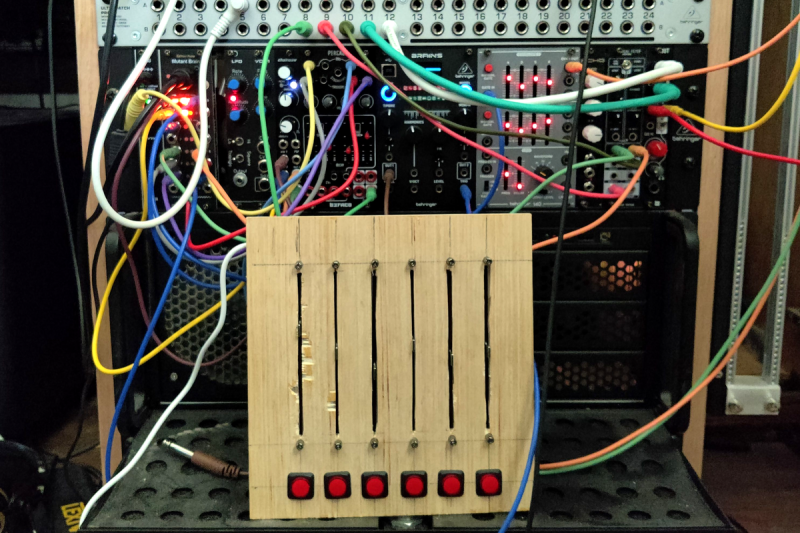
But what about Jenny’s idea, of cobbling multiple super cheap interfaces together? Well yes, that’s possible too. I’ll show you how, but first, let’s talk about how we’re going to control this software mixer monster. Yes, you can just use a mouse or keyboard, but the challenge was to build a mixing desk, and to me, that means physical faders and mute buttons. Now, there are pre-built solutions, with the Behringer X-touch being a popular solution. But again, we’re way above the price-point Jenny set for this problem. So, let’s do what we do best here at Hackaday, and build our own.

The Physical Goods

What we need is a microcontroller that has native USB client support, multiple digital I/O pins, and some analog inputs. I went with the Arduino MKRZero for the small size, decent price, and the fact that it’s actually in stock at Mouser. The other items we’ll need are some faders and buttons. I went for the full-sized 100 mm faders, and some LED toggle buttons made by Adafruit. The incidentals, like wire and resistors, was sourced from the local parts bin in the corner.

My first thought was to design and 3D print the panel, but after doing the layout on a scrap piece of plywood, the resulting size proved a bit too large for my printer. So we’re going retro, and making a “wood-grain” mixing desk. This would be a great project for a CNC router, but as I’m not part of that particular cool club yet, it was a drill press, table saw, and oscillating tool to the rescue. The results aren’t quite as pretty as I wanted, but maybe we’ll get a Mark II of this project one day.

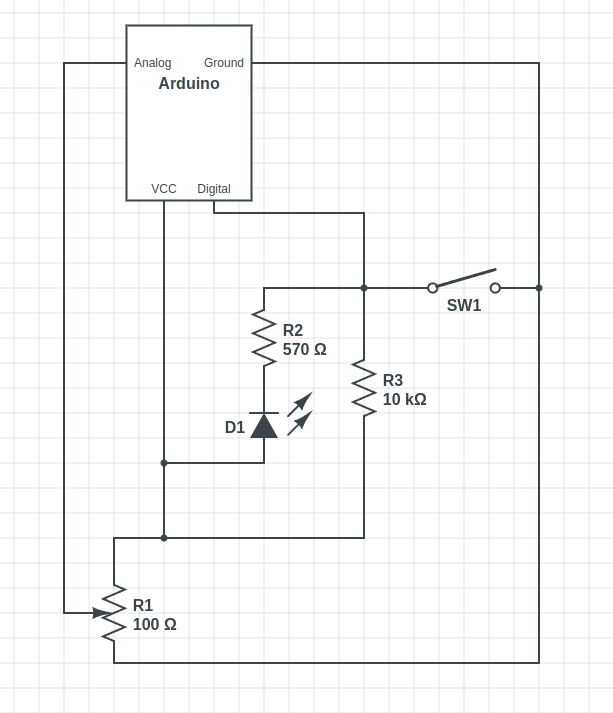
The wiring is relatively straightforward, with a current limiting resistor to protect the LEDs inside the buttons, and a pullup resistor to prevent the digital pin from floating when the button isn’t pushed. Now, that pullup might not be necessary, as I later learned that the Arduino has built-in pullup on its digital pins. And also of note, a 10 Ω resistor is *not* a good choice for a pullup. As Al eloquently put it, that’s a “pull way up resistor”. 10 kΩ is the better choice.

And to finish the build, we’ll need a sketch to run on the Arduino. Thankfully, there’s already a great library for exactly what we want to do: Control Surface. There’s a bunch of ways to set this up, but my sketch is pretty trivial:

#include <Control_Surface.h>
USBMIDI_Interface midi;

CCButtonLatching button1 {11, {MIDI_CC::General_Purpose_Controller_1, CHANNEL_1}, };
CCButtonLatching button2 {10, {MIDI_CC::General_Purpose_Controller_2, CHANNEL_1}, };
CCButtonLatching button3 {9, {MIDI_CC::General_Purpose_Controller_3, CHANNEL_1}, };
CCButtonLatching button4 {8, {MIDI_CC::General_Purpose_Controller_4, CHANNEL_1}, };
CCButtonLatching button5 {7, {MIDI_CC::General_Purpose_Controller_5, CHANNEL_1}, };
CCButtonLatching button6 {6, {MIDI_CC::General_Purpose_Controller_6, CHANNEL_1}, };
  
CCPotentiometer volumePotentiometers[] {
  {A0, {MIDI_CC::Sound_Controller_1, CHANNEL_1} },
  {A1, {MIDI_CC::Sound_Controller_2, CHANNEL_1} },
  {A2, {MIDI_CC::Sound_Controller_3, CHANNEL_1} },
  {A3, {MIDI_CC::Sound_Controller_4, CHANNEL_1} },
  {A4, {MIDI_CC::Sound_Controller_5, CHANNEL_1} },
  {A5, {MIDI_CC::Sound_Controller_6, CHANNEL_1} },
};
void setup() {
    Control_Surface.begin();
}
void loop() {
    Control_Surface.loop();
}

Pipewire to the Rescue

And now on to the meat and potatoes of this project. How do we convince an application to see inputs from multiple devices, and actually do some mixing? The problem here is de-sync. Each device runs on a different clock source, and so the bitstream from each may wander and go out of sync. That’s a serious enough problem that older sound solutions didn’t implement much in the way of card combining. Not long ago, the process of resampling those audio streams to get them to properly sync would have been a very CPU intensive procedure. But these days we all have multi-core behemoths, practical super-computers compared to 20 years ago.

So when Wim Taymans wrote Pipewire, he took a different approach. We have enough cycles to resample, so Pipewire will transparently do so when needed. Pipewire sees all your audio interfaces at once, and implements both the Jack and Pulseaudio APIs. Different distros handle this a bit differently, but generally you need the Pipewire packages, as well as the pipewire-jack and pipewire-pulseaudio packages to get that working.

And here’s the secret: The Jack routing tools work with Pipewire. The big three options are qjackctl, carla, and qpwgraph, though note that qpwgraph is actually Pipewire native. So even if an application can only select a single device at a time, if that app uses the Jack, Pulseaudio, or Pipewire API, you can use one of those routing control programs to arbitrary connect inputs and outputs.

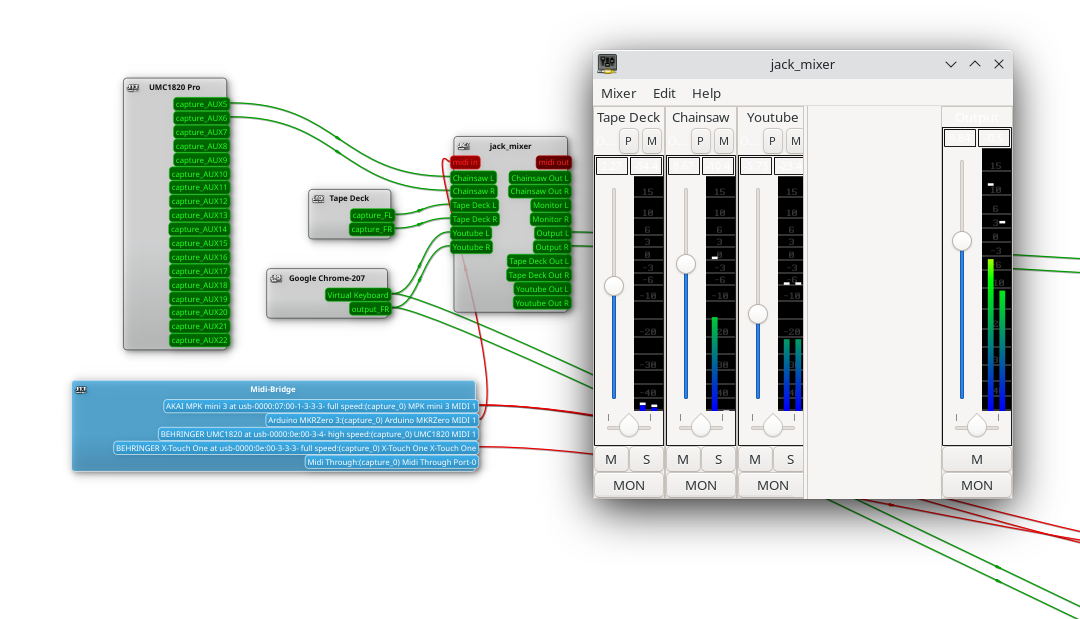
So let’s start with the simplest solution: jack_mixer. Launch the application, and then using your preferred routing controllers, take the MIDI output from our Arduino control surface, and connect it into jack_mixer‘s MIDI input. In jack_mixer, add a new input channel, and give it an appropriate name. Let’s call it “tape deck”, since I have a USB tape deck I’m testing this with. Now the controller magic kicks in: hit the “learn” button for the volume control, and wiggle the first fader on that controller. Then follow with the mute button, and save the new channel. We’ll want to add an output channel, too. Feel free to assign one of your faders to this one, too.

And finally, back to the routing program, and connect your tape deck’s output to jack_mixer input, and route jack_mixer‘s output to your speakers. Play a tape, and enjoy the full control you have over volume and muting! Want to add a Youtube video to the mix? Start the video playing, and just use the routing controller to disconnect it from your speakers, and feed it into a second channel on jack_mixer. Repeat with each of those five cheap and nasty sound cards. Profit!

You Want More?

There’s one more application to mention here. Instead of using jack_mixer, we can use Ardour to do the heavy lifting. To set it up this way, there are two primary Ardour settings, found under preferences: Under the monitoring tab make sure “Record monitoring handled by” is set to Ardour, and the “auto Input does talkback” option is checked. Then add your tracks, set the track input to the appropriate input hardware, and the track output to the master bus. Make sure the master bus is routed to where you want it, and you should be able to live mix with Ardour, too.

This gives you all sorts of goodies to play with, in the form of plugins. Want a compressor or EQ on a sound source? No problem. Want to autotune a source? X42 has a plugin that does that. And of course, Ardour brings recording, looping, and all sorts of other options to the party.

Ardour supports our custom mixing interface, too. Also under preferences, look for the Control Surfaces tab, and make sure General MIDI is checked. Then highlight that and click the “Show Protocol Settings” button. Incoming MIDI should be set to our Arduino device. You can then use the Ctrl + Middle Click shortcut on the channel faders and mute buttons, to put them in learn mode. Wiggle a control to assign it to that task. Or alternatively you can add a .map file to Ardour’s midi_maps directory. Mine looks like this:

 
  <?xml version="1.0" encoding="UTF-8"?>
<ArdourMIDIBindings version="1.1.0" name="Arduino Mapping">
  <Binding channel="1" ctl="16" uri="/route/mute B1"/>
  <Binding channel="1" ctl="70" uri="/route/gain B1"/>
  <Binding channel="1" ctl="17" uri="/route/mute B2"/>
  <Binding channel="1" ctl="71" uri="/route/gain B2"/>
  <Binding channel="1" ctl="18" uri="/route/mute B3"/>
  <Binding channel="1" ctl="72" uri="/route/gain B3"/>
  <Binding channel="1" ctl="19" uri="/route/mute B4"/>
  <Binding channel="1" ctl="73" uri="/route/gain B4"/>
  <Binding channel="1" ctl="80" uri="/route/mute B5"/>
  <Binding channel="1" ctl="74" uri="/route/gain B5"/>
  <Binding channel="1" ctl="81" uri="/route/mute B6"/>
  <Binding channel="1" ctl="75" uri="/route/gain B6"/>
</ArdourMIDIBindings>

The Caveats

Now before you get too excited, and go sink a bunch of money and/or time into a Linux audio setup, there are some things you should know. First is latency. It’s really challenging to get a Pipewire system set up to achieve really low latency, particularly when you’re using USB-based hardware. It’s possible, and work is ongoing on the topic. But so far the best I’ve managed to run stable is a 22 millisecond round-trip measurement — and that took a lot of fiddling with the Pipewire config files to avoid garbled audio. That’s just about usable for self monitoring and live music, and for playing anything pre-recorded, that’s perfectly fine.

The second thing to know is that this was awesome. It’s a bit concerning how much fun it is to combine some decent audio hardware with the amazing free tools that are available. Want to auto-tune your voice for your next Zoom meeting? Easy. Build a tiny MIDI keyboard into your desk? Just a microcontroller and some soldering away. The sky’s the limit. And the future is bright, too. Tools like Pipewire and Ardour are under very active development, and the realtime kernel patches are just about to make it over the finish line. Go nuts, create cool stuff, and then be sure to tell us about it!

The Medieval History Of Your Favourite Dev Board

It’s become something of a trope in our community, that the simplest way to bestow a level of automation or smarts to a project is to reach for an Arduino. The genesis of the popular ecosystem of boards and associated bootloader and IDE combination is well known, coming from the work of a team at the Interaction Design Institute Ivrea, in Northern Italy. The name “Arduino” comes from their favourite watering hole, the Bar di Re Arduino, in turn named for Arduin of Ivrea, an early-mediaeval king.

As far as we can see the bar no longer exists and has been replaced by a café, which appears on the left in this Google Street View link. The bar named for Arduin of Ivrea is always mentioned as a side note in the Arduino microcontroller story, but for the curious electronics enthusiast it spawns the question: who was Arduin, and why was there a bar named after him in the first place?

The short answer is that Arduin was the Margrave of Ivrea, an Italian nobleman who became king of Italy in 1002 and abdicated in 1014. The longer answer requires a bit of background knowledge of European politics around the end of the first millennium, so if you’re ready we’ll take Hackaday into a rare tour of medieval history.

Defying An Empire

The Holy Roman Empire at the turn of the second millennium. Sémhur derivative work: OwenBlacker, CC BY-SA 3.0

Western Europe’s dominant power at the turn of the first millennium was the Holy Roman Empire, a German-ruled agglomeration of states which though not a direct successor to the Roman Empire had received the recognition of the Papacy as such following the accession of a female ruler as empress of the former Eastern Roman empire in Byzantium. Its young Emperor Otto III died unexpectedly in 1002 without an heir, and in the power vacuum that followed the Italian nobility sought to re-establish their control and break away from German influence. Thus they elected one of their own to become King of Italy, selecting Arduin for the throne.

The tumultuous politics of 10th and 11th century Italy seem to revolve around the struggles between the forces controlled by the bishops, largely aligned with or appointed by the Holy Roman Emperor, and those of the nobility who seem to have been alternately on the side of — or fighting against — the Emperor. Arduin had been excommunicated twice, once in Rome before Otto himself and his Papal appointment Sylvester II, after burning the cathedral of Vercelli and killing its bishop.

The Empire Strikes Back

There seem to be no contemporary depictions of Arduin, this stylised one is from a later century. Marilynmerlo, CC BY-SA 3.0.

When the newly crowned Emperor Henry II immediately sent a force to depose Arduin, it was repulsed, leading to Henry himself leading a larger army and defeating him in 1004. This and Henry’s subsequent coronation as King of Italy in the city of Pavia might have been the end of the story, but as the newly crowned king and his retinue were driven from the city by rioting it is evident that he did so without the support of his populace. Thus while Arduin had lost control of part of his claimed kingdom he continued to hold power from his base in Ivrea and spent the next decade still asserting himself as King of Italy despite Henry also holding the crown. He was eventually defeated and forced to abdicate in 1013, and died the following year.

If there’s something to take away from this tale of European politics a millennium past, it’s the surprise at how little he leaves us. For other medieval figures there might be a statue or perhaps a fresco in a church, but for Arduin beyond the stylised portrait evidently drawn centuries later we have no depiction of him. If the town of which he was once ruler had not memorialised him in a street name that in turn prompted the owner of a bar to use his name, it’s possible nobody but a few historians would ever have known about him. Perhaps here is a lesson in measuring the legacies of our politicians here in the 21st century.

So we have the love of some Italian post-grads for their favourite watering hole to thank for our familiarity with the name of an obscure medieval king, and now we know a little more about him and his life. Perhaps we should all turn to our local pub for inspiration when naming our projects, though in my case I’m not sure that The Sow And Pigs would be as edifying an appellation.

Header image: SimonWaldherr, CC BY-SA 4.0.

Hack a Day 01 Dec 18:01

The Wash-A-Lot-Bot is a DIY handwashing timer

With the current coronavirus situation, we’ve been encouraged to wash our hands regularly for 20 seconds – or approximately how long it takes you to hum “Happy Birthday” from beginning to end twice. That sounds easy enough, but do you really do this every time? What you need is some sort of automatic timer, perhaps with a dial gauge for easy visual reference. 

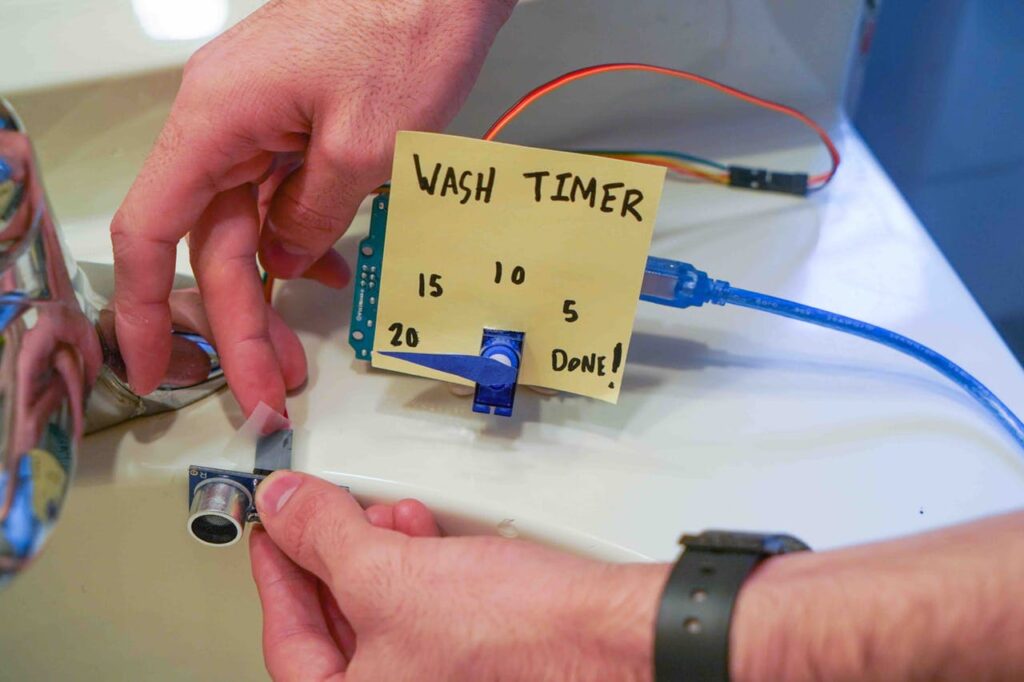
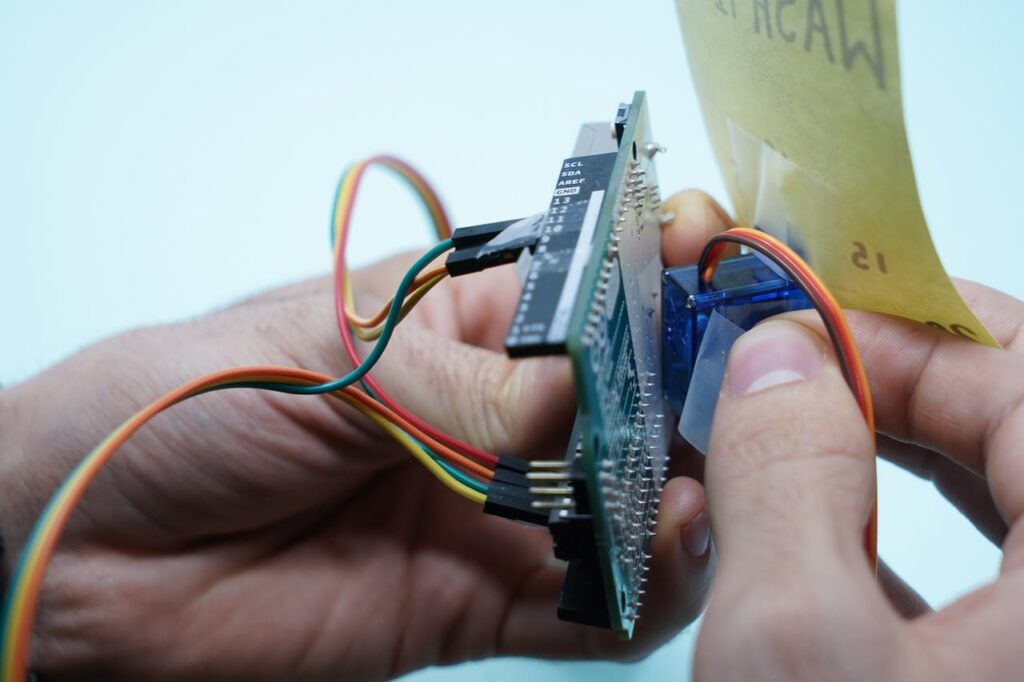
As it just so happens, Gautam Bose and Lucas Ochoa built such a device with an Arduino Uno. The aptly named Wash-A-Lot-Bot detects a person’s hands in front of it via an ultrasonic sensor, then ticks a dial timer from 0 to 20 (or rather 20 to DONE!) using a micro servo. 

This simple setup can be made with little more than scissors and tape, making it a great way to learn about Arduino and programming while you’re stuck indoors.

Arduino Blog 29 Mar 18:07
arduino  featured  uno  

1,156 LEDs make up these dual acrylic light-up panels

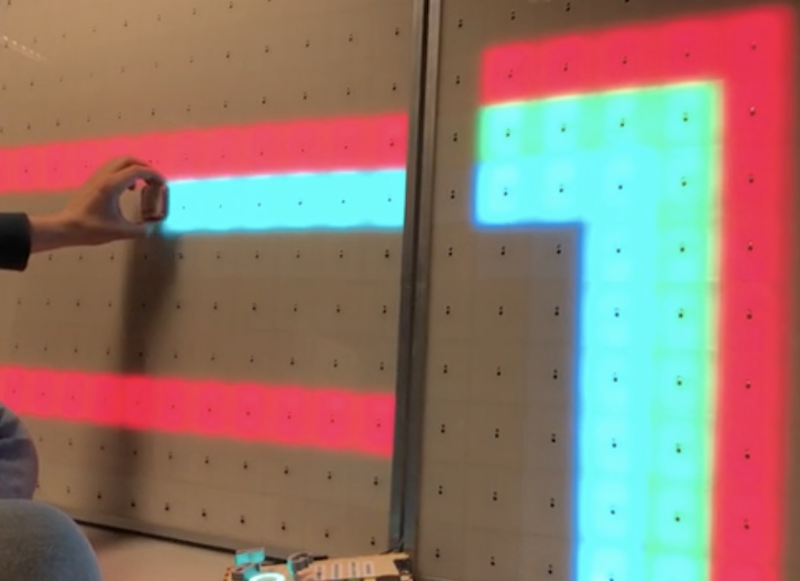
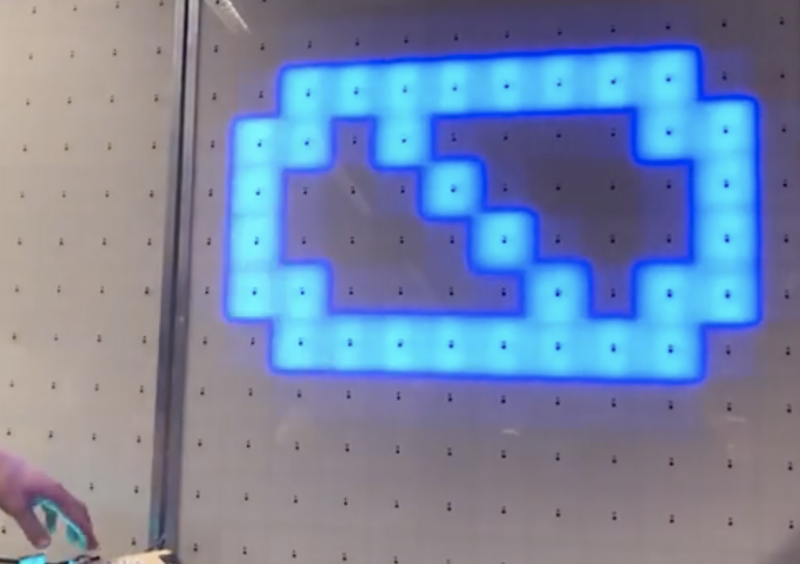
What does one do with over 1,000 LEDs, white acrylic, and 288 IR sensors? If you’re Redditor “jordy_essen,” you create an interactive light panel.

In one mode, the user pull a reflective tool across the sensors to draw a paths, with potentiometers implemented to select the color. It can also be set up to play a sort of whack-a-mole game, where one has to activate the sensor in the same area where it illuminates.

For this amazing device, jordy_essen uses not one, or even two, but six Arduino Mega boards to drive the LEDs directly — in turn controlled by a webpage running on a Raspberry Pi. If that wasn’t enough hardware, an Uno is tasked with taking inputs from the color potentiometers. 

It’s a brilliant project in any sense of the word!

Arduino response to the Covid-19 outbreak

For the latest update regarding Arduino’s response to the Covid-19 outbreak please click here.

Priority Service for the Design & Production of Essential Medical and Personal Protective Equipment (PPE)

As companies around the globe rapidly react to governments’ calls to produce critical medical equipment like ventilators and PPE, Arduino is prioritizing stock allocation for these urgent needs.

If your company urgently requires any Arduino hardware or software to facilitate the prototyping and production of any equipment or solution to lessen the impact of Covid-19 please contact us.

A dedicated team will work to ensure we support your needs through ensuring the fastest possible delivery (either directly or via sub-distribution) and/or expediting production as required. We will also provide increased levels of design support and help for those designing such critical equipment. 

Tune in to the official Arduino Day 2020 livestream

We’re just hours away from (virtually) celebrating Arduino Day! Join us on Saturday for our official livestream, starting at 2pm CET. We’ll connect with community events from all around the world as well as hear from Arduino team members like Fabio Violante, Massimo Banzi, and David Cuartielles.

Be sure to set a reminder and tune in!

Work remotely with Arduino Create – get a free upgrade now

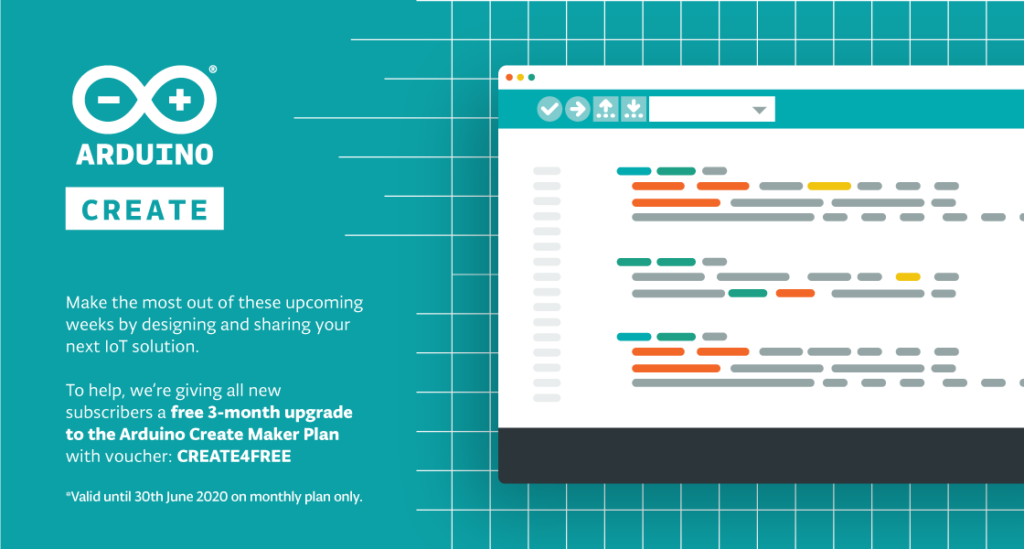
To help individuals work remotely and share their designs with team members, we’re providing a free 3-month upgrade to the Arduino Create Maker plan to all 1.4 million users of Create as well as new subscribers to the service. With Arduino Create everything is ready to go; there is no need to install libraries and you can quickly share your sketch with teammates via just a URL. 

To gain your free 3-month upgrade* all you need to do is go to Arduino Create choose the “Maker” plan with the default monthly option and enter the voucher code “CREATE4FREE” during the purchase process.

Arduino Create enables users to write code, access content, configure boards and share projects. Features such as an always up-to-date online IDE and the ability to share builds and receive feedback from other facilities means you can work from home efficiently and effectively. If you don’t want to start a project from scratch there’s always the option to tap into the power of the community on the Arduino Project Hub by browsing projects and making them your own. 

The ‘Maker’ plan comes with the added benefits of up to 250 sketches allowed in your sketchbook along with 200MB space to store those sketches and libraries. You can manage more connected objects (5 ‘things’) with up to 20 properties per ‘thing’, enabling the development of complete IoT solutions. Automating processes remotely is further enabled by the Maker plan including access to set up and remotely control 5 of each cloud enabled Arduino board, 3 cloud-enabled Linux devices, and 1 cloud-enabled generic third-party board.

Find out more details about Arduino Create and all the features included in the Maker plan here.

*The ‘free 3-month upgrade to Create Maker is applicable to the monthly plan and is limited to new subscribers only. Voucher code “CREATE4FREE” expires 30th June 2020. 

Please note the first monthly payment will start 3 months after you purchase the plan, and you are able to cancel your subscription at any time.

This acoustic sensing system localizes touch and senses force on everyday surfaces

Researchers from the University of Auckland in New Zealand’s are exploring a new way to construct interactive touch surfaces using finger-mounted audio transducers. 

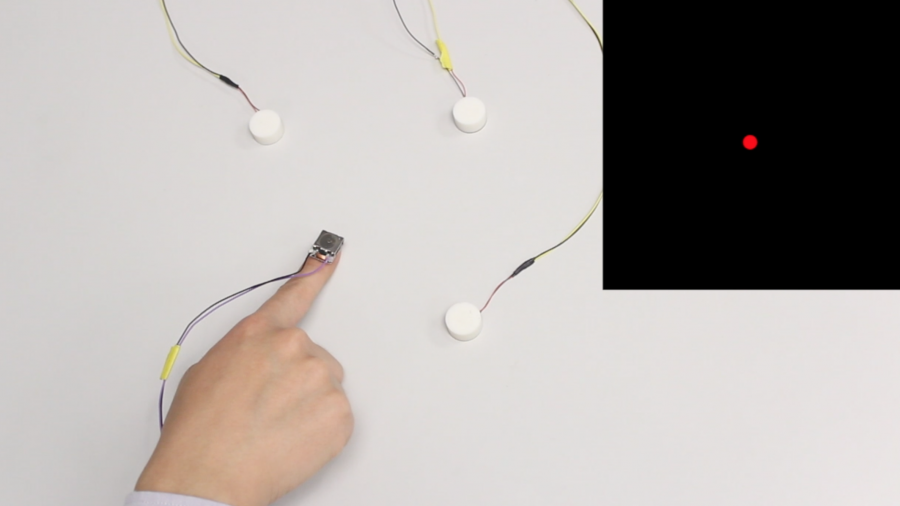
VersaTouch — which works on everyday surfaces — uses one or more receivers to measure sound waves emanating from the wearer’s “augmented” fingers, allowing it to calculate their positions and/or movements. The plug-and-play system can also sense force based on a changing audio signature and track individual digits by alternating each one’s sonic outputs. 

Importantly, VersaTouch can be configured without permanent modification to the newly interactive surface. The setup includes an Arduino Due to receive signals, a Teensy 3.6 to control the transducers, and a MacBook to process the data and calculate the touch positions with a Java program.

More information on the project can be found in the team’s research paper, and you can see it demonstrated in the video below. 

VersaTouch is a portable, plug-and-play system that uses active acoustic sensing to track fine-grained touch locations as well as touch force of multiple fingers on everyday surfaces without having to permanently instrument them or do an extensive calibration. Our system is versatile in multiple aspects. First, with simple calibration, VersaTouch can be arranged in arbitrary layouts in order to fit into crowded surfaces while retaining its accuracy. Second, various modalities of touch input, such as distance and position, can be supported depending on the number of sensors used to suit the interaction scenario. Third, VersaTouch can sense multi-finger touch, touch force, as well as identify the touch source. Last, VersaTouch is capable of providing vibrotactile feedback to fingertips through the same actuators used for touch sensing.