aMaze
What does it do?
aMaze is A Maze solving robot.

Custom build using an Arduino bootloaded atmeag328p as the brain, a SN754410 as Motor Control, all wired on a solderless breadboard and fitted to a laser cut chassie designed by myself.

aMaze is A Maze solving robot.

Custom build using an Arduino bootloaded atmeag328p as the brain, a SN754410 as Motor Control, all wired on a solderless breadboard and fitted to a laser cut chassie designed by myself.

Take a look at this:
http://cubloc.com/product/01_01cb210.php
It LOOKS like an Arduino (but its not). Same basic Arduino feature set. (add a power switch and a little more neat stuff)
It runs ,,,,,, tada ,,,,,, BASIC! (Don't run, shake or shiver!)
(It looks one HECK of a lot like P-BASIC (STAMP 2) but has more commands and floating point.)
The editor can be downloaded and looks nice, but nothing special.
The manual looks nice and well organized and is BIG, but again is nothing special.
It costs $29

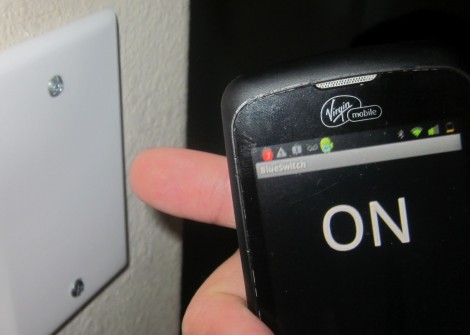
So [RobB] wanted to take out all the light switches in his house. His plan was to replace them with a system that could be operated from his smart phone. But his wife insisted that there still must be some way to control the lighting directly — we have to agree with her on that one. The solution was to develop a system that switches the lights via a touch sensor or by Bluetooth.
The touch part of the project is pretty easy. He coated the back of a blank outlet plate with tin foil and hooked it to a microcontroller with a couple of resistors. He’s using an ATtiny85, which can be programmed using Arduino sketches, so the software side is made easy by the CapSense Library. The chip also uses the software serial library to communicate with a Bluetooth module. You can see the result of both in the demo video after the break.
Of course you need to throw a relay in there to switch mains, and find a way to power the uC and Bluetooth module. [RobB] went with a tiny plug-in USB power converter and managed to fit everything in a single-gang switch.
The Santa Cruz Robotics Club met again today, for the first time in over a month. The current project is not the underwater ROV (we’re all getting very tired of waterproofing problems), but an automated Nerf gun.
The club members came up with some very ambitious plans for the Nerf gun (which included getting a Raspberry Pi and doing image processing to have a self-aiming gun), but I’m making them build quick-and-easy prototypes to try out their ideas one step at a time. I don’t think I can get an Raspberry Pi this summer—the companies doing the distribution aren’t taking more orders (just expressions of interest) and they don’t expect to clear the current backlog until September at the soonest. They are doing batches of 100,000 units, and that doesn’t seem to be enough to shrink the lead time—if anything, the lead time is growing.
So, giving up on image processing for this summer, there are still a lot of things to build. For today’s four-hour meeting (which included a 1-hour trip to the hardware store and a fifteen-minute snack break), the goal was simply to test out the basic launcher concept: an air reservoir pressurized by a bike pump, a solenoid valve, and a barrel.

The first prototype. The air reservoir is about 18″ of 1-½” PVC pipe on the left, and the barrel is about 24″ of ½” PVC pipe on the right.
The biggest problem was that the valve has ¾” male pipe threads, but we wanted 1-½” PVC pipe for the reservoir (because we had a piece handy—we may build a bigger reservoir later) and ½” PVC pipe for the barrel (because Nerf darts just fit inside—probably Nerf guns were prototyped with PVC barrels). Our hardware store run was to get threaded adapters to make things fit.We wanted everything to be joined with screw threads, so that we could disassemble the components and replace them or add elbows as needed.
Note that the ½” PVC pipe is also a good size for compressed-air paper “rockets”. The term “rocket” is a misnomer here, as all the acceleration occurs while the rocket is on the launcher—it is modeled more like a gun than like a rocket. (But my soda-bottle rocket simulator can model these paper bullets also.) It would probably best to have a shorter barrel for doing rocket launching—just the length of the rocket and no more, since the longer barrel results in more pressure loss with no gain in launch speed.
The bicycle valve glued into a ½” female-threaded end cap was one I’ve had for a long time, as part of a soda-bottle rocket launcher. I had two of them, and both failed in testing today (the Barge cement holding the valve stem in failed—we’ve now reglued them with a different cement), though we managed some testing before the failure.
The solenoid valve we used was the same model (sold by Sparkfun) as the one used for the vacuum bottle on the ROV. It has ¾” male pipe threads on each side. To make it air-tight we had to disassemble it and grease the rubber membrane thoroughly with vaseline or faucet grease, but we had done that months ago, so it did not need to be done today. The valve only works in one direction, but the high-pressure side is clearly marked by a metal intake screen, so assembling it the right way around is easy.
I was not sure that the solenoid valve would work in this application. It is not the model of valve that the compressed-air “rocket” people have used—those valves cost about twice as much and have female threaded ends rather than male threaded ends. I think that the mechanism they use may open up a bigger channel for air or water than the cheap solenoid valve sold by Sparkfun.
My first concern was that I did not know whether the valve would open up wide enough and fast enough to let a blast of air through to get a clean launch. Second, I did not know whether we could open and close the valve fast enough to retain pressure in the reservoir for doing multiple shots.
We controlled the solenoid valve with an Arduino and the Hexmotor motor-control board (which is really overkill for one solenoid—a single power transistor would be enough to interface the Arduino to a solenoid, but I did not have one handy). My son wrote an Arduino program to allow us to experiment with the duration of the solenoid pulse. If it were too short, the Nerf dart would not leave the barrel. If it were too long, air pressure would be wasted. He allowed for 100 µsec increments in pulse duration, under control from commands on the USB serial line.
Because the glue they used takes 24 hours to set properly, we only tested at low pressure today (20–30 psi). At those pressures, a 16 msec pulse was not long enough for the dart to clear the barrel, but a 19.2 msec pulse was easily long enough. We were also able to launch a 14g paper “rocket” left over from Maker Faire, though it did not go as high as the approximately 1.6g “Nerf” darts (I think several of the foam darts we have a different brand). We would not have expected it to go as high, since it was only accelerated for its 11″ length, not the 24″ length of the barrel for the darts, and it weighed a lot more.
One thing I thought about was monitoring the air pressure in the reservoir electronically. I doubt that we’ll put a pressure sensor in the reservoir, though, as the sensors I have only go up to 250 kPa absolute (about 21 psi above atmospheric pressure—about as low as we could fire with). Freescale makes a 145psi (1000 kPa) sensor, the MPX5999D, but it is a differential sensor without port tubes (so would be difficult to mount) and it costs $13.
Perhaps the other thing worth doing today is to analyze how fast the Nerf dart should be going as it leaves the barrel, and how high it should fly if we shoot it straight up. The physics here is fairly simple, if we assume that opening the solenoid valves connects us to a constant-pressure source. (In practice, we saw about a 10psi or 70kPa drop in pressure after one shot. If the pressure is P, then the force on the dart is P*area. The cross-sectional area of the foam dart is a little hard to measure, because of the squishiness of the foam, but the inside diameter of the barrel is 1.45cm, for a cross-sectional area of 1.65 cm^2. At 140 kPa (about 20 psi), the force on the dart would be 23 Newtons. That force is applied for about 60 cm (the length of the barrel), for a total energy of about 14 Joules.
We can use the kinetic energy of the dart to get its speed (E = ½ m v2), so for 140 kPa, the dart should leave the barrel at about 130 m/s or 290 mph. I suspect that we are not getting anywhere near that speed, for several reasons, including leakage of air around the dart, limited speed of air moving through the valve, and friction of the dart in the barrel (mainly from the pressure wave in front of it, but also from rubbing on the sides of the barrel).
We can also use the kinetic energy of the dart to estimate how high it would fly (ignoring air resistance, which is obviously hugely important for a low density object like a foam dart). The potential energy of a mass at height h is , so the height it would go without air resistance is
. For 14 Joules and 1.6 grams, that would be almost 900m. I think that 20m is a more reasonable estimate for the height the dart went, though I never could see it near the top of its trajectory.
I tried adding the specs for the Nerf dart and a 60cm barrel to my rocket simulator (to get a crude estimate of the effect of air drag), and for 140 kPa I got an estimated max speed of 132m/s and an estimated max height of 52.6m. I don’t know if that height is reasonable—certainly it is better than the no-air-resistance estimate. The 6.78 second estimated time of flight seems to be fairly reasonable, though we never timed it.
Doubling the pressure increases the maximum velocity by a factor of 1.414, but only increases the maximum height to 60.8 m, a 16% increase. Doubling the barrel length has about the same effect. Air drag is what determines the speed of the dart, and that is the least well-modeled part of my simulation.
On Thursday, when they club meets again, they’ll try experimenting with higher pressures, and see whether 17 or 18 msec pulses are long enough—the shorter the pulse the less air will be wasted, and the more shots they can make from the reservoir. It may be necessary to design a bigger reservoir or add a compressor to the design, since they eventually want a fully automatic Nerf gun, not the one-shot muzzle-loader that they made as the prototype today. They’ll also start designing a pan-tilt mechanism for the Nerf gun, probably prototyping it out of Lego Technic components.
1 | /* Simple Serial ECHO script : Written by ScottC 03/07/2012 */ |
1 | /* Simple Serial ECHO script : Written by ScottC 04/07/2012 */ |
1 | /* Simple Serial ECHO script : Written by ScottC 05/07/2012 */ |

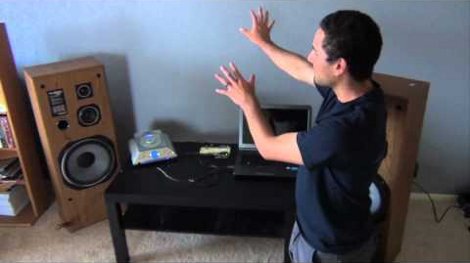
Here [Matthew Br] explains the situation he’s in with the neighbors that share this wall of his apartment. When they listen to music they like it loud and so he gets to ‘enjoy’ the experience as well. But he can’t ignore it any longer, and has decided to use a sound volume detector to blast some tunes right back at them.
He taped a microphone to the wall and wired it up to his Arduino. It monitors incoming sound and, using an adjustable threshold, it will trigger when the neighbors are too loud. We think he was wise to include some time filtering that makes sure the loud noises are sustained and not just the result of someone bumping into the wall. When the system does detect loud music for a sustained period it triggers [Matthew's] own CD player to pump out Who Let the Dogs Out? by the Baha Boys. It will play for a period of time, then shut off to listen and see if the neighbors are still rowdy.
He documents an actual run in the latter half of the clip after the break. We sure hope he’s living in a building with just two units, otherwise this will drive the rest of the neighbors batty as well!

Because everything is moving to a web app, [Vasilis Georgitzikis], a.k.a. [tzikis] developed codebender, a cloud-based Arduino IDE replete with built-in libraries, documentation, and the ability to upload your code to an Arduino from a browser.
To compile an Arduino sketch, codebender uses clang a wonderful compiler that will give you extremely descriptive warnings on terrible code. Like any good IDE, there’s built-in highlighting and documentation, and a small bit of Java allows you to upload your code and monitor the serial port right in the browser.
One of the more interesting innovations is codebender’s (upcoming) use of a TFTP bootloader. With this and an Ethernet shield, it’s easy to upload code to any Internet-connected Arduino, whether it’s on your desk or halfway across the world. We can see that being very useful for a data logger or even a UAV balloon, and can’t wait to see it in action.
Hi all,
I'm using a QRD1114 sensor for a line-follower. Datasheet: http://www.fairchildsemi.com/ds/QR/QRD1114.pdf
Im hooking it up with this schematic:

However, I'm unsure how the value for the 10K resistor was calculated? It's acting as a potential divider, right?
For the LED im guessing that the value of 220 was taken from doing:
R=(Input Voltage - Max Forward Voltage)/(Optimum forward current)
O’K, after having some fun with stereo version of the VU meter I described in my previous blog-post, now it’s time to do a serious stuff. Studio grade VU meter !!! 24 steps, equally spaced every 3 dB, covering Extra wide Dynamic Range from -63 up to +6 dB. Single (mono) channel this time, no messing around, absolute precision at the stake. Plus, it keeps absolutely Top-Flat linear frequency response from 40 Hz up to 20 kHz(*).
I’m not going into details of RGB LEDs Display, which has no modification since “Tears of Rainbow” project, only plates installed in one line, form a single GIGANTIC bar-graph. There are some minor changes in mixing colors data tables, but they intuitively understandable. The most important feature in this project is autoscaling. As you, probably know, Arduino has 10 bits ADC. Only it can’t process negative half-wave, and for this reason it has only 9 bits available for AC measurements. According to DSP theory, maximum dynamic range is:
DR = 1.77 + 6.02 x B = 1.77 + 6.02 x 9 = 55.95 dB.
As input audio waveform represents anything but perfect peak-to-peak 5V sine-wave, real dynamic range would be lower. How much? In first, there is a hardware limits. OPA (NE5532), which is:
but, unfortunately, isn’t rail-to-rail type. Test results show, that compression become noticeable (~1 dB) when not scaled magnitude approaches level about 50 dB. That is in good agreement with observed on oscilloscope not distorted deviation peak-to-peak 2.5 V. Or only half of full range of 5V. And as theory says, half is one bit less, and real DR = 1.77 + 6.02 x 8 = 49.93 (~50 dB). In second, audio data is processed on “block” structure basis. It means, having average of the block 50 dB, doesn’t mean that there was no spikes in the sampling pull, that obviously would be clipped and introduce error in the measurements results. This phenomenon is defined as Crest Factor. Different sources estimate crest factor of musical content between 10 – 20 dB. So, taking direct approach, Arduino with OPA mentioned above as front-end could accurately cover only: 50 – 20 = 30 dB. To get wider dynamic range, I have to scale input amplifier gain, and this is exactly what I did, building amplifier in two stages and selecting one cascade (by-passing second one) or two cascades using internal ADC multiplexer. As there is no switching IC in analog signal path involved, gain is defined with high stability, could be one time precisely measured – calibrated via coefficient stored in EEPROM (nice feature to add).
On the right side there are electrical drawings of “slightly” modified kit, where stereo amplifier was converted into 2 stage mono version. First stage, with gain about G1 = 1 + 10 k / 1 k = 11 is necessary to “bump-up” line-level signal, to create DC bias required for correct operation of the ADC, and also served as buffer to lower signal source impedance, as it seen by ADC input. I set a gain of the second stage amplifier at 40 dB: 20 x Log_10 ( G2 ), where G2 = 1 + 100 k / 1 k = 101.
IMHO, setting gain limit for only 30 db per stage as it follows from paragraph above, is overkill, and would be justified for “real-time” radio broadcasting or audio processing for storage media, when high fidelity of audio program must be preserved. For visual display “clipping” of bursts in signal is not noticeable at all due high refresh rate of display, 78 Hz. Human just can’t see, if LED lights-up with such speed. For steady AC amplitude measurements (micro Voltmeter mode) this is not a problem at all, and headroom as small as 3 dB would be sufficient, leaving wide 47 dB per stage.
Software
There are two thresholds are defined in program, where switching between one or two stage amplification is happening:
if ( magn_new <= 44 ) sensitv = 1;
if ( magn_new >= 47 ) sensitv = 0;
44 and 47, with hysteresis 3 dB. First line defines switching to high sensitive mode (overall gain 1100), and second line, does exactly opposite. Look at the chart, hope it would save me a million words -);
Couple words on using this device as precise AC micro-voltmeter. Having 1100 overall amplification as add-up to already quite sensitive Arduino ADC, driving overall sensitivity to enormously 5 / ( 1024 x 1100 ) = 4.439 uV Special care should be taken on grounding, shielding of amplifier PCB, probably, EMI suppressor ferrite chokes wouldn’t be an excess in power line and signal path. In my project, w/o any modification to original kit’s board (except couple jumper wires to cascade two stage amplifier) of course, I was not expecting to get to such high sensitivity level. Moreover, in project arduino is driving LED display, “ADC noise reduction mode” is off, plus ADC is working on double speed – preselector set to 250 kHz!!! And this is why constant 14 was subtracted in software from magn_new, just before it goes for BarGraph “mapping” procedure:
magn_new -= 14;
Basically 14 is a noise flour of my analog front-end. Approximately 51 micro volts AC is turning on first LED bar. Look at the table, which reflect my current hardware set-up.
* Other things to keep in mind, there is a “gap” 78 Hz wide in frequency range at 10 kHz, It introduces a small error, about 78 / 20.000 = 0.39% in white noise measurements result. For musical content, which has really low power density level at 10 kHz, magnitude of error would be much lower, probably, less than 0.05 %.
Running FFT in code creates great opportunity to reject any interference in the audio band. For example, if there is a noticeable hum from electrical grid lines in the content, issue easily could be fixed NOT including bin[1] in final sum of magnitude calculation. Though to make it works more efficient, some adjustment in sampling period would be necessary, setting bin[1] frequency precisely at 50/60 Hz.
One more advantage of having FFT based filtering (primary mission is HPF, look in stereo VU meter, how long kernel of the FIR filter has to be otherwise), is great opportunity to create “weighting” A, B, C or D curve for audio noise measurements. (:TO DO).
Link to Download Arduino sketch: Audio_VU_Meter_Mono_69dB
A while back I notice the simularity between the Ultrasound/IR sensors we use on robots for object avoidance to the concept of basic RADAR. (This is more like UDAR or IRDAR). Direction and range information are what the controller uses to detect objects (RADARs basically use the same information.)
So instead of building robots for a while I decided to see how good I could make my own IRDAR. Wow! One can adjust trigger point, gain and a bunch of other factors and have a way-cool little system!