Posts with «arduino» label

Arduino Selfie


My attention is drawn towards the noise behind me....
I cannot believe it.
There it is.

  The Arduino is taking a SELFIE !!


How did this happen?
 
Well actually, it is not that difficult for an Arduino.
 
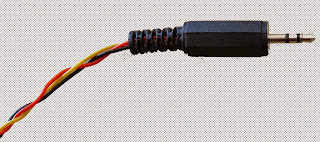
I found out that my Canon Powershot SX50 HS camera has a port on the side for a remote switch. In the "Optional Accessories" section of the camera brochure, it identifies the remote switch model as RS-60E3. I then looked up the model number on this website to find out the size of the jack (3 core, 2.5mm), and the pinout (Ground, focus and shutter) required to emulate the remote switch. Once I had this information, I was able to solder some really long wires to the jack and connect up the circuit (as described below).
 

And before I knew it, the Arduino was taking Selfies !!!


Warning : Any circuit you build for your camera (including this one) is at your own risk. I will not take responsibility for any damage caused to any of your equipment.
 

Parts Required:


Fritzing Sketch


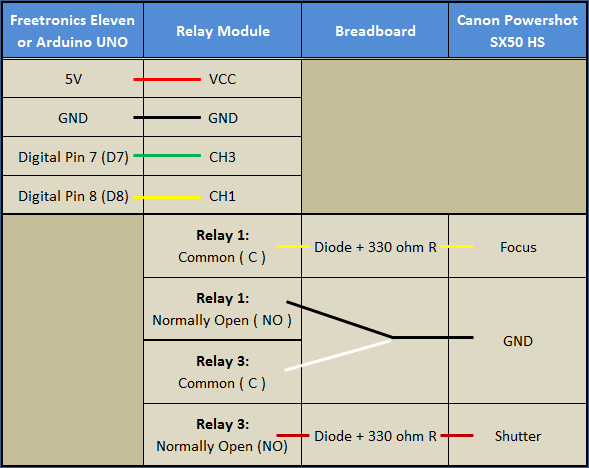
Connection Table


Three core, 2.5 mm jack


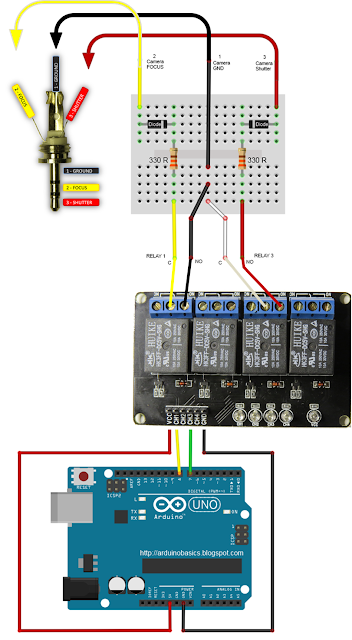
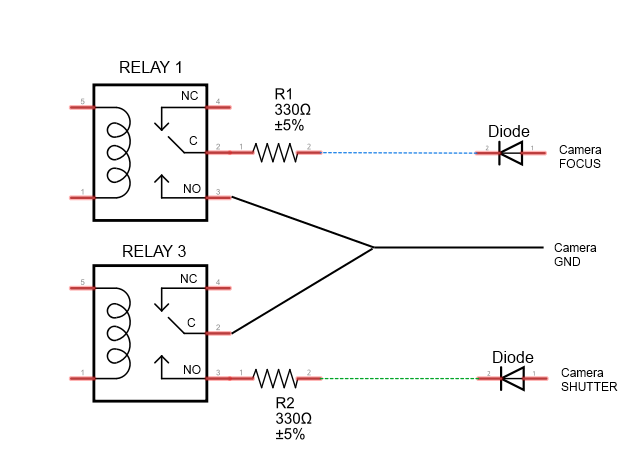
Camera Connection to Relays


Jack pinout


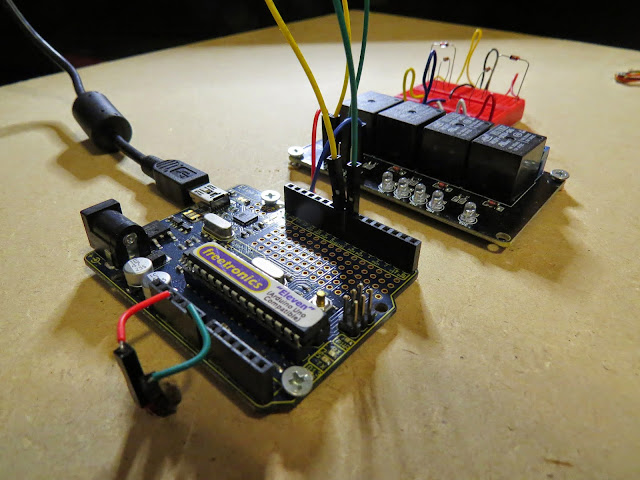
Completed Circuit


Arduino Sketch


  1
2
3
4
5
6
7
8
9
10
11
12
13
14
15
16
17
18
19
20
21
22
23
24
25
26
27
28
29
30
31
32
33
34
35
36
37
38

/* ===============================================================
      Project: Arduino Selfie
       Author: Scott C
      Created: 14th Sept 2014
  Arduino IDE: 1.0.5
      Website: http://arduinobasics.blogspot.com/p/arduino-basics-projects-page.html
  Description: Arduino takes selfie every 30 seconds
================================================================== */

 /*
  Connect 5V on Arduino to VCC on Relay Module
  Connect GND on Arduino to GND on Relay Module */
 
 #define CH1 8   // Connect Digital Pin 8 on Arduino to CH1 on Relay Module
 #define CH3 7   // Connect Digital Pin 7 on Arduino to CH3 on Relay Module
 
 void setup(){
   //Setup all the Arduino Pins
   pinMode(CH1, OUTPUT);
   pinMode(CH3, OUTPUT);
   
   //Turn OFF any power to the Relay channels
   digitalWrite(CH1,LOW);
   digitalWrite(CH3,LOW);
   delay(2000); //Wait 2 seconds before starting sequence
 }
 
 void loop(){
   digitalWrite(CH1, HIGH); //Focus camera by switching Relay 1
   delay(2000);
   digitalWrite(CH1, LOW); //Stop focus
   delay(100);
   digitalWrite(CH3, HIGH); //Press shutter button for 0.5 seconds
   delay(500);
   digitalWrite(CH3,LOW); //Release shutter button
   delay(30000); //Wait 30 seconds before next selfie
 }


By connecting up the camera to an Arduino, the camera just got smarter !!
The Arduino connects to 2 different channels on the relay board in order to control the focus and the shutter of the camera. The relays are used to isolate the camera circuit from that of the Arduino. I have also included a couple of diodes and resistors in the circuit as an extra precaution, however they may not be needed.

Warning : Any circuit you build for your camera (including this one) is at your own risk. I will not take responsibility for any damage caused to any of your equipment. Do your research, and take any precautions you see fit.


The Video


If you like this page, please do me a favour and show your appreciation :

  Visit my ArduinoBasics Google + page.
Follow me on Twitter by looking for ScottC @ArduinoBasics.
Have a look at my videos on my YouTube channel.


However, if you do not have a google profile...
Feel free to share this page with your friends in any way you see fit.

Arduino at MakerCon in New York City


Right before the weekend of  World Maker Faire in NYC, Massimo Banzi will be at MakerCon with a keynote taking place on September 18 at 11 a.m local time. Makercon is a 2-day conference by and for makers organized around 4 specific tracks: Business of Making, Education, Maker Community Building, Tools of Innovation&Technology.

Makercon connects individuals at the forefront of the maker movement, focusing on the technologies, services ecosystem, manufacturing models, and funding trends that provide new ways of making things and getting them to market.

On Wednesday, September 17 at 7:30pm (after the Innovation Showcase) MakerCon will be able to watch the exclusive New York premiere screening of the acclaimed Neflix documentary Print the Legend. Right after the film, Dale Dougherty is moderating a panel discussion with some of the key players from the film.

The Arduweenie

This is the tell-all guide to #Arduweenie, a bewitching maker project brought to you by Tenaya Hurst of Rogue Making and dog hunter LLC.  My project is a wire frame in the shape of a dachshund dog wrapped with a 5 meter long RGB LED strip which I program.  That’s […]

Read more on MAKE

MAKE » Arduino 16 Sep 13:01

Developed on Hackaday: Mooltipass Arduino Shields Compatibility

Some of our dear readers may already have an infallible system to remember different complex passwords for the different websites they visit daily. This is why they may have not been following the offline password keeper that the Hackaday community is building.

The Mooltipass has a characteristic that may regain their interest: it is possible to connect Arduino shields to it. In the video embedded below you can see the Arduino conversion process our development team imagined a few months back. The operation simply consists in using a knife to remove plastic bits on top of standard Arduino headers. We also embedded a few use cases with their respective sketches that may be downloaded from our official GitHub repository.

As with stacking several shields, a little tweaking may be required to keep the functionalities from both the Mooltipass and the connected shield. We therefore strongly welcome Arduino enthusiasts to let us know what they think of our setup.

In the meantime, you may want to subscribe to our official Google Group to stay informed of the Mooltipass launch date.


Filed under: Hackaday Columns

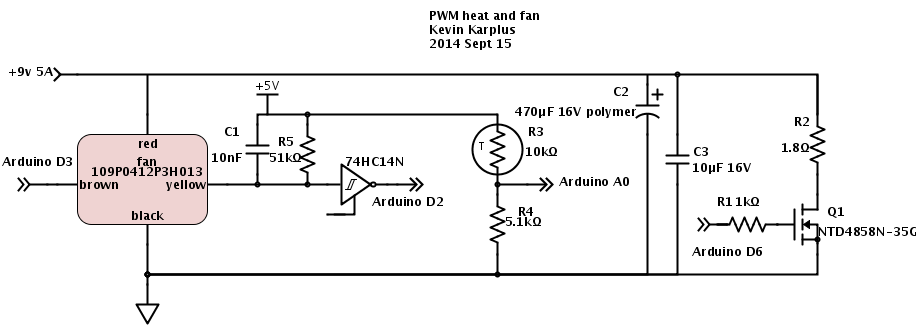
Controlling the heater and fan

Here is the circuit for the heater and fan that I’ve been developing for incubator project for the freshman design course:

Here is the circuit I’ve been using for playing with control loops. (The 74HC14N Schmitt trigger inverter does not have an enable input, but SchemeIt has a very limited and idiosyncratic set of schematic symbols, so I used the closest one.)

Yesterday and this morning, when I was developing the controller software for the fan and resistive heater, I ran into a lot of problems with overshoot when changing the setpoints. For the fan controller I wrote One thing that helped was not accumulating integral error when the PWM signal was pinned at the lowest or highest values.”  I also switched to using RPM rather than pulse duration as the measured variable, because RPM is nearly linear with the PWM input (RPM approximately 24.1 PWM + 878). Another thing “that helped was to make a guess at the target PWM setting when the setpoint was changed (using d RPM/ d PWM =24 and the current PWM setting and RPM value), then setting the cumulative error to what it would be in steady state at that PWM. I then set the PWM to five times as far from current PWM as the target PWM to make the transition as fast as possible without increasing overshoot, making sure to clip to the legal 0..255 range.”  Because I have a reasonable model for RPM as a function of PWM, it was easy to estimate what the target PWM should be so that the cumulative error from the integrator would set the PWM value correctly once the error dropped enough that the desired PWM value was no longer pinned at the limits.

Today I decided to do a little reading to find out what other people have done about the problem of the controller overshooting when the actuator hits its limits.  It turns out that the phenomenon is know as “integrator windup“, and the two solutions I came up with are standard solutions.  Turning off the error accumulation when the actuator is at its limit and more movement in that direction is desired is known as “conditional integration” and guessing the correct setting for the cumulative error on setpoint change is a form of “back calculation”.  There are more sophisticated forms of back calculation that I might want to try implementing.  (I found a better explanation of the anti-windup scheme, which I might base my next implementation on—basically it gradually reduces the cumulative error to 0 as long as the desired setting for the actuator is past its limits.)

The temperature controller has been harder for me to tune, for several reasons:

  • The response time is very long.  Instead of oscillating around 5Hz, the period seems to be more like 90 seconds.  This means that it takes a long time to see whether an adjustment to the parameters makes a difference.
  • The temperature at the thermistor is dependent on the temperature at the resistor.  The thermal mass and thermal resistance act like an RC circuit (with temperature analogous to voltage, and power dissipated analogous to current).  Adjusting the power to the resistor via PWM changes the rate at which the temperature increases.  It also changes the eventual equilibrium temperature, but the PWM control is more directly of the rate of temperature change.
  • The heatsink and resistor continue to warm the air and the measuring thermistor even after all power to the resistor is cut off, so there is a big danger of overshoot whenever the setpoint temperature is increased.
  • The control is asymmetric—dumping 40W of power into the resistor heats it up fairly fast, but heat is only slowly dissipated when power is turned off.  Running the fan fast helps a little here, slowing down the temperature rise and speeding up the cool down, but once I put the whole thing in a closed box, it will be very difficult to cool things off if the box gets too warm.  This makes overshoot in the positive direction  a serious problem.
  • The temperature measurements are only about 0.1°C resolution, and the noise on the ADC is about ±4LSB, so it will be difficult to get tight temperature control, even with a perfectly tuned controller.
  • I don’t have a simple model of what the steady-state thermistor temperature will be given the PWM input, so I’ve had difficulty coming up with a guess about the eventual PWM value for resetting the cumulative error on a setpoint change.  I have a model for the resistor temperature in still air, but the fan makes a huge difference, both in the thermal resistance (and so both the equilibrium temperature and time constant of the resistor heating) and in the coupling between the resistor and the thermistor.

I still have a lot of things left over from a couple of days ago, and I’ve added some new things to the list.

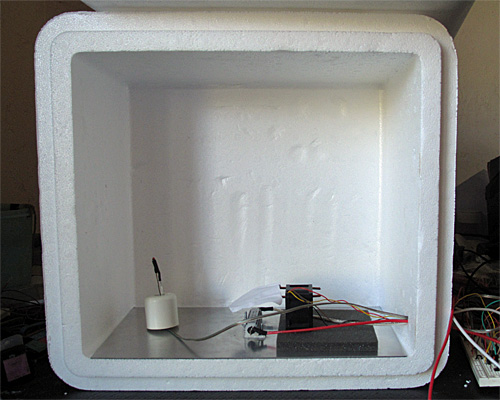
  • Put the whole thing into a styrofoam box, to see whether extra venting is needed to allow things to cool down, and to see how tightly temperature can be controlled. I’ve put stuff in the box, but I can’t close the box with the stuff sticking out, so it doesn’t really count.
  • Design and build baffling for the fan to get better airflow in the box. I’ve made a little paper and wire baffle, to get better air flow over the resistor, but I’ve not done the full baffling to get good airflow in the box.
  • Figure out how to get students to come up with workable designs, when they are starting from knowing nothing. I don’t want to give them my designs, but I want to help them find doable subproblems.  Some of the subproblems they come up with may be well beyond the skills that they can pick up in the time frame of the course. The more I work on this project, the more I realize that I and the students will have to be happy with them having explored the options, without getting all the problems solved.
  • Find a smaller bread board or prototype board to put the controller on—my current bread boards are all 6.5″ long, and the box only has room for 6″, especially since I put the resistor in the center of the 6″×12″ aluminum plate, which just fits the box.  I suppose I could drill a couple more holes in the plate and mount the resistor off center, but I rather like the idea of building the controller as an Arduino shield, so that the Arduino + controller is a single unit.
  • Another possibility is to drill a hole in the styrofoam box and run cables through the box for the resistive heater, the fan, and the thermistor.  Even if the grounds are connected outside the box, this is only 8 wires. Putting the control electronics outside the box would reduce the clutter in the box and make tweaking easier.
  • Add some low-pass filtering to the temperature measurement to reduce noise.  Just adding 4 measurements in quick succession would reduce the noise and give the illusion of extra precision.
  • The fan controller occasionally has a little glitch where the tachometer either misses a pulse or provides an extra one (I think mainly an extra one due to ringing on the opposite edge).  I could try reducing this problem in three ways: 1) changing which edge I’m triggering on, 2) using more low-pass filtering before the Schmitt trigger in the edge detector, or 3) using median filtering to throw out any half-length or double-length pulses, unless they occur as a pair.  (Hmm, the half-length pulses would occur as a pair, so this might not help unless I go to median of 5, which would be a lot of trouble.)
  • Improve my modeling of the thermal system, so that I can do more reasonable back calculation on setpoint change.
  • Consider using a PID controller for the temperature to get faster response without overshoot.  (If I can reduce the noise problem.)
  • Improve my anti-windup methods for both thermal and fan controllers, to reduce overshoot.

Filed under: freshman design seminar Tagged: Arduino, control loop, fan, incubator, integrator windup, PID controller, power resistor, PWM, tachometer, thermistor

Controlling the heater and fan

Here is the circuit for the heater and fan that I’ve been developing for incubator project for the freshman design course:

Here is the circuit I’ve been using for playing with control loops. (The 74HC14N Schmitt trigger inverter does not have an enable input, but SchemeIt has a very limited and idiosyncratic set of schematic symbols, so I used the closest one.)

Yesterday and this morning, when I was developing the controller software for the fan and resistive heater, I ran into a lot of problems with overshoot when changing the setpoints. For the fan controller I wrote One thing that helped was not accumulating integral error when the PWM signal was pinned at the lowest or highest values.”  I also switched to using RPM rather than pulse duration as the measured variable, because RPM is nearly linear with the PWM input (RPM approximately 24.1 PWM + 878). Another thing “that helped was to make a guess at the target PWM setting when the setpoint was changed (using d RPM/ d PWM =24 and the current PWM setting and RPM value), then setting the cumulative error to what it would be in steady state at that PWM. I then set the PWM to five times as far from current PWM as the target PWM to make the transition as fast as possible without increasing overshoot, making sure to clip to the legal 0..255 range.”  Because I have a reasonable model for RPM as a function of PWM, it was easy to estimate what the target PWM should be so that the cumulative error from the integrator would set the PWM value correctly once the error dropped enough that the desired PWM value was no longer pinned at the limits.

Today I decided to do a little reading to find out what other people have done about the problem of the controller overshooting when the actuator hits its limits.  It turns out that the phenomenon is know as “integrator windup“, and the two solutions I came up with are standard solutions.  Turning off the error accumulation when the actuator is at its limit and more movement in that direction is desired is known as “conditional integration” and guessing the correct setting for the cumulative error on setpoint change is a form of “back calculation”.  There are more sophisticated forms of back calculation that I might want to try implementing.  (I found a better explanation of the anti-windup scheme, which I might base my next implementation on—basically it gradually reduces the cumulative error to 0 as long as the desired setting for the actuator is past its limits.)

The temperature controller has been harder for me to tune, for several reasons:

  • The response time is very long.  Instead of oscillating around 5Hz, the period seems to be more like 90 seconds.  This means that it takes a long time to see whether an adjustment to the parameters makes a difference.
  • The temperature at the thermistor is dependent on the temperature at the resistor.  The thermal mass and thermal resistance act like an RC circuit (with temperature analogous to voltage, and power dissipated analogous to current).  Adjusting the power to the resistor via PWM changes the rate at which the temperature increases.  It also changes the eventual equilibrium temperature, but the PWM control is more directly of the rate of temperature change.
  • The heatsink and resistor continue to warm the air and the measuring thermistor even after all power to the resistor is cut off, so there is a big danger of overshoot whenever the setpoint temperature is increased.
  • The control is asymmetric—dumping 40W of power into the resistor heats it up fairly fast, but heat is only slowly dissipated when power is turned off.  Running the fan fast helps a little here, slowing down the temperature rise and speeding up the cool down, but once I put the whole thing in a closed box, it will be very difficult to cool things off if the box gets too warm.  This makes overshoot in the positive direction  a serious problem.
  • The temperature measurements are only about 0.1°C resolution, and the noise on the ADC is about ±4LSB, so it will be difficult to get tight temperature control, even with a perfectly tuned controller.
  • I don’t have a simple model of what the steady-state thermistor temperature will be given the PWM input, so I’ve had difficulty coming up with a guess about the eventual PWM value for resetting the cumulative error on a setpoint change.  I have a model for the resistor temperature in still air, but the fan makes a huge difference, both in the thermal resistance (and so both the equilibrium temperature and time constant of the resistor heating) and in the coupling between the resistor and the thermistor.

I still have a lot of things left over from a couple of days ago, and I’ve added some new things to the list.

  • Put the whole thing into a styrofoam box, to see whether extra venting is needed to allow things to cool down, and to see how tightly temperature can be controlled. I’ve put stuff in the box, but I can’t close the box with the stuff sticking out, so it doesn’t really count.
  • Design and build baffling for the fan to get better airflow in the box. I’ve made a little paper and wire baffle, to get better air flow over the resistor, but I’ve not done the full baffling to get good airflow in the box.
  • Figure out how to get students to come up with workable designs, when they are starting from knowing nothing. I don’t want to give them my designs, but I want to help them find doable subproblems.  Some of the subproblems they come up with may be well beyond the skills that they can pick up in the time frame of the course. The more I work on this project, the more I realize that I and the students will have to be happy with them having explored the options, without getting all the problems solved.
  • Find a smaller bread board or prototype board to put the controller on—my current bread boards are all 6.5″ long, and the box only has room for 6″, especially since I put the resistor in the center of the 6″×12″ aluminum plate, which just fits the box.  I suppose I could drill a couple more holes in the plate and mount the resistor off center, but I rather like the idea of building the controller as an Arduino shield, so that the Arduino + controller is a single unit.
  • Another possibility is to drill a hole in the styrofoam box and run cables through the box for the resistive heater, the fan, and the thermistor.  Even if the grounds are connected outside the box, this is only 8 wires. Putting the control electronics outside the box would reduce the clutter in the box and make tweaking easier.
  • Add some low-pass filtering to the temperature measurement to reduce noise.  Just adding 4 measurements in quick succession would reduce the noise and give the illusion of extra precision.
  • The fan controller occasionally has a little glitch where the tachometer either misses a pulse or provides an extra one (I think mainly an extra one due to ringing on the opposite edge).  I could try reducing this problem in three ways: 1) changing which edge I’m triggering on, 2) using more low-pass filtering before the Schmitt trigger in the edge detector, or 3) using median filtering to throw out any half-length or double-length pulses, unless they occur as a pair.  (Hmm, the half-length pulses would occur as a pair, so this might not help unless I go to median of 5, which would be a lot of trouble.)
  • Improve my modeling of the thermal system, so that I can do more reasonable back calculation on setpoint change.
  • Consider using a PID controller for the temperature to get faster response without overshoot.  (If I can reduce the noise problem.)
  • Improve my anti-windup methods for both thermal and fan controllers, to reduce overshoot.

Filed under: freshman design seminar Tagged: Arduino, control loop, fan, incubator, integrator windup, PID controller, power resistor, PWM, tachometer, thermistor

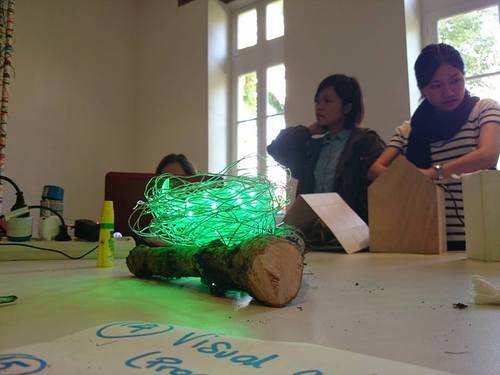
The internet of trees makes smart birdhouses using Arduino Yùn

The connected birdhouse is a project prototyped during a workshop ran by Massimo Banzi at Boisbuchet, last August in France. It was developed using Arduino Yùn, by Valentina Chinnici, who shared with us the project, and two other students taking part to  the week of learning-by-doing around the theme of  the Internet of Trees.

They redesigned a traditional object, a wooden birdhouse to be placed outdoor, and connected it to a lamp shaped like a nest, to be placed indoor:

The connected birdhouse was in fact an interactive object able to communicate to the nest/lamp the presence of a bird inside the house, and accordingly to a color coded signal was giving also some informations about the size of the bird itself. In the event of a bird entering into the house, the nest/lamp remotely controlled via WiFi by an Arduino Yùn, was turned on. The nest/lamp received the notification from the birdhouse translating it firstly with a rainbow effect. After few seconds the light changed according to the weight of the bird (green, yellow or red).

The LED strip used for the nest lamp was an Adafruit Neopixel strip controlled by an Arduino Yún.

On this blog you can find the sketch to make it work and create one yourself.

Arduino Blog 15 Sep 22:27

LEDs Turn This Paper Map into a Tram Tracker

Public transit can be a wonderful thing. It can also be annoying if the trains are running behind schedule. These days, many public transit systems are connected to the Internet. This means you can check if your train will be on time at any moment using a computer or smart phone. [Christoph] wanted to take this concept one step further for the Devlol hackerspace is Linz, Austria, so he built himself an electronic tracking system (Google translate).

[Christoph] started with a printed paper map of the train system. This was placed inside what began as an ordinary picture frame. Then, [Christoph] strung together a series of BulletPixel2 LEDs in parallel. The BulletPixel2 LEDs are 8mm tri-color LEDs that also contain a small controller chip. This allows them to be controlled serially using just one wire. It’s similar to having an RGB LED strip, minus the actual strip. [Christoph] used 50 LEDs when all was said and done. The LEDs were mounted into the photo frame along the three main train lines; red, green, and blue. The color of the LED obviously corresponds to the color of the train line.

The train location data is pulled from the Internet using a Raspberry Pi. The information must be pulled constantly in order to keep the map accurate and up to date. The Raspberry Pi then communicates with an Arduino Uno, which is used to actually control the string of LEDs. The electronics can all be hidden behind the photo frame, out of site. The final product is a slick “radar” for the local train system.


Filed under: Arduino Hacks, Raspberry Pi

PWM heater and fan continued

Yesterday I gave myself the following to-do list:

  • Check the VDS voltage at 4A on the nFET. Is the on-resistance still much too high?

    Yes, with the 1.8Ω resistor I get 110mV across the FET with 8.372V across the resistor, so at 4.65A I’m seeing an on-resistance of 24mΩ, still much higher than the 10mΩ I was expecting, but closer than I was getting yesterday at 1A. The voltage across the nFET does go up as the nFET warms up, but the nFET does not get too hot (up to around 45°C).

  • Try adding a 1kΩ gate resistance to slow down the transitions on the PWM, to see if that reduces the inductive spikes and the noise-coupling through the 9V power supply.

    Slowing the transitions definitely reduced the spikes, from about 13V to about 1V.  The bypass capacitors absorbed the highest-frequency spikes, and the 470µF polymer electrolytic capacitor seems to be enough—the 10µF ceramic doesn’t seem to add any extra suppression.  At about 94% duty cycle the noise on the power supply is about the following:

    gate resistor bypass capacitor peak-to-peak noise
     0Ω  none  20V
     1kΩ  none  3V
     0Ω  10µF  2.5V
     1kΩ  10µF  2.5V
     0Ω  470µF  1V
     1kΩ  470µF  0.3V

    The slew rate for the drain voltage with the 1kΩ gate resistor is about +7V/µs and -5V/µs.

  • Write a simple control loop for the fan speed, so that the fan speed can be held constant even when the power-supply voltage changes.  This may be an opportunity to try the P/PI/PID tuning, since the control loop should be fairly fast.

    I wrote a simple PID controller with the control variable being the fan PWM and the measured variable being the time per pulse (in µsec).  I tried tuning the controller by adjusting the proportional gain until the control loop barely oscillated, then cutting the gain to 0.45 of that and setting the integration time to about period of the oscillation (very loosely estimated).  I then tweaked the parameters until it seemed to give good control without oscillation over the full range of fan speeds.I tried the differential control, but the noisiness of the speed measurement (which I was not filtering at all) makes the derivative far too touchy, even with tiny amounts of differential control, so I used a simple PI controller instead.  I don’t think that the optimal parameters are the same at the high speed and low speed for the fan, but it was not difficult to find parameters that worked fairly well across the range.  One thing that help was not accumulating integral error when the PWM signal was pinned at the lowest or highest values.

    The speed is almost linear with the PWM input, so I would probably get better control if I used speed (the reciprocal of the pulse duration) as the measured value in the controller.

    The fan speed is nearly linear with PWM, which is ideal for proportional control, but I had foolishly used the pulse duration as my measured value to control.

    I rewrote the controller as a simple PI controller, using 16*RPM as my measured variable, so that I could have an integer setpoint with sufficient resolution. I’m still using floating-point in the controller for simplicity of coding but I plan to switch to fixed-point soon. This controller was fairly easy to tune—I made the Kplarge enough that system oscillated, and counted how many samples were in the period, then set the integration time to about the period. I then reduced Kp until the oscillations went away. I ended up with Kp = 0.01 PWM/16RPM and TI= 1/0.15 samples (with a sampling rate of 30ms, so TI=0.2s).

    One thing that helped was to make a guess at the target PWM setting when the setpoint was changed (using d RPM/ d PWM =24 and the current PWM setting and RPM value), then setting the cumulative error to what it would be in steady state at that PWM. I then set the PWM to five times as far from current PWM as the target PWM to make the transition as fast as possible without increasing overshoot, making sure to clip to the legal 0..255 range.

  • Write a simple control loop for controlling the temperature at the thermistor, by adjusting the PWM for the resistor.  This might get messy, as the fan speed probably affects the rate of transfer from the resistor to the thermistor (the thermistor is in the air stream blown over the resistor, not touching the resistor).

    When I started working on this, my power supply failed. I’m afraid it might have shorted when I was rewiring things (though I never saw evidence for a short). I’ll leave it overnight (in case there is a resettable poly fuse) and check it in the morning. If there is still no power, I’ll open the case and see if there is a replaceable fuse inside. I’m afraid that this may have a soldered-in non-resettable fuse, which would be a terrible design—setting me back a couple of weeks as I either order a replacement fuse or a replacement power supply.

    Correction: the power supply was fine—I’d managed to blow a circuit breaker for the room. I’m not sure how I did that, but resetting the circuit breaker fixed the problem. I now have a temperature control sort of working—I still have to tune the control loop, but I was able to get the thermistor to about 30°C (400 as the Arduino reading) and hold it to within about 0.3°C. There was a pretty substantial overshoot at the beginning, which I’ll have to look into controlling—the temperature controller may need to be critically damped. Now it really is time for me to get some sleep.

  • Put the whole thing into a styrofoam box, to see whether extra venting is needed to allow things to cool down, and to see how tightly temperature can be controlled.
  • Design and build baffling for the fan to get better airflow in the box.
  • Figure out how to get students to come up with workable designs, when they are starting from knowing nothing. I don’t want to give them my designs, but I want to help them find doable subproblems.  Some of the subproblems they come up with may be well beyond the skills that they can pick up in the time frame of the course.

Filed under: freshman design seminar Tagged: Arduino, fan, incubator, power resistor, PWM, tachometer, thermistor

PWM heater and fan continued

Yesterday I gave myself the following to-do list:

  • Check the VDS voltage at 4A on the nFET. Is the on-resistance still much too high?

    Yes, with the 1.8Ω resistor I get 110mV across the FET with 8.372V across the resistor, so at 4.65A I’m seeing an on-resistance of 24mΩ, still much higher than the 10mΩ I was expecting, but closer than I was getting yesterday at 1A. The voltage across the nFET does go up as the nFET warms up, but the nFET does not get too hot (up to around 45°C).

  • Try adding a 1kΩ gate resistance to slow down the transitions on the PWM, to see if that reduces the inductive spikes and the noise-coupling through the 9V power supply.

    Slowing the transitions definitely reduced the spikes, from about 13V to about 1V.  The bypass capacitors absorbed the highest-frequency spikes, and the 470µF polymer electrolytic capacitor seems to be enough—the 10µF ceramic doesn’t seem to add any extra suppression.  At about 94% duty cycle the noise on the power supply is about the following:

    gate resistor bypass capacitor peak-to-peak noise
     0Ω  none  20V
     1kΩ  none  3V
     0Ω  10µF  2.5V
     1kΩ  10µF  2.5V
     0Ω  470µF  1V
     1kΩ  470µF  0.3V

    The slew rate for the drain voltage with the 1kΩ gate resistor is about +7V/µs and -5V/µs.

  • Write a simple control loop for the fan speed, so that the fan speed can be held constant even when the power-supply voltage changes.  This may be an opportunity to try the P/PI/PID tuning, since the control loop should be fairly fast.

    I wrote a simple PID controller with the control variable being the fan PWM and the measured variable being the time per pulse (in µsec).  I tried tuning the controller by adjusting the proportional gain until the control loop barely oscillated, then cutting the gain to 0.45 of that and setting the integration time to about period of the oscillation (very loosely estimated).  I then tweaked the parameters until it seemed to give good control without oscillation over the full range of fan speeds.I tried the differential control, but the noisiness of the speed measurement (which I was not filtering at all) makes the derivative far too touchy, even with tiny amounts of differential control, so I used a simple PI controller instead.  I don’t think that the optimal parameters are the same at the high speed and low speed for the fan, but it was not difficult to find parameters that worked fairly well across the range.  One thing that help was not accumulating integral error when the PWM signal was pinned at the lowest or highest values.

    The speed is almost linear with the PWM input, so I would probably get better control if I used speed (the reciprocal of the pulse duration) as the measured value in the controller.

    The fan speed is nearly linear with PWM, which is ideal for proportional control, but I had foolishly used the pulse duration as my measured value to control.

    I rewrote the controller as a simple PI controller, using 16*RPM as my measured variable, so that I could have an integer setpoint with sufficient resolution. I’m still using floating-point in the controller for simplicity of coding but I plan to switch to fixed-point soon. This controller was fairly easy to tune—I made the Kplarge enough that system oscillated, and counted how many samples were in the period, then set the integration time to about the period. I then reduced Kp until the oscillations went away. I ended up with Kp = 0.01 PWM/16RPM and TI= 1/0.15 samples (with a sampling rate of 30ms, so TI=0.2s).

    One thing that helped was to make a guess at the target PWM setting when the setpoint was changed (using d RPM/ d PWM =24 and the current PWM setting and RPM value), then setting the cumulative error to what it would be in steady state at that PWM. I then set the PWM to five times as far from current PWM as the target PWM to make the transition as fast as possible without increasing overshoot, making sure to clip to the legal 0..255 range.

  • Write a simple control loop for controlling the temperature at the thermistor, by adjusting the PWM for the resistor.  This might get messy, as the fan speed probably affects the rate of transfer from the resistor to the thermistor (the thermistor is in the air stream blown over the resistor, not touching the resistor).
    When I started working on this, my power supply failed. I’m afraid it might have shorted when I was rewiring things (though I never saw evidence for a short). I’ll leave it overnight (in case there is a resettable poly fuse) and check it in the morning. If there is still no power, I’ll open the case and see if there is a replaceable fuse inside. I’m afraid that this may have a soldered-in non-resettable fuse, which would be a terrible design—setting me back a couple of weeks as I either order a replacement fuse or a replacement power supply.
  • Put the whole thing into a styrofoam box, to see whether extra venting is needed to allow things to cool down, and to see how tightly temperature can be controlled.
  • Design and build baffling for the fan to get better airflow in the box.
  • Figure out how to get students to come up with workable designs, when they are starting from knowing nothing. I don’t want to give them my designs, but I want to help them find doable subproblems.  Some of the subproblems they come up with may be well beyond the skills that they can pick up in the time frame of the course.

Filed under: freshman design seminar Tagged: Arduino, fan, incubator, KL25Z, power resistor, PWM, tachometer, Teensy, thermistor