Posts with «arduino» label

Open Source Hackable Robot

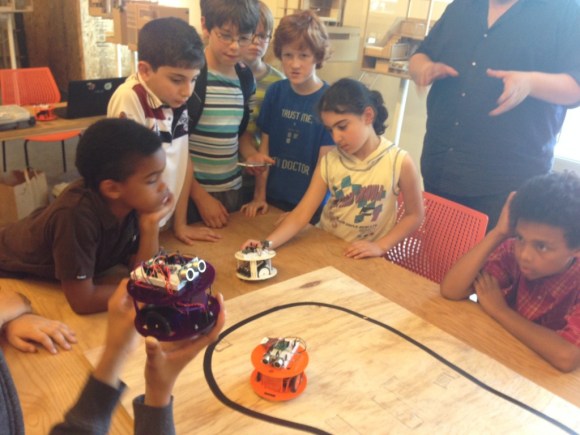
The world of robots is an interesting place, and it’s an even better place for children to get started in electronics. To that end, [Richard Albritton] has created a low-cost, open source robotics platform called the Hack-E-Bot specifically tailored to make it as easy as possible to get started.

The goals for the robot kit were to spark curiosity for electronics and programming, to be easy to assemble and program, to be scalable, and to be as easy on the wallet as possible. This was accomplished by using the familiar Arduino microcontroller on an intuitive platform. The robot uses an ultrasonic rangefinder to navigate as well, and can support a wide range of other sensors. The kit comes in at just under $50, making it a great option for an entry-level robot.

The project is currently seeking crowd funding and [Richard] is also seeking educators to get involved. Currently the only kits available are at fairs and other conventions but they should be able to start producing them in greater quantities in the future. The Arduino libraries are a work in progress but they are available on the project site, as well as several instructional videos and other information about the project.


Filed under: robots hacks

Improving feedback for fan

I wanted to look at the step response of the fan and of the heater, so that I could see if I could derive somewhat reasonable control parameters by theory, rather than by cut-and-try parameter fiddling.  Most of the tutorials I’ve looked at give empirical ways of tuning PID controllers, rather than theoretical ones, even ones that use Laplace transforms to explain how PID controllers work and how to determine whether or not the control loop is stable if you are controlling a linear time-invariant system with a known transfer function.

When I first looked at the fan response, I noticed a problem with my tachometer code:
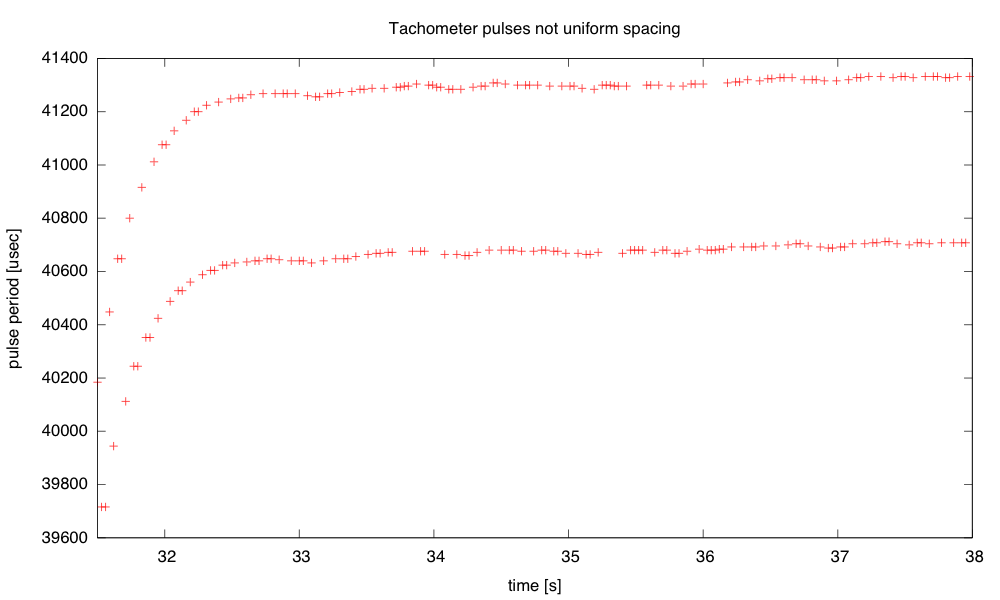
The tachometer gives two pulses per revolution, but the markers used are not perfectly spaced, so I get different estimates of the speed depending which falling-edge-to-falling-edge pulse width I measure. The difference between the two speeds is about 1.6%.

I rewrote the tachometer code to trigger on all four edges of a revolution, and to record the time at each edge in a circular buffer. This way I can use a full revolution of the fan for determining the speed, but get updated estimates every quarter revolution, available in micros_per_revolution:

volatile uint32_t old_tach_micros[4];  // time of last pulses of tachometer
	// used as a circular buffer
volatile uint8_t prev_tach_index=0;    // pointer into circular buffer
volatile uint32_t micros_per_revolution; // most recent pulse period of tachometer

#define MIN_TACH_PULSE  (100)   // ignore transitions sooner than this many
				// microseconds after previous transition

void  tachometer_interrupt(void)
{   uint32_t tach_micros = micros();

    if (tach_micros-old_tach_micros[prev_tach_index] < MIN_TACH_PULSE) return;
    prev_tach_index = (prev_tach_index+1)%4;  // increment circular buffer pointer
    micros_per_revolution= tach_micros-old_tach_micros[prev_tach_index];
    old_tach_micros[prev_tach_index] = tach_micros;
}

In setup(), I need to set up the interrupt with attachInterrupt(FAN_FEEDBACK_INT,tachometer_interrupt, CHANGE);

I think that this improved tachometer code may be a bit too much for first-time programmers to come up with. Circular buffers use a bunch of concepts (arrays, modular arithmetic) and are likely to cause a lot of off-by-one errors. Interrupts alone were a complicated enough concept for students to deal with. I don’t know whether the improvement in speed measurement would be justifiable in the freshman design course.

The new tachometer code did smooth out the measurements a lot, though, as expected—it reduces the fluctuation in measured speed to about 0.3%, which is limited by the resolution of the micros() timer I’m using on the Arduino board. I then tried recording some step responses, both for upward steps and downward steps. The upward steps are reasonably approximated by an exponential decay (like a charging curve):
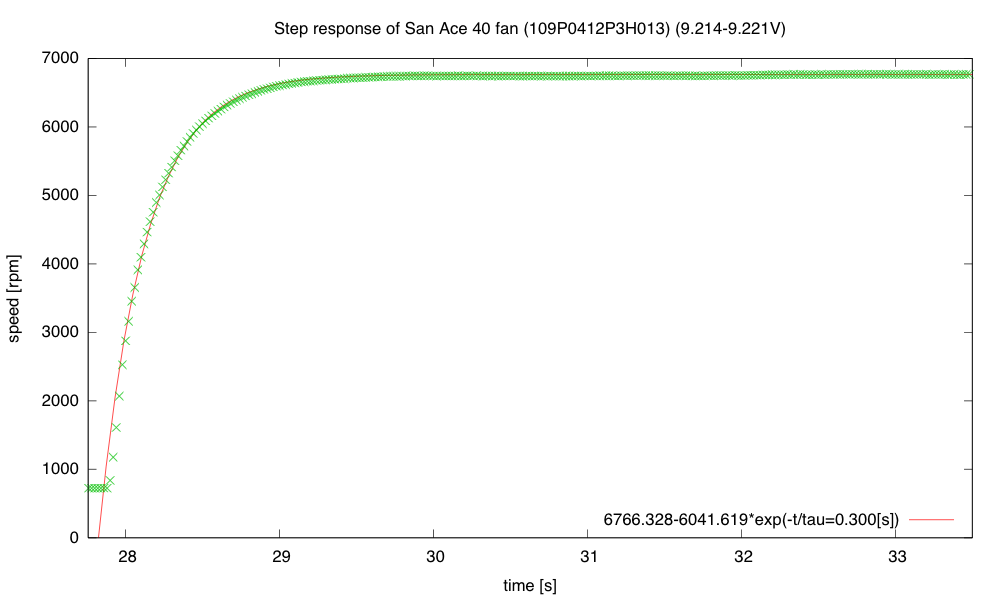
The low speed with PWM=0 (always off) is 724.7 rpm, and the high speed with PWM=255 (always on) is 6766.3rpm. The exponential fit is not perfect, but it is certainly a good enough approximation for designing a closed-loop system.

The response to a downward step, however, is not well modeled by a simple exponential decay:
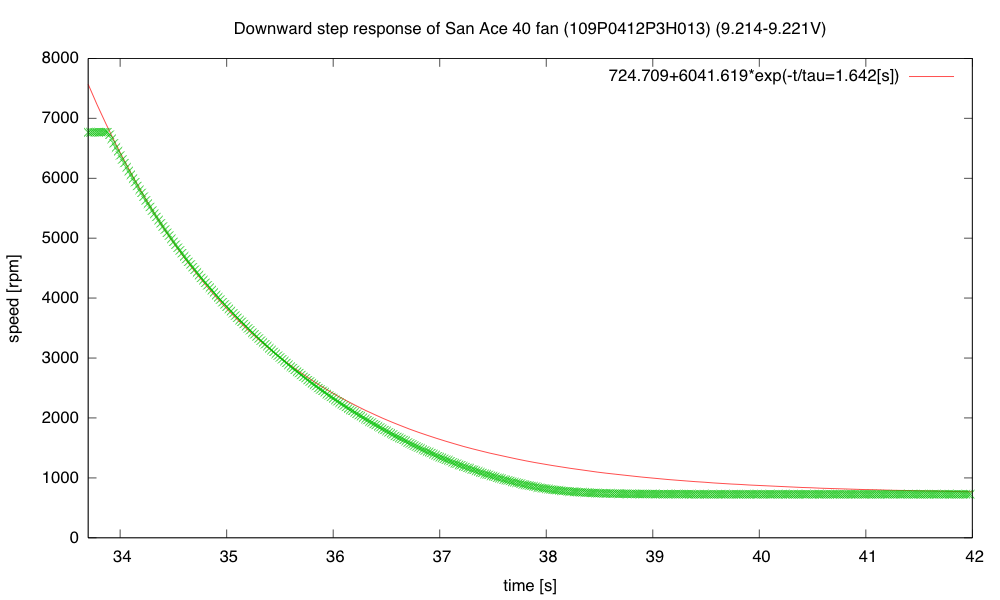
The fan spins down gradually at first (with a time constant about 1.6s), but at low speed the speed changes faster (as if the time constant dropped to about 0.6s).

Note that the fan slows down much more gradually than it speeds up, which means that it is not a linear, time-invariant system. In a linear system, superimposing a step-up and a step-down would cancel, so the responses to the step up and step down should add to a constant value—the fan most definitely does not have that property.

I was curious whether the difference was just apparent for large steps, or also for small ones, so I tried steps between PWM duty cycles of 100/256 and 160/256:
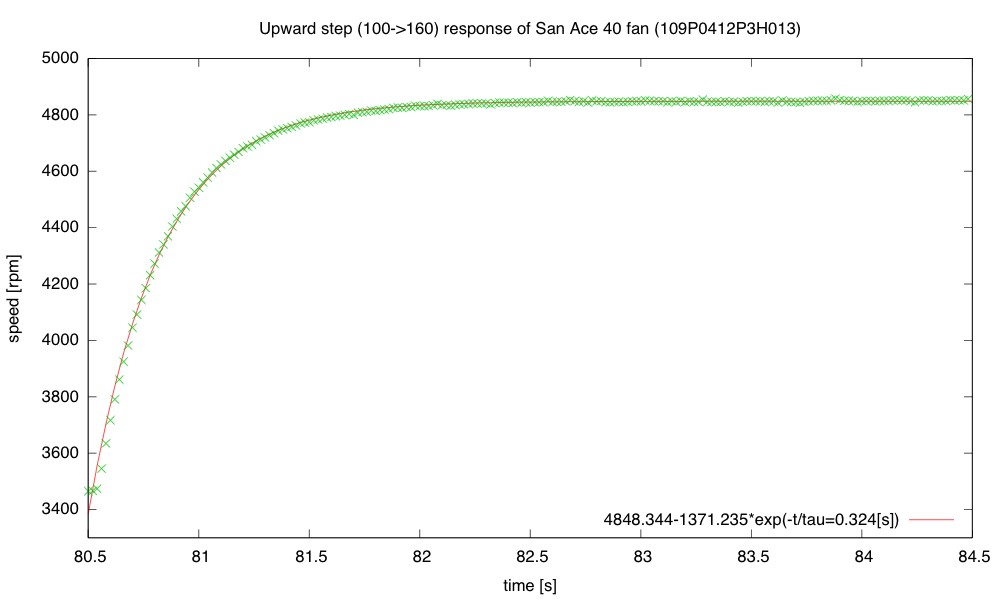
A small upward step is again quick, with almost the same time constant as before.
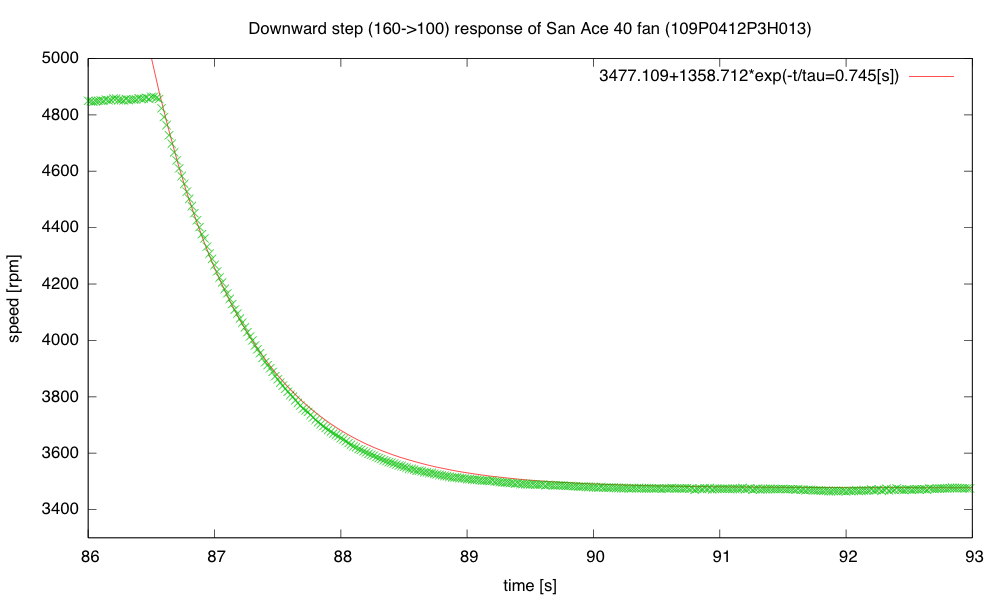
The small downward step is faster than before, though still substantially slower than the upward step of the same size, and with an initially slower response than the final convergence.

I’m going to try writing a couple of ad hoc controllers for the fan, to see if they behave better than the PID controller I’ve been using: open-loop control using just  PWM=(setpoint-740)/25; a simple on/off control with a single threshold; hysteresis, using two thresholds instead of 1; PI control with no anti-windup; and a controller that goes to full on or full off when the error is large, to make a quick transition,  switching to approximately the right PWM value,  when the error is small, with PI control thereafter.

I think that the open-loop controller will have a steady, but wrong speed; the  crude on/off controllers will make an audible pulsing of the fan motor; the PI controller will suffer from overshoot when making big steps, and the on/off/PI controller should make nice steps, if I can tune it right.

I implemented all the controllers and ran a test switching between setpoints of 1000RPM and 5000RPM every 30 seconds.  Here are plots of the behavior with different control algorithms:
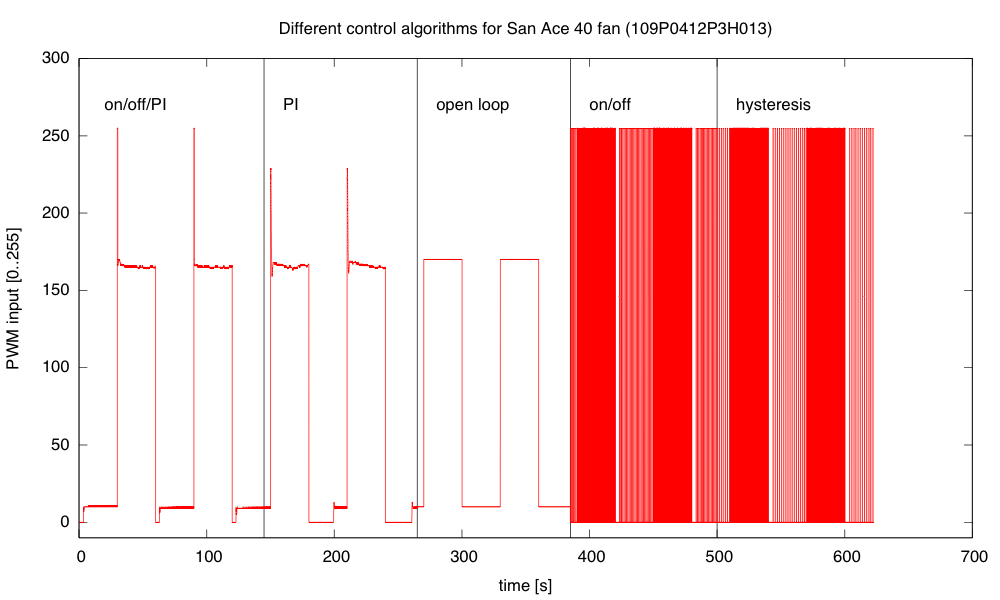
The PWM values computed by the various control algorithms show the integrator windup problem for PI clearly after the downward transitions—PI takes a long time to recover from the errors during the downward edge.
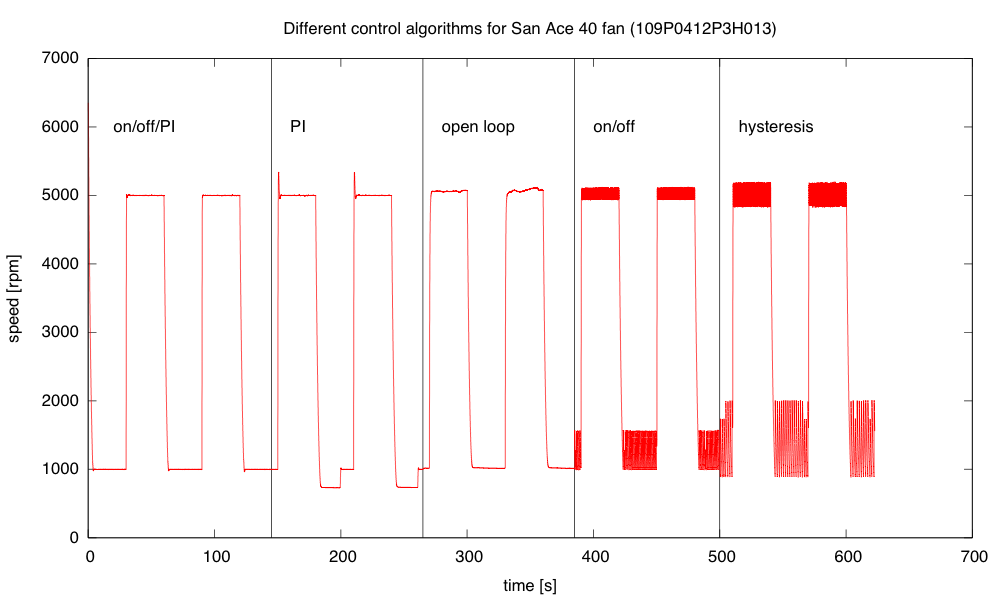
The mixed algorithm does a very good job of control, with little overshoot. The simple PI algorithm has substantial overshoot, particularly when the control loop wants a PWM value outside the range [0,255]. Open loop has significant offset and wanders a bit. On/off control oscillates at about 10hz, and adding hysteresis makes the oscillation larger but slower (about 5Hz).

The errors for the mixed controller are only about ±0.3% and overshoot or ringing at the transitions <40RPM.  The simple PI controller overshoots by 340RPM and takes 20 seconds to recover from the integrator windup on the downward transition.  The open-loop controller has offset errors of about 1% and a fluctuation of about ±0.7% at the high speed, and an offset of 1% and fluctuations of about ±0.5% at the low speed.  The on/off controller has an offset of  about 0.5% at high speed with fluctuations of ±2%, and an offset of 28% with fluctuations of ±28%.  Adding hysteresis slows down the oscillations, but makes them larger (0.2% offset, fluctuations ±3% at high speed, and 44% offset with fluctuations of ±70% at low speed).The mixed algorithm which uses on/off control for large errors and PI for small errors, with back-calculation of the integral error when switching to the PI controller seems to work very well.  But would I be able to get freshmen to the point of being able to develop that themselves within a 2-unit course?  Probably not, but I might be able guide them through the development in a series of exercises that started with on/off control, then went to modeling and open-loop control, then the PI control, and finally the mixed control.  It would take most of the quarter.


Filed under: freshman design seminar Tagged: Arduino, control loop, fan, incubator, PID controller, PWM, tachometer

Improving feedback for fan

I wanted to look at the step response of the fan and of the heater, so that I could see if I could derive somewhat reasonable control parameters by theory, rather than by cut-and-try parameter fiddling.  Most of the tutorials I’ve looked at give empirical ways of tuning PID controllers, rather than theoretical ones, even ones that use Laplace transforms to explain how PID controllers work and how to determine whether or not the control loop is stable if you are controlling a linear time-invariant system with a known transfer function.

When I first looked at the fan response, I noticed a problem with my tachometer code:

The tachometer gives two pulses per revolution, but the markers used are not perfectly spaced, so I get different estimates of the speed depending which falling-edge-to-falling-edge pulse width I measure. The difference between the two speeds is about 1.6%.

I rewrote the tachometer code to trigger on all four edges of a revolution, and to record the time at each edge in a circular buffer. This way I can use a full revolution of the fan for determining the speed, but get updated estimates every quarter revolution, available in micros_per_revolution:

volatile uint32_t old_tach_micros[4];  // time of last pulses of tachometer
	// used as a circular buffer
volatile uint8_t prev_tach_index=0;    // pointer into circular buffer
volatile uint32_t micros_per_revolution; // most recent pulse period of tachometer

#define MIN_TACH_PULSE  (100)   // ignore transitions sooner than this many
				// microseconds after previous transition

void  tachometer_interrupt(void)
{   uint32_t tach_micros = micros();

    if (tach_micros-old_tach_micros[prev_tach_index] < MIN_TACH_PULSE) return;
    prev_tach_index = (prev_tach_index+1)%4;  // increment circular buffer pointer
    micros_per_revolution= tach_micros-old_tach_micros[prev_tach_index];
    old_tach_micros[prev_tach_index] = tach_micros;
}

In setup(), I need to set up the interrupt with attachInterrupt(FAN_FEEDBACK_INT,tachometer_interrupt, CHANGE);

I think that this improved tachometer code may be a bit too much for first-time programmers to come up with. Circular buffers use a bunch of concepts (arrays, modular arithmetic) and are likely to cause a lot of off-by-one errors. Interrupts alone were a complicated enough concept for students to deal with. I don’t know whether the improvement in speed measurement would be justifiable in the freshman design course.

The new tachometer code did smooth out the measurements a lot, though, as expected—it reduces the fluctuation in measured speed to about 0.3%, which is limited by the resolution of the micros() timer I’m using on the Arduino board. I then tried recording some step responses, both for upward steps and downward steps. The upward steps are reasonably approximated by an exponential decay (like a charging curve):

The low speed with PWM=0 (always off) is 724.7 rpm, and the high speed with PWM=255 (always on) is 6766.3rpm. The exponential fit is not perfect, but it is certainly a good enough approximation for designing a closed-loop system.

The response to a downward step, however, is not well modeled by a simple exponential decay:

The fan spins down gradually at first (with a time constant about 1.6s), but at low speed the speed changes faster (as if the time constant dropped to about 0.6s).

Note that the fan slows down much more gradually than it speeds up, which means that it is not a linear, time-invariant system. In a linear system, superimposing a step-up and a step-down would cancel, so the responses to the step up and step down should add to a constant value—the fan most definitely does not have that property.

I was curious whether the difference was just apparent for large steps, or also for small ones, so I tried steps between PWM duty cycles of 100/256 and 160/256:

A small upward step is again quick, with almost the same time constant as before.

The small downward step is faster than before, though still substantially slower than the upward step of the same size, and with an initially slower response than the final convergence.

I’m going to try writing a couple of ad hoc controllers for the fan, to see if they behave better than the PID controller I’ve been using: open-loop control using just  PWM=(setpoint-740)/25; a simple on/off control with a single threshold; hysteresis, using two thresholds instead of 1; PI control with no anti-windup; and a controller that goes to full on or full off when the error is large, to make a quick transition,  switching to approximately the right PWM value,  when the error is small, with PI control thereafter.

I think that the open-loop controller will have a steady, but wrong speed; the  crude on/off controllers will make an audible pulsing of the fan motor; the PI controller will suffer from overshoot when making big steps, and the on/off/PI controller should make nice steps, if I can tune it right.

I implemented all the controllers and ran a test switching between setpoints of 1000RPM and 5000RPM every 30 seconds.  Here are plots of the behavior with different control algorithms:

The PWM values computed by the various control algorithms show the integrator windup problem for PI clearly after the downward transitions—PI takes a long time to recover from the errors during the downward edge.

The mixed algorithm does a very good job of control, with little overshoot. The simple PI algorithm has substantial overshoot, particularly when the control loop wants a PWM value outside the range [0,255]. Open loop has significant offset and wanders a bit. On/off control oscillates at about 10hz, and adding hysteresis makes the oscillation larger but slower (about 5Hz).

The errors for the mixed controller are only about ±0.3% and overshoot or ringing at the transitions <40RPM.  The simple PI controller overshoots by 340RPM and takes 20 seconds to recover from the integrator windup on the downward transition.  The open-loop controller has offset errors of about 1% and a fluctuation of about ±0.7% at the high speed, and an offset of 1% and fluctuations of about ±0.5% at the low speed.  The on/off controller has an offset of  about 0.5% at high speed with fluctuations of ±2%, and an offset of 28% with fluctuations of ±28%.  Adding hysteresis slows down the oscillations, but makes them larger (0.2% offset, fluctuations ±3% at high speed, and 44% offset with fluctuations of ±70% at low speed).The mixed algorithm which uses on/off control for large errors and PI for small errors, with back-calculation of the integral error when switching to the PI controller seems to work very well.  But would I be able to get freshmen to the point of being able to develop that themselves within a 2-unit course?  Probably not, but I might be able guide them through the development in a series of exercises that started with on/off control, then went to modeling and open-loop control, then the PI control, and finally the mixed control.  It would take most of the quarter.


Filed under: freshman design seminar Tagged: Arduino, control loop, fan, incubator, PID controller, PWM, tachometer

Stepping Through Code on a Pace 4000 Set Top Box

[Lee] wrote in to tell us about a Set Top Box he hacked. Before the cable industry lawyers get out their flaming swords… he’s not stealing cable, or really doing much of anything. This is a hack just for the adventure and thrill of making someone else’s hardware design do your bidding without any kind of instructions.

He posted about the adventure in two parts. The first is finding the JTAG header and identifying the pins. Arduino to the rescue! No really, and this is the type of Arduino use we love. Using a package called JTAGenum the board becomes a quick tool for probing and identifying JTAG connections.

The image above shows a different piece of hardware. From looking at it we’re pretty sure this is a Bus Blaster which is specifically designed for JTAG debugging with ARM processors. This is the beginning of the second part of his documentation which involves code dumping and stepping through lines code (or instructions) using OpenOCD and GDB. It’s a chore to follow all that [Lee] discovered just to write his name to the display of the box. But we certainly found it interesting. The display has a convoluted addressing scheme. We assume that there are cascading shift registers driving the segments and that’s why it behaves the way it does. Take a look for yourself and let us know what you think in the comments.


Filed under: ARM, classic hacks

THP Semifinalist: Farmbot

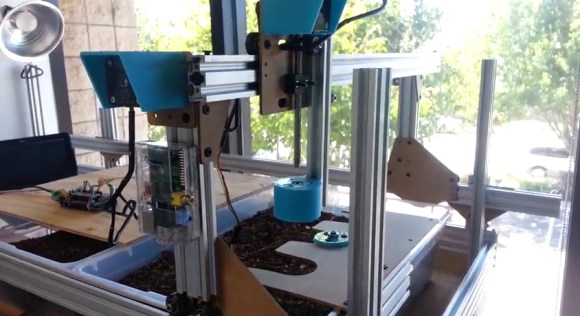
The FarmBot team has been pretty busy with their CNC Farming and Gathering machine. The idea is to automate the farming process with precise deployment of tools: plows, seed injection, watering, sensors, etc. An Arduino with an added RAMPS handles the movement, and a Raspi provides internet connectivity. Their prototype has already experienced four major iterations: the first revision addressed bigger issues such as frame/track stability and simplification of parts. Now they’re locking down the specifics on internet-of-things integration and coding for advanced movement functions.

The most recent upgrade provides a significant improvement by overhauling the implementation of the tools. Originally, the team envisioned a single, multi-function tool head design that carried everything around all the time. Problem is, the tool that’s in-use probably works best if it’s lower than the others, and piling them all onto one piece spells trouble. The solution? a universal tool mounting system, of course. You can see them testing their design in a video after the break.

If the FarmBot progress isn’t impressive enough—and admittedly we’d have called project lead [Rory Aronson] crazy for attempting to pull this off…but he did it—the FarmBot crew started and successfully funded an entire sub-project through Kickstarter. OpenFarm is an open-source database set to become the go-to wiki for all things farming and gardening. It’s the result of [Rory] encountering an overwhelming amount of generic, poorly written advice on plant growing, so he just crowdsourced a solution. You know, no sweat.


The project featured in this post is a semifinalist in The Hackaday Prize.


Filed under: Crowd Funding, The Hackaday Prize

Arduino and Bruce Sterling Launching an Open-Source Apartment

You'll soon be able to rent the "home of the future" on Airbnb.

Read more on MAKE

Putting the heater in a box

Continuing the saga of the incubator project in the recent posts:

On my to-do list for the project

  • Put the whole thing into a styrofoam box, to see whether extra venting is needed to allow things to cool down, and to see how tightly temperature can be controlled. Find a smaller bread board or prototype board to put the controller on—my current bread boards are all 6.5″ long, and the box only has room for 6″, especially since I put the resistor in the center of the 6″×12″ aluminum plate, which just fits the box. I suppose I could drill a couple more holes in the plate and mount the resistor off center, but I rather like the idea of building the controller as an Arduino shield, so that the Arduino + controller is a single unit. Another possibility is to drill a hole in the styrofoam box and run cables through the box for the resistive heater, the fan, and the thermistor. Even if the grounds are connected outside the box, this is only 8 wires. Putting the control electronics outside the box would reduce the clutter in the box and make tweaking easier

    I got this done today, by drilling a hole in the box and soldering long wires onto the resistor and the thermistor, so that all the active electronics could live outside the box. Incidentally, “drilling” did mean using a drill bit, but I held it and turned it with my fingers—styrofoam is so soft and grainy that I feared a power drill would tear out big chunks.

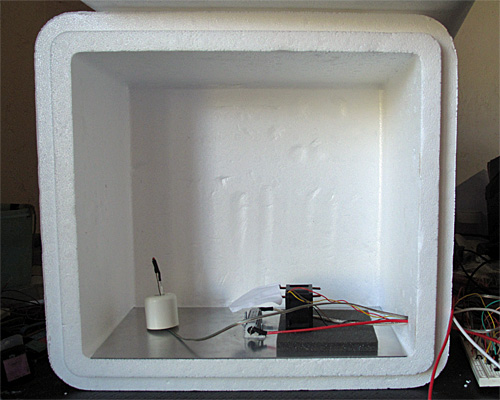
    Here is the interior of the styrofoam box, with the lid open. The 6″×12″ aluminum plate covers the bottom. The thermistor is on the left, propped up by a rubber foot, the resistor in is the center, and the fan is sitting on a foam pad on the right. (The foam is to reduce noise until I can get the fan proper mounted in a baffle.)

    As expected, I can heat up the thermistor fairly quickly, but if I overshoot on the temperature, it takes a very long time for the closed box to cool back down. Cooling off just 1°C took over half an hour.

  • Add some low-pass filtering to the temperature measurement to reduce noise. Just adding 4 measurements in quick succession would reduce the noise and give the illusion of extra precision.

    I did this also. With the box closed, the thermistor reading is fairly stable, with fluctuations of less than 0.1°C (which was the resolution with a single thermistor reading before adding 4 successive reads).

  • The fan controller occasionally has a little glitch where the tachometer either misses a pulse or provides an extra one (I think mainly an extra one due to ringing on the opposite edge).  I could try reducing this problem in three ways: 1) changing which edge I’m triggering on, 2) using more low-pass filtering before the Schmitt trigger in the edge detector, or 3) using median filtering to throw out any half-length or double-length pulses, unless they occur as a pair.  (Hmm, the half-length pulses would occur as a pair, so this might not help unless I go to median of 5, which would be a lot of trouble.)

    I fixed this also, using two techniques:

    1. In the program I have 3 states for the interrupt routine that catches the edges: normally, I check that the edge is within 3/4 to 3/2 of the previously recorded pulse—if so I record it and continue. If it is less than 3/4 as long, I skip it, and change to a skip state. If it is more than 3/2 as long, I skip it and switch to a force state. In the skip state, I ignore the reading and switch to the force state. In the force state, I accept the pulse length (whatever it is), and switch to the normal state. With this state machine, I ignore a double-length pulse or a pair of half-length pulses together.
    2. The rising edge of the pulse from the tachometer is very slow (thanks to the RC filter of the pullup), but the falling edge is sharp. Extraneous pulses are more likely to occur if I trigger on the slow edge rather than fast edge, so I switched the polarity to make sure that I was using the falling edge (which is the rising edge of the output of the Schmitt trigger).

    I think that changing which edge I used made a bigger difference than trying to suppress the erroneous reads digitally. I no longer hear the occasional hiccup where the control algorithm tries desperately to double or half the fan speed because of a misread timing pulse.

  • Improve my anti-windup methods for both thermal and fan controllers, to reduce overshoot.

    I changed from using conditional integration and back calculation of the integration error to using a decay of the integration error based on the difference between the computed PWM setting and the limit when the limits were exceeded. I’m not sure this improved anything though, and it introduces yet another parameter to tune, so I may go back to the previous method. I did play around with the tuning parameters for the fan loop today, and realized that I still don’t have good intuition about the effect of parameter changes. I noticed that the fan control was oscillating a little (small fluctuations around the desired speed, but big enough that I could hear the changes), and I found ways to reduce the oscillations, but at the expense of slower response to step changes.

  • Improve my modeling of the thermal system, so that I can do more reasonable back calculation on setpoint change.

    I still need to do more thinking about the thermal modeling, since it is clear that I can’t afford overshoot when heating (though overshoot during slow cooling is unlikely to be a problem).

Still on my list with no progress:

  • Consider using a PID controller for the temperature to get faster response without overshoot.  (If I can reduce the noise problem.)
  • Design and build baffling for the fan to get better airflow in the box. I’ve made a little paper and wire baffle, to get better air flow over the resistor, but I’ve not done the full baffling to get good airflow in the box.
  • Figure out how to get students to come up with workable designs, when they are starting from knowing nothing. I don’t want to give them my designs, but I want to help them find doable subproblems. Some of the subproblems they come up with may be well beyond the skills that they can pick up in the time frame of the course. The more I work on this project, the more I realize that I and the students will have to be happy with them having explored the options, without getting all the problems solved.

I want to add to the list today:

  • Add changes to the cumulative error term whenever KP or TI are changed, to keep the PWM output the same after the changes—currently changing any of the control loop parameters adds a huge disturbance to the system.
  • Separate the control algorithm better from the rest of the code, so that I can use the same code base and quickly switch between different control algorithms: on/off, on/off with hysteresis, proportional control, proportional control with offset, PI control, PI control with anti-windup variants, PID control.
  • Add an option for recording the response of the system over a long time, so that I can plot input and output of the system with gnuplot. This would be nice for the fan control loop, but I think it will be essential for the temperature control loop.
  • Research control algorithms other than PI and PID, particularly for asymmteric systems like the temperature control, where I can get fairly quick response to the inputs when heating, but very slow response when cooling.

Filed under: freshman design seminar Tagged: Arduino, control loop, fan, incubator, integrator windup, PID controller, power resistor, PWM, tachometer, thermistor

Putting the heater in a box

Continuing the saga of the incubator project in the recent posts:

On my to-do list for the project

  • Put the whole thing into a styrofoam box, to see whether extra venting is needed to allow things to cool down, and to see how tightly temperature can be controlled. Find a smaller bread board or prototype board to put the controller on—my current bread boards are all 6.5″ long, and the box only has room for 6″, especially since I put the resistor in the center of the 6″×12″ aluminum plate, which just fits the box. I suppose I could drill a couple more holes in the plate and mount the resistor off center, but I rather like the idea of building the controller as an Arduino shield, so that the Arduino + controller is a single unit. Another possibility is to drill a hole in the styrofoam box and run cables through the box for the resistive heater, the fan, and the thermistor. Even if the grounds are connected outside the box, this is only 8 wires. Putting the control electronics outside the box would reduce the clutter in the box and make tweaking easier

    I got this done today, by drilling a hole in the box and soldering long wires onto the resistor and the thermistor, so that all the active electronics could live outside the box. Incidentally, “drilling” did mean using a drill bit, but I held it and turned it with my fingers—styrofoam is so soft and grainy that I feared a power drill would tear out big chunks.

    Here is the interior of the styrofoam box, with the lid open. The 6″×12″ aluminum plate covers the bottom. The thermistor is on the left, propped up by a rubber foot, the resistor in is the center, and the fan is sitting on a foam pad on the right. (The foam is to reduce noise until I can get the fan proper mounted in a baffle.)

    As expected, I can heat up the thermistor fairly quickly, but if I overshoot on the temperature, it takes a very long time for the closed box to cool back down. Cooling off just 1°C took over half an hour.

  • Add some low-pass filtering to the temperature measurement to reduce noise. Just adding 4 measurements in quick succession would reduce the noise and give the illusion of extra precision.

    I did this also. With the box closed, the thermistor reading is fairly stable, with fluctuations of less than 0.1°C (which was the resolution with a single thermistor reading before adding 4 successive reads).

  • The fan controller occasionally has a little glitch where the tachometer either misses a pulse or provides an extra one (I think mainly an extra one due to ringing on the opposite edge).  I could try reducing this problem in three ways: 1) changing which edge I’m triggering on, 2) using more low-pass filtering before the Schmitt trigger in the edge detector, or 3) using median filtering to throw out any half-length or double-length pulses, unless they occur as a pair.  (Hmm, the half-length pulses would occur as a pair, so this might not help unless I go to median of 5, which would be a lot of trouble.)

    I fixed this also, using two techniques:

    1. In the program I have 3 states for the interrupt routine that catches the edges: normally, I check that the edge is within 3/4 to 3/2 of the previously recorded pulse—if so I record it and continue. If it is less than 3/4 as long, I skip it, and change to a skip state. If it is more than 3/2 as long, I skip it and switch to a force state. In the skip state, I ignore the reading and switch to the force state. In the force state, I accept the pulse length (whatever it is), and switch to the normal state. With this state machine, I ignore a double-length pulse or a pair of half-length pulses together.
    2. The rising edge of the pulse from the tachometer is very slow (thanks to the RC filter of the pullup), but the falling edge is sharp. Extraneous pulses are more likely to occur if I trigger on the slow edge rather than fast edge, so I switched the polarity to make sure that I was using the falling edge (which is the rising edge of the output of the Schmitt trigger).

    I think that changing which edge I used made a bigger difference than trying to suppress the erroneous reads digitally. I no longer hear the occasional hiccup where the control algorithm tries desperately to double or half the fan speed because of a misread timing pulse.

  • Improve my anti-windup methods for both thermal and fan controllers, to reduce overshoot.

    I changed from using conditional integration and back calculation of the integration error to using a decay of the integration error based on the difference between the computed PWM setting and the limit when the limits were exceeded. I’m not sure this improved anything though, and it introduces yet another parameter to tune, so I may go back to the previous method. I did play around with the tuning parameters for the fan loop today, and realized that I still don’t have good intuition about the effect of parameter changes. I noticed that the fan control was oscillating a little (small fluctuations around the desired speed, but big enough that I could hear the changes), and I found ways to reduce the oscillations, but at the expense of slower response to step changes.

  • Improve my modeling of the thermal system, so that I can do more reasonable back calculation on setpoint change.

    I still need to do more thinking about the thermal modeling, since it is clear that I can’t afford overshoot when heating (though overshoot during slow cooling is unlikely to be a problem).

Still on my list with no progress:

  • Consider using a PID controller for the temperature to get faster response without overshoot.  (If I can reduce the noise problem.)
  • Design and build baffling for the fan to get better airflow in the box. I’ve made a little paper and wire baffle, to get better air flow over the resistor, but I’ve not done the full baffling to get good airflow in the box.
  • Figure out how to get students to come up with workable designs, when they are starting from knowing nothing. I don’t want to give them my designs, but I want to help them find doable subproblems. Some of the subproblems they come up with may be well beyond the skills that they can pick up in the time frame of the course. The more I work on this project, the more I realize that I and the students will have to be happy with them having explored the options, without getting all the problems solved.

I want to add to the list today:

  • Add changes to the cumulative error term whenever KP or TI are changed, to keep the PWM output the same after the changes—currently changing any of the control loop parameters adds a huge disturbance to the system.
  • Separate the control algorithm better from the rest of the code, so that I can use the same code base and quickly switch between different control algorithms: on/off, on/off with hysteresis, proportional control, proportional control with offset, PI control, PI control with anti-windup variants, PID control.
  • Add an option for recording the response of the system over a long time, so that I can plot input and output of the system with gnuplot. This would be nice for the fan control loop, but I think it will be essential for the temperature control loop.
  • Research control algorithms other than PI and PID, particularly for asymmteric systems like the temperature control, where I can get fairly quick response to the inputs when heating, but very slow response when cooling.

Filed under: freshman design seminar Tagged: Arduino, control loop, fan, incubator, integrator windup, PID controller, power resistor, PWM, tachometer, thermistor

A Proof of Concept Project for the ESP8266

It’s hardly been a month since we first heard of the impossibly cheap WiFi adapter for micros, the ESP8266. Since then orders have slowly been flowing out of ports in China and onto the workbenches of tinkerers around the world. Finally, we have a working project using this module. It might only be a display to show the current weather conditions, but it’s a start, and only a hint of what this module can do.

Since the ESP8266 found its way into the storefronts of the usual distributors, a lot of effort has gone into translating the datasheets both on hackaday.io and the nurdspace wiki. The module does respond to simple AT commands, and with the right bit of code it’s possible to pull a few bits of data off of the Internet.

The code requests data from openweathermap.org and displays the current temperature, pressure, and humidity on a small TFT display. The entire thing is powered by just an Arduino, so for anyone wanting a cheap way to put an Arduino project on the Internet, there ‘ya go.


Filed under: Arduino Hacks, hardware
Hack a Day 18 Sep 03:00

Gravity Touch bluetooth Glove powered by Arduino Micro

Arduino user Jubeso submitted to our blog an instructable explaining the 10 steps to build an input device for gaming.

The  Gravity Touch bluetooth glove  is specifically designed to interact with augmented reality glasses like the Google Glass, Meta, Moverio BT or with the VR headsets like Oculus Rift, Samsung Gear VR, vrAse, Durovis Dive:

Those new products are amazing and they need new types of input devices. This instructable will describe how to build your own “Gravity Touch bluetooth glove” and I will also give you some tips to build your own Durovis Dive VR headset so that you will be able to enjoy full mobile VR. Because this glove will be of most use for VR game, I have created a Unity3D plugin for Android that handle the communication between your app and the glove. It means that you will be able to use your Gravity Touch glove to interact with your Unity3D VR game.

The Arduino code and the Java class I wrote to handle the communication between the glove and the Android device will also be available so that you will be able to adapt them for your need.


The bill of materials, among other things, contains an Arduino Micro , FreeIMU – an Open Hardware Framework for Orientation and Motion Sensing and 3m of flexible soft electric wire.