Posts with «arduino hacks» label

Fruit piano uses a different circuit than the Makey Makey

[Hasbi Sevinç] is using perishable goods in his electronics project. The orange, tomato, and two apples seen above act as keys for the virtual piano. The concept is the same as the Makey Makey which is often demonstrated as a banana piano. This implementation uses an Arduino to read the sensors and to connect to the computer running the piano program.

You can see there’s a fair amount of circuitry built on the breadboard. Each piece of fruit has its own channel to make it into a touch sensor. The signal produced when your finger contacts the food is amplified by transistors connected in a Darlington pair. That circuit drives the low side of a optoisolator transmitter. The receiving side of it is connected the I/O pin of the Arduino. You can see the schematic as well as a demo clip after the break.

This use of hardware frees up a lot of your microcontroller cycles. That’s because projects like this banana piano use the timers to measure RC decay. [Hasbi's] setup provides a digital signal that at most only needs to be debounced.


Filed under: arduino hacks, peripherals hacks

The PICnDuino Review

For those of you that can’t make a decision between buying an Arduino and a PIC processor, [Brad] has come up with a novel solution, the PICnDuino. We’ve featured him before with his [Retroball] project, but this time Brad has been full funded on Kickstarter, and is pre-selling boards for delivery in March.

[HAD], specifically I, was fortunate enough to be sent one of the boards to try out early. I’ve worked with an Arduino before, but never a PIC processor, so read on to see if it was actually as easy as the tutorial video (at the end of the article) would have you believe it is to get started.

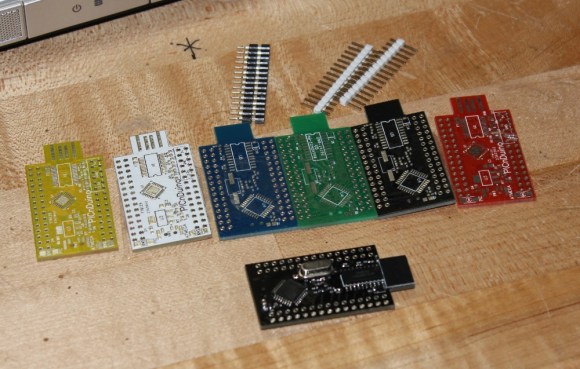
I was sent both a black board fully populated, as well as several blanks in the various colors pictured below.  After loosely attaching the headers, I found that the oscillator on the bottom makes the board sit up a bit when placed into a breadboard. This is actually a clever design feature to make sit up a bit to allow USB attachment while breadboarded. After a quick physical inspection, the real trick would be seeing if it worked as advertised.

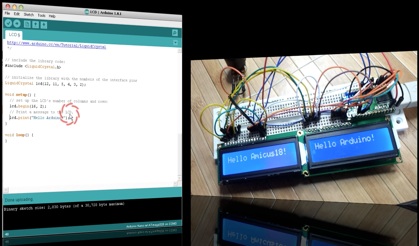
The first challenge for me was that, according to the documentation, this board runs in Windows or a virtualisation environment. I normally run Ubuntu, so, grabbing my wife’s circa 2000 vintage XP notebook, I downloaded and Amicus and Arduino software as explained in the video tutorial. The tutorial really spells out how to get the software running. This would be great for a total beginner, and made it so I didn’t have to even poke around for where to get the software.
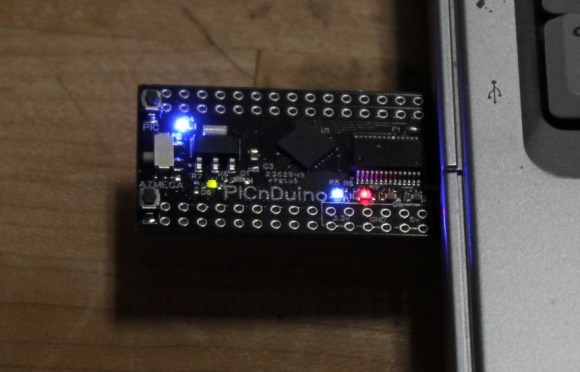
The only issue I had connecting to the board(s?)was that I had to manually install the Amicus18 USB driver. I’m a total noob when it comes to the PIC processor, and only have limited experience with the Arduino, but once the driver was updated, it was quite easy to get everything going.

After programming a “blink” sketch using it as an Arduino, I then flipped a switch and opened the Amicus IDE. Programming the PIC was also simple, although I had to use a and modify a program called “LED_Flash” to match the video instead of the “blink” program as described in the tutorial. It was a bit strange to see the built in blinking light for the Arduino still working while the PIC was being programmed, as well as both built-in lights blinking slightly offset while running simultaneously.

The documentation is extremely well done for a product that won’t even be available for delivery until March 2013. I’m really excited to play with it more, and I think it will be a great tool for people to either run two processors simultaneously, or just have the option of learning to program both a PIC and (n) Arduino. So check it out here, and get it shipped worldwide straight out of Australia!

Side note, bonus points if you can tell from the two pictures what kind of computer I used for this review!


Filed under: arduino hacks, reviews

Nerf Sentry Gun for the Apocalypse

If you’ve ever wanted to shoot someone with a Nerf gun, but just didn’t have the energy to get off the couch, this hack may be for you. It’s also a good way to ward off zombies if another apocalypse, Mayan or otherwise, is on the horizon.

Although the effects are very cool, as seen in the video after the break, the method for making this setup was quite simple. The requirements for this project were that the gun could not be permanently modified, and everything had to fire automatically. These restrictions may have contributed to the simplicity of the design as many of us would start breaking things before we had to.

Instead of some elaborate hack, the trigger was tied back in the firing position at all times. A relay was then used to interrupt the power supply to the mechanism allowing an Arduino equipped with an infrared sensor to automatically control the firing. The setup is explained after the break, but skip to around 1:55 if you’d rather just see the guns in action.


Filed under: arduino hacks, weapons hacks
Hack a Day 28 Dec 19:31

Solving a Rubick’s Cube with LEGO and popsicle sticks

We’ve seen automated Rubick’s Cube solvers before, but never one that has garnered as many awards as [James]‘ popsicle stick and LEGO Rubick’s Cube solver.\

To keep the project complexity down, [James] opted not to use a webcam to detect the color pattern on each face of the cube. Instead, he wrote a little Python app to manually enter the pattern on each face before letting his algorithm loose on the cube and calculating how to solve it.

So far, [James] has seen a huge amount of success from his project. He entered it in the New Zealand Brightsparks competition netting him $1000. This competition led to a win in the Realize the Dream science competition where he won a major prize and an entry into the International Taiwan Science Fair held early next year. An awesome accomplishment from a budding hacker, and we can’t wait to see what he comes up with next.

You can check out a video of [James]‘ cube solver after the break.


Filed under: arduino hacks

Twitter radio

This anthropomorphized wood bowl will read Tweets out loud. It was built by [William Lindmeier] as part of his graduate work in the Interactive Telecommunications Program (ITP) at New York University. View the clip after the break to see and hear a list from his Twitter feed read in rather pleasant text-to-speech voices.

The electronics involved are rather convoluted. Inside the upturned bowl you’ll find both an Arduino and a Raspberry Pi. But that’s not the only thing that goes into this. The best sounding text-to-speech program [William] could find was for OSX, so there is a remote computer involved as well. But we think what makes this special is the concept and execution, not the level of hardware inefficiency.

The knob to the left sets the volume and is also responsible for powering down the device. The knob of the right lets you select from various Twitter lists. Each turn of the knob is responded to with a different LED color in the nose and a spoken menu label. You can get a quick overview of the project from this summary post.


Filed under: arduino hacks, Raspberry Pi
Hack a Day 12 Dec 21:30

Arduino Esplora makes a great controller

The folks at Arduino seem to be stepping up their game. With the new Arduino Leonardo board able to emulate USB keyboards and mice right out of the box, it seems the perfect time for Arduino designers to come up with a proper video game controller. This new board is called the Arduino Esplora and packs enough buttons and sensors inside to capture just about any user input you can imagine.

On board the Esplora is the same ATMega 32U4 microcontroller found in the newest Arduino boards. For input, the designers included an analog joystick, four tact switches, a linear pot, a microphone, and light sensor. The Esplora also includes a three-axis accelerometer, RGB LED, buzzer, and a breakout for an SPI-controlled TFT LCD display, lest you would want to recreate something like the new Wii U controller on your own.

You can check out everything the Esplora can do over on the official Arduino site for the Esplora library.


Filed under: arduino hacks
Hack a Day 11 Dec 18:01

Inventing networking protocols for dozens of Arduinos

When you don’t want to use I2C or SPI, and MIDI and DMX are old hat, [Scott] comes along and invents a very strange networking protocol that is just daisy chaining a few Arduinos together with serial connections.

Strange as it may seem, this networking protocol actually makes a whole lot of sense. [Scott] is working on an animatronic birdhouse in the vein of Disney’s Imagineers and needed to network a whole bunch of Arduinos without using up precious IO pins.

The networking stack [Scott] came up with capitalizes on the hardware UART in each Arduino by simply daisy-chaining several boards together. By adding an FTDI breakout at the beginning of the chain, [Scott] can control dozens of Arduinos straight from a terminal

[Scott] isn’t using off-the-shelf Arduinos for this project – a few months ago he found 100 Arduino-compatible stepper motor controllers while dumpster diving at his job, giving him more than enough nodes to come up with some pretty crazy networking protocols. It’s a great use of the hardware he has on hand, and a very clever solution to controlling dozens of microcontrollers at once.

Check out [Scott]‘s demo after the break.


Filed under: arduino hacks
Hack a Day 03 Dec 13:00

MariaMole – an alternate Arduino IDE aimed at advanced users

[Rodrigo] has been working with Arduino for some time now, but always thought it lacked some features which advanced users would really find useful. He decided to devote some free time to fixing the problem and ended up coding an Arduino IDE for more advanced users. A screenshot of his work — called MariaMole — can be seen above. It is obviously different from the standard IDE, bot not so much as to scare off new users.

This is meant to complement the original IDE, so it actually uses those configuration settings as dependencies. Once running, the program allows you to have multiple projects open at once. These are managed with the tree in the left hand column and a series of tabs along the top of the code window. When it comes time to compile and load the sketch you can click one button like normal, or use the program to fine tune your compiler flags, libraries includes, and the like. It also allows for interaction through one or more serial terminal windows. We haven’t tried it ourselves, so please leave a comment with your thoughts after having given it a go.


Filed under: arduino hacks
Hack a Day 29 Nov 20:01

Kickstarter incurs the wrath of Arduino creator

[Massimo], one of the creators of the Arduino, is a little perturbed over what passes for the truth over on Kickstarter.

While [Massimo] does recognize that Kickstarter can be a force of good launching garage-designed projects into the hands of willing consumers, he noticed something was a little fishy with the recent smARtDUINO kickstarter (notice the capital letters, by the way). Right near the top of the smARtDUINO’s kickstarter page is the phrase, “For years we manufactured the ARDUINO in Italy. Now we created a new Open System: modular, scalable, the world’s cheapest and smallest!”

Being at the top of the Arduino organization, you’d think [Massimo] would have heard of these former Arduino manufacturers. The name didn’t ring a bell to him, so he called up the factory. No one at the factory had heard of them, and after a long search it was finally revealed the head of the smARtDUINO project hired two factory workers who worked for a supplier the official Arduino manufacturer uses.

[Massimo] makes the comparison of, “if he hires two factory workers from Ford he can claim he used to manufacture Ford cars.” We’re thinking that’s a little generous. It’s more like hiring two people who used to restock the vending machines in a Foxconn plant and claiming you used to build Apple computers.

With a simple trademark infringement on his hands, [Massimo] contacted Kickstarter to see what could be done. Kickstarter replied:

Thanks for writing in and bringing this to our attention. This is a matter that must be taken up directly with the project creator. You can contact them by clicking “Contact me” on the project page.
Best,
Kickstarter

For [Massimo], and us, that’s just not a sufficient answer. We’re thinking Kickstarter has an obligation to vet their projects and make sure the creators of these projects are who they say they are.

But enough about what we think. What do you, the Hackaday reader, think about this situation?


Filed under: arduino hacks, kickstarter
Hack a Day 27 Nov 15:01

Adafruit’s got a new board, an official Arduino

There’s a new Arduino in town, this time designed in conjunction with Adafruit. It’s the Arduino Micro, a very neat little board designed for breadboard use.

Ostensibly an upgrade of the long in the tooth Arduino Nano, the new Micro takes all the best features of the new Arduino Leonardo and shrinks them down to a convenient stick of gum-sized package. It’s powered by the ATmega32u4 microcontroller, and with a MicroUSB port is able to emulate keyboards, mice and other USB input devices.

Of course with any microcontroller dev board, comparisons must be drawn between the Arduino Micro and the very popular Teensy USB dev board. Like the Teensy boards (and the new Arduino Leonardo), the Micro is able to function as a USB keyboard or mouse. The Teensys, though, is loaded with LUFA making it able to emulate just about anything from mice, USB audio devices, and MIDI synths.


Filed under: arduino hacks