Posts with «software» label

"Close enough" Wise Clock display mode

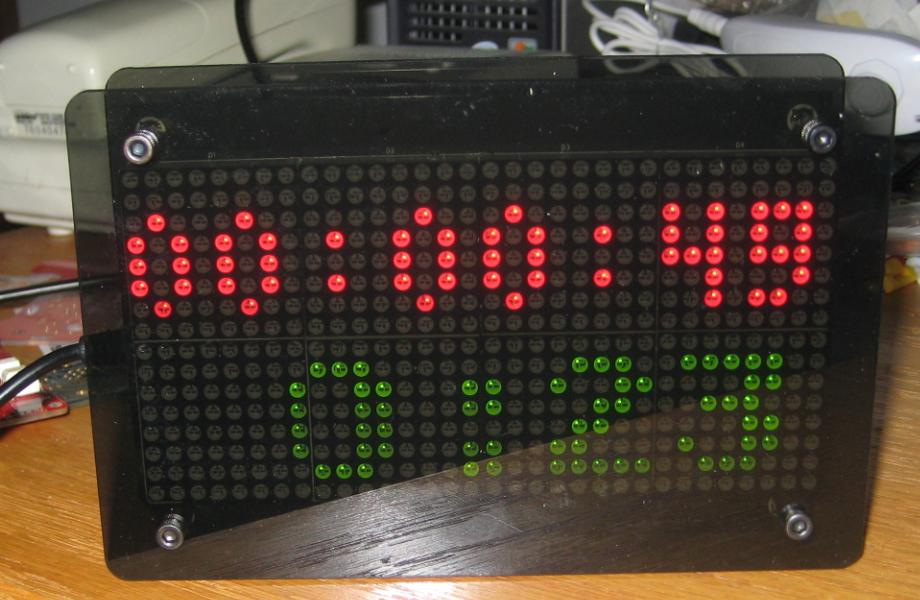
Inspired by this article, MikeM added the "Close enough" mode to the functionality of Wise Clock 4.
This new "face" is accessed by pressing the "Set" (middle) button inside the application "BIG".
The time is shown as an approximation, with the hours as an explicit number, the minutes filling the circle of  a 60-minutes clock and the passing seconds represented by a moving red dot on the bottom line. Thus, one can tell time with a 5-minutes "precision" at a very quick glance.


I will soon publish a new software release that will include this mode. It will also include some other changes I've done recently:
  • moved some "app" functionality out of the main class (WiseClock.cpp) into their own separate classes (AppDemo, AppPacman); will probably need to re-organize WiseClock.cpp, since it almost grew beyond a manageable size (currently at 103KB);
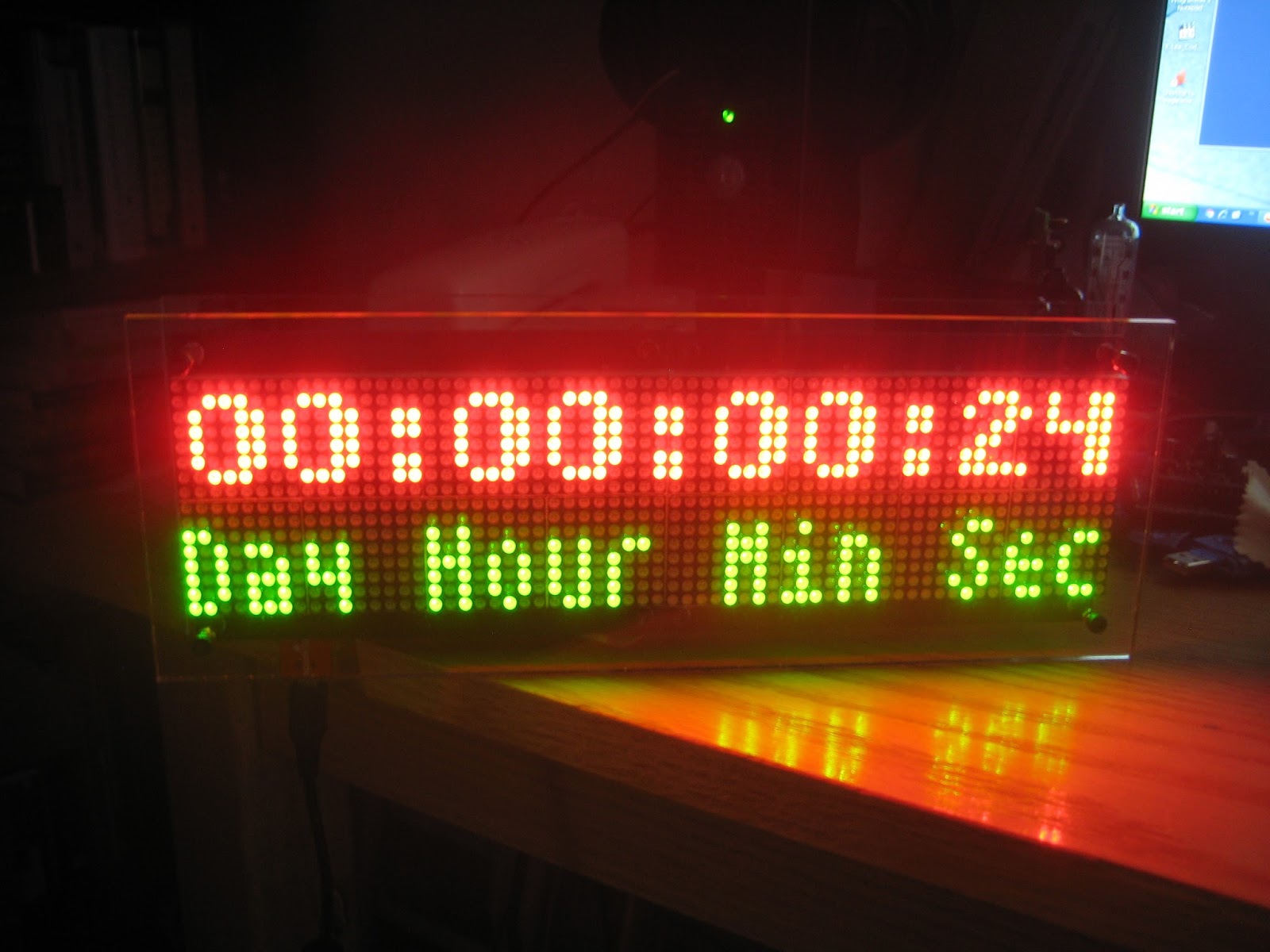
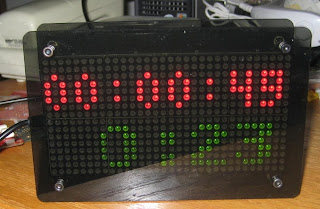
  • in dual-display mode (64x16 resolution), extended AppCountdown to include days in addition to hours: minutes:seconds;


Below is a clip of the countdown in action. The bottom line can show (subject to code change) either the current time (HH:MM::SS) or a static line as in the photo above.


For comparison, this is how the countdown looks on the single-display Wise Clock 4.

  • used (long overdue) proper C++ polymorphism (created CAppBase class with pure virtual functions) to simplify the calls to run() functions of each app class (which are now derived from the base class); essentially, most of the case branches in the switch statement are gone and replaced by a simple pCrtApp->run(), as shown in the code snippet below:

switch (crtApp)
{
case APP_TMP:
ms = runappTmp();
break;
case APP_NEWSD:
ms = runappNewSD();
break;
case APP_STATS:
ms = runappStats();
break;
case APP_SET_POWER_ON:
ms = runappSetPowerOn();
break;
default:// for all other apps;
ms = pCrtApp->run();
}


Unifont on Wise Clock 3/4

This was a quick experiment inspired by WyoLum's EReader library: displaying Unicode characters on the 3216 display from Sure Electronics (as used in Wise Clock 3/4).

The fonts (developed by Roman Czyborra a very long time ago (1998!) and documented here) are defined in the file unifont.wff on the SD card. Before a character is displayed, its 32-byte definition is loaded from the file, starting from the calculated address.


The simple sketch used in the above video can be found here. It was tested with Arduino 1.0.4 and does not require the EReader library (but requires the unifont.wff file on the SD card).

PS  For the non-Chinese speakers/readers, the displayed symbol is "nihao" ("hello"), Unicode 0x6829.

Showcase your project: ListComPorts per Windows

Marco Lai ci propone un software da lui sviluppato per semplificare la gestione delle porte COM su di un sistema Windows, nel caso vengano utilizzate differenti schede Arduino in una volta sola:

Spesso mi capita di usare diversi tipi di Arduino collegati allo stesso pc e diventa abbastanza frustrante capire quale sia la relativa porta COM, dato che nell’IDE viene elencato il nome della porta senza la descrizione del tipo di dispositivo associato.
Quindi devo accedere a gestione dispositivi e controllare nella voce Port (COM e LPT) quale sia questa associazione, in modo da caricare gli sketch sui giusto relativi dispositivi.
Il problema poi aumenta quando collego e scollego le schede dalla porta usb, magari invertendo l’ordine sulle porte, ottenendo così nuovi assegnamenti di COM che mi costringono a tenere aperta la finestra gestione dispositivi.
Ho scritto una piccola utility che elenca le porte COM con la descrizione del dispositivo collegato, in questo modo lavoro meglio e quando ricollego le schede posso cliccare sul pulsante aggiorna per ottenere la nuova lista aggiornata.

Maggiori informazioni, così come il link per scaricare ListComPorts, possono essere trovate qui.

Arduino Blog 15 Feb 16:00
com  port  serial  software  

Arduino 1.0.2 released w/ support for the Micro, Wifi shield, and starter kit.

To accompany the new Arduino Micro, we’ve released a new version of the Arduino software, Arduino 1.0.2. This release also includes the WiFi library (for the WiFi Shield) and the examples for the Arduino Starter Kit. In addition, it contains many bug fixes and improvements, detailed in the release notes. In particular, it addresses many small incompatibilities between the Arduino Leonardo and other boards, which should ensure that the Micro also performs well (since it shares the same Atmel ATmega32U4 processor as the Leonardo).

You can download the software from the Arduino website.

Arduino Blog 08 Nov 21:37
software  

Arduino 1.5: support for the Due and other processors, easier library installation, simplified board menu, etc.

The new Arduino 1.5 software brings a number of improvements, some in support of the new Arduino Due board and others to make it easier to install libraries and to simplify the boards menu. While these new features should work well, we expect to get lots of feedback and to iterate on them in future releases of the Arduino software. That also applies to the new (experimental) libraries for the Due, which add features like USB Host, audio playback, and cooperative scheduling. In the short-term, if you’re not using the Due, you might want to stick with the current 1.0.x (AVR-only) releases of the Arduino software; Arduino 1.0.2 will be out shortly. In the long-term, though, we’re going to be basing the Arduino software on the Arduino 1.5 code. Here’s an overview of the improvements and changes it contains.

Support for Multiple Microcontroller Architectures and Toolchains

While the interface for compiling and uploading sketches remains the same, we’ve made some significant changes under the hood in order to support the new 32-bit, Atmel SAM3X ARM processor on the Due. The new Arduino environment (IDE) can now be configured to target multiple processor architectures, each with its own toolchain and compilation process. To support a new processor family, the core language and libraries need to be ported (as we’ve done for the Due) and some configuration files edited to specify the commands for compilation and uploading. We’ve focused on ensuring that this new system works seamlessly for the Due and our existing AVR-based boards, but with some tweaks and improvements, we imagine that it will allow the Arduino environment to work with many, many more microcontrollers. We’ll be posting more details of this new system soon but, for now, you can look at the “avr” and “sam” directories in the Arduino software for an idea of how it works.

Note: the changes to the underlying configuration files means that older “third-party hardware” folders will require some tweaking to work with Arduino 1.5. We’ll try to improve backwards compatibility in future versions of the software but, for now, you’ll need to work with makers of third-party hardware to update their files for Arduino 1.5.

Easier Library Installation

Arduino 1.5 makes it easier to install libraries. We’ve added a new “Add Library…” menu item (inside of “Sketch > Import Library…”) that prompts you select a library zip file or folder on your computer. It then copies it to your sketchbook folder and adds it to the list of installed libraries. You can still install libraries manually but this is a simpler alternative.

Simplified Boards Menu

With the addition of the Due, the boards menu in the Arduino software was getting so long that we decided to simplify it. To do so, we’ve separated the choice of the board itself from that of the processor (microcontroller) on it. For example, if you’re using an Arduino Mega with an ATmega1280, select “Arduino Mega” from the boards menu and “ATmega1280″ from the processor menu. To make things easier, the processor menu defaults to the microcontroller on the most recent version of the selected board. So if you have an Arduino Mega with an ATmega2560, you can simply select “Arduino Mega” from the boards menu and the processor menu will default to the appropriate item (“2560 or ADK”). If the selected board only has one processor option, the processor menu will be disabled. (For example, every Leonardo board comes with an ATmega32U4.) We hope this makes it a little easier to find and select the board you’re using.


We want to hear your feedback about Arduino 1.5 and its new features. For general suggestions and discussion, you can post on the Arduino forum. If you find a bug, please add it to the Google Code issues list. If you’d like to get more deeply involved in the development of the Arduino software, subscribe to the developers mailing list. We’re planning to iterate on the software and its features, so look for Arduino 1.5.1 and other releases to come soon.

Finally, I want to talk about the people who have made this release possible. Cristian Maglie has led the development of the Arduino 1.5 software and has done an incredible job. In the last few weeks, Cristian and I have been ably assisted by Federico Fissore, a Java developer also based in Italy who’s banged out a number of features. The multiple-platform code in Arduino 1.5 was initially based on work by Rick Anderson. And, again, the Due itself is the product of work by a number of additional people, as mentioned in our previous post about the board. Thanks to everyone!

Arduino Blog 22 Oct 18:52
new  software  

Skube, a tangible radio

Skube is a music player that allows you to discover and share music.

There are two modes, Playlist and Discovery. Playlist plays the tracks on your Skube, while Discovery looks for tracks similar to the ones on your Skube so you can discover new music that still fits your taste. When Skubes are connected together, they act as one player that shuffles between all the playlists. You can control the system as a whole using any Skube.

The interface is designed to be intuitive and tangible. Flipping the Skube changes the modes, tapping will play or skip songs and flipping a Skube on its front face will turn it off.

The Skube is a fully functional device, not just a concept. It use a combination of Arduino, Max/MSP and an XBee wireless network.

This project was made by Andrew Nip, Ruben van der Vleuten, Malthe Borch, and Andrew Spitz. It was part of the Tangible User Interface module at CIID ran by Vinay Venkatraman, David Cuartielles, Richard Shed, and Tomek Ness.

You can read the details and see the inner workings of the Skube here.

Via:[Create Digital Music]


Arduino Blog 20 Sep 10:21

leOS and looper: task scheduling made easy on Arduino

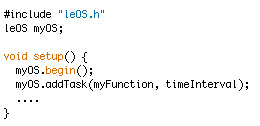
In his website, Leonardo Miliani proposes a simple prototype of a pseudo operating system for Arduino, dubbed leOS (which is the acronym of little embedded operating system). Its goal is to provide the user with the capability to periodically schedule any given C function according to a specific time period. From his blog:

To be honest, it should more correct to say that leOS is actually something that is halfway a simple prototype of an real-time operating system (RTOS) and a scheduler. [...]

leOS can run simple tasks that don’t require excessive CPU time but it can be useful in all of those situations where the user wants to let a task run itself out of the main loop.

Based on the experience pursued during the development of leOS, Leonardo also proposes another project, named looper, which resembles a simple task scheduler. Its goal is to provide a much lighter set of APIs for scheduling tasks on the microcontroller, if compared to leOS.

More information and source code can be found here, for leOS, and here, for looper.

[Via: Leonardo Miliani's website]

Arduino Blog 29 Aug 10:05

“Hello Garden” – Making Aquaponics Smart


If you’ve ever walked around West Oakland, farming probably doesn’t come to mind. That’s because it’s the fifth busiest shipping port in the United States. But that hasn’t stopped maker Eric Maundu from feeding himself with locally-grown food from his aquaponic gardens, a combination of fish farming and hydroponic planting. Frequently proclaiming, “I am not a farmer,” Eric has applied his robotics and software background to making gardens smart.

“I feel knowledge of electronics and software programming makes me a better farmer than just having a hoe. Gardens that can communicate for themselves using the internet can lead to exchanging of ideas in ways that were not possible before. I can test, for instance, whether the same tomato grows better in Oakland or the Sahara Desert given the same conditions. Then I can share the same information with farmers in Iceland and China.”

His company, Kijani Grows, sells kits, components, installs gardens throughout the Bay Area, and teaches classes on aquaponics. This inspiring video from fair companies gives an epic walkthrough (note the length of the video – how leet!) of his various indoor & outdoor systems and designs:


Filed under: Arduino, Home and Garden

Visual Navigator. Making it MOBILE !

Obstacle avoiding vehicle, continue in “3D Laser Range Finder” series ( project 1, project 2). The basic idea is the same, measuring distance using red laser pointers, CCD analog camera and Arduino UNO.  Modification was made in geometry.  Two lasers were set for “far field” obstacle detection, few meters in front of vehicle on left or right side. Primary mission is to trigger left / right turn before a car get too close to the “continuous” but not necessarily “high”  object, for example, sidewalk stone. Of course, this distance depends on the vehicle speed, and “alert” should be dispatched in right time “window”, or there would be no space left to making a turn ( proportional speed adaptation is not implemented yet). Low height of such road infrastructure is making useless ultrasound based range finder.


Two additional lasers were set in “cross” configuration, in order to detect any object that comes dangerously close to the front of vehicle. “Near field” obstacle detection or “head on collision” avoidance. Theirs two beams form reflective “trip-wires” and able to detect as narrow object as leg of a chair or desk, open door frame, anything that at least 1 mm wide.  One laser, pointed to the left, is also works as sidewalk / wall follow navigation system, keeping this distance constant.

Now couple words on “autopilot” algorithm. Three main feature of the project:

  1. wall / sidewalk following;
  2. “far field” obstacle avoidance;
  3. “near field” head on collision avoidance.

were classified in 3 priority levels: 1 – warning, 2 – major, 3 – critical.

0 – clear level, corresponds to normal  R/C radio control, or by  ”man / operator”  navigation via  remote R/C module. Operator is also has “authority” to decline warning class navigator status. But it’s not the case when navigator’s “autopilot” subroutine performs class 2 or 3 maneuver, with status “major” and “critical”. When vehicle performs maneuver 2, “left / right” command from R/C remote module are ignored, the same with “forward / backward” command in status “3 – critical”, making algorithm completely “fool – proof”.

More video will be posted, Link to Arduino UNO sketch: Visual_Navigator.

 5 August 2012.

I’d like to publish more pictures from “inside”, which show interface between arduino and R/C receiver module in the car. Well, not quite arduino, I build a “clone” using pre-programmed AtMega328. As you can see, the receiver was left almost intact, what I did, is just identified two on-board H-bridges which supply power to steering control motor and main vehicles motor-driver. Than, remove 4 resistors in series with controls lines, and routed 8 wires to the arduino ( 4 inputs from R/C receiver and 4 outputs to H-bridges ). Here you are, now arduino could intercept any command coming from R/C transmitter, and based on data from the sensors, make a decision if it makes sense to follow them. Also, “autopilot” function could “directly” address two motors in order to execute “obstacle avoiding” maneuver not asking anyone’s permission!.  What more, arduino control a power delivered to motors via software PWM,  making 7! different speed level available like in real vehicle. Unfortunately, the model I “hack” doesn’t use proportional steering control, but still PWM power management helpful to save a battery energy, limiting unnecessary current delivered to motor.


Animation on Wise Clock 3/4

Mr Ruud did it again :)  He took this video showing a few more features he added.


1. ANIMATIONS
It is now possible to create your own animations which are stored on the SD card.
The APPS menu entry ANIM allows for continously showing one or all animations files.
Animation files are named: anim0.wc3 - anim9.wc3
There are also 4 special animation files named: time00.wc3, time15.wc3, time30.wc3 and time45.wc3
If ANIM+ is selected in the SETUP menu and the BIG mode is active then every quarter the correponding animation is shown once with a random speed. 
Besides the four time*.wc3 animation file, there are currently 4 sample animations: anim1.wc3 - anim4.wc3.

You may create your own animations (there is NO programming involved) by creating individual screens in Excel and then use a small conversion program to create the *.wc3 file. 
As the animations are stored on the SD card you can make them as big as you like.

2. LOGGING
If the LOG+ menu is selected in the SETUP menu then the following items will be logged in the wc3log.csv file:
  • every hour the current temperature is logged both in Celsius and Fahrenheit (32.5 degrees is stored as 325)
  • all entries created in the time clock (TCLOK) app are now stored in the log file

The wc3log.csv file is an ASCII Comma Separated Values file, which can be opened in Excel for further analysis (or for creating graphs etc).

The average log record is about 25 bytes long. The temperature logging will take 24 x 25 bytes =  600 per day. (So the 2 Megabyte log file will be full after about 9 years.)
A warning message ("log= @ End") will be shown when the log file is almost full, an error message ("log= FULL!") will appear if no more records can be written to the log file.

The SETUP menu entry CLRLG allows for clearing the complete log file, it will take about 10 minutes to clear a 2 megabyte log file.

Mike integrated all of the above changes with a previous version that works with FAT32. This code is still under testing and it will become available soon.