Posts with «arduino» label

Reading bar codes with Arduino and unaltered CueCat

[Damcave] decided to try out some bar code reader projects. He got his hands on a CueCat years ago. The problem is that it outputs encrypted character sets instead of a clear text string. To get around this he used his Arduino to decrypt the CueCat’s data output.

Originally you could get you hands on a CueCat for free. It was meant to work like QR codes do now — you see a bar code, you scan it to get to a web address. It never really took off but you can still get your hands on one for about twelve clams. We’ve seen projects that clip a pin on the processor to disable to encryption. But [Damcave] didn’t want to mess with the hardware. Instead he connected the Arduino via the PS/2 connector and used software to translate the data. The encryption format has long been know so it was just a matter of translating the steps into an Arduino function.


Filed under: arduino hacks
Hack a Day 12 Jul 13:09

Energia brings Arduino IDE to the TI Launchpad

The Arduino IDE is an abstraction layer for the AVR chip which the board is based around. So it’s no surprise that it is now possible to use the Arduino IDE with the TI Launchpad board. This makes it dead simple for beginners to play around with the inexpensive and low-power MSP430 platform. This is all thanks to a lot of hard work on part of the Energia developers.

The project branches from Arduino so the look, feel, and function are all about the same. Most notably, the color scheme has migrated to red to match the board color of the Launchpad. You can configure the hardware the same way by selecting a COM port and target board. Almost everything is already working, but you should check the known issues page so that you don’t try to use a function that hasn’t been ported. Right now the list includes the random and random seed functions, as well as tone, notone, and micros. There is also an issue with analogWrite; it will only produce half the requested frequency and duty cycle can only be set from 0-50%. Still this is a great development if you’re most comfortable working from this IDE.


Filed under: Microcontrollers
Hack a Day 12 Jul 12:01

EMIC2 text to speech module

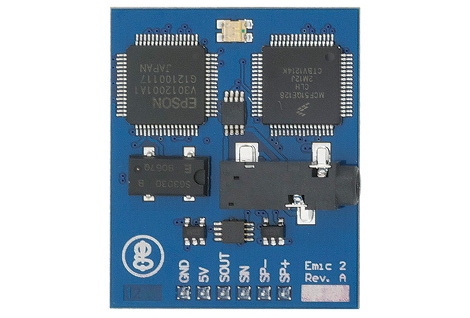
This is the EMIC2 text-to-speech module. You can see from the logo on the bottom left it’s the latest gadget coming out of [Joe Grand's] Grand Idea Studios. [Dino] tipped us off about his first experience with a prototype of the board. He’s driving it with an Arduino and the video after the break shows that the sound rendering is high quality and the words are very easy to understand. One of the things that we think is interesting is that the serial communications used to drive the board are not uni-directional. In fact, there’s a serial terminal that provides documentation on how to use the chip. Obviously this is most suited to the Arduino, which always has a PC-side terminal window available to it.

[Joe] himself shows some of the potential for the board. He gave new life to a broken toy by replacing its internals with a PIC-based circuit to drive the EMIC2. That video is also found after the break. He’s just using the demo clips, but from that you will get a good idea of the vocal modulations this device is capable of. The board rings up at $60 and is available from Parallax.

[Dino's] introduction:

[Joe's] project:

and it’s on sale now for about $60 for Parallax.


Filed under: arduino hacks

Want to learn Arduino? Use this educational Microbot!

Primary image

What does it do?

Educates people on arduino

Introducing the latest creation from B.O.T, the SWARMµBOT. An Arduino-Compatible educational micro-bot with all sensors required for applications such as Line-Following, Maze Solving, And Swarming! With a Atmega328 running an Arduino-compatible bootloader, and an integrated USB-UART bridge, programming this bot is as easy as connecting a USB cable, and hitting upload.

Cost to build

$99,95

Embedded video

Finished project

Complete

Number

Time to build

0 hours

Type

URL to more information

Weight

65 grams

read more

blink(1) the USB RGB LED Status Light

The wonderful gang at ThingM (makers of the blinkM smart LED) have announced an interesting new product is in the works, the blink(1) programmable USB RGB LED status indicator. Plug the little open source nub into most any USB port – laptop, desktop, server, some Android phones, DD-WRT router – and then you can use apps (or create your own) to make the blink(1) LED light up to indicate an event. A tweet just mentioned me? Steady green light. Email from my wife? Three blue blinks. CPU overheating? Red alert!

From the ThingM blog:

ThingM has just launched a Kickstarter for “blink(1)”. A USB RGB LED that builds on our BlinkM Smart LED. It’s a super status light that packs three dimensions of information (color, brightness and pattern) into a single tiny package that fits into any USB port on nearly every device.
It makes it incredibly easy to connect any data source in the cloud or on your computer to a full-color RGB LED so you can know what’s happening without checking any windows, going to any websites, or typing any commands.

I can’t wait to get my hands on one – the Kickstarter is nearly funded, so I’m optimistic – to play around with the development tools. I’d love, for example, to have the Blink(1) tell me when a Renderman render has completed, or if I have a meeting in five minutes.

Blink(1), the USB RGB LED by ThinkM


Intern’s Corner: The Arduino Bumper

Inspired by Arduino design and the iPhone Bumper, I present to you the 3D-printable Arduino Bumper!

The Arduino Bumper is a 3D-printed case for Arduino boards that use the Uno form factor. It allows the Arduino to be placed onto a flat conductive surface without running the risk of shorting out your microcontroller. It also keeps the bottom of the board from scratching your table.

The bumper securely press-fits onto the Arduino boards, staying in place until you want to remove it, at which point, it can be popped right off. Recessed grooves located under where the Arduino pins sit allow the back of the board to sit flat in the bumper.

I designed this case to fit the Arduino, but I also wanted to it to reflect the Arduino design instead of just making a box. I decided to design around the look of the Arduino board, thus I needed to make an offset of its outline for the general shape. Looking up the dimensions for the Arduino, I found an excellent drawing by Wayne and Layne, found via Arduino.cc.

Using the dimensions from the drawing, I drew the outline of the Uno in Autodesk Inventor, created an outer offset by 0.008” for press-fit spacing, and another one at 0.029” to complete the 2-perimeter-thick wall. This means that when 3D printed with a 0.4mm nozzle (such as on a standard Ultimaker or MakerBot Replicator), the printer will lay down two strands of plastics that are solidly fused together, resulting in a very sturdy wall. Extruding the outlines gave me the general shapes of the bumper. I then added the grooves for the pins, and cut-aways for the USB and power jack. Lastly, I cut made cut-aways for the underside of the board for the USB mounting backets and power jack pins. I gave the corners a nice 45-degree chamfer to give it that Arduino look.

The Arduino Bumper and the Inventor source file are available for download at Thingiverse. I printed mine on our Ultimaker, at 0.1mm-thickness-resolution, in under 20 minutes. At such a small layer thickness, it feels incredibly solid, almost like it was injection molded.  Go print your own bumper today!


Telepresence Zen Garden

Harford Hackerspace’s Telepresence Zen Garden looks awesome! Such a great idea.

For this year’s RedBull Creation competition, we had to incorporate a ‘Bullduino’ into the project of our choice. What is a Bullduino? It’s essentially an Arduino Uno shaped like the RedBull logo. So, we came up with the idea of creating a Telepresence Zen Garden. Sounds simple right? Well, it was actually more difficult than it sounds.

We created a user interface in Flash which allows the user to draw lines on a canvas. That data is uploaded to a web server and stored into a MySQL database. There is a queuing system written in PHP on the web server. The queuing system keeps track of the order in which the drawings are submitted and it is responsible for keeping the buffer full on the Bullduino.

The Bullduino is connected to a rail of power mosfets to control turning on and off 8 banks of Red and Blue LEDs. It is also connected to 2 stepper motor drivers, 2 servos, and 4 limit switches. The limit switches are used to zero out the XY table and prevent damage to the machine should something go wrong.

[via MakerBot]


MAKE » Arduino 11 Jul 15:00

BlinkM gets upgraded to a USB mass-market device

[TodBot] has a new piece of hardware on the way up. His Blink(1) is currently about 50% funded on Kickstarter. It’s a USB nub that has an RGB LED inside of it. When plugged into a computer it can be used as a status indicator. At first that sounds like a let down, but his marketing is fantastic as the myriad of uses really caught our attention. If you’re on the road you can use it to report back your server statistic. Plug one into each rack-mounted servers for quick visual indication of which one has crashed. Or find your own use.

You probably remember [TodBot] as the creator of the BlinkM. Recently he was calling it the world’s smallest Arduino. Well this Blink(1) is being marketed as Arduino programmable as well. The board size is about the same, and both have an RGB LED module. The difference is that the BlinkM had an ATtiny85 and needed a serial converter to program it. This has a USB plug so we’d bet he’s swapped the tiny for an ATmega8u2 or something from the same family.

Don’t think one blinky LED is going to cut it? For folks that just need more resolution there are other hardware options out there. For instance, this project gives you a wireless 8×8 RGB led display to use as an indicator.


Filed under: led hacks
Hack a Day 11 Jul 14:01

Sending serial from python to an arduino

I'm working on a project where I send a bunch of data through an arduino to my laptop.  I'm using python serial to read in the serial data.  That part is working fine.  Then I do some processing and I want to send the results back to the arduino.  This part is not working so well.  

It seems like python  serial.write()  only likes to send strings?  Right now I'm trying to send back one integer value.  Any ideas how to do that?  

Let's Make Robots 11 Jul 13:41

Time-based One-Time Passwords with an Arduino

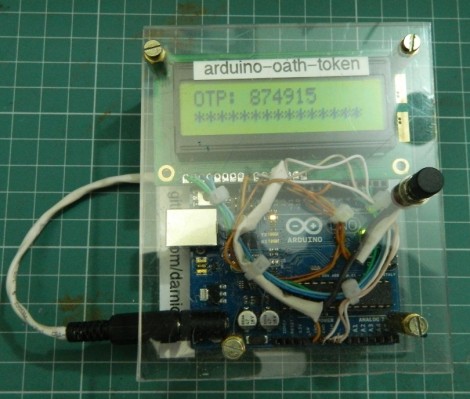
Get your feet wet with Time-based One-Time Password (TOTP) security by building your own Arduino OATH system. OATH is an open standard authentication system that provides a platform to generate tokens, making your login more secure than a password alone would.

The TOTP approach is what is used with many companies that issue hardware-based dongles for logging in remotely. This security may have been compromised but it’s still better than passwords alone. Plus, if you’re building it around an Arduino we’d bet you’re just trying to learn and not actually responsible for protecting industrial or state secrets.

The hardware setup requires nothing more than the Arduino board with one button and a screen as a user interface. Since the board has a crystal oscillator it keeps fairly accurate time (as long as it remains powered). It will push out a new token every thirty seconds. The video after the break shows that the Arduino-calculated value does indeed match what the test box is displaying.


Filed under: arduino hacks, security hacks
Hack a Day 11 Jul 12:01