Posts with «arduino» label

Arduino Forum Quick-typer Uses Arduino, Naturally


Arduino Forum moderator Nick Gammon finds himself typing in the same things over and over again while responding to questions within the community. On the list are links to primers about interrupts, serial, and debugging; plus there are also few phrases and markup tags. To make his life a little easier, he used a 16-key keypad and the Arduino Leonardo’s capability to act like a USB keyboard to make all these strings one pushbutton away.


MAKE » Arduino 14 Jul 14:00

Sales Team Goes to Camp, Part II

These are the ongoing adventures of the MAKE Sales and Marketing team, as we build our maker skill sets… pretty much from scratch. To read about how MAKE Sales Camp came to be, go here.

My masterpiece.

Up until now at MAKE Sales Camp, it’s been all fun and games.  We did a little programming, a little building, had some laughs, and everyone went home feeling good.  But today at Camp, things stopped being fun– and started getting REAL.

Camp Director Nick Raymond, knowing what today’s task would demand of us, left us in the capable hands of the only intern man enough for the job: the Sultan of Solder, Brian Melani.  Our task?  Using only a soldering iron and a steady hand, populate a servo motor shield with capacitors, resistors, and integrated circuits.

This basic soldering task seemed like child’s play at first, but after the first dozen solder joints, tensions began to escalate.  Attention to detail was essential.  Perfection: the only option.  In the end, the pressure proved too much… for some.

Professional demeanor was compromised.  Dignity was left by the wayside.  Tears were shed.

(OK, no tears, but there were definitely some colorful expressions tossed around the lab.)

It’s all in the wrist…

Once we were finally able to regain our composure, we emerged from the cloud of solder fumes we had created and all came to the same conclusion: Putting this board together was harder than we thought!  Getting all those tiny parts lined up, making sure we knew which capacitors were polarized, and most of all, having a steady yet quick hand (no bridges!!)… sheesh!  I definitely earned a new respect for our Engineering interns today.

In the end, it took an iron will (and a rosin core)– but we all managed to get our servo shields put together (reasonably) correctly.  High Fives all around!

But our future is still uncertain: Will our shields hold up when we hook them up to our Arduinos?  Do we have what it takes for the more advanced maker skills that lay ahead?

Will yours truly crack the color code for differentiating resistor values and become totally awesome??

Only time will tell… see you at next week’s MAKE Sales Camp!


Joystick operated security cam will overlook the moat

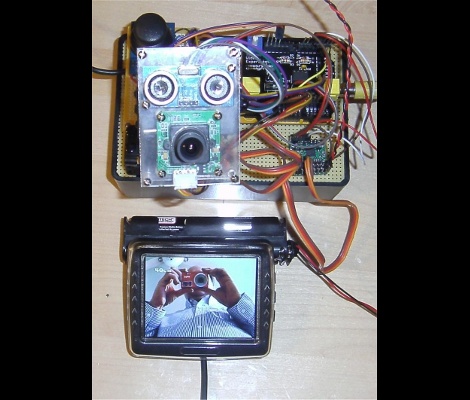
What good is a moat if nobody is guarding it? We suppose that depends on what beasties lurk beneath the surface of the water, but that’s neither here nor there. The members of LVL1 continue their quest to outdo each other in augmenting the building’s automated features. The latest offering is this security camera which is operated with an analog thumb stick.

These are the people who are building a moat (which the city things is a reflecting pool) in front of their main entrance. Now they will be able to see and sense if anyone is trying to get across the watery hazard. The hack marries an ultrasonic rangefinder and camera module with a pair of servo motors. The brackets for the motors allow a full range of motion, and the signal is translated by an Arduino and Video Experimenter shield to put out a composite video signal. That’s not going to make streaming all that easy, but we’re sure that is just one more hack away.


Filed under: Hackerspaces, video hacks

Laser light painting includes camera control

This laser light painting setup can even control the camera. But it probably will not work with your average point-and-shoot. The exposure time used is somewhere around 2 seconds long, a feature which is hard to find on anything but DSLR cameras.

The setup relies on a red laser diode to do the painting. When viewed in real time you only see a dot tracing out a cryptic pattern and occasionally switching on and off. But with a long exposure the intense light persists to achieve an image like the one seen above. Note the ghosting around the rig as it has moved while the shutter was open.

The Arduino controlled device consists of a base which pivots the diode horizontally, with a servo for aiming on the vertical axis. Since the sketch is divided up by letter, we wonder how hard it would be to adapt this for use with a point-and-shoot? Perhaps you could capture one letter at a time and layer the frames in post production?

It seems this is a lot easier to build than some of the LED plotters we’ve looked at. If you do make your own don’t forget to send a link our way.


Filed under: digital cameras hacks, laser hacks

cheap wireless shields for arduino

I was looking for wireless shields for my arduino and stumbled across      this http://www.kickstarter.com/projects/1608192864/open-source-wireless-inventors-shield-for-arduino 

its a wireless shield for arduino that has 177meters range and is easy to program check out the link above for more info

read more

Capacitive sensing with op amps, continued

What more can I do (or, more importantly, have the students do with the Capacitive sensing with op amps?

The circuit that I gave in that post has several parameters.  Perhaps the students should try predicting what happens when they are adjusted.
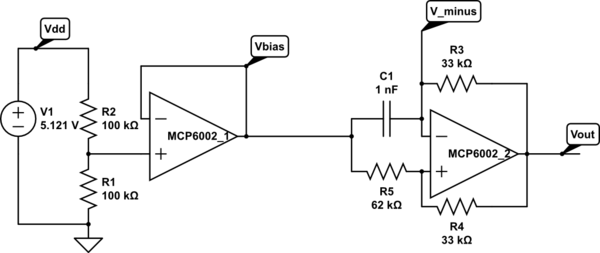
Op amp multivibrator. The first op amp is just to set up a virtual ground halfway between the power rails. The second op amp does the oscillating (at about 8.12 kHz for these components). Circuit drawn with CircuitLab, which is not capable of simulating it.

For example, what happens if Vbias is raised or lowered? What is the effect of changing each of the resistors? How can we optimize the circuit for easy, reliable detection of touches with an Arduino pulseIn() measurement?

If we pretend that the output is a rail-to-rail square wave (ignoring the slew rate limitation), analysis is pretty easy.

.

  • If the output is low, then and Vminus is higher than that, but dropping.
  • If the output is high, then and Vminus is lower than that, but rising.

If we define , we can simplify further and say that Vminus swings between two threshold voltages:   and .

The discharging curve is simply , where , so it takes to discharge to the other threshold.

The charging curve is , and so it takes . That is, .

If we want a symmetric waveform, we need to have , which in turn requires . Raising Vbias makes the low part of the output waveform shorter and the high part longer. Conversely, lowering Vbias makes the low part longer and the high part shorter.

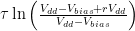
The total period is  .  If we set Vbias to Vdd/2, then we can simplify further to .

The sum R4+R5 only affects the amount of current that the Vbias supply has to provide, but it is probably a good idea to make it fairly large, and to add a bypass capacitor to Vbias, to prevent noise coupling though the bias supply.

When using pulseIn() on the Arduino to measure the capacitance C1, we want to have a large change in the pulse duration (to avoid quantization effects from reporting the duration in μsec), which means a large value for R3. That is limited by the problem of picking up 60Hz noise if the input impedance is too high.

We can also tweak r=R5/R4 a little, to make the period a larger multiple of τ, limited by the problem of noise if we get the thresholds too close to the rails.

Since pulseIn() only measures one part of the waveform (the low part or the high part), we could also tweak the bias voltage to lengthen just that part of the waveform, for example, dropping Vbias to Vdd/4 to length the low part.  We again have to be careful not to get the threshold too close to the rails.  If we are lowering Vbias, then the threshold to watch is . If we fix as low as we’re willing to make it, then should we make Vbias low or r high?  The number we are trying to maximize is the discharge time , with the constraint that . At equality, we have to maximize , which is achieved by making r as large as possible.  Of course, that would mean raising Vbias, which would run us into trouble with noise at the other threshold.  In general, it seems like the symmetric waveform with Vbias=Vdd/2 gives us the best noise margins.

Next step: how do we either slow down the oscillator or clean up the waveform enough to get a good signal to feed into the Arduino?

I tried increasing both R1 and R5, while decreasing R4, as shown below.

Modified circuit for longer period. C1 is just the stray capacitance of the touch sensor, with no deliberately added capacitance.

This circuit oscillates with a frequency of 35.66 kHz (period of about 28 µsec )when the touch sensor is not touched, which is slow enough that the signal runs from rail to rail. Touching the sensor drops the frequency to 20kHz or less (period of 50 µsec or more). Since r=5.556, the expected period is 4.988 τ, or 0.4988 µsec/pF C1.  The period is consistent with a stray capacitance of 56 pF, increasing to over 100 pF when the sensor is touched.  There is a lot of jitter in the lower-frequency signal, probably due to some coupling of 60 Hz noise into the system. A 1nF capacitor for C1 gives a frequency of 1660Hz (602 µsec, which is more than the expected 500 µsec), 47nF gives 34.65 Hz (28.86 msec, not the expected 23.44 msec).  Why am I consistently 25% off?

The change of 20 µsec or more in the period (10 µsec or more in the half period) should be easily detectable with one pulseIn() measurement on the Arduino.  The following code seems to work fairly well, with a light touch causing the LED to flash (right on the edge of detection) and a firmer touch giving a steady reading.

// Capacitive sensor switch
// Thu Jul 12 21:36:42 PDT 2012 Kevin Karplus

// To use, connect the output of the op-amp oscillator to
// pin CAP_PIN on the Arduino.
// The code turns on the LED on pin 13 when a touch is sensed.

// The Arduino measures the width of one LOW pulse on pin CAP_PIN.
// The LED is turned on if the pulse width is more than min_pulse_usec

// pin that oscillator output connected to
#define CAP_PIN (2)

// time (in milliseconds) to wait after a change in state before
// testing input again
#define DEBOUNCE_MSEC (100)

static uint8_t was_on;	// stored state of LED, for detecting transition

static uint16_t min_pulse_usec=5;
// min pulse width (in  microseconds) for detecting a touch

void setup(void)
{
    was_on=0;
    pinMode(CAP_PIN,INPUT);
    pinMode(13, OUTPUT);
    
    // assuming that the touch sensor is not touched when resetting, 
    // find the maximum typical value for untouched sensor
    for (uint8_t i=0; i<10; i++)
    {   long pulse=pulseIn(CAP_PIN,LOW);
        if (pulse>min_pulse_usec)
	{    min_pulse_usec =pulse;
	}
    }
    min_pulse_usec += 2;	// add some room for noise
}

void loop(void)
{
    uint8_t on = pulseIn(CAP_PIN,LOW) >= min_pulse_usec;
    digitalWrite(13, on);
    if (on!=was_on)
    {   delay(DEBOUNCE_MSEC);
        was_on=on;       
    }
}


Filed under: Circuits course Tagged: Arduino, bioengineering, capacitive touch sensor, circuits, course design, op amp, sensors, teaching

UPGRADE INDUSTRIES - Home of BoardX: The Open Source, Miniature Robotics Motherboard

what is the best way to communicate wirelessly from one arduino to another

I have 2 arduino megas and would like to send the potentiometer values of one arduino to control servos conected to the other arduino and I have never used any wireless things with arduino before I have a 433mhz transmitter and a reciever but havent been able to find any useful code for it and was wondering what other wireless devices i could use for sending potentiometer values wirelessly to another arduino easily . Any sugestions and example code and where to buy it would be greatly apreciated thank you

Introducing Maker – Michael Shiloh


photo by Scott Beale / Laughing Squid

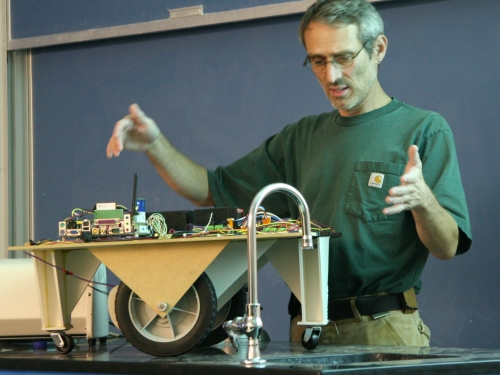
Teach me to make” as simple as it sounds is a simple yet powerful effort on wordpress by a maker from USA. Apart from being a true maker, Michael Shiloh is an absolutely delightful and an approachable person to talk to. His sense of purpose in his work was very much apparent in my short, yet interesting conversation with him. Here are some widely and less known things about the teacher, student and entrepreneur.

Priya: What brought your interest in electronics? What is the very first project that you fondly remember completing till date?
Michael: Ever since I remember, I have been taking things apart and putting them back. The important thing is to pay attention to details while doing that. Like, where the screw fits, what part goes where, what are the names of the parts etc. even if one is not able to know the full functioning one should be able to call the parts by the name and know where they fit and what they do. Growing up at a time with limited resources, left only one option of harvesting old electronic parts. I suggest every aspiring-maker to do that!

(Gives a pause) As for the finishing part, I never finished a lot of projects, and I had a LOT of unfinished projects sitting around me in my room. But the important part was, that I caught hold of a lot of basics while making them. Not stopping, is important.

P: What drives your passion for Arduino and open source hardware?
M: 10 years back, I started a project called Teleo based on PIC which was on similar lines as an Arduino, just not with an IDE. Hence, a simple prototype for students to interact has always been my passion.

P: You talk about 3 methods of your teaching – contraption building, physical computing, and open source advocacy. What is Contraption building as defined by you?
M: Interesting question! Contraption, is an idea of a prototype in its raw un-polished form. It is the fastest way to check if what you assume in theory is in fact practical or not. I always encourage contraption as it makes understanding and explaining easier of the internal working mechanisms of an idea.

P: How is it different from Physical computing?
M: Contraption building, may or may not include electronics. It can be purely mechanical, say, just a few wheels, pulleys and a rubber band? Physical computing on the other hand needs an inclusion of electronics.

P: What do you think is the right approach to Advocate Open source hardware?
M: The right approach is to teach the concept of sharing knowledge, Eg: Pythagoras Theorem. Its a shared piece of knowledge which is applied everywhere, new theorems are proven using the age old theorem. The strength of Open source hardware is not only the product, but what people do using the product.

P: In all your teaching classes, What do you think is the biggest attraction for any individual towards Arduino?
M: (Laughs) I am yet to find a concept or topic where Arduino has not been used. Type on google, ‘The concept + Arduino’ and voila! You have an application. BE it gardening, space, music or photography, name your interest and there is a way to tinker with it using an Arduino.

P: We hear a lot about media art, as a concept these days. What is special about adding electronics to art?
M: Any Art installation with electronics is based on sensors and actuators. Arduino helps the artist to manipulate the idea in his head and give a more personal and interactive approach to a previously ‘look-but-don’t-touch’ art. Let me call it a more knowledgeable way of interacting?

P: Since you have taken so many workshops and visited so many hackerspaces, what are the few useful tips you might want to give to the maker at home?
M: The most important thing is, to have a space. Space defines purpose. The next is organizing the tools that you have. In my times, I used old shoe boxes with egg-cartons inside to separate the resistors, LEDs and potentiometers. Harvest old electronic items and know what they are used for, they might come of use later. A multimeter is a must have. So are tiny components like LEDs etc. To add intelligence a programing board would be useful, and arduino has a great community support for a maker even at the middle of the night!

Never get intimidated by others polished presentations. The more raw your circuit is, the better it is appreciated among the maker community. Do share the knowledge, including the success and including the failures.

P: What is your role as a part of Arduino?
M: Let me see… We can call it Community Liason. Ill take care of all the minor bugs, wishlist and major issues, bridging the gap between developers and the community.
P: Wow! That sounds exciting! On a separate note, what would be your Ideal birthday gift?
M: Since there is SO much to build and manage, that would be – time.

A full bios of Michael alongwith his latest work can be read here.

Capacitive sensing with op amps

I’m not very happy with the lab exercise in Capacitive sensing.  The basic design questions are good:

  • What capacitance do we add by touching something?
  • What frequency should the oscillator run at without the touch?
  • What % change in frequency can we detect reliably? How will we do that detection?

but I’m not happy with my choice of an LM555 chip for the oscillator.  It is a fine choice for many purposes, and a good chip for students and hobbyists to learn about, but the Fairchild Semiconductor LM 555 data sheet does not do a good job of explaining how the chip works nor exactly what the logic function is for triggering the flip-flop.  As a result, students will probably end up just copying the astable circuit without really understanding it.

I think I would prefer to have them use an op-amp multi-vibrator circuit.  It can’t quite be modeled with only linear op amps, as it relies on clipping of the output to get nearly a square wave.

Op amp multivibrator. The first op amp is just to set up a virtual ground halfway between the power rails. The second op amp does the oscillating (at about 8.12 kHz for these components). Circuit drawn with CircuitLab, which is not capable of simulating it.

The op-amp multivibrator is a simple design.  When the output is high, C1 is charged until V_minus is higher than the positive input of the op amp (about 34.7% of the way from Vbias to Vout=Vdd).  Then the output goes low (taking about 6µsec, limited by the slew rate of the op amp), and the capacitor discharges until it is below the positive input (about 65.3% of the way from Vbias to Vout=0 with these values for R4 and R5). So Vminus swings from (1-0.6526) Vbias = 0.1737 Vdd to Vbias+0.6526(Vdd-Vbias)=0.8263Vdd.  The time it takes to charge or discharge should be about ,  where the time constant τ=R3 C1.  For the values of R4 and R5 here, the charge time should be 1.560 τ, and the period 3.119 τ. With the given values of R3 and C1, this should be a period of 102.9 µsec, or a frequency of 9.7 kHz.   I’m measuring 8.1 kHz, not 9.7 kHz, but I think that the discrepancy is due to the slew rate limitations (which add about 12 µsec to the period) and possibly stray capacitance.  With C1=47 nF, the frequency is 203.6 Hz, when the calculation says it should be 206.7 Hz, well within the accuracy of the components.

Connecting the foil-and-plastic-wrap sensor to Vminus adds a little stray capacitance, dropping the frequency to 8.01 kHz. Touching the sensor drops the frequency to 7.5 kHz–7.7 kHz, adding about 5 µsec–8.5 µsec to the period, consistent with adding about 50pF – 83 pF to C1.  This is a little smaller than the 163 pF that I estimated using the parallel-plate model in Capacitive sensing, but consistent with my measurements using the LM555 circuits.

I can get a much stronger effect if I remove C1 from the circuit, and use only stray capacitance.  The period drops to about 6.2 µsec (roughly 160 kHz), but (because of the slew rate limitations of the op amp) is not full scale and is essentially a triangle wave.  Touching the sensor reduces the frequency to about 35 kHz – 45 kHZ, an increase of 16 µsec – 22 µsec in period, consistent with an additional capacitance of  155 pF – 220 pF, which is about what was predicted by the parallel plate model. I’m a little reluctant to put this signal into an Arduino board, though, as the no-touch signal spends most of its time in the non-digital region between high and low, and only barely crosses the thresholds that would allow the ATMega328 chip to detect the signal.

One interesting idea would be to take advantage of the change in amplitude of the oscillation to make an all-analog touch detector.  I’m afraid that would not be very robust, though, as an increase in the period of only 12 µsec is enough to make the oscillation full scale.


Filed under: Circuits course Tagged: Arduino, bioengineering, capacitive touch sensor, circuits, course design, LM555, op amp, sensors, teaching