3D Printed Foldable Head Mounted Display
 The $80 Head Mounted Display was made with 3D printed frames and component housing modules with the optics bought from eBay.
They are fully adjustable and function with Android or Linux-based mobile devices.
The $80 Head Mounted Display was made with 3D printed frames and component housing modules with the optics bought from eBay.
They are fully adjustable and function with Android or Linux-based mobile devices.


 The $80 Head Mounted Display was made with 3D printed frames and component housing modules with the optics bought from eBay.
They are fully adjustable and function with Android or Linux-based mobile devices.
The $80 Head Mounted Display was made with 3D printed frames and component housing modules with the optics bought from eBay.
They are fully adjustable and function with Android or Linux-based mobile devices.
 Originally prototyped using an Arduino, Aalberg Audio's guitar delay pedal and Bluetooth LE remote control now looks like a product, not a prototype.
 Chuck Stephens is an artist, musician, hardware hacker and small boat builder who specializes in the use of recycled, repurposed and salvaged materials. Exhibiting at Maker Faire Orlando as Nepchune’s Noise Circus, Chuck says noise circuits provided his Eureka! moment in electronics.
 A group of electronics students from HiST brought two very different projects to the faire—an underwater ROV and a bunch of electric long boards.

Heidi Røneid with an Arduino Ethernet microprocessor. (Photo: Tore Zakariassen, NRK)
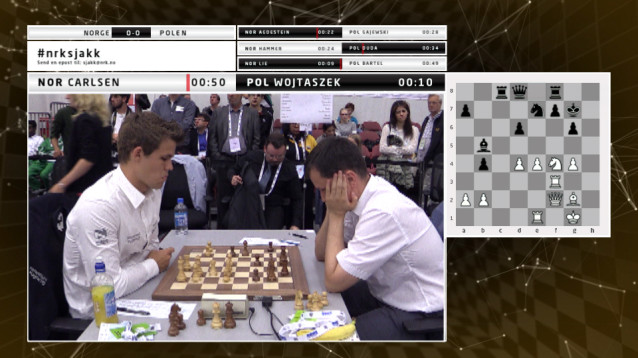
When The Norwegian Broadcasting (NRK) planned the television broadcast of the Chess Olympiad 2014 in Tromsø, Norway, they encountered a challenge: how to mix video, graphics and the results of many ongoing chess games simultaneously, requiring 16 cameras for the games going on at the same time?
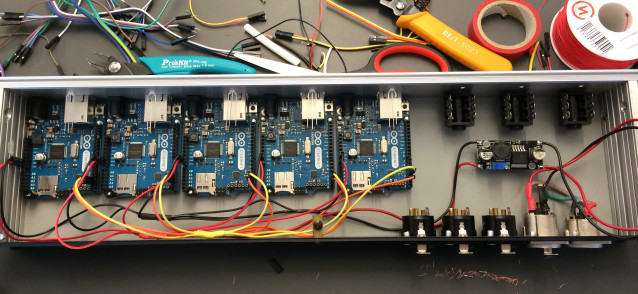
On their blog you can find a long and nice post about how they found the solution using Arduino Uno, Arduino Ethernet Shield and the library for Arduino to control such Atem switchers written by Kasper Skårhøj:
At first, the idea was to use a computer with a webcam for each of the 16 games, then mix video images, background animation and results in software on each of them.
Afterwards the finished mix of images would be streamed to separate channels in our web player, so that the online audience would be able to choose which game they wanted to follow. This solution would also provide our outside broadcasting van (OB van) with 16 finished video sources composed of video, graphics and results. This would make the complex job of mixing all video signals much easier.
After thorough thinking we came to the conclusion that for our web-audience, it would be better to skip the stream of individual games, and spend our resources on building websites that could present all games in the championship via HTML in real time. This would also give the audience the opportunity to scroll back and forth in the moves and recall all the previous games in the championship. We started working on it immediately, and you can find the result on our website nrk.no/sjakk.
 This is a series that will document Nomiku’s journey into lean manufacturing in America through the conversations of the founding team: Lisa, Abe, and Bam. We will update the series as our adventure in building our high-tech device that lets people cook with the cloud continues. As we enter uncharted […]

This tutorial from Adafruit shows how to create a custom interactive drum set that lights up with sound. It uses a mic amp sensor that is connected to a miniature Arduino Gemma board to detect when the instrument is being hit by the sticks. Neopixels then illuminate into a range of colors creating a beautifully synced up music presentation.
The container that houses the electronics is 3D printed. The entire circuit is integrated into the snare, mid-tom, hi-tom and a drum kick. All the code and step-by-step instructions can be found on Adafruit’s website. Now imagine something like this being packed up in a suitcase and carried from venue to venue as an up-and-coming band travels from state to state on tour; especially at Drum n’ Bass raves or electronic based music festivals. A video of the kit being used is below.


 “Way back” in 2009, students in the UC Berkley “ME 102″ class came up with this excellent automatic chalk-spraying machine. It uses 8 cans of spray-chalk to spray the message of your choosing onto the sidewalk or street as you push it along. This device is controlled by two Arduino […]

Producing items onto a screen simply by touching the air is a marvelous thing. One way to accomplish this involves four HC-SR04 ultrasonic sensor units that transmit data through an Arduino into a Linux computer. The end result is a virtual touchscreen that can made at home.
The software of this device was developed by [Anatoly] who translated hand gestures into actionable commands. The sensors attached to the Arduino had a an approximate scanning range of 3m, and the ultrasonic units were modified to broadcast an analog signal at 40 kHz. There were a few limitations with the original hardware design as [Anatoly] stated in the post. For example, at first, only one unit was transmitting at a time, so there was no way the Arduino could identify two objects on the same sphere. However, [Anatoly] updated the blog with a 2nd post showing that sensing multiple items at once could be done. Occasionally, the range would be finicky when dealing small items like pens. But besides that, it seemed to work pretty well.
Additional technical specifications can be found on [Anatoly]‘s blog and videos of the system working can be seen after the break.
[Thanks for the tip João!]


[Jon] and his brother converted an RC car into a robot that can fire airsoft pellets into the air. The little motorized vehicle was disassembled and a handheld was attached to the top. A pulling mechanism was put in place and a safety procedure was added to make sure no accidents occurred.
An Arduino was used to get the servo working, and a chassis stand was created to hold the handle. The setup was then tested at this point, and a Raspberry Pi server was configured to install a motion sensing camera that would act as the eyes for the robot. Once everything was in place, the wheels hit the ground and the vehicle was able to move around, positioning itself to aim the servos at a designated target. Footage was transmitted via the web showing what the robot was looking at.
A video of the remote-controlled counter-strike robot can be seen after the break. You could consider this your toy army. That makes this one your toy air force.

