Tinkernut’s Lamp Comes To Life Using Ultrasonic Waves
 The Motion Controlled Ultrasonic Lamp is great for beginners starting out with the Arduino Uno.
It may or may not detect ninjas but will illuminate and follow most everyone else.
The Motion Controlled Ultrasonic Lamp is great for beginners starting out with the Arduino Uno.
It may or may not detect ninjas but will illuminate and follow most everyone else.


 The Motion Controlled Ultrasonic Lamp is great for beginners starting out with the Arduino Uno.
It may or may not detect ninjas but will illuminate and follow most everyone else.
The Motion Controlled Ultrasonic Lamp is great for beginners starting out with the Arduino Uno.
It may or may not detect ninjas but will illuminate and follow most everyone else.
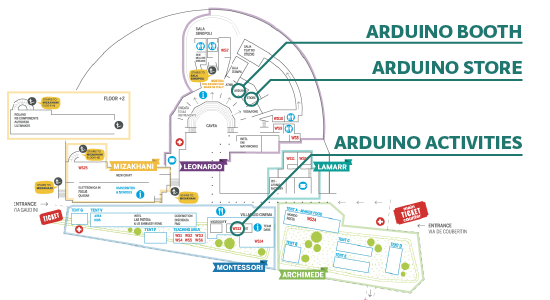
From the 3rd to the 5th of October all the Arduino crew will be staying in Rome for the European Maker Faire hosting more than 500 makers from all over the world! You can come and visit us in one of the 3 main areas (Arduino booth, Arduino Store, Arduino Activities) of the fair dedicated to Arduino:
*********************
ARDUINO BOOTH
*********************
Visit the Arduino booth and explore a showcase of projects and Arduino boards:

The Kit walks you through the basics of using the Arduino in a hands-on way. The kit includes a selection of the most common and useful electronic components with a book of 15 projects.
Learn more about the Arduino AtHeart program, designed for makers and companies wanting to make their products easily recognizable as based on the Arduino technology. Fea
Bhoreal – OpenTracker v2 Board – JubeBox with littleBits Arduino Module – Cromatica – Smart Citizen Kit – Apollo
Kit Demo for Teachers & Schools
*********************
ARDUINO STORE
*********************
The official Arduino Store will be open during the 3 days of the Maker Faire and is your chance to purchase boards, materials, kits, for all your tinkering skills. Come check us out to discover more than 300 products.
***************************
ARDUINO ACTIVITIES
***************************
FRIDAY
///h.10.30-19.30
Creative Technology in the Classroom
Activity: 4 Kit Demos for Teachers & Schools
///h.10.30-14.30
Arduino and Makers activities
Activity: Presentation for Teachers & Schools
Overview of workshops and activities for kid and teens at school
///h.14.30-15.30
Arduino TRE and Web IDE
Activity: Board Demo
Come try out the new Arduino Software (IDE) we are designing for the Arduino TRE, give us your feedback to guide the development in the right direction!
///h.10.30-18.30
Svante’s catapult and claw
Activity: Kid-friendly Workshop (over 6 year-old)
You can remote control our robot Svante: grab objects with a claw, or make him use the catapult to launch balls to specific targets.
Do you want to participate? Add your name to the schedule (on paper) in the Arduino Activity area and be there at your scheduled time.
SATURDAY
h.10.30-11.30/12.30-13.30/14.30-15.30/16.30-17.30
Drawdio
Activity: Kid-friendly Workshop (over 7 year-old) – 4 slots
Make sound while you draw. Learn about conductivity and sound by drawing on a piece of paper.
Do you want to participate? Add your name to the schedule (on paper) in the Arduino Activity area and be there at your scheduled time.
h.11.30-13.30/13.30-14.30/15.30-16.30/17.30-18.30
Binary LP
Activity: Kid-friendly Workshop (over 7 year-old) – 4 slots
Draw your own binary patterns to play music in our nice Binary LP player. Learn about sound, melody, binary reading and sensors.
Do you want to participate? Add your name to the schedule (on paper) in the Arduino Activity area and be there at your scheduled time.
h.13.30-16.30
Conductive dough cakes and animals
Activity: Drop-in Workshop (20 min – over 6 year-old)
Make an animal, a cake with candles or an emitting light object with conductive dough and learn the basics on conductivity.
h.10.30-12.30
Lasercut Race
Activity: Workshop
Build something is usually pretty fun, but if we’re talking about lasercut race cars, it’s impossible to not enjoy it! what could be better? tune them after all and challange the other racer!
Do you want to participate? Add your name to the schedule (on paper) in the Arduino Activity area and be there at your scheduled time.
h.10.30-18.30
LED necklace
Activity: Drop-in Workshop (15 min)
Build a cool and simple necklace! Power an LED with a small battery and put it inside a designed paper box. You will be able to decorate it with hole patterns and hang it from your neck.
h.14.30-16.30
Arduino TRE and Web IDE
Activity: Board Demo
Come try out the new Arduino Software (IDE) we are designing for the Arduino TRE, give us your feedback to guide the development in the right direction!
h.16.30-18.30
Vibro-Robot
Activity: Kid-friendly Workshop (over 6 year-old)
A workshop to learn by playing the basics of robotics. Using little motors, lasercut pieces and little plastic parts, kids will build their (first) small robot!
Do you want to participate? Add your name to the schedule (on paper) in the Arduino Activity area and be there at your scheduled time.
SUNDAY
h.10.30-18.30
Svante’s catapult and claw
Activity: Robotics Demo
You can remote control our robot Svante: grab objects with a claw, or make him use the catapult to launch balls to specific targets.
h.10.30-18.30
Conductive dough cakes and animals
Activity: Drop-in Workshop (15 min – over 6 year-old)
Make an animal, a cake with candles or an emitting light object with conductive dough and learn the basics on conductivity.
h.10.30-18.30
LED necklace
Activity: Drop-in Workshop (15 min)
Build a cool and simple necklace! Power an LED with a small battery and put it inside a designed paper box. You will be able to decorate it with hole patterns and hang it from your neck.
h.11.30-13.30
E-Jewels
Activity: Workshop
Jewels are not just for girls and electronics not just for boys. During this brief workshop you will learn how to solder and make your first electronic jewel. This workshop is perfect for mum/dad+son/daughter
Do you want to participate? Buy your E-Jewel kit in the Arduino Store (10 euro) before the workshop starts r name on the paper in the Arduino Activity area and be there at the scheduled time.
h.14.30-17.30
Arduino TRE and Web IDE
Activity: Board Demo
Come try out the new Arduino Software (IDE) we are designing for the Arduino TRE, give us your feedback to guide the development in the right direction!

There have been countless projects to make custom photo flash trigger circuits. Usually the circuits react to sound, triggering the camera flash at the moment a certain sound is triggered. That type of trigger can be used to detect the popping of a balloon or shattering of glass. Other triggers detect motion, like a projectile crossing a laser beam for example. [Udo's] friend had a fun idea to take photos of water balloons popping. Unfortunately neither of those trigger methods would be well suited for this situation. That’s when [Udo] had to get creative.
[Udo] built a unique trigger circuit that uses the water inside the balloon as the trigger. The core component of the circuit is an Arduino. One of the Arduino’s analog pins is configured to enable the internal pull-up resistor. If nothing else is connected to the pin, the Arduino will read 5 volts there. The pin is connected to a needle on the end of a stick. There is a second needle on the same stick, just a short distance away from the first. When these needles pierce the balloon’s skin, the water inside allows for a brief moment of conductivity between the two pins. The voltage on the analog pin then drops slightly, and the Arduino can detect that the balloon has popped.
[Udo] already had a flash controller circuit. He was able to trigger it with the Arduino by simply trying the flash controller’s trigger pin to one of the Arduino’s pins. If the Arduino pulls the pin to ground, it closes the switch on the flash controller and the flash is triggered. Both circuits must share a common ground in order for this to work.
All of the code for [Udo's] project is freely available. With such spectacular photographs, it’s only a matter of time before we see more of these floating around.


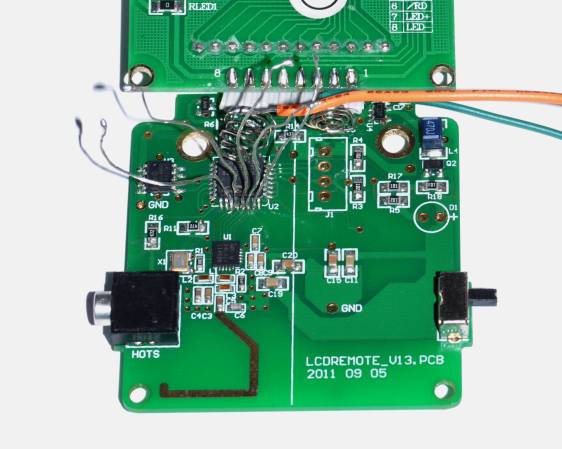
If you want to take a photograph with a professional look, proper lighting is going to be critical. [Richard] has been using a commercial lighting solution in his studio. His Lencarta UltraPro 300 studio strobes provide adequate lighting and also have the ability to have various settings adjusted remotely. A single remote can control different lights setting each to its own parameters. [Richard] likes to automate as much as possible in his studio, so he thought that maybe he would be able to reverse engineer the remote control so he can more easily control his lighting.
[Richard] started by opening up the remote and taking a look at the radio circuitry. He discovered the circuit uses a nRF24L01+ chip. He had previously picked up a couple of these on eBay, so his first thought was to just promiscuously snoop on the communications over the air. Unfortunately the chips can only listen in on up to six addresses at a time, and with a 40-bit address, this approach may have taken a while.
Not one to give up easily, [Richard] chose a new method of attack. First, he knew that the radio chip communicates to a master microcontroller via SPI. Second, he knew that the radio chip had no built-in memory. Therefore, the microcontroller must save the address in its own memory and then send it to the radio chip via the SPI bus. [Richard] figured if he could snoop on the SPI bus, he could find the address of the remote. With that information, he would be able to build another radio circuit to listen in over the air.
Using an Open Logic Sniffer, [Richard] was able to capture some of the SPI communications. Then, using the datasheet as a reference, he was able to isolate the communications that stored information int the radio chip’s address register. This same technique was used to decipher the radio channel. There was a bit more trial and error involved, as [Richard] later discovered that there were a few other important registers. He also discovered that the remote changed the address when actually transmitting data, so he had to update his receiver code to reflect this.
The receiver was built using another nRF24L01+ chip and an Arduino. Once the address and other registers were configured properly, [Richard's] custom radio was able to pick up the radio commands being sent from the lighting remote. All [Richard] had to do at this point was press each button and record the communications data which resulted. The Arduino code for the receiver is available on the project page.
[Richard] took it an extra step and wrote his own library to talk to the flashes. He has made his library available on github for anyone who is interested.


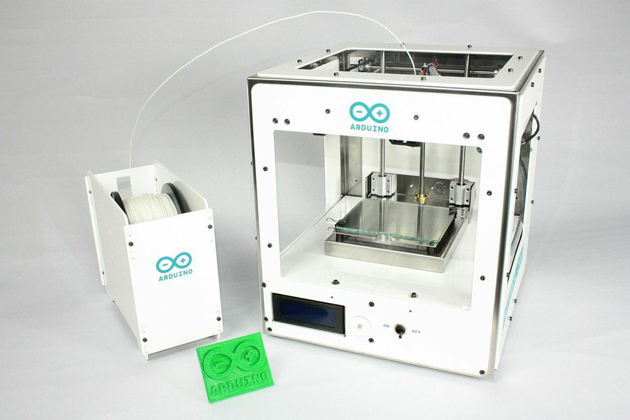
If you're a fan of Arduino's tinker-friendly approach to computing, you'll be glad to hear that it's now extending that open philosophy to 3D printers. The company has teamed up with Sharebot to unveil the Materia 101, a small (5.5 inches by 4 inches) printer that's built to be both friendly to beginners and very accessible. You can modify the code on the underlying Arduino Mega mini-PC, of course, but you also have access to the full schematics of the printer -- you can upgrade it or even make your own, if you have the know-how and parts. Arduino hasn't said when it plans to ship the Materia, but it'll be available both as a build-it-yourself kit (priced under $800) and fully assembled (under $1,000).
Filed under: Peripherals
Source: Arduino
After the sneak peak of some days ago, we are happy to officially announce the Arduino 3d printer . Completely open source and affordable, Arduino Materia 101 is a device aiming at simplifying access to the world of 3D printing and rapid prototyping.
Materia 101 is a precision 3D printer running on Arduino Mega, designed and developed in Italy, thanks to the collaboration of Arduino and Sharebot, two companies working with a similar approach to technology. It is ideal for beginners, makers and education.
Materia 101’s visual identity is curated by studio ToDo: the choice of essentiality of design and the white color of the machine suggests its ease of use.
The printer will be available only on the Arduino Store both as a kit and pre-assembled. Official pricing of the device will be disclosed at a later date but the kit will sell for less than 600 EUR/800 USD, while the pre-assembled version will be available for less than 700 EUR/1000 USD.
The official presentation will be held during Maker Faire Rome, 3-5 October 2014.
Technical characteristics:
Printing technology: Fused Filament Fabrication
Printing area: 140 x 100 x 100 mm +/- 5mm
X and Y theorical resolution position: 0,06 mm
Z resolution: 0.0025 mm
Extrusion diameter: 0.35 mm
Filament diameter: 1.75 mm
Optimal temperatures with PLA: 200-230°
Tested and supported filaments: PLA
Unsupported but tested filaments: Cristal Flex, PLA Thermosense, Thermoplastic Polyuretane
(TPU), PET, PLA Sand, PLA Flex
External dimensions: 310 x 330 x 350 mm
Weight: 10 kg
Usage: 65 watt
Electronical board: Official Arduino Mega 2560 with Open Source Marlin Firmware
LCD display 20 x 4 with encoder menu
Preloaded with PLA printing presets
Extruder block with filament pressure regulation
Atmel and Arduino teamed up at World Maker Faire to introduce the Wi-Fi shield 101. [Gary] from Atmel gave us the lowdown on this new shield and its components. The shield is a rather spartan affair, carrying only devices of note: an Atmel WINC1500 WiFi module, and an ATECC108 crypto chip.
The WINC1500 is a nifty little WiFi module in its own right. WINC handles IEEE 802.11 b/g/n at up to 72 Mbps. 72Mbps may not sound like much by today’s standards, but it’s plenty fast for most embedded applications. WINC handles all the heavy lifting of the wireless connection. Connectivity is through SPI, UART or I2C, though on the Arduino shield it will be running in SPI mode.
The ATECC108 is a member of Atmel’s “CryptoAuthentication” family. It comes packaged in an 8-pin SOIC, and is compatible with serial I2C EEPROM specifications. Internally the similarities to serial EEPROMs end. The ‘108 has a 256-bit SHA engine in hardware, as well as a Federal Information Processing Standards (FIPS) level random number generator. Atmel sees this chip as being at the core of secure embedded systems. We think it’s pretty darn good, so long as we don’t hear about it at the next DEFCON.
The Wi-Fi shield 101 and associated libraries should be out in January 2015. We can’t wait to see all the new projects (and new ways to blink an LED) the shield will enable.


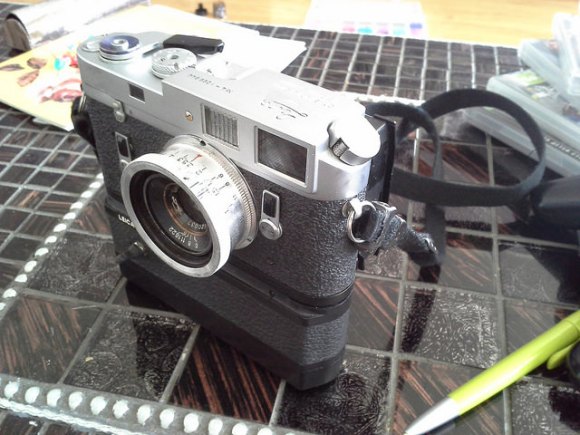
[Eugene] wanted to use his vintage Leica M4 as a digital camera, and he had a Canon EOS 350D digital camera sitting around unused. So he Frankensteined them together and added a digital back to the Leica’s optical frontend.
It sounds simple, right? All you’d need to do is chop off the back from the EOS 350D, grind the digital sensor unit down to fit into exactly the right spot on the film plane, glue it onto an extra Leica M4 back door, and you’re set. Just a little bit of extremely precise hackery. But it’s not even that simple.
Along the way [Eugene] reverse-engineered the EOS 350D’s shutter and mirror box signals (using a Salae Logic probe), and then replicated these signals when the Leica shutter was tripped by wedging an Arduino MiniPro into an old Leica motor-winder case. The Arduino listens for the Leica’s bulb-flash signal to tell when the camera fires, and then sends along the right codes to the EOS back. Sweet.
There are still a few outstanding details. The shutter speed is limited by the latency in getting the signal from the Leica to the 350D back, so he’s stuck at shutter speeds longer than 1/8th of a second. Additionally, the Canon’s anti-IR filter didn’t fit, but he has a new one ordered. These quibbles aside, it’s a beautiful hack so far.
What makes a beautiful piece of work even more beautiful? Sharing the source code and schematics. They’re both available at his Github.
Of course, if you don’t mind completely gutting the camera, you could always convert your old Leica into a point and shoot.


There is no question that steering wheel mounted controls are super convenient. Reaching all the way over to the dashboard to change a radio station is so 1990’s. An ever-increasing percentage of new cars are coming equipped with steering wheel controls for the stereo, however, you’ll lose the button control if you change out the stock head unit to something a little higher in quality. Sure, there may be an adapter readily available for your car/stereo combination, but there also may not be. [Ronnied] took the DIY road and made his own adapter.
The first obstacle for [Ronnied] was to figure out the wiring on the steering wheel controls. After some poking around he found that there were only two wires used for all of the control buttons, each button only changing the resistance between the two wires. The button states could easily be read by using an Arduino’s analog input. A Pro Mini model was chosen for its small size as it could be housed in the radio compartment of the dash.
The next step was getting the Arduino to control the aftermarket head unit. [Ronnied] did some research regarding JVC’s Stalk digital control interface but came to the conclusion that it would be easier to direct wiring the Arduino outputs to the appropriate spot on the head unit’s circuit board. To do this the button for each function that would also be represented on the steering wheel was traced out to find a common point on the circuit board. Jumper wires soldered to the circuit board simply allow the Arduino to emulate button pushes. To ensure that the head unit buttons still work in conjunction with the steering wheel buttons, the Arduino would have to keep the pins as inputs until a steering wheel button was pushed, the pin changed to an output, the signal sent and the pin changed back to an input. This feature was easily created in the Arduino sketch.
Video below.


At the Atmel booth at Maker Faire, they were showing off a few very cool bits and baubles. We’ve got a post on the WiFi shield in the works, but the most impressive person at the booth was [Quin]. He has a company, he’s already shipping products, and he has a few projects already in the works. What were you doing at 13?
[Quin]‘s Qduino Mini is your basic Arduino compatible board with a LiPo charging circuit. There’s also a ‘fuel gauge’ of sorts for the battery. The project will be hitting Kickstarter sometime next month, and we’ll probably put that up in a links post.
Oh, [Quin] was also rocking some awesome kicks at the Faire. Atmel, I’m trying to give you money for these shoes, but you’re not taking it.
[Sophie] had a really cool installation at the faire, and notably something that was first featured on hackaday.io. Basically, it’s a virtually reality Segway, built with an Oculus, Leap Motion, a Wobbleboard, an Android that allows you to cruise on everyone’s favorite barely-cool balancing scooter through a virtual landscape.
This project was a collaboration between [Sophie], [Takafumi Ide], [Adelle Lin], and [Martha Hipley]. The virtual landscape was built in Unity, displayed on the Oculus, controlled with an accelerometer on a phone, and has input with a Leap Motion. There are destructible and interactable things in the environment that can be pushed around with the Leap Motion, and with the helmet-mounted fans, you can feel the wind in your hair as you cruise over the landscape on your hovering Segway-like vehicle. This is really one of the best VR projects we’ve ever seen.

