Posts with «arduino» label

PteroDAQ supports Teensy 3.1

In one day my son and I added support for the Teensy 3.1 board to the PteroDAQ data acquisition system that previously supported the Freedom KL25Z board and the ATMega-based Arduino boards.

We ended up using the Teensyduino development system, but really only for the downloading and for the usb-serial library, since the K20 ARM chip on the Teensy 3.1 is quite similar to the KL25 that we originally based things on.

The Teensy 3.1 is a lot easier to install the software on than the Freedom boards, and runs a little faster (72MHz instead of 48MHz), but has essentially the same ADC.  Actually, it has 2 analog-to-digital converters, but most of the pins can only be read by ADC0, so we’ve not set up ADC1 to read anything but the internal 1.2V Vref (which is conveniently provided as an output on the AREF pin).  We had originally planned to use just ADC0, but the code for reading the Vref signal on ADC0 never worked—I suspect an error in the reference manual, since changing to reading Vref with ADC1 worked fine.

The Freedom boards are cheaper, are easier to unplug the USB cables from, can deliver more power at 3.3V, have RGB LED, and have a lot of neat features missing from the Teensy boards, but the Teensy boards can be configured to plug directly into a bread board (if you give up a lot of the connections and just use 26 pins), and have more RAM (so can run for longer at high sampling rates before the buffer overflows).

I’m going to have to rewrite part of my book to talk about the possibility of using the Teensy 3.1, and I’ll have to decide whether the extra $6–$7 is worth the simpler setup for my Applied Electronics lab course. We’d sacrifice being able to get much power from the board (probably only about 100mA instead of 500mA at 3.3V), but that is a relatively minor loss, since we have bench power supplies at every station.

I’m not sure what I’ll recommend in the book for people trying to learn on their own—I’ll probably have to play with the Teensy a bit to see how useful it is.  I have at least one other program that the students have been using in the lab (the frequency detector for turning a relaxation oscillator into a touch sensor) that I’ll have to port to Arduinos and the Teensy 3.1.

For home hobbyists who aren’t planning to dive deep into embedded-system programming, the Teensyduino IDE is a lot friendlier than the MBED.ORG tools (and I hear that the Kinetis SDK has a very, very large learning curve), so it might be a better board despite the lack of peripherals (no accelerometer, RGB LED, or capacitive touch slider).


Filed under: Circuits course, Data acquisition Tagged: Arduino, data acquisition, KL25Z, PteroDAQ, Teensy

Hack Your Cat’s Brain to Hunt For Food

This cat feeder project by [Ben Millam] is fascinating. It all started when he read about a possible explanation for why house cats seem to needlessly explore the same areas around the home. One possibility is that the cat is practicing its mobile hunting skills. The cat is sniffing around, hoping to startle its prey and catch something for dinner. Unfortunately, house cats don’t often get to fulfill this primal desire. [Ben] thought about this problem and came up with a very interesting solution. One that involves hacking an electronic cat feeder, and also hacking his cat’s brain.

First thing’s first. Click past the break to take a look at the demo video and watch [Ben’s] cat hunt for prey. Then watch in amazement as the cat carries its bounty back to the cat feeder to exchange it for some real food.

[Ben] first thought about hiding bowls of food around the house for his cat to find, but he quickly dismissed this idea after imagining the future trails of ants he would have to deal with. He instead thought it would be better to hide some other object. An object that wouldn’t attract pests and also wouldn’t turn rancid over time. The problem is his cat would have to know to first retrieve the object, then return it to a specific place in order to receive food as a reward. That’s where the cat hacking comes in.

[Ben] started out by training his cat using the clicker method. After all, if the cat couldn’t be trained there was no use in building an elaborate feeding mechanism. He trained the cat to perform two separate behaviors, one tiny bit at a time. The first behavior was to teach the cat to pick up the ball. This behavior was broken down into six micro behaviors that would slowly be chained together.

  • Look at the ball
  • Approach the ball
  • Sniff the ball
  • Bite the ball
  • Pick up the ball
  • Pick up the ball and hold it for a few seconds

[Ben] would press on the clicker and reward his cat immediately upon seeing the desired step of each behavior. Once the cat would perform that step regularly, the reward was removed and only given to the cat if the next step in the chain was performed. Eventually, the cat learned the entire chain of steps, leading to the desired behavior.

Next, [Ben] had to teach his cat about the target area. This was a separately trained behavior that was broken down into the following three steps.

  • Look at the target area
  • Approach the target area
  • Sniff the target area

Once the cat learned both of these behaviors, [Ben] had to somehow link them together. This part took a little bit of luck and a lot of persistence. [Ben] would place the ball near the target area, but not too close. Then, he would reward his cat only when the cat picked up the ball and started moving closer to the target area. There is some risk here that if the cat doesn’t move toward the target area at all, you risk extinguishing the old behaviors and they will have to be learned all over again. Luckily, [Ben’s] cat was smart enough to figure it out.

With the cat properly trained, it was time to build the cat feeder. [Ben] used an off-the-shelf electronic feeder called Super Feeder as the base for his project. The feeder is controlled by a relay that is hooked up to an Arduino. The Arduino is also connected to an RFID reader. Each plastic ball has an RFID tag inside it. When the cat places the ball into the target area, the reader detects the presence of the ball and triggers the relay for a few seconds. The system also includes a 315MHz wireless receiver and remote control. This allows [Ben] to manually dispense some cat food should the need arise.

Now whenever the cat is hungry, it can use those primal instincts to hunt for food instead of just having it freely handed over.

[Thanks Dan]


Filed under: home hacks
Hack a Day 08 Aug 18:00
315mhz  arduino  ball  behavior  brain  cat  clicker  control  feeder  food  home  home hacks  hunt  kitten  learn  psychology  remote  rfid  tag  teach  training  

A traditional weather house gets a smart upgrade

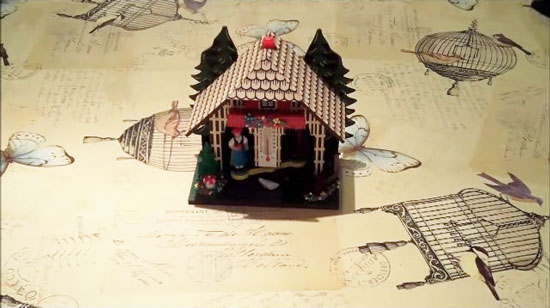
The “Enchanted Cottage” is a project by Andy Clark with the aim of upgrading a traditional  german “wetter haus”  with a new mechanism and electronics running on Arduino Yún:

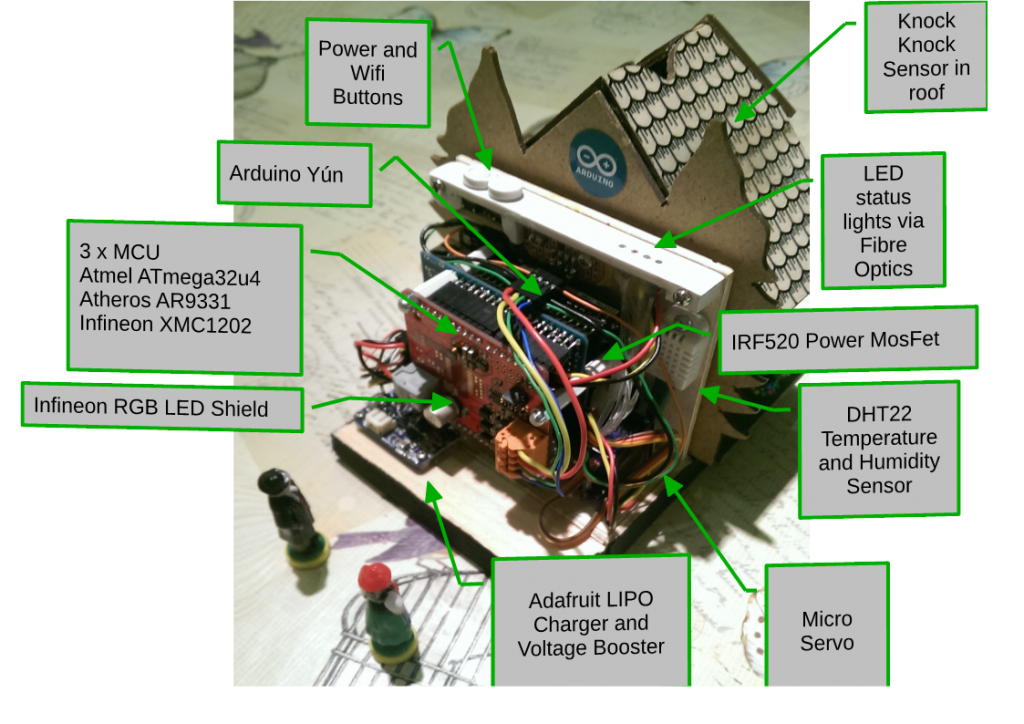
The mechanics were replaced with a servo and 3D printed parts designed to make the movement linear rather than arcing as in the traditional approach. The figures were fitted with magnets so that they could move without any obvious form of propulsion.
The electronics were based on an Arduino Yún, custom prototyping shield and an Infineon RGB LED driver shield. The whole thing is powered by a rechargable LiPo battery and a module from AdaFruit. Because the Arduino was deep in the middle of the house, I used fibre optics to bring the light to the top panel. A sensor was added into the roof so you could simply tap it to get it to update the forecast for you.

The project was build over a period of 16 weeks, the mechanical aspects were completed first and the 3D printing took several goes to get it right. The electronics build was fairly straightforward but fitting everything onto the proto shield was challenging and the high clearance for the Yún was also a challenge. The software was written as I went along with demo programs created to test each part. Getting the Yún to work on low power was fairly straightforward but getting a secure and validated HTTPS connection took a few attempts. tried to put as much of the processing into the Python script so that the C++ code was just handling the control. All in all a challenging project that pushed the Yún to it’s limits.

Learn more about the project on Andy’s blog.

Arduino Blog 07 Aug 18:06

Sci-Fi Instrument Is a Real Life Windows Media Visualizer

Artist Balam Soto has been making interactive projects for years. This is his latest: Exp.Inst.Rain, a wavering, touch-controlled instrument.

Read more on MAKE

The post Sci-Fi Instrument Is a Real Life Windows Media Visualizer appeared first on Make: DIY Projects, How-Tos, Electronics, Crafts and Ideas for Makers.

Hackaday Prize Entry: PICs and Arduinos, Cats and Dogs Living Together

Half of our little corner of the Internet complains about the Arduino, how the pin headers of the Arduino standard don’t make any sense, how the Arduino IDE is rubbish, gives well-reasoned arguments why the Arduino language is hindering the next generation of embedded programmers, and laments the fact that everything is commoditized into Arduino-compatible packages. The other half of our little corner of the Internet uses Microchip PICs.

[Jarrett] is stubborn, and he wants to use a PIC with the distinctive Arduino pin layout. Thus was born PIC-On-The-Go. It’s a PIC18F4520 in the familiar goofy-pin package, made specifically for everyone who just wants to buckle down and get some work done.

This isn’t the only PIC-become-Arduino board out there; the Fubarino is a great board that speaks Arduino, but that doesn’t take advantage of our favorite Arduino shields. Either way, we’re surprised something like [Jarrett]’s project doesn’t exist yet, making it a great entry for The Hackaday Prize.

The 2015 Hackaday Prize is sponsored by:


Filed under: The Hackaday Prize

“Arduino Borealis” Combines LEDs and Paint

[Stef Cohen] decided to combine three different artistic mediums for her latest project. Those are painting, electronics, and software. The end goal was to recreate the aurora borealis, also known as the northern lights, in a painting.

The first step was to make the painting. [Stef] began with a shadow box. A shadow box is sort of like a picture frame that is extra deep. A snowy scene was painted directly onto the front side of the glass plate of the shadow box using acrylic paint. [Stef] painted the white, snowy ground along with some pine trees. The sky was left unpainted, in order to allow light to shine through from inside of the shadow box. A sheet of vellum paper was fixed to the inside of the glass pane. This serves to diffuse the light from the LEDs that would eventually be placed inside the box.

Next it was time to install the electronics. [Stef] used an off-the-shelf RGB LED matrix from Adafruit. The matrix is configured with 16 rows of 32 LEDs each. This was controlled with an Arduino Uno. The LED matrix was mounted inside the shadow box, behind the vellum paper. The Arduino code was easily written using Adafruit’s RGB Matrix Panel library.

To get the aurora effect just right, [Stef] used a clever trick. She took real world photographs of the aurora and pixelated them using Photoshop. She could then sample the color of each pixel to ensure that each LED was the appropriate color. Various functions from the Adafruit library were used to digitally paint the aurora into the LED matrix. Some subtle animations were also included to give it an extra kick.


Filed under: Arduino Hacks, led hacks

Adorable Automated Turret Launches Rubber Band Barrage

This 3D printed rubber band launching turret looks like it popped right out of Portal.

Read more on MAKE

The post Adorable Automated Turret Launches Rubber Band Barrage appeared first on Make: DIY Projects, How-Tos, Electronics, Crafts and Ideas for Makers.

Build an IoT Gauge with Arduino Yún and IFTTT

Tomas Amberg shared with us the link to an Instructable he published on how to build a Web-enabled, Arduino-based IoT Gauge with a REST API, and connect it to the IFTTT mash-up platform, via the Yaler.net relay service he founded.

The cool thing about this project is the connection with the Maker Channel  of IFTTT which supports custom Webhooks, to integrate DIY IoT projects: 

Inspired by WhereDial, a DIY Internet of Things classic, the IoT Gauge shows the current location of its owner. A bit like the Weasley Clock in Harry Potter. The design and code of the IoT Gauge is generic and could be used as well to display e.g. weather conditions. The logic resides in the Cloud, the gauge is just a servo with an API.

Check out the five-step tutorial and the ingredients you need at this link.

Arduino Blog 05 Aug 18:00
arduino  featured  fritzing  gauge  ifttt  iot  lasercut  tutorial  uno  yún  

First Look: Bean+ Microcontroller Adds Greater Range, Better Battery, and More

Today Punch Through Design launched a Kickstarter campaign for their new Bluetooth LE Arduino-compatible microcontroller board the Bean+.

Read more on MAKE

The post First Look: Bean+ Microcontroller Adds Greater Range, Better Battery, and More appeared first on Make: DIY Projects, How-Tos, Electronics, Crafts and Ideas for Makers.

Robot on Rails for Time Lapse Photography

What do you get when you cross a photographer with an Arduino hacker? If the cross in question is [nukevoid], you wind up with a clever camera rail that can smoothly move with both shift and rotation capability. The impressive build uses an Arduino Pro Mini board and two stepper motors. One stepper moves the device on rails using some Delrin pulleys as wheels that roll on an extruded aluminum track. The other stepper rotates the camera platform.

The rotating platform is very cool. It’s a plastic disk with a GT2 motion belt affixed to the edge. The stepper motor has a matching pulley and can rotate the platform easily. The GT2 belt only goes around half of the disk, and presumably the software knows when to stop on either edge based on step counts. There’s even a support to steady the camera’s lens when in operation.

Some AA batteries provide power (so probably not going to run all day long without a battery change). Judging by the video, the whole set up is cat-resistant (although nothing is totally cat-proof). Photographers are an innovative bunch, and we’ve seen Android-powered rails before as well as spinning turntables.


Filed under: Arduino Hacks, robots hacks