Posts with «arduino» label

Preparing 200 teachers to inspire students with electronics

Arduino Verkstad has just started CTC* Catalunya 2015 in Barcelona with David Cuartielles preparing a group of 200 teachers that will be teaching CTC to students in Cataluña next September. A technology fair will be hosted at the end of the program and we are expecting more than 2500 people to attend.

Creative Technologies in the Classroom (CTC) is a collaborative learning curriculum designed for schools that wish to incorporate emerging technologies into their existing technology classes. It’s also a collection of experiments aimed at transforming the way technology is taught in schools around the world. These experiments introduce basic concepts in programming, electronics, and mechanics.These experiments introduce basic concepts in programming, electronics, and mechanics.

Thanks to the Departament d’Ensenyament of the Generalitat de Catalunya and our partner eduCaixa Obra Social “La Caixa” who is also involved with launching CTC for 75 schools in Andalusia in the fall. Stay tuned with Arduino Verkstad blog for news on CTC Andalucía.

Last year’s show included over 240 projects, which means we’ll probably have twice as many for this year’s show. This is the second edition of the program and it will reach 103 schools; we expect about 2.500 students to be involved in the project and the final fair will be at CosmoCaixa Museum in Barcelona on February 6th, 2016. Since the numbers promise a lot and the amount of people participating might be big, we will need the whole temporary exhibition space at the museum to be booked for the fair!

Click here for a press article on the teachers’ training in Barcelona. (in Catalan).

The news was originally posted on the Arduino Verkstad Blog.

Arduino Powered Rubber Band Sentry Turret Is Not a Lie

You know that guy in the next cube is sneaking in when you are away and swiping packs of astronaut ice cream out of your desk. Thanks to [Kevin Thomas], if you have an Arduino and a 3D printer, you can build a rubber band sentry gun to protect your geeky comestibles. You’ll also need some metric hardware, an Arduino Uno, and a handful of servo motors.

The video shows [Kevin] manually aiming the gun, but the software can operate the gun autonomously, if you add some sensors to the hardware.  The build details are a bit sparse, but there is a bill of material and that, combined with the 3D printing files and the videos, should allow you to figure it out.

We couldn’t help but wish for a first person view (FPV) camera and control via a cell phone, so you could snipe at those ice cream thieves while hiding in the broom closet. On the other hand, if you got the gun working, adding the remote wouldn’t be hard at all. You probably have a WiFi FPV camera on your quadcopter that finally came out of that tree and there’s lots of ways to do the controls via Bluetooth or WiFi.

Not that you don’t have options. But here at Hackaday HQ, we have lots of rubber bands and not so many green pigs. If you’d rather shoot paintballs, be careful you don’t accidentally repaint the insides of your cube.


Filed under: 3d Printer hacks, Arduino Hacks, weapons hacks

It’s Time to Roll Your Own Smartwatch

Giant wristwatches are so hot right now. This is a good thing, because it means they’re available at many price points. Aim just low enough on the scale and you can have a pre-constructed chassis for building your own smartwatch. That’s exactly what [benhur] did, combining a GY-87 10-DOF module, an I²C OLED display, and an Arduino Pro Mini.

The watch uses one button to cycle through its different modes. Date and time are up first, naturally. The next screen shows the current temperature, altitude, and barometric pressure. Compass mode is after that, and then a readout showing your step count and kilocalories burned.

In previous iterations, the watch communicated over Bluetooth to Windows Phone, but it drew too much power. With each new hardware rev, [benhur] made significant strides in battery life, going from one hour to fourteen to a full twenty-fours.

Take the full tour of [benhur]’s smartwatch after the break. He’s open to ideas for the next generation, so share your insight with him in the comments. We’d like to see some kind of feedback system that tells us when we’ve been pounding away at the Model M for too long. 

[via Embedded Lab]


Filed under: Arduino Hacks, wearable hacks

Interview: NIcole Grimwood on Electronics (and Cake)

Nicole Grimwood is working towards a dual degree in engineering from Columbia University and liberal arts from Scripps College.

Read more on MAKE

The post Interview: NIcole Grimwood on Electronics (and Cake) appeared first on Make: DIY Projects, How-Tos, Electronics, Crafts and Ideas for Makers.

A DIY Seizure Alarm based on Arduino Micro

Chad Herbert’s son Daniel was diagnosed with Benign Rolandic Epilepsy in 2014. It’s a type of epilepsy the Epilepsy Foundation says accounts for about 15 percent of all Epilepsies in children and the good news is that most children grow out of it.

The bad news is that Daniel’s most affected by his condition at night or early morning while he sleeps. That’s why Chad invested in a sleep monitor/alarm for his bed that detects when he’s having a full tonic-clonic seizure.

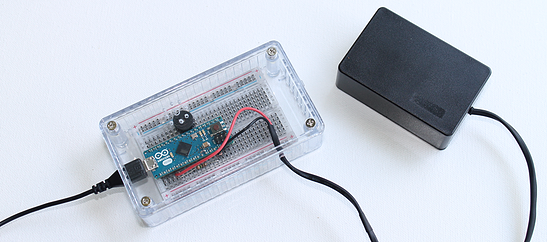
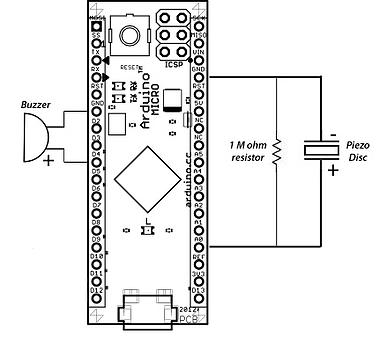
At the same time though, he decided to work on a DIY version of a seizure alarm  running on Arduino Micro. The starting point was Arduino’s “Knock” example project with the sketch code originally created in 2007 by David Cuartielles and modified by Tom Igoe in 2011:

While shopping around for the exact type of monitor/alarm my wife and I wanted, I found out a few things:

  • They are hard to find. I believe the one we ended up with was manufactured by a company in Great Britain.
  • They are expensive. The one we ended up getting cost in the $400-$500 range.
  • The one we have isn’t totally cumbersome, but it’s not easy to pack up and take with you somewhere.

Figuring these things out, I decided to search for a way to build a simple seizure alam that’s both relatively inexpensive and easy to transport. I’m sure there are people out there who have children that suffer from seizures that simply cannot afford equipment such as this even though they truly need it. Thanks to the folks in the Arduino community, I was able to accomplish both things I was setting out to do.

Discover how it was made on his blog.


Mason Jar LED Tiki Torches Glow Any Color

Tiki torches are a fun summer lighting solution and this RGB LED version, that uses an Arduino, can be a great alternative to an open flame.

Read more on MAKE

The post Mason Jar LED Tiki Torches Glow Any Color appeared first on Make: DIY Projects, How-Tos, Electronics, Crafts and Ideas for Makers.

PteroDAQ boards

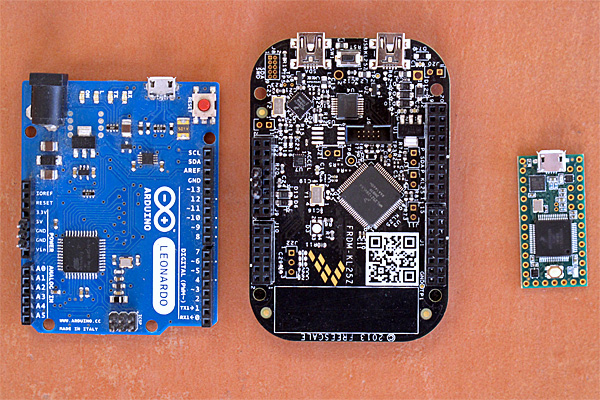
I took a photograph this afternoon of three of the boards that can be used with the PteroDAQ data acquisition system:

On the left is the Arduino Leonardo, the slowest and most expensive of the boards here. In the middle is the KL25Z, which I’ve been using in my class for a couple of years—it is the cheapest and most featureful of the boards. On the right is the Teensy 3.1 (without headers yet), which is the fastest and smallest of the supported boards.

I’m considering switching to the Teensy 3.1 for the class, despite its higher price than the KL25Z board, because adding male headers to the bottom of the board makes it possible to plug the Teensy 3.1 into a bread board, which makes for more secure wiring than running separate wires to the KL25Z board.  We don’t really need the 64 pins of the KL25Z board, we’re not mounting Arduino shields, and we’re not using the accelerometer or the touch sensor, so the main question is whether it is better to have the data-acquisition board be standalone or be inserted into a bread board. The RGB light on the KL25Z board is a nice feature for providing feedback that is missing from the other boards (which only have a single-color LED).

I’ve also thought about usefulness to the students after the course, though few of the students will go on to do anything other than PteroDAQ with the boards.  The Arduino IDE is much easier to deal with for beginners than any of the development environments for the KL25Z, and Teensyduino is pretty easy to install on top of the Arduino environment.  So if students are going to go on to do hobbyist-level programming on the boards, then an Arduino board or the Teensy 3.1 might be a better choice. Given how much more powerful the Teensy 3.1 is than the old ATMega-based Arduinos, I see no reason to recommend buying Arduino boards (though clones from China have gotten down to about $3).

Erich Styger, in a comment, mentioned that he is frustrated by the Teensy’s lack of a SWD (serial wire debug) connector, which he is used to using for debugging. Since I’m from an older generation of programmers, I don’t miss it—I’ve not used the SWD connector on the KL25Z boards (though my son has, to use the OpenSDA chip as a programmer).  For me, it is a luxury to have a serial port for getting print messages from the board—I started microprocessor programming in the days when having one or two LEDs was about all the information you got back from the board. Having debuggers like GDB was a luxury available on computers that cost thousands of dollars.

Of course, the ARM processors on the Teensy 3.1 and the FRDM KL25Z boards are very much more complicated than the old 8080A, Z80, and 6800 8-bit processors I started with, and people are writing much larger programs for them, so I can see the advantage of having a debugger. But there is a large startup cost to learning to use a debugger and setting up the complicated software development tools they expect you to use, so I’m happy recommending the very limited, but easy-to-use Arduino interface for bioengineering students who want to go a bit further.

I’m curious what my readers think about the choice between a FRDM KL25Z board and a Teensy 3.1 board for the Applied Electronics class, given that most of the students will only use the boards for that class.  What tradeoffs might I have missed?  If you were in the class, which board would you rather work with?


Filed under: Circuits course, Data acquisition Tagged: Arduino, debugger, KL25Z, Leonardo, PteroDAQ, Teensy

Defend your desk with a 3D printed rubber band auto-gun

If you work with a bunch of sticky-fingered co-workers, your desk is going to need protecting -- especially when you're away at lunch. This 3D-printed sentry gun from Swiss engineering student Kevin Thomas is motion-activated and fires a 6-round clip of rubber bands at anybody foolhardy enough to come within range. It's controlled with an Arduino chip running Thomas' version of the open-source Project Sentry Gun software. And if you don't want to let the sentry gun have all the fun, you can also switch it from autonomous mode and manually aim it using a joystick. With all the eyes you'll put out and SBC violations you'll incur with this menacing mechanization, you and the HR department are going to become such good friends.

Via: The Next Web

Source: Thingverse

New Project: Build a Two-Octave Laser Harp

I find laser harps fascinating. The first time I saw one was when I stumbled across a video of a guy using using lasers to play the theme song to Tetris. I thought it was the coolest thing ever, but I couldn’t justify the cost of buying one. Instead, I decided […]

Read more on MAKE

The post Build a Two-Octave Laser Harp appeared first on Make: DIY Projects, How-Tos, Electronics, Crafts and Ideas for Makers.

Arduino Based Remote Shutter For Beme

The well-dressed hacker [Sean Hodgins] has put together a neat little project: a battery powered remote shutter. He built it for use with Beme, the latest Snapchat clone that all of the cool kids are now using.

This service is designed to get away from the selfie culture by starting to record when you hold your phone against your chest, so you are looking at the thing being recorded, not your phone. [Sean] wanted a bit more control than that, so he built a remote control that starts the recording by moving the servo arm over the proximity sensor.

He built this neat little device from an Arduino Pro Mini, a battery, a small servo, a couple of power control boards and a cheap RF link from SeedStudio, all glued onto an iPhone case. It’s a bit rough around the edges (the servo makes some noise that is picked up on the recording, for one thing), but it is a great example of how to lash together a quick prototype to test a project out.


Filed under: Arduino Hacks, digital cameras hacks