Posts with «arduino» label

Arduino parking lot attendant

Here’s an automatic parking gate for toy cars. There’s no need to press a button, the electronics detect the presence of a vehicle on either side of the gate, raising it after verifying that the lot is not already full. It’s the same idea as counting how many people enter a room in order to switch the lights but the hardware is just a bit different.

The system is controlled by a pair of sensors in the paper which serves as the parking lot. There are three sheets of heavy stock, the top and bottom both have aluminum foil on them, with the center layer  as a separator. There are holes cut in the separator where the hash marks are seen above. By adding a little pressure to the car when you drive it up to the gate this completes a circuit instructing the Arduino that there’s a vehicle in position.

You can see a demonstration, as well as the guts of the build, in two videos after the break.

[via Reddit via Freetronics]


Filed under: arduino hacks, toy hacks

Arduino UNO Rev 3 + Bluetooth Bee + Android

Guys, 

behalf of my Awesomeness,

I beg all of you to PLEASE HELP me on my very 1st robot :D 

I have an Arduino UNO Rev 3 and a Protyping Sheild 

And I need to control 6 DC motors via BLUETOOTH Bee 

and my remote control is a App in ANDROID the "BlueBots" 


My MAIN concern is 

How to combine that 3 products so that I can Control the 6 DC motors 

read more

BOXX-E

Primary image

What does it do?

Navigates via four HC-SR04 Ultrasonic Sensors

Parts:

Meduino Nano microcontroller

TB6612FNG motor driver on carrier board

Four HC-SR04 ultrasonic sensors

i2c serial LCD display - 16X2

1 TI MSP430 Launchpad box

1 TI Stellaris Launchpad box

Tamiya twin motor gearbox

Tamiya truck tires

Tamiya ball caster Power switch

IDE ribbon cable

2 430 contact breadboards

AA battery pack

9V battery connector

Zip ties

Wire

You can read more at my blog: http://www.meanpc.com

Cost to build

$70,00

Embedded video

Finished project

Number

Time to build

5 hours

Type

wheels

URL to more information

Weight

907 grams

Arduino voice changer turns you into [Vader]

Halloween is just around the corner, so of course we’re looking forward to a bunch of awesome costumes put together by Hackaday readers. In an effort to match his voice to his costume, [Phil Burgess] over at Adafruit (and former Hackaday alumnus) put together an Arduino-powered voice changer to give his voice the gravitas of [James Earl Jones] or the lightheartedness of a member of the Lollipop Guild.

If you’ve ever played with a turntable, you’ll know playing a 33 RPM record at 45 or 78 RPM turns your treasured copy of Dark Side of the Moon into a lighthearted aural experience with a pitch that is much too high. Likewise, playing a single at 33 or 16 RPM means those once dulcet tones are now recordings of tormented souls in an acoustic hell.

[Phil]‘s voice changer operates on the same principle by recording sounds from a microphone into a circular array and playing them back at a different rate; faster if the desired effect is a Munchkin, and slower if this year’s Halloween costume will be a Sith lord.

The completed build incorporates a 10k pot to dynamically change the timbre of the voice changer, as well as an Adafruit Wave Shield to play back a few pre-recorded sounds of lightsabers clashing. In all, a very cool project for your Halloween costume that’s also a very good introduction to DSP and real-time audio modifications with a microcontroller.


Filed under: Holiday Hacks, musical hacks

Malting kiln controller for preparing beer brewing grains

A quick primer is in order: when it comes to hobby brewing there’s two main types, extract brewing and all-grain brewing. The former uses a syrup that has been extracted from the grains at a factory while the latter adds the steps to do this yourself. But in both cases the brewing grains have already been malted. This is a careful process of soaking the grains and then kiln drying them. [Richard Oliver] built his own malt kiln controller to add the preliminary step to his home brewing ritual. Now the only thing he’s not doing himself is growing the grains (and perhaps culturing the yeast).

His original design used a food dehydrator for the drying step, but this didn’t work because the temperature wasn’t at the correct level. The new build uses the ceramic heating element from a 300W hot air gun. A blower directs air through the element and into the wooden box that serves as the kiln. An Arduino monitors the heated air to keep it right in the sweet spot. He’s included a graphing GUI for easy monitoring, which is shown in the video after the break.


Filed under: beer hacks
Hack a Day 12 Oct 12:01

Building a better PID smoker controller

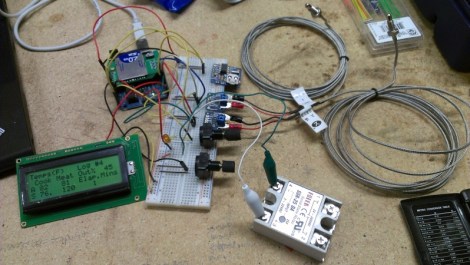
[Matt] wanted to have more control over his meat smoker so he built this advanced PID smoker controller. It uses the solid state relay seen in the bottom-right of this image to switch the smoker’s heating element. But all of the other goodies that are included add several features not usually found in these builds.

This is a replacement for the commercial PID unit he used on the original build. That monitored the temperature in the smoker, using predictive algorithms to maintain just the right heat level. But this time around [Matt] is looking for extra feedback with a second sensor to monitor meat temperature. Using an Arduino with an SD shield he is able to data log the smoking sessions, and his custom code allows him to specify temperature profiles for resting the meat after it has hit the target temperature. It kind of reminds us of a reflow oven controller… but for food.


Filed under: cooking hacks
Hack a Day 11 Oct 20:01

ADXL345 graphing program in Processing

OK, so I got this nice little sensor, the ADXL345 and I have composed it into a new version of my "shield".


read more

Let's Make Robots 11 Oct 18:25
adxl345  arduino  processing  uno  

New Micro Magician V2

The new improved Micro Magician V2 is here! It has all the features you loved in the original Micro Magician but with an ATmega328P, improved power supply that can work at lower input voltages and both 5V and 3.3V LDO regulators for powering all your sensors. The new black and yellow PCB looks great and is easier to read.

Features:

read more

Arduino shields on the raspberry pi

Flicking through hackaday as you do and found an article that may be of interest to those using the raspberry pi.


http://hackaday.com/2012/10/10/using-arduino-shields-with-the-raspi/


The article then links here:

http://www.cooking-hacks.com/index.php/documentation/tutorials/raspberry-pi-to-arduino-shields-connection-bridge

Let's Make Robots 10 Oct 17:51
arduino  arm  other  pi  raspberry  shield  

Using Arduino shields with the Raspi

With hundreds of Arduino shields available for any imaginable application, it’s a shame they can’t be used with the Raspberry Pi. Breaking out the Raspi GPIO pins to Arduino-compatible headers would allow makers and tinkerers to reuse their shields with a far more capable computing platform.

The folks over at Cooking Hacks realized a Raspi to Arduino shield bridge would be an awesome device, so they made their own, complete with a software library that allows you to port your Arduino code directly to the Raspberry Pi.

There are a few limitations with the Raspberry Pi’s GPIO headers; the Raspi doesn’t have analog inputs, so the Cooking Hacks team added an 8-channel digital to analog converter. Along with analog inputs and the headers required to pop a shield on the board, there’s also a socket for an XBee module.

The software library contains most of the general Arduino functions such as digitalWrite() and digitalRead(). There Serial, Wire, and SPI libraries are also implemented, allowing any device that communicates through UART, I2C, or SPI to talk directly to the Raspberry Pi.

While the Raspi Arduino bridge doesn’t allow for PWM in the same capacity as an Arduino, you’re always welcome to whip up a servo or LED shield for this neat little adapter.


Filed under: arduino hacks, Raspberry Pi