Posts with «arduino» label

3D scanner made in a day

The LVL1 Hackerspace held a hackathon back in June and this is one of the projects that was created in that 24-hour period. It’s a 3D scanner made from leftover parts. The image gives you an idea of the math used in the image processing. It shows the angular relations between the laser diode, the subject being scanned, and the webcam doing the scanning.

The webcam is of rather low quality and one way to quickly improve the output would be to replace it with a better one. But because the rules said they had to use only materials from the parts bin it worked out just fine. The other issue that came into play was the there were no LCD monitors available for use in the project. Because of that they decided to make the device controllable over the network. On the right you can see a power supply taped to the top of a car computer. It connects to the laser (pulled out of a barcode scanner which produces a line of red light) and the turntable. A Python script does all of the image processing, assembling each slice of the scan into both an animated GIF and an OBJ file.

[Thanks Nathan]


Filed under: laser hacks

use mains AC as a switch for arduino?

hey gang, does anyone know if it's possible to use mains AC as a switch for the 'duino?

A little background:

Calculon is working on a project that he hopes will take advantage of his doorbell's AC power. He wants the old-school analog doorbell switch to activate a function on his arduino instead of firing off a solenoid in the door chime. Is this possible with some sort of voltage divider? He doesn't need to measure the current, voltage, phase, or anything liek that, he just needs to sense on/off like a pushbutton. He assumes the initial doorbell voltage will be 120V.

read more

Let's Make Robots 14 Feb 03:40
ac  arduino  doorbell  electronics  mains  

The MicroGranny, a DIY Granular Sampler

Vaclav Pelousek packs a ton of features into his Arduino-based microGranny musical instrument, including WAV player, sampler, 8 presets with 15 sounds each, MIDI input, and a whole lot of knobs and buttons to play with pitch, loop length, shift speed, and so on. Vaclav is selling kits and will [...]
MAKE » Arduino 13 Feb 16:30
arduino  music  

Picaxe as an I/O expander for Arduino

As I was thinking of new features for my robot, I realised how painfully short I was on pins! The Arduino Mini just doesn't have enough! I'm not thinking of upgrading to a Mega, seeing how pricey it is and also because it's pretty huge. That's when I though of I/O expanders. Unfortunately, most are designed to be shields for anything but the Arduino Mini, so, again, I didn't know what to do. That's when I thought of using a Picaxe for expanding! I'm thinking of using a PWM or an analog pin from the Arduino as an output to a Picaxe input pin.

read more

Let's Make Robots 13 Feb 02:55
arduino  expander  i  ideas  io  o  picaxe  

Network Enabled ShapeOko CNC Uses Raspberry Pi and Alamode

Kevin Osborn was tired of worrying about getting dust from his ShapeOko CNC mill into his computer. Using a Raspberry Pi and an AlaMode shield he can now send G-Code to the machine over his wireless network, leaving his computer clean and available for other tasks. According to Kevin, "this is of the simplest and most rewarding applications of AlaMode."

Read the full article on MAKE

Obstacle-avoiding robot - a weekend project

Primary image

What does it do?

Navigate around via ultrasound

This is my first robot, it simply avoids obstacles by using an ultrasonic sensor. It uses an Arduino as its brain, a pair of DC motors for locomotion and a small servo for swinging its sensor around.

Cost to build

Embedded video

Finished project

Number

Time to build

8 hours

Type

wheels

URL to more information

Weight

Harry Potter location clock spies on your smart phone

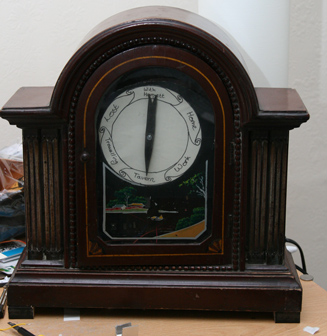
The location clock found in the Harry Potter books makes for a really fun hack. Of course there’s no magic involved, just a set of hardware to monitor your phone’s GPS and a clock face to display it.

[Alastair Barber] finished building the clock at the end of last year as a Christmas gift. The display seen above uses an old mantelpiece clock to give it a finished look. He replace the clock face with a print out of the various locations known to the system and added a servo motor to drive the single hand. His hardware choices were based on what he already had on hand and what could be acquired cheaply. The an all-in-one package combines a Raspberry Pi board with a USB broadband modem to ensure that it has a persistent network connection (we’ve seen this done using WiFi in the past). The RPi checks a cellphone’s GPS data, compares it to a list of common places, then pushes commands to the Arduino which controls the clock hand’s servo motor. It’s a roundabout way of doing things but we imagine everything will get reused when the novelty of the gift wears off.


Filed under: gps hacks

First Robot - Arduino + Processing

Primary image

What does it do?

Remote Controlled Robot, Navigate around via ultrasound

After some weeks of browsing this website, I felt inspired to built something, so, here is the first robot that I'm currently working on.

The idea of this project is to have a platform that can be controlled remotely or work autonomously. For the initial fase, I'm working on some basic remote programmed on Processing, which send commands to the robot via bluetooth (using controlP5 for the UI, and bluetoothDesktop to handle bt communication).

Cost to build

$100,00

Embedded video

Finished project

Number

Time to build

10 hours

Type

wheels

URL to more information

Weight

read more

LCD

Hi.

Has anyone tried using These LCDs with an arduino? I'm not sure whether they're HDD44780 compatible or not, and I can't seem to find much of a datasheet.

Thanks in advance.

Let's Make Robots 10 Feb 13:28
arduino  electronics  lcd  

Track Facebook Likes with Arduino

Using an Arduino Uno equipped with an Ethernet Shield and an LCD Keypad shield, MAKE reader Kedume demonstrates how to create a simple text display for the number of likes on any Facebook page. I think that this is a great project for an Arduino beginner because all you need [...]

Read the full article on MAKE

MAKE » Arduino 09 Feb 17:40