RFBees and AVR Watchdog Timers...bark!
In my last post I mentioned using RFBees for a communications link between a remote sensor and a laptop PC. During my testing, the RFBees would become unresponsive at random intervals for some reason.


In my last post I mentioned using RFBees for a communications link between a remote sensor and a laptop PC. During my testing, the RFBees would become unresponsive at random intervals for some reason.

Scratch, a graphical programming language developed by MIT’s Media Lab, is an excellent tool for teaching programming. [Daniel] created an Arduino Sensor Shield to interface with Scratch, allowing for real-world input to the language.
This board is a derivative of the Picoboard, which is designed for use with Scratch. Fortunately, the communication protocol was well documented, and [Daniel] used the same protocol to talk to the graphical programming environment. The shield includes resistance sensing, a light sensor, a sound sensor, and a sliding potentiometer.
The main goal was to create a board that could easily be built by DIY etching. This meant a one sided board with as few jumpers as possible. The final design, which can be downloaded and etched at home, is single sided and uses only one jumper. Detailed steps on testing the board are provided, which is very helpful for anyone trying to build their own.
This board is perfect for educational purposes, and thanks to [Daniel]‘s optimizations, it can be built and tested at at home.


Controlling the pH level of a solution is usually a tedious task. Adding an acid or base to the solution will change the pH, but manually monitoring the levels and adding the correct amount isn’t fun. [Reza] rigged up an automated pH controller to keep a solution’s pH steady.
The build uses an Arduino with a LCD shield, screw terminal shields, and [Reza]‘s own pH shield attached. A peristaltic pump is used to pump the pH down acid into the solution. This type of pump isolates the fluid from the pump parts, preventing contamination of the solution. The pump is controlled using a PowerSwitch Tail, allowing the Arduino to control the flow of fluid.
An Omega pH probe is used to read the pH level. [Reza]‘s open source firmware has support for calibrating the probe to ensure accurate readings. Once it’s set up, the screen displays the pH level and the current state of the system. The pump is enabled when the pH rises out of the desired range.
After the break, check out a video walk through of the device.


Internet of things? That's so 2012. 2013? Well maybe, just maybe, it'll be all about the internet of places. Hexagonal Research founders Loren Lang and Ronald Bynoe are betting that the next big thing will be environmentally aware computers. The pair have created Observos which combines an ATMEL microcontroller (with integrated wireless) with a host of on-board sensors. What began as a prototype built around a tower of Arduino shields is now a small first-run integrated board with spots for connecting XBee radio cards and a small LCD display. Right now the focus is on humidity, temperature and barometric pressure, though other environmental variables would be relatively trivial to tack on. While the Observos board is isn't quite ready for prime time, its already getting some serious field testing in a plant nursery and a potential partnership with the IEEE Humanitarian Technology Challenge could find the boards placed in health clinics in the Amazon.
In addition to the small display, the board can be programmed to send text message or email alerts, and in the future could tie into venting or heating systems for completely automated control. There's even a rudimentary web interface for monitoring the various data coming in from the sensors.
Check out the full list of Insert Coin: New Challengers semifinalists here -- and don't forget to pick a winner!
Filed under: Misc
Source: Observos
 Natalia Buckley is a hacker, designer, and creative technologist. She's originally from Poland and now live in Brighton on England's south coast, a city famed for its appetite for experimentation. "I'm just making speculative things, that don't necessarily fully exist in the real world, but help us learn something," she says. "I'm a social observer. The sole reason I make things is to learn something about other people. Because I find other people fascinating. My work in technology is basically about people. People constantly interact with technology and I can make technology to watch them do stuff!"

Here’s a weekend junk bin project if we’ve ever seen one. [Pat] used a quartet of computer fans to make his laser Spirograph. Deciding to try this simple build for yourself will run you through a lot of basics when it comes to interfacing hardware with a microcontroller. In this case it’s the Arduino Nano.
The Spirograph works by bouncing a laser off of mirrors which are attached to the PC fans. When the fans spin the slight alignment changes cause the laser dot to bob and weave in visually pleasing ways. You can catch twenty minutes of the light show in the clip after the break.
Three of the fans have mirrors attached, the housing of the fourth is used to host the laser diode and make assembly easier. A TC4469 motor driver is used to connect the fans to the Arduino. The light show can be manually controlled by turning the trio of potentiometers which are read using the Arduino’s ADC.
If you manage your way through this build perhaps you’ll move on to a setup that throws laser light all over the room.


The students at ITP are constantly churning out creative projects that are unafraid to walk the fine line between art and tech. So its no wonder that Gal Sasson's Make a Play wound up as one of the semi-finalists in our Insert Coin: New Challengers competition. It doesn't hurt that the concept also combines two of our greatest loves here at Engadget: toys and Arduino. The name, it turns out, is actually quite descriptive. The microcontroller-driven stage allows anyone to quickly create a piece of miniature theater using handcrafted puppets and an impressive selection of buttons, knobs and switches -- all lovingly handcrafted out of wood on this prototype. The control panel can move the actors using two motorized carts, cue lighting, playback voice recordings and even activate special electronics embedded in the puppets, such as LED eyes in the demo video after the break. Any action can be recorded and fed to a companion computer program, where tweaks can can be made to the automation. Honestly, sounds like the sort of thing we wish we had a as kids.
Check out the full list of Insert Coin: New Challengers semifinalists here -- and don't forget to pick a winner!
Filed under: Misc

There are certain things you'd expect to encounter on a visit to NASA's Swamp Works research facility. Walking into the former Apollo testing facility, you'll almost certainly catch glimpses of martian rovers, soil samples and an assortment of scientific testing devices. But in spite of Arduino's near ubiquity these days, we'll admit that we were a bit taken aback when the familiar blue microcontroller made an appearance on a lab desk during our conversation with NASA "lighting guy," Dr. Eirik Holbert. It seems that NASA, like pretty much everyone else, is experimenting with the hacker-friendly component.
The board was hooked up to a lighting fixture Holbert is working on as part of NASA's upcoming deep space habitat concept generator. It's an attempt to bring some sunlit consistency to space exploration, simulating Earth-like lighting patterns to help keep the crew alert and get them ready for sleep in the evenings. So, where does NASA turn when it's looking to conserve weight and save some taxpayer money in the process? Toward the Arduino Uno, naturally. Holbert assembled a number of off-the-shelf products, including the aforementioned microcontroller and shields from Sparkfun to make a fixture for under $500.
Asked whether we might be seeing an Arduino setup like this on an upcoming mission, Dr. Holbert told us, "I'm all about interchangeability. If they can make something space compatible, I'd be all for it."
Filed under: Science
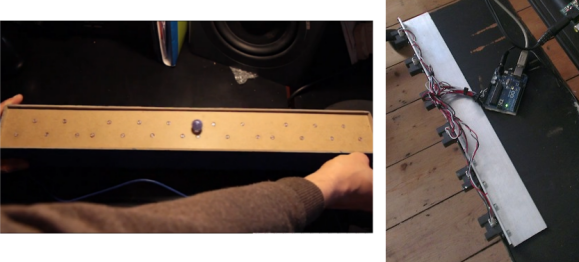
This pair of musical keyboard hacks both use light to detect inputs. The pair of tips came in on the same day, which sparks talk of consipiracy theory here at Hackaday. Something in the weather must influence what types of projects people take on because we frequently see trends like this one. Video of both projects is embedded after the jump.
On the left is a light-sensitive keyboard which [Kaziem] is showing off. In this image he’s rolling a marble around on the surface. As it passes over the Cadmium Sulfide sensors (which are arranged in the pattern of white and black keys from a piano keyboard) the instrument plays pitches based on the changing light levels. [Thanks Michael via Make]
To the right is [Lex's] proximity sensor keyboard. It uses a half-dozen Infrared proximity sensor which pick up reflected light. He calls it a ‘quantised theremin’ and after seeing it in action we understand why. The overclocked Raspberry Pi playing the tones reacts differently based on distance from the keyboard itself, and hand alignment with the different sensors.


sorry if im getting boring. i promise i will get onto a rock crawler rover thing once i have got some life out of the polargraph...


