Arduino SRL (formerly known as Smart Projects SRL) sent out a letter to its distribution partners yesterday. If you’ve been following along with the Arduino vs Arduino story (we’ve previously published two installments), the content isn’t entirely surprising; it’s essentially a tactical move to reassure their distribution channels that Arduino SRL is the “One True Arduino”. That said, there’s still some new tidbits buried inside. You can skip down to read the full text below, but here’s our take.
The Business History of Arduino
 A quick summary of the legal situation. Arduino LLC was formed in April 2008 by the original five founders to provide a corporate entity behind the Arduino project. Smart Projects SRL, controlled by one of the founders, was tasked with the actual production of the boards. It turns out that Smart Projects had trademarked the Arduino brand in Italy in December 2008, before Arduino LLC got around to filing in April 2009 in the USA. But everyone was friends, right? As long as the licensing fees keep flowing.
Fast-forward to September 2014, when Arduino LLC filed a lawsuit in Italy against Smart Projects claiming that they had infringed LLC’s trademark and that they had recently stopped paying licensing fees on their use of the Arduino name. In October, Smart Projects filed with the USPTO to revoke Arduino LLC’s trademark. In late 2014, Smart Projects changed its company name to Arduino SRL (a “Società a responsabilità limitata” is one form of Italian limited-liability company) and hired a new CEO, [Federico Musto]. Around the same time, Arduino SRL opened up the website arduino.org (different from long-existing arduino.cc) but with nearly identical style. In January 2015, Arduino LLC filed a lawsuit in the US, claiming their right on the Arduino name.
The Gist of it
In short, Arduino LLC has been working on developing the Arduino platform, software, and community while Smart Projects / Arduino SRL was the major official producer of the hardware for most boards. Both are claiming to “be” Arduino, and going after each other in court. So it’s not strange that Arduino SRL would like to try to keep its hold on the distribution channels. Which brings us to their letter to distributors.
March 27 Letter
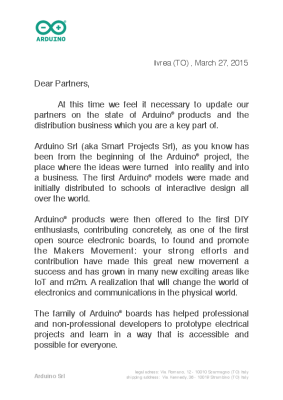 A good portion of the letter reads to be a very carefully worded defense of why Arduino SRL is the true Arduino:
“Arduino Srl (aka Smart Projects Srl), as you know has been from the beginning of the Arduino® project, the place where the ideas were turned into reality and into a business.”
This is of course strictly true — Smart Projects was certainly the largest manufacturer of Arduino boards. But it sidesteps the issue at hand in the trademark suits: whether they were simply a licensed producer of the boards or whether they’re “Arduino”.
Similarly, in the questions section of the letter, they ask if there are actually two “Arduino” product manufacturers, and answer “not really”. Of course, that’s true. Arduino LLC doesn’t manufacture boards, but exists to license their trademark out to fund development.
The only real news in the letter is that Arduino SRL is replacing its old distribution and logistics company, Magyc Now, with a new one named CC Logistics. Both Magyc and CC Logistics are named as defendants in the US lawsuit filed by Arduino LLC, so it’s unlikely that this change is due to legal fallout.
What this Means
In conclusion, Arduino SRL’s letter to its distributors seems to essentially follow the line of reasoning in their trademark lawsuit in the US against Arduino LLC: since Arduino SRL is doing the manufacturing and using the Arduino name, they’re the true Arduino. Whether or not this will stand up in court, or whether Arduino LLC can make its case that SRL was simply a licensed manufacturer, remains to be seen.
We’ve embedded the contents of the letter after the break. You can also download the original PDF.
Ivrea (TO) , March 27, 2015
Dear Partners,
At this time we feel it necessary to update our partners on the state of Arduino® products and the distribution business which you are a key part of.
Arduino Srl (aka Smart Projects Srl), as you know has been from the beginning of the Arduino® project, the place where the ideas were turned into reality and into a business. The first Arduino® models were made and initially distributed to schools of interactive design all over the world.
Arduino® products were then offered to the first DIY enthusiasts, contributing concretely, as one of the first open source electronic boards, to found and promote the Makers Movement: your strong efforts and contribution have made this great new movement a success and has grown in many new exciting areas like IoT and m2m. A realization that will change the world of electronics and communications in the physical world.
The family of Arduino® boards has helped professional and non-professional developers to prototype electrical projects and learn in a way that is accessible and possible for everyone.
Currently, Arduino Srl continues to be the only designer and manufacturer of original Arduino® products.
Open Source is the environment we want for millions of designers, engineers, makers and Arduino® lovers around the world. We hope to continue to help children and newbies learn about electrical engineering and computer programming, in order to develop and grow their ideas for today and tomorrow.
This fantastic story and these ideals will continue on the new website Arduino.org, which has been developed to ensure we stay true to the vision of the beginning of Arduino® and Arduino Srl and our distribution of these cool products.
Beginning in 2015 new changes have been put into place to ensure that our companies can continue to grow with the popularity of the Arduino® product line. The production of these high quality products continue to be done in Europe and specifically Italy which has been very successful.
Our distribution and logistics are going through a change for a couple of reasons, to help with faster deliveries and lower transport costs, we have a new company structure cc logistics that have offices and warehouses in three continents, EMEA Cham Switzerland, North American Boston Massachusetts and APAC Honk Kong and Taipei.
Additionally lots of work are being completed to get inventories in line with demand. New personnel are being added to in many areas for response to your buying needs but also in the sales and support areas to ensure we are creating demand for Arduino products and for our distribution channel. These new sales people from time to time will be in contact to forge closer working relationships.
To help inform our partners of some questions recently raised in the press and other areas:
Q: Are there two “Arduino® ” branded products manufacturers?
A: Not really, the only company that ever designed and manufactured the “Arduino® ” branded product is Arduino Srl (formerly Smart Projects Srl). Others, for a number of reasons, have created in USA and Switzerland “Arduino” named companies. Some have been involved in completing contracts for web site development and PR (namely Arduino SA – Switzerland take cares of the web site arduino.cc has been one of those). Clearly this has been the place to go for open source info in the past, but we will make arduino.org your new comprehensive location for this info and other valuable resources and services.
Q: I have heard in the press that there is a disagreement going on amongst initial founders of the open source project which inspired the Arduino® business.
A: Yes, there is a disagreement between the initial founders of the open source project (which have never been shareholders of Arduino Srl) and the actual management of Arduino Srl. We are confident that these issues will come to a conclusion shortly. Frankly some of these issues are complex because related to the validity of the registration of the trademark “Arduino® ” in some areas of the world and cannot be summarized in few words. In this respect just bear in mind that Arduino Srl (aka Smart Projects Srl) has been the sole manufacturer of the original “Arduino® ” branded products, selling and distributing them world wide for 10 years.
Q: Will cc logistics replace Magyc as distribution points ?
A: That is the big plan but exceptions may happen due to the nature of doing a worldwide distribution. cc logistics will help our makers to produce and distribute their projects in a world wide arena.
Q: Will Arduino make new products and new software?
A: Yes, new software and new products are the life blood of Arduino® . Recently new products, Arduino® Zero Pro, Arduino® , 9 Axes shield partnership with Bosch and many more are coming.
Q: Will Arduino forge technology partnership?
A: Arduino is in the forefront of new exciting fields like IoT and m2m which is an exciting direction of the type of prototyping done with present day Arduino® products. We are in constant contact with major companies exploring these exciting fields. The Arduino YUN with its wifi capabilities and open source processing has ignited lots of new opportunities.
Q: Arduino EMEA, APAC and NA Distributors Sales Meeting
A: We are planning and will notify you of the details of the first global annual meeting
Q: Is there a New Management structure in Arduino ?
A: As it happens in every company that grows as fast as the Arduino environment, additional expertises and capabilities are needed to help steer the company in the correct direction. Federico Musto is the new CEO of Arduino group and he has a strong background in the open source business.
You are Arduino and we are honored and privileged to work with you – Arduino isn’t the company, nor the board, nor the software nor the founders – the Arduino is YOU – You made Arduino® what it is today and you’ll continue to make it what it will be in the future.
Thank you in advance for your help and support
Arduino team
Arduino Srl
legal adress: Via Romano, 12 – 10010 Scarmagno (TO) Italy
shipping address: Via Kennedy, 36 – 10019 Strambino (TO) Italy
Filed under:
Arduino Hacks,
Featured,
news,
slider