Posts with «arduino» label

Tiny Hotplate Isn’t Overkill

When working on a new project, it’s common to let feature creep set in and bloat the project. Or to over-design a project well beyond what it would need to accomplish its task. Over at Black Mesa Labs, their problem wasn’t with one of their projects, it was with one of their tools: their hot plate. For smaller projects, an 800W hot plate was wasteful in many ways: energy, space, and safety. Since a lot of their reflow solder jobs are on boards that are one square inch, they set out to solve this problem with a tiny hot plate.

The new hot plate is perfectly sized for the job. Including control circuitry, it’s around the size of a credit card. The hot plate is powered from a small surplus 20V 5A laptop power supply and does a nice 4 minute reflow profile and cools off completely in under a minute. Compared to their full-sized hot plate, this is approximately 29 minutes faster, not to mention the smaller workspace footprint that this provides. The entire setup cost about $20 from the heating element to the transistors and small circuit board, and assuming that you have an Arduino Pro sitting in your junk bin.

It’s a good idea to have a reflow oven or a hot plate at your disposal, especially if you plan to do any surface mount work. There are lots of options available, from re-purposed toaster ovens to other custom hot plates of a more standard size. Overkill isn’t always a bad thing!


Filed under: tool hacks
Hack a Day 01 Apr 16:31

PJON, Fancy One Wire Arduino Communications Protocol For Home Automation

PJON, pronounced like the iridescent sky rats found in every city, is a cool one wire protocol designed by [gioblu].

[gioblu] wasn’t impressed with the complications of I2C. He thought one-wire was too proprietary, too complicated, and its Arduino implementations did not impress. What he really wanted was a protocol that could deal with a ton of noise and a weak signal in his home automation project with the smallest amount of wiring possible.

That’s where is his, “Padded Jittering Operative Network,” comes in. It can support up to 255 Arduinos on one bus and its error handling is apparently good enough that you can hold an Arudino in one hand and see the signals transmitted through your body on the other. The fact that a ground and a signal wire is all you need to run a bus supporting 255 devices and they’ll play nice is pretty cool, even if the bandwidth isn’t the most extreme.

Aside from the cool of DIY protocols. We really enjoyed reading the wiki describing it. Some of the proposed uses was running your home automation through your ducting or water pipes (which should be possible if you’re really good at isolating your grounds). Either way, the protocol is neat and looks fun to use. Or check out PJON_ASK if you want to do away with that pesky single wire.


Filed under: Arduino Hacks
Hack a Day 31 Mar 21:00

Discover and follow our new Instagram channel


Do you have an Instagram account? We’re launching  today the official profile of Arduino.cc and  inviting you to follow us!

After Facebook, Twitter and G+, now we are using Instagram to show all of you our events, products, behind the scene moments and getting  in touch with all the open source community.

Use hashtags like #Arduinocc, #ArduinoD16, #Genuino and make sure to follow us, and tag us in your pics using @Arduino.cc if you are interested we know about your projects, and share them on all other channels.

More news and goodies to come! Stay tuned.


Moodbox makes you play with emotions for perfect ambience

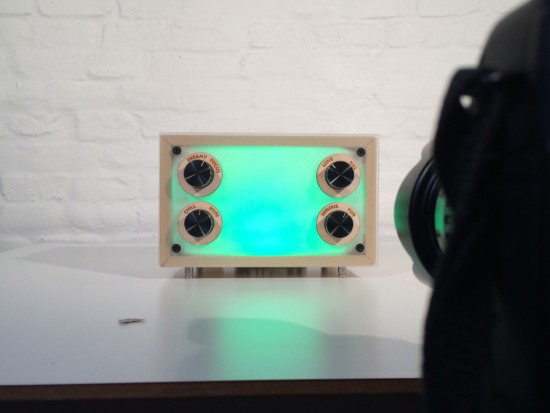
Moodbox is a musical device created by a group of students (Iskra Uscumlic, Cyrus Kamath, Luca Mustacchi, Dario Loerke) to explore how we might set the mood in a studio space through music. They created it using Genuino Uno during the Interaction Design Programme at CIID with the help of Massimo Banzi and Dario Buzzini.

Moodbox enables you to set the perfect ambience and trigger different emotions:

Taking inspiration from the classic bar jukebox and its ability to influence the mood, we recognized that music and the atmosphere created by it are inextricably linked. When selecting a song to play in a social setting there is always a sense of negotiation involved. The person choosing has to consider the environment, the people around them, the current mood and that they would like to create.

With this in mind we set out to explore new opportunities for interaction in the communal space, using the environment of the studio as the setting.


As you can see in the video above, you can adjust the vibe of any space using four scales of emotions – from love to kill, serious to fun, chill to hype and dreamy to focus:

Emotions may be combined and fine-tuned with retro-style rotary knobs to dial-in feelings and get the perfect song choice. Like a jukebox, songs are queued once the selection is made. To provide visual feedback, lights also respond to the changes in mood, enhancing the overall influence on the space.

Moodbox connects to your iTunes account, with the rotary knobs sending information via a Genuino Uno and JavaScript to sort through a playlist. Our custom emotional algorithm then picks the right song and triggers mood lighting depending on the selection.

Dirt-Cheap USB Arduino Hack From the Past

Mass production is a wonderful thing. Prices fall, and hobby hackers get cheap gear. The mind then wanders towards what can be done with it. So it’s little wonder that someone like [Aaron Christophel] would try to repurpose those sub-$3 AVR programmers that are all over eBay (translated poorly out of German here, but demonstrated in the video embedded below).

[Aaron] didn’t have to do much, really. The only trick is that you’ll first need to re-flash the existing ISP firmware with one that lets you upload code to the device itself over USB. If you don’t have an Arduino on hand to re-flash, buy at least two of the cheap programmers — one to program the other ones. Once you’ve done that, you have essentially an Arduino with limited pinout and two onboard LEDs, but in a nice small form-factor and with built-in USB. [Aaron] even provides an Arduino boards.txt file to make it all work smoothly within the IDE.

All of this is done with the very friendly V-USB firmware, which lets you build up low-speed USB devices on the cheap and easy. This would be perfect for making a couple-key keyboard, a USB-USART or USB-SPI bridge, or even a volume control knob — one ADC pin seems to be broken out. With some delicate soldering, the rest of the pins could be brought out and you could do something really useful with this little dongle.

It’s hard to imagine even sourcing all of the parts for the cost of having one of these shipped to your door, and this is a fairly old hack, dating from 2013. We’re a little surprised that we haven’t seen more projects with people repurposing these cheap ISP programmers. Have you made anything with one of these? Let us know.


Filed under: Arduino Hacks
Hack a Day 29 Mar 09:01

What’s Tiny, Has Eight Legs, and Acts Like an Arduino?

Back in the late 1970s, comedian Steve Martin had a bit about “Let’s get small!” Over on Hackaday.io, [Daniel Grießhaber], has taken that call to heart. He’s been working on DIL-Duino, a minuscule form factor Arduino in an 8-pin DIP format.

Built with an ATtiny85, the board has an area of just under 75 square millimeters (less than 8 mm x 10 mm). If you add the USB port, it still comes in at just over 144 square millimeters. [Daniel] found other small Arduino boards like the Olimexino-85s and the Nanite are not as small as his design.

The module has a QFN CPU and castellated holes around the perimeter for mounting. With pin headers, this would easily fit into a breadboard (as [Daniel] shows) or you could mount it directly to another board like a surface mount device. In fact, that’s the reason for using castellated holes: you can inspect that the solder joint at the mating SMD pad is good. You sometimes hear the technique called half-vias or leadless chip carrier.

If you note, [Daniel] used an oversized board with full holes around the perimeter and then had the board maker score the board, so the holes are cut in half. This is a better technique than trying to drill half holes on the board edge, which is difficult to do.

Naturally, this isn’t the first tiny Arduino we’ve seen. If you are an ARM fan, there’s some little bitty cards for it, too, although not quite as small as DIL-Duino.


Filed under: Arduino Hacks

PWM on High Current(amp) Actuators

I'm trying to move up into the category I originally got into robotics for in the first place: bigger buddies!

I have a Raspberry Pi I'd like to use to control some linear actuators, which are 12v and lift about 225lbs. I'm unaware of their amp usage: a search for similar rated ones said ~4-5A. They were purchased from an online auto parts place, so it's unlikely they'd know.

read more

Pipe in (Robot) Hand

How do you make a robot hand? If you are [Robimek], you start with some plastic spiral tubing, some servo motors, and some fishing line. Oh, and you also need an old glove.

The spiral tubing (or pipe, if you prefer) is cut in a hand-like shape and fused together with adhesive. The knuckle joints are cut out to allow the tubing to flex at that point. The fishing line connects the fingertips to the servo motors.

The project uses an Arduino to drive the servos, although you could do the job with any microcontroller. Winding up the fishing line contracts the associated finger. Reeling it out lets the springy plastic pipe pull back to its original position.The glove covers the pipes and adds a realistic look to the hand.

Granted, this is probably more practical as a display piece than a working hand. We’d like to put it in our next Halloween project. We’ve seen some simple hand builds before, but the glove is a nice touch. For some reason, many of our robot hand projects like to make rude gestures. You can see a video of [Robimek]’s hand working below.


Filed under: Arduino Hacks, robots hacks

Pipe in (Robot) Hand

How do you make a robot hand? If you are [Robimek], you start with some plastic spiral tubing, some servo motors, and some fishing line. Oh, and you also need an old glove.

The spiral tubing (or pipe, if you prefer) is cut in a hand-like shape and fused together with adhesive. The knuckle joints are cut out to allow the tubing to flex at that point. The fishing line connects the fingertips to the servo motors.

The project uses an Arduino to drive the servos, although you could do the job with any microcontroller. Winding up the fishing line contracts the associated finger. Reeling it out lets the springy plastic pipe pull back to its original position.The glove covers the pipes and adds a realistic look to the hand.

Granted, this is probably more practical as a display piece than a working hand. We’d like to put it in our next Halloween project. We’ve seen some simple hand builds before, but the glove is a nice touch. For some reason, many of our robot hand projects like to make rude gestures. You can see a video of [Robimek]’s hand working below.


Filed under: Arduino Hacks, robots hacks

Father Creates an Interactive Toy that Hones Fine Motor Skills for Son with Autism

Abu Zubair developed a toy to help his son with fine motor skills. Now this toy is helping many more children with autism.

Read more on MAKE

The post Father Creates an Interactive Toy that Hones Fine Motor Skills for Son with Autism appeared first on Make: DIY Projects and Ideas for Makers.