Posts with «arduino» label

Cartesio – low cost cartesian plotter robot

Primary image

What does it do?

Plotter robot arm

Recently the famous site evilmadscientist introduced the new art robot called Axidraw.I saw the robot in action and it is very similar to the robot I built in the 2015, called Cartesio, a 3d printed cartesian robot.

Cost to build

$60, 00

Embedded video

Finished project

Complete

Number

Time to build

Type

URL to more information

Weight

read more

LCD display for Arduino how hard can it be ?

Yeah so i thought i would have a play with an LCD display.

How hard can it be I foolishly thought.

in my ignorance I assumed they were all pretty much the same and spoke the same language.

My problem came when I wanted to talk with it on the UNO.

All the libraries are different.

Not being a good programer I tend to womble a bit of code from here and there,

and go off and do the fun stuff of building it,

and eventually get it to do what I want.

This becomes a bit of problem when the sketches are

made for different hardware.

read more

Homebrew Multimode Digital Voice Modem

There’s an old saying that the nice thing about standards is there are so many of them. For digital voice modes, hams have choices of D-Star, DMR, System Fusion, and others. An open source project, the Multimode Digital Voice Modem (MMDVM), allows you to use multiple modes with one set of hardware.

There are some kits available, but [flo_0_] couldn’t wait for his order to arrive. So he built his own version without using a PCB. Since it is a relatively complex circuit for perf board, [flo_0_] used Blackboard to plan the build before heating up a soldering iron. You can see the MMDVM in action below.

The build includes an Arduino, of course, and the neat perf board wiring makes for a good-looking project. We’ve covered digital voice that uses PCs before and even some digital ham modes that use an Arduino. Or check out the MMDVM project for more info.


Filed under: Arduino Hacks, radio hacks

Internet Connected Trash Can Robot That Talks

Primary image

What does it do?

This IOT project started out serious, then I kept thinking of funny things I wanted to make it do. The only way I could think to present it was a corny infomercial style video. It talks, sends you an email when its full, and I made an accompanying Android App for more control over its functionality. 

Full Instructions:

http://www.instructables.com/id/OpenTrashCan-a-Smart-Internet-Connected-Trash-Can-/

Code and Android App can be found on: www.WireBeings.com

You need: A cheap trash can (this one is from Target)

Computer Speakers

Cost to build

$80, 00

Embedded video

Finished project

Complete

Number

Time to build

2 hours

Type

URL to more information

Weight

read more

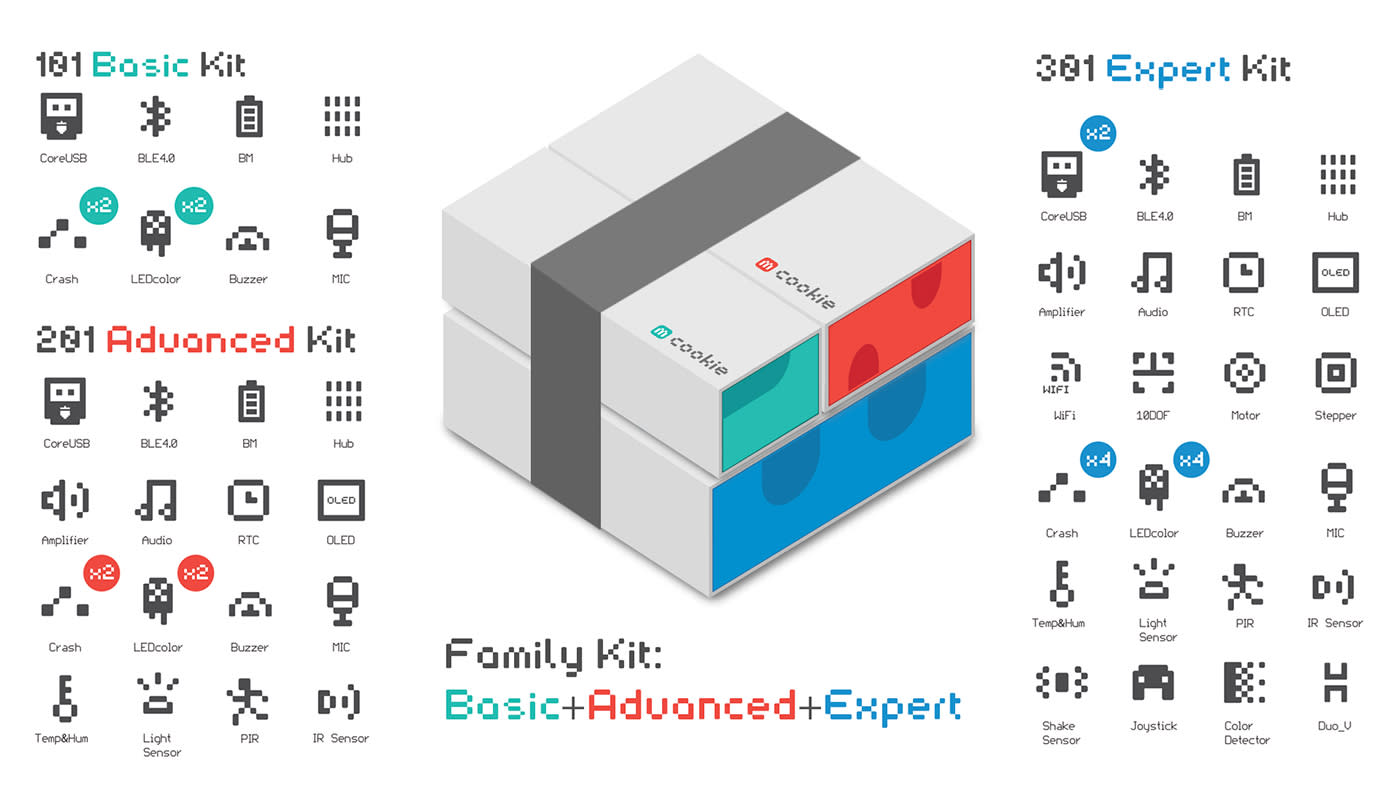
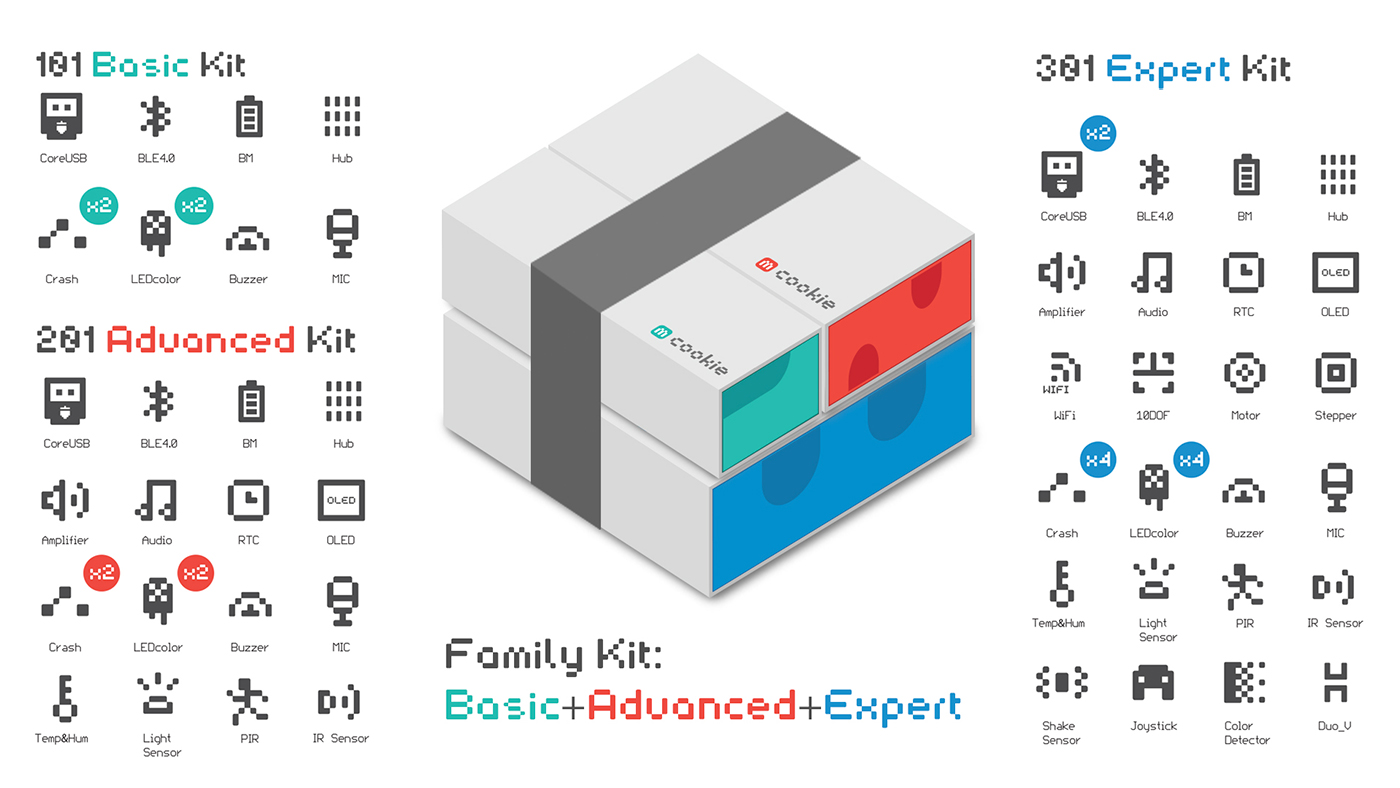
Engadget giveaway: Win an mCookie Family Kit courtesy of Microduino!

Getting your STEM skills up to speed is now easier than ever with Microduino's mCookie. These Arduino-compatible electronics kits make building mini machines a snap -- literally -- with magnetic connectors and interlocking pins that match up with LEGO blocks. The mCookie family of DIY modules, sensors and accessories was Kickstarted back in 2015 and began shipping to consumers at the end of the year. Now anyone can pick up one of the various kits (Basic, Advanced or Expert) and assemble projects like a music box, voice-activated camera, paw-waving fortune cat and more. Microduino also offers additional components to expand the possibilities to keep pace with your imagination. This week, one lucky reader will win a Family Kit (including all three mCookie sets) to launch their smart-machine-making career. Just head down to the Rafflecopter widget below for up to three chances at winning.

Winner: Congratulations to Robin B. of Chico, CA!

Engadget giveaway: Win an mCookie Family Kit courtesy of Microduino!

Getting your STEM skills up to speed is now easier than ever with Microduino's mCookie. These Arduino-compatible electronics kits make building mini machines a snap -- literally -- with magnetic connectors and interlocking pins that match up with LEGO blocks. The mCookie family of DIY modules, sensors and accessories was Kickstarted back in 2015 and began shipping to consumers at the end of the year. Now anyone can pick up one of the various kits (Basic, Advanced or Expert) and assemble projects like a music box, voice-activated camera, paw-waving fortune cat and more. Microduino also offers additional components to expand the possibilities to keep pace with your imagination. This week, one lucky reader will win a Family Kit (including all three mCookie sets) to launch your smart-machine-making career. Just head down to the Rafflecopter widget below for up to three chances at winning.

Engadget giveaway: Win an mCookie Family Kit courtesy of Microduino!

Getting your STEM skills up to speed is now easier than ever with Microduino's mCookie. These Arduino-compatible electronics kits make building mini machines a snap -- literally -- with magnetic connectors and interlocking pins that match up with LEGO blocks. The mCookie family of DIY modules, sensors and accessories was Kickstarted back in 2015 and began shipping to consumers at the end of the year. Now anyone can pick up one of the various kits (Basic, Advanced or Expert) and assemble projects like a music box, voice-activated camera, paw-waving fortune cat and more. Microduino also offers additional components to expand the possibilities to keep pace with your imagination. This week, one lucky reader will win a Family Kit (including all three mCookie sets) to launch their smart-machine-making career. Just head down to the Rafflecopter widget below for up to three chances at winning.

Winner: Congratulations to Robin B. of Chico, CA!

The Infrared Theremin

The traditional theremin is more or less an audio oscillator with two metal rods. Using proximity sensing, one rod controls the pitch of the oscillator and the other controls the volume. [Teodor Costachiou] apparently asked himself the excellent question: Why does the proximity sensor have to use capacitance? The result is an Arduino-based theremin that uses IR sensors to determine hand position.

[Teodor] used a particular type of Arduino–the Flip and Click–because he wanted to use Click boards for the IR sensors and also to generate sound via an MP3 board based around a VS1053. The trick is that the VS1053 has a realtime MIDI mode, and that’s how this Theremin makes it tones.

Of course, a real theremin is distinctly analog. A tiny change in hand position creates a small change in the output. With digital sensors and sound generation, the output is more in discrete steps, but according to [Teodor], the effect isn’t bad. We were hoping for a video (or, at least, an audio clip) but [Teodor] pleaded that he’s not a musician. He did include a video of a real theremin performance with his post, and you can see it below. But that’s a real analog theremin.

If you want to build something more traditional, have a look at Open Theremin. Or, if you want to get your exercise, how about trying a terpsitone. If you do, and can play the theme to The Day the Earth Stood Still, we’d love to see the video. Meanwhile, if you didn’t know the theremin had an espionage connection, you haven’t been staying current on Hackaday posts.


Filed under: Arduino Hacks, musical hacks

Let’s warm up for Maker Faire Rome 4th edition!

Last friday in Rome during the press conference of Maker Faire Rome 4th edition, Riccardo Luna together with Massimo Banzi announced that next October the event is going to become “better, bigger and stronger”.
A new location by Fiera di Roma building will host six pavilions in an area of over 100.000 sq.m. for makers, visitors, conferences, seminars and workshops. The event promoted by the Rome Chamber of Commerce and powered by its Innovation Unit “AssetCamera “ is once more curated by Massimo Banzi, Arduino co-founder, along with Riccardo Luna, Italian Digital Champion.

The topics featured at Maker Faire Rome 2016 are going to be home automation, re-use, drones and robots, 3D printing, digital manufacturing, industry 4.0, IoT – Internet of things, mobility, safety & security, food , fashion, music and especially Food & Nutrition.Together with the Future Food Institute (FFI), trust voted to food and innovation, Maker Faire will focus on the intersection between food and technology and will deepen the relationship between nutrition, health & wellbeing. The “Call 4 Makers” 2016 will open on April 18th and will close on June 5th.

Maker Faire Rome is also looking for amazing project with a “Call for BigBang Projects”  open until March 31st.  The call will consider large-scale, entertaining, high impact, interactive projects. Installations and performances proposals will be welcome, too. The goal is to create the most immersive scenery one could dream of for a Faire of such character.

In the meanwhile take a look at the European Maker Week, an entire week of makers’ events, from May 30th to June 5th,  promoted by The European Commission and implemented by Maker Faire Rome in collaboration with Startup Europe, the event:

aims to draw European citizens to the “Maker world” thanks to the aid of Fablabs, Makerspaces, Hackerspaces and the hardware startups environment. The goals of European Maker Week are two folds: create awareness about the importance of the maker culture to foster an education of creativity and innovation in all schools across Europe; build bridges between local authorities and media and the main players of their own local makers ecosystems. It is of particularly importance to reach out to new players (e.g. Schools) who have never organized a maker event before.


Strap a Robot to Your Face! Your Expressions Are Now Controlled by Technology

Turn an old headlamp into a power assist for your eyebrows. Use an infrared remote control to raise, lower, waggle, and adjust.

Read more on MAKE

The post Strap a Robot to Your Face! Your Expressions Are Now Controlled by Technology appeared first on Make: DIY Projects and Ideas for Makers.