Posts with «arduino» label

Arduino powers this Matrix-themed mortarboard

With graduation season upon us, Makers are coming up with creative ways to decorate their mortarboards. One thing is for certain, Fahad Mirza will stand out in the crowd of his classmates with a movie-themed cap that would even impress Keanu Reeves himself. Inspired by The Matrix, the headpiece is equipped with an Arduino Pro Mini, an Adafruit NeoPixel ring for its green LED effects, and a 3.7V lithium-ion battery for power. The electronics are all hidden inside the cap which aptly reads, “Everything that has a beginning has an end.”

Take a Walk on the Disconnected Side with These Notification-Silencing Shoes

You've heard of "dancing" shoes, but have you heard of "disabling your contacts and notifications" shoes?

Read more on MAKE

The post Take a Walk on the Disconnected Side with These Notification-Silencing Shoes appeared first on Make: DIY Projects and Ideas for Makers.

Nerf-firing Rover

Primary image

What does it do?

Navigate via RC control, fires Nerf gun, supports autonomous control via Raspberry Pi

This rover makes use of the following:

CPPM RC radio input from openTx RC radio

Arduino Nano to handle communcations from RC, Raspberry Pi via USB (not attached  yet), I/O to servos via i2c, I/O to/from Roboclaw motor controller via serial (gets velocity from encoders on motors), and output to various DC-driven devices (headlight, gripper).

5.8ghz video transmitter for FPV roving

Cost to build

$600, 00

Embedded video

Finished project

Number

Time to build

50 hours

Type

wheels

URL to more information

Weight

read more

Turning a toy piano into a standalone digital synthesizer

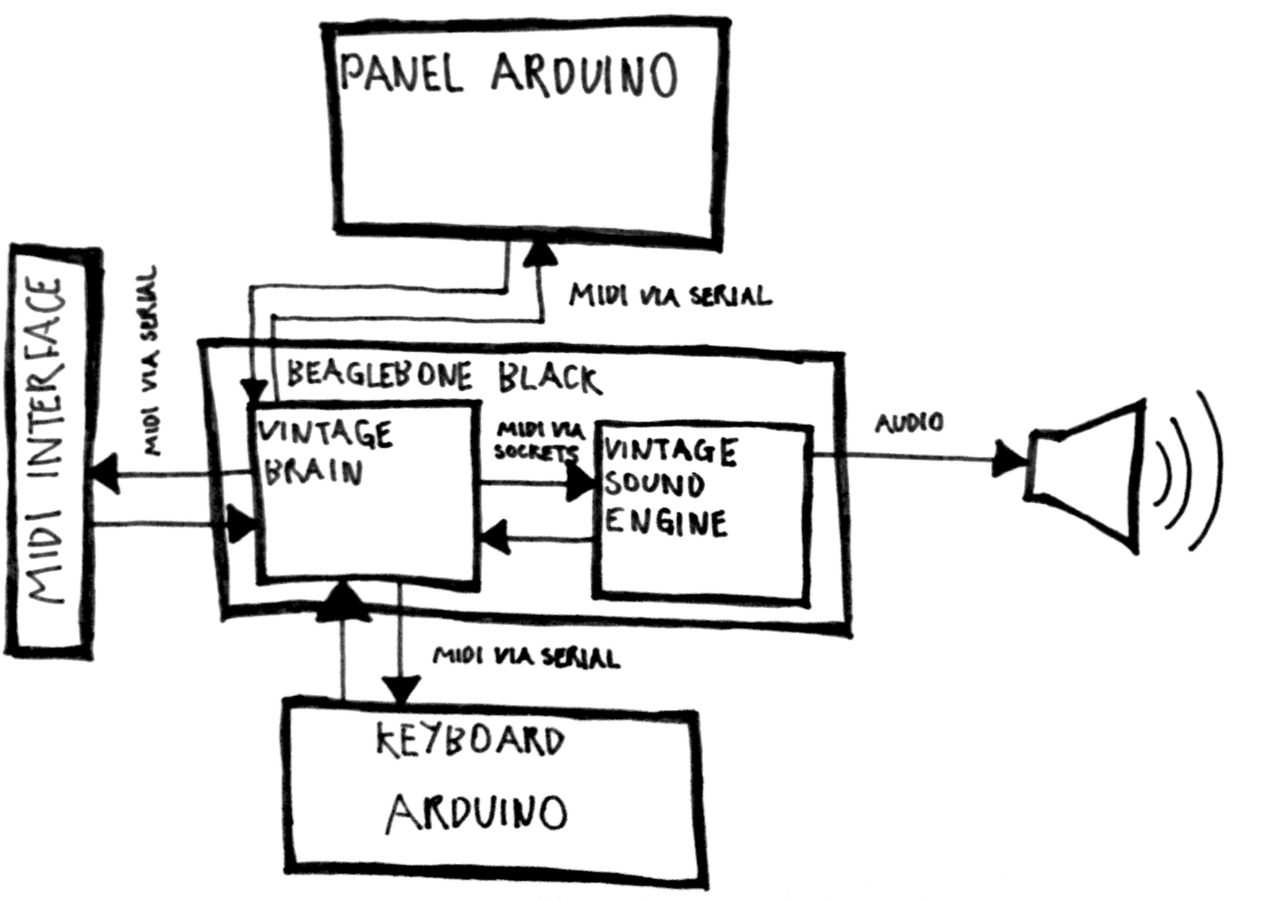
Electronic musical instruments are fun for Makers. With some cheap tools, know-how and passion, anyone can become a real synth geek. Just ask software developer Liam Lacey, who also happens to be a sound coder and freelance hacker. He recently won element14’s Open Source Music Tech design challenge for his Vintage Toy Synthesizer project — it’s an acoustic wooden toy piano converted into an open-source, standalone polyphonic digital synthesizer running on a BeagleBone Black and an Arduino Pro Mini.

Playing an instrument is about a lot more than just the sound you create – the way you play it; the physical feedback; and the overall feel and aesthetics of the instrument also play a big role in the overall experience, with these elements also helping to nurture inspiration, and can even affect your perception of the sound created.

Lacey developed the voice engine using the C++ audio DSP library Maximilian, and the keyboard mechanism uses homemade pressure sensors made out of Velostat. The instrument has 18 keys, with players able to also alter scales using the knobs on top of the mini piano’s lid.

Other dials are used to toggle dedicated waveform oscillators, various filters and onboard distortion effects, and there’s even vintage parameters for replicating old or broken analog synth voices. What’s neat is that the converted toy can also act as a MIDI controller to send velocity-sensitive note messages and polyphonic aftertouch to Logic Pro, Ableton Live and various music software programs.

Here’s a diagram of the software architecture of the synth:

You can read more about the hack here, as well as listen to some quick and rough sound/patch demos:

The project took three and a half months to bring to fruition, and let us just say, the final result is quite impressive! Check out the video below to learn more about  its specs and explore the complete documentation on GitHub.


FR4 Machine Shield Is A CNC Milling Machine From FR4 PCB

The people behind the PocketNC heard you like CNC PCB mills, so they milled you a PCB mill out of PCB. They announced their surprising new open source hardware product, a pocket sized 3-axis CNC machine entirely made out of FR4 PCB material, aptly named “FR4 Machine Shield”, at this year’s Bay Area Maker Faire.

We know the concept from quadcopters, little robots, and generally things that are small enough to make use of their PCBs as a structural component. But an entire CNC machine, soldered together from a few dozen PCBs certainly takes it to the next level.

There is no doubt that 2mm thick fiber reinforced epoxy can be surprisingly rigid, although the Achilles heel of this method might be the solder joints. However, it looks like all load bearing, mechanical connections of the machine are supported by tightly interlocking “dovetail”-joints, which may help protecting all the solder connections from the strain hardening effects of continuous stress and spindle vibrations.

As you might expect, most of the wiring is embedded into the FR4 frame construction, and to squeeze the maximum value out of the PCB material, the motor driver boards interface via card edge connectors with the (currently Arduino based) controller board. In addition to the milling head, which features a brushless DC motor and a tool coupler, the team wants to develop heads for circuit printing, microscopy, pneumatic pick and place, hot air reflow, and 3D printing.

With all those cost-driven design choices, from the one-step manufacturing process of the frame and wiring to the dismissal of screws and nuts from the frame assembly, the “FR4 Machine Shield” could indeed become one of the cheapest CNC machine kits on the market. The team targets an introduction price of $400 during a Kickstarter campaign in June 2016. Can they deliver? [Gerrit] check Pocket NC out at the Faire and ended up raving about how they run their business.

Enjoy their teaser video below!


Filed under: cnc hacks

How Does a Buck Converter Work Anyway?

[Great Scott] should win an award for quickest explanation of a buck converter. Clocking in at five and a half minutes, the video clearly shows the operating principles behind the device.

It starts off with the question, what should you do if you want to drop a voltage? Many of us know that we can dim and brighten an LED using the PWM on an Arduino, but a closer inspection with an oscilloscope still shows 5V peaks that would be dangerous to a 3.3V circuit. He then adds an inductor and diode, this keeps the current from dropping too fast, but the PWM just isn’t switching fast enough to keep the coil energized.

A small modification to the Arduino’s code, and the PWM frequency is now in the kHz range. The voltage looks pretty good on the oscilloscope, but a filter cap gets it to look nice and smooth. Lastly, he shows how when the load changes the voltage out looks different. To fix this a voltage divider feeds back the information to the Arduino, letting it change the PWM duty to match the load.

In the last minute of the video he shows how to hook up off-the-shelf switching regulators, whose support components are now completely demystified as the basic principles are understood. Video after the break.


Filed under: classic hacks, parts

Control the Real World with an Arduino-Enabled Minecraft Mod

Minecraft modding has become almost as popular as the block-based game itself, with tons of editors and tools available to create new kinds of blocks, mobs, and weapons. And now, with this mod framework that can talk to an Arduino, modders can build blocks that break out of the Minecraft world to control the real world.

While turning on a light from Minecraft is not exactly new, the way that MCreator for Arduino goes about it is pretty neat. MCreator is a no-code framework for building Minecraft mods, which allows modders to build new game capabilities with a drag and drop interface. The MCreator Arduino toolkit allows modders to build custom Minecraft blocks that can respond to in-game events and communicate with an Arduino over USB. Whatever an Arduino can do – light an LED, sense a button press – can be brought into the game. It’s all open-source and free for non-commercial use, which is perfect for the upcoming STEM-based summer camp season. We can think of some great projects that would really jazz up young hackers when presented through a Minecraft interface.


Filed under: Arduino Hacks, misc hacks

Control your DIY quadcopter with one hand

Back in 2014, Josef Holmner built his own DIY quadcopter with a flight time of 30 minutes. Impressively, he also developed a wearable controller that enabled him to maneuver his device through the air using just one hand.

As you can see in the video below, pitch and roll are dictated by the angle of his hand, yaw is handled by two push buttons in his palm, and throttle is achieved through the bending of his index finger.

To get started, Holmner needed a transmitter and receiver, an Arduino Nano, a digital potentiometer, a flex sensor, a pair of push buttons, an IMU, and a glove, of course. The Maker had torn apart the transmitter, replaced the regular potentiometer with a digital one that could be controlled by the Arduino. After taking out the electronics from its original enclosure, he housed them inside a 3D-printed box, and reused the old battery holder by gluing it to the bottom of the case. Velcro straps are used to keep it around his forearm.

The flex sensor was sewn to the index finger, while the buttons were placed in the palm and the IMU set on the back of the hand. He also made a connector between the glove and the box, and added four LEDs that illuminate to show the angle of the glove.

Holmner has made the Arduino code and schematics available online. Be sure to see it in action!

Morse Code: Paris in the Mint Box

[Rob Bailey] likes to build things and he likes ham radio. We are guessing he likes mints too since he’s been known to jam things into Altoids tins. He had been thinking about building a code practice oscillator in a Altoids Smalls tin, but wasn’t sure he could squeeze an Arduino Pro Mini in there too. Then he found the TinyLily Mini. The rest is history, as they say, and 1CPO was born.

The TinyLily Mini is a circular-shaped Arduino (see right) about the size of a US dime. most of the pads are arranged around the circle and there is a small header that takes a USB programmer. A small rechargeable battery can run the device for a long time.

If you’ve ever written Morse code software, one challenge is to compute the actual sending speed in words per minute (WPM). If you are doing a serial port, for example, the speed is easy because the sent elements are the same length. However, with Morse code, some things are very short (like an E, for example) and some are much longer (like a zero). In fact, the code tries to reflect the frequency certain letters occur. E is the shortest character and the most common in English texts.

You might think [Samuel Morse] was responsible for this, but his original code was only numbers. The idea is you would get numbers and look them up in a code book. Presumably, some of the codes would have been single letters forming an early coding like ASCII, Baudot, or EBCDIC. [Alfred Vail] expanded the system to include letters and other characters and assigned lengths based on the examination of type cases at the local newspaper. That code also used dots, dashes, and long dashes, but it is almost recognizable as the Morse code in use today.

So [Rob] looked for a way to determine the speed and found that the ARRL uses the timing of the word PARIS as an average word. [Rob] wasn’t quite convinced that was the right way to go, so he compiled a list of the 1,000 most common English words, the 100 largest cities in the word, and a few other groups of words and computed the average element length of the words. PARIS has 50 elements total. The average of [Rob’s] list was 49.489. Pretty close.

If you think Morse code is dead, there are still a number of hams who enjoy it. Also, the US Air Force trains 10 Morse code operators every year. Morse has been used to transfer data over cell phones cheaply, and we’ve seen plenty of larger practice devices.


Filed under: Arduino Hacks

Paraffin Oil and Water Dot Matrix Display

In preparation for Makerfaire, [hwhardsoft] needed to throw together some demos. So they dug deep and produced this unique display.

The display uses two synchronized peristaltic pumps to push water and red paraffin through a tube that switches back over itself in a predictable fashion. As visible in the video after the break, the pumps go at it for a few minutes producing a seemingly random pattern. The pattern coalesces at the end into a short string of text. The text is unfortunately fairly hard to read, even on a contrasting background. Perhaps an application of UV dye could help?

Once the message has been displayed, the water and paraffin drop back into the holding tank as the next message is queued up. The oil and water separate just like expected and a pump at the level of each fluid feeds it back into the system.

We were deeply puzzled at what appeared to be an Arduino mounted on a DIN rail for use in industrial settings, but then discovered that this product is what [hwhardsoft] built the demo to sell. We can see some pretty cool variations on this technique for art displays.


Filed under: Arduino Hacks
Hack a Day 03 Jun 03:00