Posts with «arduino» label

Easy ‘USB-ake’ Oven with Arduino Uno

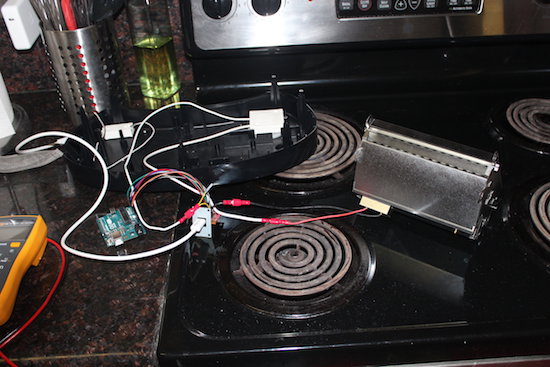
After procuring a new Easy-Bake Oven, engineer Jason Cerundolo decided to convert it to run off of USB. According to his project write-up, “USB-C spec allows for 100 Watts of power to be transferred through the connector, and that is the power rating for the oven, so it should work.”

The biggest modification in this build was dividing the heating element into six segments in order to power it with 20V allowed over USB-C. Finding a suitable charger for this device was also a bit of a challenge, but after 20 minutes, it was able to reach 300° F, producing five strangely-shaped but likely still tasty cookies!

For the electronics, I used my USB-C breakout board with the FUSB302B PHY and an Arduino Uno. I wired I2C plus interrupt between the two. I connected VBUS from the breakout board to VIN on the Arduino to power it. Then, I connected +3V3 from the Arduino to the VDD on the breakout board to power the FUSB302B, as well as +5V to V_pullup on the breakout board. I also connected VBUS to the switch, then to the modified heating element and back to GND. To make the connections easier, I crimped spade connectors onto jumper wires. Finally, I plugged the modified light into pin 13 on the Arduino.

You can check out more about Cerundolo’s project, and find his code on GitHub.

Scratch-built Camera Gimbal for Photographer with Cerebral Palsy

We so often hack for hacking’s sake, undertaking projects as a solitary pursuit simply for the challenge. So it’s nice to see hacking skills going to good use and helping someone out. Such was the case with this low-cost two-axis handheld camera gimbal intended to help a budding photographer with a motion disorder.

When [Tadej Strah] joined his school photography club, a fellow member who happens to have cerebral palsy needed help steadying cameras for clean shots. So rather than shell out a lot of money for a commercial gimbal, [Tadej] decided to build one for his friend. A few scraps of aluminum bar stock were bent into the gimbal frames and camera mount. Two hobby servos take care of the pitch and roll axes, controlled by an Arduino talking to an MPU-6050. Mounted to a handle from an angle grinder with the battery and electronics mounted below, the gimbal looks well-balanced and does a good job of keeping the camera level.

Hats off to [Tadej] for pitching in and solving a real world problem with his skills. We like to see people helping others directly, whether it’s building a gyroscopic spoon for Parkinson’s sufferers or vision enhancement for a nearly blind adventurer.

[via r/arduino]


Filed under: Medical hacks, misc hacks

Who on Earth Needs a Ninja Timer?

John Edgar Park builds a giant 7-segment display timer for a Ninja obstacle course.

Read more on MAKE

The post Who on Earth Needs a Ninja Timer? appeared first on Make: DIY Projects and Ideas for Makers.

These e-tattoos turn your skin into smartphone controls

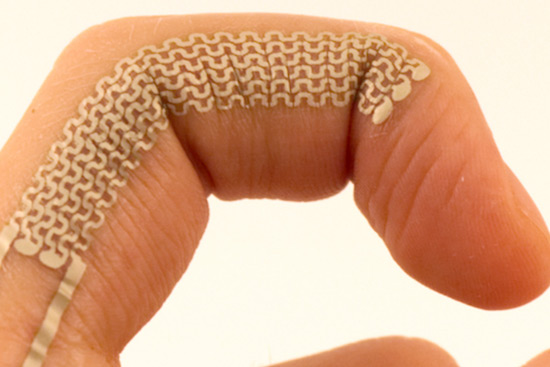
Electronic interfaces have advanced from plugging things in, to keyboards, touchscreens, VR environments, and perhaps soon temporary tattoos. Led by Martin Weigel, researchers at Saarland University in Saarbrücken, Germany have come up with a way to turn your skin blemishes and wrinkles into touch-sensitive controls for devices like smartphones and computers.

“SkinMarks” can be transferred onto the skin using water and last a couple of days before rubbing off. As seen in the video below, these e-tattoos can take the form of buttons, sliders and visual displays, and even sense when a joint is bent. For example, knuckles on a hand made into a fist could act as buttons and then become a slider when the fingers are straightened.

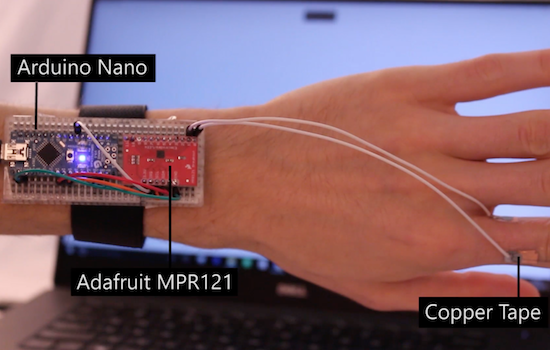
Another type of SkinMark is electroluminescent, meaning that an image printed on your skin could light up to signal a phone call or other important notifications. These tattoos are connected to a wrist-mounted Arduino Nano and an Adafruit MPR121 capacitive touch shield via wires and copper tape; though if the system can be shrunk down even further, this could open up many different possibilities!

You can find more information on this project on New Scientist, or in the team’s published paper here.

Panel Mount Display Solves The Problem Of Drilling Square Holes

[Absolutelyautomation] has a problem with seven-segment displays. Fitting these displays in an enclosure is a pain because you can’t drill perfectly square holes, and you will invariably mess up a few enclosures with overzealous file work. There is a solution to this problem – panel mount meters.

The bezels on these panel mount meters hide the imperfections in the enclosure, and usually don’t require screws. They are, however, dedicated displays, usually for temperature, RPM, or some other measurement.

[Absolutelyautomation] took one of these dedicated panel mount displays and turned it into an all-purpose device. Basically, it’s a panel mount Arduino with three seven-segment displays.

This project is built on perfboard cut down to fit inside the enclosure of a very cheap panel meter found at the usual suppliers. Tucked away underneath this perfboard is an ATmega, a few resistors, and the support parts to make everything go. This panel mount meter can either be a serial slave or as a standalone controller, programmable with the Arduino IDE. It’s cheap, too. You can check out [Absolutelyautomaion]’s video below.


Filed under: Arduino Hacks

The Custom Clicky Shortcut Keypad

You’re not cool unless you have a mechanical keyboard. Case in point: if you were to somehow acquire an identical keyboard to the one I used to type this, it would set you back at least seven hundred dollars. Yes, it’s mechanical (Topre), and yes, I’m cooler than you. Of course, you can’t be as cool as me, but you can build your own mechanical keyboard. [Robin] is, I presume, a pretty cool dude so he built his own keyboard. It’s the amazing shortcut keyboard, and it can be programmed graphically.

The idea for this keyboard came when [Robin] was studying as an engineer. We assume this is code for wearing out the Escape key on AutoCAD, but many other software packages have the same problem. The solution to [Robin]’s problem was a shortcut keypad, a 3 by 4 matrix of Cherry switches that could be programmed for any task.

The design of this keyboard started out as an Adafruit Trellis matrix keypad. This was combined with some software written in Processing that assigned macros to each button. This was a sufficient solution, but the switches in the Adafruit trellis look squishy. These are not the right switches for someone who craves a soft snap under every fingertip. It’s not the keyboard of someone who desires the subtle thickness of laser etched PBT keycaps. The Adafruit keypad doesn’t have the graceful lines of a fully sculpted set of keycaps. Oh my god, it’s doubleshot.

[Robin]’s completed keyboard has gone through a few revisions, but in the end, he settled on PCB-mounted switches and a very clever 3D printed standoff system to hold an Arduino Pro Micro in place. The enclosure, too, is 3D printed, and the end result is a completely custom keyboard that’s perfect for mashing key combos.

You can check out a video of this keyboard in action below.


Filed under: Arduino Hacks, peripherals hacks

A Wordsearch Twist on the Word Clock

We love seeing new takes on existing ideas, and [Danny] certainly took the word clock concept in an unusual direction with his Wordsearch Clock. Instead of lighting up words to spell out the time, [Danny] decided to embrace the fact that the apparent jumble of letters on the clock face resembles a word search puzzle.

In a word search puzzle, words can be found spelled forward or backward with letters lined up horizontally, diagonally, or vertically. All that matters is that the correct letters are in a line and sequentially adjacent to one another. [Danny]’s clock lights up the correct letters and words one after the other, just as if it were solving a word search puzzle for words that just happen to tell the correct time. You can see it in action in the video, embedded below.

[Danny] went the extra mile in the planning phase. After using a word search puzzle generator tool to assist in designing the layout, he wrote a Processing sketch to simulate the clock’s operation. Visually simulating the clock allowed him to make tweaks to the layout, identify edge cases to address, and gain insight into the whole process. If you’re interested in making your own, there is a GitHub repository for the project.

Word Clocks are a great place to see innovation; you can go small like this micro word clock, you can push the concept for all it’s worth by adding heaps of weather data, or just go the extra mile on presentation like this walnut-finish clock.


Filed under: clock hacks
Hack a Day 17 Mar 03:00

Add flair to your turn signals with programmable LEDs

Modding vehicles to do something different and unique has been a pastime of “motorheads” almost since cars began to replace horses. Many modifications involve speed, but some like these fancy turn signals by Shravan Lal, simply supplement the looks of his ride.

An Arduino Nano was used as the brains of this hack in order to control strips of WS2812B LEDs acting as blinkers (similar to those on the new Audi A6) in the video below. In addition to signaling a right or left turn, Lal’s build also has a neat startup animation, and can act as a set of hazard lights if needed.

It’s a neat project, with lots of further potential; on the other hand, be sure to check the legality of this type of modification in your area before attempting something similar! You can find more information on his GitHub page. Speaking of customizing cars, don’t miss AtHeart’s Macchina M2 on Kickstarter now!

Temperature based fan speed control using arduino uno and lm35

In this post, we will make a temperature based fan control using arduino and lm35. LM35 is temperature sensor, whose output is analog (linear). Arduino uno has six channle of adc (A0-A5)
and adc is of 10-bit

Stuff required:
  • Arduino UNO
  • LM35
  • LCD 16*2
  • POT 10k
  • Motor driver (L293D)
  • DC motor

Circuit Diagram

Resolution = Vref/((2^n)-1)  = 5000 (in mV)/1023   [2^10-1]

that comes out to be, 4.887 millivolts

For temperature calculation, Voltage (in millivolts)/10    [Sensitivity is 10mV per degree Celsius]

Source Code:

Download source code from link below


Watch the Video:


“Smarten” a dumb switch without running wires

Using a pair of Arduino Unos and nRF24L01+ modules, this hacker can now remote control his lights.

After struggling with a wall switch that was just too far from his desk to turn off without getting up, “Guyfromhe” decided to take matters into his own hands and rig up a servo to do it for him. The servo is simply hot glued to the switch plate, and when it gets a command, it obediently switches the lights on or off. Though crude, it seems to get the job done, and it wouldn’t be too hard to imagine a good bracket setup.

An Arduino Uno controls the servo, and takes signals from another Arduino via an nRF24+ RF module. He chose this wireless device as a simple transmission method, and one that uses less power than an ESP8266 that he also tried out. The non-servo Arduino can potentially take signals from several sources, including a Raspberry Pi, laptop, or even a hacked Amazon Dash button.

You can see this makeshift system demonstrated in the video below, and read more about the build here.