Posts with «arduino» label

Robot Draws Using Robust CNC

While initially developed for use in large factory processes, computer numeric control (CNC) machines have slowly made their way out of the factory and into the hands of virtually anyone who wants one. The versatility that these machines have in automating and manipulating a wide range of tools while at the same time maintaining a high degree of accuracy and repeatability is invaluable in any setting. As an illustration of how accessible CNC has become, [Arnab]’s drawing robot uses widely available tools and a CNC implementation virtually anyone could build on their own.

Based on an Arudino UNO and a special CNC-oriented shield, the drawing robot is able to execute G code for its artistic creations. The robot is capable of drawing on most flat surfaces, and can use almost any writing implement that will fit on the arm, from pencils to pens to brushes. Since the software and hardware are both open source, this makes for an ideal platform on which to build any other CNC machines as well.

In fact, CNC is used extensively in almost everything now, and are so common that it’s not unheard of to see things like 3D printers converted to CNC machines or CNC machines turned into 3D printers. The standards used are very well-known and adopted, so there’s almost no reason not to have a CNC machine of some sort lying around in a shop or hackerspace. There are even some art-based machines like this one that go much further beyond CNC itself, too.


Filed under: robots hacks
Hack a Day 22 Jun 00:00
arduino  art  cnc  drawing  g-code  robot  robots hacks  

Arduino Uno-driven plotter uses rulers for arms

When you see a plastic ruler, you wouldn’t normally assume it was destined to become part of a CNC plotter. Maker “lingib,” however, realized their potential to be combined to form plotter arms, in this case actuated by two stepper motors.

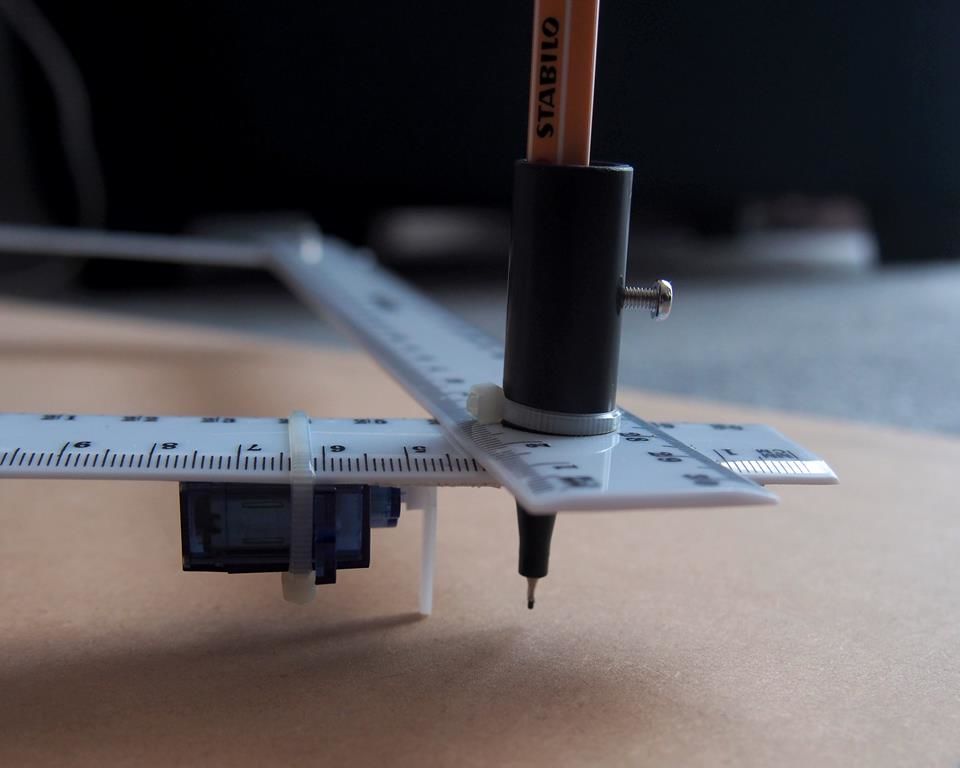
The resulting build can expand and contract the resulting shape, allowing a pen at the end point of the two sets of rulers to move back and forth across a piece of paper. Necessary spaces in the plot are provided by a micro servo that can lift the pen/ruler off of the writing surface.

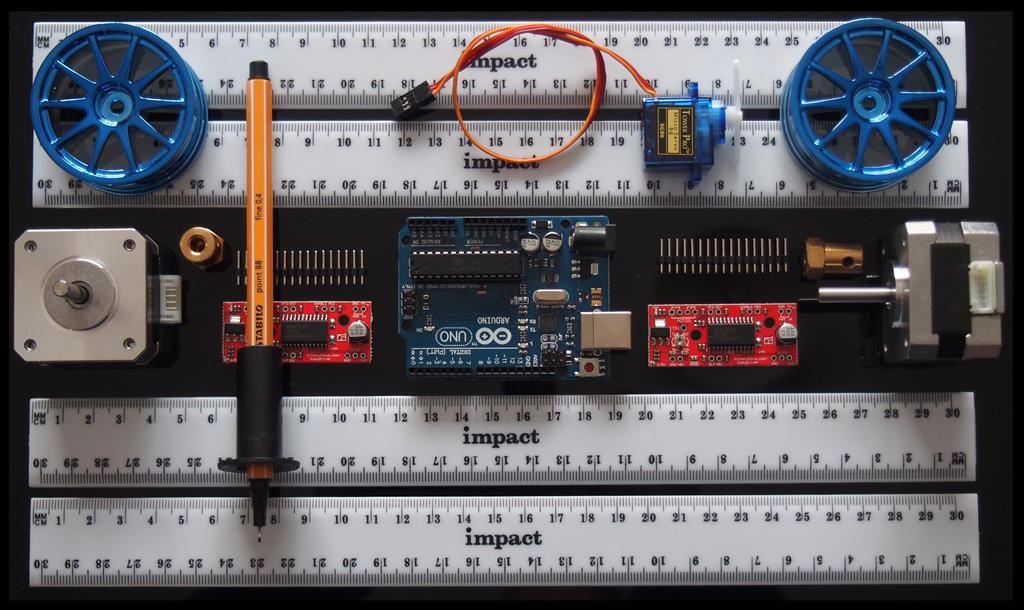
The device is powered by an Arduino Uno, which controls the two NEMA 17 stepper motors via a pair of EasyDriver Modules. You can find more details about how to create one of these, including code and how the geometry behind it works, on its Instructables page.

Circuito.io Helps Beginners Assemble Electronic Projects

Use Circuito.io to drag and drop different parts together. It will compute all the necessary additional items and give you a wiring diagram.

Read more on MAKE

The post Circuito.io Helps Beginners Assemble Electronic Projects appeared first on Make: DIY Projects and Ideas for Makers.

Codebender Rises from the Ashes

If you were sad that Codebender had bit the dust, cheer up. A site called codeanywhere has acquired the online Arduino development environment and brought it back to life. In addition to the main Codebender site, the edu and blocks sites are also back on the air.

Not only is this great news, but it also makes sense. The codeanywhere site is a development IDE in the cloud for many different programming languages. The downside? Well, all the people who said they’d be glad to pay to keep Codebender alive will get a chance to put their money where their mouth is.

Here’s an excerpt from Codebender’s blog:

First of all, codebender will mostly remain the same. It will continue to operate as a standalone service, so you don’t have to change the way you are currently using codebender. However, it will transition to a monthly subscription service. This means that you will be able to use it for free for 1 month (as a trial, beginning on June 1st, or for the first month after registration), and it will then cost $10/month to keep using it. This is the price to pay for keeping codebender alive and sustainable, and it’s a small one, really.

Secondly, Codeanywhere intends to keep adding more and more features, the same way we have been adding features, libraries, and board support in the past few years. So you can expect codebender to keep improving with time, much as it did until now.

We have to wonder how many people will pay $120 / year to do something they can do for free. Mbed has support from ARM and offers a free IDE. Maybe a better deal with Codebender would have been with Atmel or Arduino. Not that we are opposed to charging for services, but we imagine a lot of people will just use free tools unless they have a strong use case for using a cloud-based service.

We covered Codebender’s short-lived demise back in October of last year.


Filed under: Arduino Hacks, news
Hack a Day 21 Jun 09:00

Face tracking with Arduino and Android

Computer vision has traditionally relied on an assortment of rather involved components. On the other hand, everything you need to do this complicated task is readily available on an Android phone. The clever setup seen in the video here uses a smartphone to capture and process images, then send out a signal over Bluetooth to tell which way the device needs to be adjusted in order to focus on a nearby face.

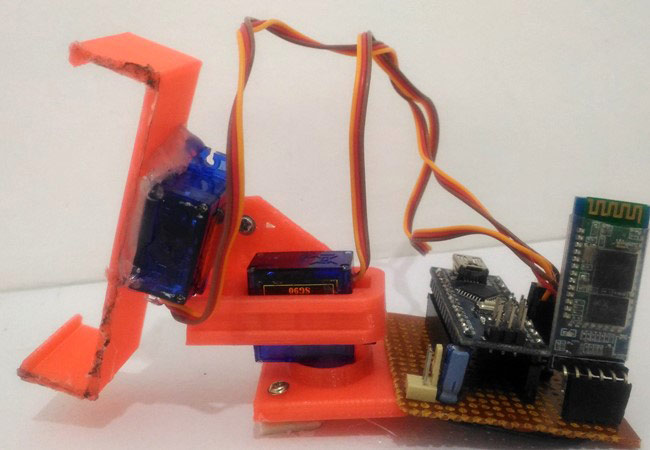
An HC-05 Bluetooth module receives this signal and passes it to two servo motors via an Arduino Nano, moving the phone left/right and up/down.

You can find the Arduino code for this project on CircuitDigest, and the Android Processing code can be downloaded there as a compressed folder.

Arduino-controlled frame makes objects move in slow motion

Though time may be relative, unless you’re planning on doing a lot of space travel, slowing things down in real life is “notoriously” difficult. On the other hand, with carefully-coordinated vibrations and lighting, the “sLOMO” device is able to make objects such as a feather or plant appear to move in slow motion with the naked eye.

Inspired by Jeff Lieberman’s Slow Dance Frame, this project is made out of a readily available IKEA Ribba frame, and the object inside vibrates using an electromagnet. An Arduino Nano controls this magnet and pulses a double-row LED strip, in order to make the item appear to slow down, or even distort itself into multiple overlapping images.

Want to build your own? Check out the excellent write-up on Instructables, and see the magical frame in action below!

Make a Plotter Out of Rulers

Instructables user [lingib] made a clever and inexpensive pen arm plotter that uses plastic rulers for arms. An inspiring sight for anyone without a bunch of robot parts lying around,

The electronics are straightforward, with an Arduino UNO and a pair of Easy Drivers to control NEMA17 stepper motors connected to robot wheels, which serve as hubs for the rulers. At the end of the arms, an SG90 micro servo raises and lowers the pen as commanded, shoving the whole pen assembly off the paper with its horn—an elegant solution to an age-old drawbot problem. He even wrote wrote a custom Processing program that allows him to control the plotter from his desktop

[lingib]’s experimented with different kinds of drawing machines, including a drum plotter (video after the break), a V-plotter, as well as a rolling drawbot.

You’ll find tons of Hackaday posts about all types of drawing machines, including vintage plotters, plotters for making circuit boards, and even one built out of cardboard.

…the aforementioned drum plotter…

[Thanks, Setvir]


Filed under: cnc hacks
Hack a Day 17 Jun 00:00

Hackaday Prize Entry: Oscilloscope for the Masses

If you head down to your local electronics supply shop (the Internet), you can pick up a quality true-RMS multimeter for about $100 that will do almost everything you will ever need. It won’t be able to view waveforms, though; this is the realm of the oscilloscope. Unlike the multimeter’s realistic price point, however, a decent oscilloscope is easily many hundreds, and often thousands, of dollars. While this is prohibitively expensive for most, the next entry into the Hackaday Prize seeks to bring an inexpensive oscilloscope to the masses.

The multiScope is built by [Vítor] and is based on the STM32-O-Scope which is built around a STM32F103C8T6 microcontroller. This particular chip was chosen because of its high clock speed and impressive analog-to-digital resolution, which are two critical specifications for any oscilloscope. This particular scope has an inductance meter built-in as well, which is another feature which your otherwise-capable multimeter probably doesn’t have.

New features continue to get added to this scope by [Vítor]. Most recently he’s added features which support negative voltages and offsets. His particular scope is built inside of a model car, too, but we believe this to be an optional feature.


Filed under: The Hackaday Prize, tool hacks

Assemble a Robot Opponent for Air Hockey

Use JJ Robots' kit and your Android phone to build an air hockey partner who's always game.

Read more on MAKE

The post Assemble a Robot Opponent for Air Hockey appeared first on Make: DIY Projects and Ideas for Makers.

Oh No! It’s the Claw Again!

[Ryan Bates] apparently really likes building claw machines. We noticed his latest build with a new PCB, but then we scrolled down and found other incarnations of the machine going back to 2015.

The laser-cut claw is interesting looking and the brains are an Arduino. You can see the action in the video below and there are plenty of older videos on the project page.

Without the PCB, the machine was a mess of wires. With the PCB, a single ribbon cable connects the Arduino to the board, and the board has a layout of screw terminals. This results in a much cleaner layout than before.

You might think you wouldn’t see many homemade claw machines. However, that’s not true. We’ve seen plenty, some of them even using commercial claws. Naturally, some of them also connect to the Internet.


Filed under: Arduino Hacks