Posts with «arduino» label

Jumper: Arduino controlled animation

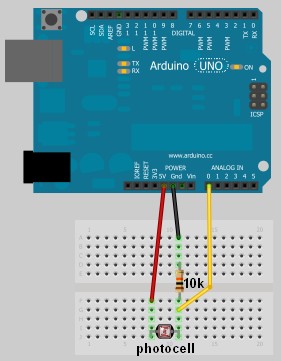
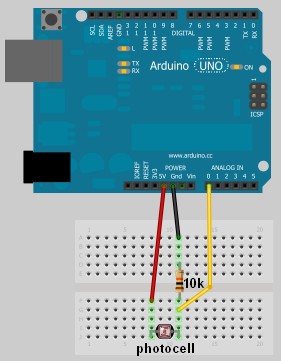
In this project, I have connected an Arduino to my computer and used a photoresistor to control an animation on the screen. Other sensors could have been used, but I chose a photoresistor because it feels like magic!!

The photoresistor responds to changes in ambient light as my hand moves up and down. The Arduino sends the reading to a Processing sketch on the computer via a Serial command (through the USB cable). The processing sketch interprets the signal from the Arduino and selects the appropriate picture to display.

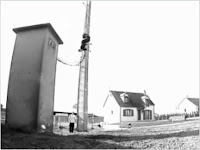
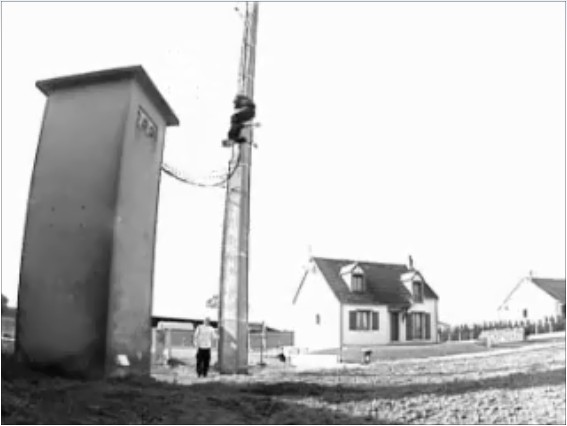
I took a series of screenshots from the following YouTube video: http://www.youtube.com/watch?v=h6nE8m74kDg  And after borrowing a bit of code from these sites (1,2), the project was born.
This idea is not new, nor my own. There are many people who have done this project before, but I thought to blog about how I have done it, just for fun.
The Project Movie


Components Required


  • Arduino Uno (and associated software), and USB cable
  • Photoresistor or Photocell
  • 10K resistor
  • Wires to put it all together
  • Processing IDE from http://processing.org
  • Computer/laptop


The Arduino Sketch


The Arduino Code:

You can download the Arduino IDE from this site.
 1
2
3
4
5
6
7
8
9
10
11
12
13
14
15
16
17
18
19
20
21
22
23
24
25
26
27
28
29
30
31
32
33
34
35
36
37
38
39
40
41
42
43
44
45
46
47
48
49
/* Jumper: Using an Arduino to animate:
Written by ScottC on 02/06/2012 */

int photoRPin = 0;
int minLight;
int maxLight;
int lightLevel;
int adjustedLightLevel;
int oldLightLevel;

void setup() {
Serial.begin(9600);

//Setup the starting light level limits
lightLevel=analogRead(photoRPin);
minLight=lightLevel-10;
maxLight=lightLevel;
oldLightLevel=lightLevel;
}

void loop(){
lightLevel=analogRead(photoRPin);
delay(10);

//auto-adjust the minimum and maximum limits in real time
if(minLight>lightLevel){
minLight=lightLevel;
}
if(maxLight<lightLevel){
maxLight=lightLevel;
}

//Map the light level to produce a result between 1 and 28.
adjustedLightLevel = map(lightLevel, (minLight+20), (maxLight-20), 1, 28);
adjustedLightLevel = constrain (adjustedLightLevel, 1,28);

/*Only send a new value to the Serial Port if the
adjustedLightLevel value changes.*/
if(oldLightLevel==adjustedLightLevel){
//do nothing if the old value and the new value are the same.
}else{
//Update the oldLightLevel value for the next round
oldLightLevel=adjustedLightLevel;

/*Send the adjusted Light level result
to Serial port (processing)*/
Serial.println(adjustedLightLevel);
}
}

The code above was formatted using this site.


The Processing Code:

You can download the Processing IDE from this site.

 1
2
3
4
5
6
7
8
9
10
11
12
13
14
15
16
17
18
19
20
21
22
23
24
25
26
27
28
29
30
31
32
33
34
35
36
37
38
39
40
41
42
43
44
45
46
47
48
49
50
51
52
53
54
55
56
57
58
59
60
61
62
63
64
65
66
67
68
69
70
71
72
73
74
75
76
77
/* Jumper: Using an Arduino to animate
Written by ScottC on 02/06/2012

Source code derived from :
http://processing.org/learning/topics/sequential.html
http://processing.org/discourse/beta/num_1267080062.html

Pictures captured from:
http://www.youtube.com/watch?v=h6nE8m74kDg

======================================================= */

import processing.serial.*;
Serial myPort;
String sensorReading="";

// Create the array that will hold the images
PImage[] movieImage = new PImage[29];

/* The frame variable is used to control which
image is displayed */
int frame = 1;


/* Setup the size of the window. Initialise serial communication with Arduino
and pre-load the images to be displayed later on. This is done only once.
I am using COM6 on my computer, you may need replace this value with your
active COM port being used by the Arduino.*/

void setup(){
size(700,600);

myPort = new Serial(this, "COM6", 9600);
myPort.bufferUntil('\n');

for(int i=0;i<28;i++){
movieImage[i] = loadImage("Jumper" + (i+1) + ".jpg");
}
}


// The draw function controls the animation sequence.

void draw(){

//this draws the relevant image to the window
image(movieImage[frame-1],0,0,width,height);
}

void serialEvent (Serial myPort){
sensorReading = myPort.readStringUntil('\n');
if(sensorReading != null){
sensorReading=trim(sensorReading);
if (sensorReading.length()<2){
frame = integerFromChar(sensorReading.charAt(0));
}else{
frame = integerFromChar(sensorReading.charAt(0))*10;
frame += integerFromChar(sensorReading.charAt(1));
}
}
}


/* This function used to convert the character received from the
serial port (Arduino), and converts it to a number */

int integerFromChar(char myChar) {
if (myChar < '0' || myChar > '9') {
return -1;
}else{
return myChar - '0';
}
}

The code above was formatted using this site.


The pictures 

Captured from this YouTube Video: http://www.youtube.com/watch?v=h6nE8m74kDg


ATMega AVR Pin Sticker

Okay, so I was bored and flipping through Adafruit tonight and I saw that they had stickers like these for $3/10.  Not that I want to take money out of Limor's pocket, but I thought I'd share these with my LMR kin:
read more

Let's Make Robots 02 Jun 03:30
168  328  arduino  atmega  avr  compatible  throughhole  

Scratch-build garden nursery uses Arduino monitoring

Starting your garden indoors helps to ensure large yields. This is because the plants get a head start before it’s warm enough for them to be put in the ground. But the process involves a fair amount of labor, ensuring that the lights are turned on and off at the right times each day, and that the temperature for germination and growth, as well as humidity, hit a certain target. It’s obvious that a bit of automation would be nice, and this Arduino-based garden nursery does just that. One of the things that sets this project apart is that it shows you how to go from an empty room to the bounty of plant starters seen here.

For the most part the equipment is what you’d expect, seed trays and covers, tray warming mats, and fluorescent light fixtures. the whole thing is given a small footprint thanks to an adjustable shelving unit. The Arduino is used in conjunction with a Sprout Board to add connectivity for switching the lights and warming mats. This is just a matter of driving a relay to switch mains voltage and can take any number of forms, including this home automation project we saw the other day.

[Thanks Tom]


Filed under: green hacks
Hack a Day 01 Jun 21:01

NES controllers for any Bluetooth application

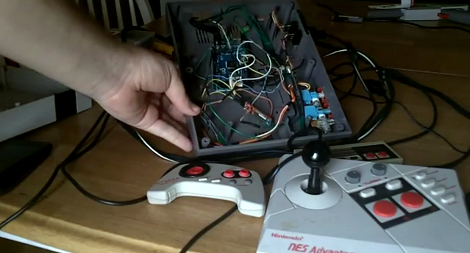
[Dustin Evans] wanted to used his original NES controllers to play emulated games. The problem is he didn’t want to alter the classic hardware. His solution was to use the connectors and enclosure from a dead NES to build a Bluetooth translator that works with any NES controller.

Here he’s showing the gutted half of an original NES. Although the motherboard is missing, the connectors for the controllers are still there. They’ve been rewired to an Arduino board which has a BlueSMiRF modem. The controller commands are harvested by the Arduino and sent to whatever is listening on the other end of the Bluetooth connection. He also has plans to add a couple of SNES ports to the enclosure so that those unaltered controllers may also be used.

In the video after the break [Dustin] walks us through the hardware setup. He then demonstrates pairing the device with an Android phone and playing some emulators with the pictured controllers.


Filed under: nintendo hacks, peripherals hacks

Electronic bracer wraps a lot of features around your arm

[Stephanie] just finished up her wearable project which puts a lot of information where a wristwatch would normally be found. She calls it the Integrated Sensors Electronic Bracer. We had to look up what a bracer is; the name originates with archers and it was a leather wrap used to protect the wrist. This does that, but we don’t think you’ll want the bowstring frequently hitting the electronic components hidden within.

There is a nice finished leather cover which wraps around the unit, leaving just a few holes for key components. Above you can see the parts undressed, with an Arduino compatible board in the middle. It provides a user interface with the OLED display and three input buttons. The array of sensors found on the device include a GPS module to display position data, humidity sensor, magnetometer, luminance sensor, and galvanic skin response.

The opposite side of the bracer has an opening secured by a couple of elastic cords. [Stephanie] mentions that this works, but she’s not happy with the look of it and hopes to make some leather-based improvements.

[via Adafruit]


Filed under: wearable hacks
Hack a Day 01 Jun 18:01
arduino  bracer  cuff  gps  wearable hacks  wrist  

SparkFun launches ProtoSnap MiniBot for the budding roboticist

SparkFun struck a chord with many when it released the ProtoSnap series last year. The perforated perfboard housed not only a tiny Arduino compatible chip, but a small host of sensors and components that made assembling simple projects a snap (pun not only intended, but relished). Tomorrow, the company will begin selling the next member of its ProtSnap family -- the MiniBot. Just like its predecessors, the ProtoSnap MiniBot is based around an Arduino compatible microcontroller (specifically ATmega328) and features a number of components that can easily be detached when you're ready to move from prototype to a more permanent arrangement. The onboard selection components is fairly limited. The base is a relatively bare perfboard with a 9v battery holder on one side and two wheels connected to a motor on the other. Up front is two IR sensors that can be used for basic controls.

Of course, it's simple enough to expand on the basic platform with any host of sensors and components, like servos or RF receivers. Ultimately it's up to your imagination and skill level, which is why SparkFun is primarily targeting the kits at the educational market. The company's new educational outreach program is making a big push to put the ProtoSnap MiniBot in classrooms across the country, starting with high schools and trade schools, as a bridge from more simplistic robotics kits to the more advanced projects tackled at the university level. The completely open source robotics platform will be available tomorrow for $74.95. As soon as we can get our mitts on one our own we'll return with a thorough hands on... one that reveals just how much smarter the average high school kid is than us.

SparkFun launches ProtoSnap MiniBot for the budding roboticist originally appeared on Engadget on Thu, 31 May 2012 16:46:00 EST. Please see our terms for use of feeds.

Permalink | Email this | Comments

Comunikino, an Arduino based communication system

Comunikino is a box, connected to a PC which runs a script in Python.  When receiving a mail, the subject will be printed to its LCD. You can then use one of three Comunikino’s buttons to send a mail back to say “Yes”,  “No” or “Readed”  (this button can also to be used to say: “Hey! I’m thinking of you”).


The project has been developed by Eraticlux, check here the full project.


Arduino Blog 31 May 19:26

Triangle-grid LED display

[Dearmash] put together this RGB LED display using triangles for each pixel. It’s an interesting deviation from the traditional grid layout. There are two video demos after the break. The first is a plasma-style pattern generated in Processing. The second is a spinning color wheel which would be perfect if synchronized with your Photoshop color spinner.

So the physical build is done, and now [Dearmash] is looking for a purpose for the device (isn’t that always the way it happens?). He mentions that the triangular layout looks cool, but makes text display almost impossible. Does anyone have any ideas on how to make this work? Right off the bat we could see side-scrolling a font similar to the Metallica logo’s M and A. Bu there must be some way to group these pixels together into readable characters. If you always use an upward and downward pointed triangle on the same row as a pixel it makes a parallelogram which would be used to display italicization characters.


Filed under: led hacks
Hack a Day 31 May 14:01

Remote shutter module uses LCD screen for setup

Here’s a full-featured remote shutter project which [Pixel-K] just finished. It seems that he’s interested in taking time-lapse images of the cosmos. Since astrophotography happens outside at night, this presented some special design considerations. He wanted something that he could configure in the dark without zapping his night-vision too much. He also wanted it to be easily configured with a pair of gloves on.

The project enclosure is a 4x AA battery box. He removed the partitions between each cell, leaving plenty of room for the guts. Inside you’ll find a lithium battery and a micro-USB recharger board. It powers the Arduino mini pro which drives the 1.8″ LCD screen and actuates the optoisolator which is responsible for triggering the camera. On the right you can see the clear knob of the clickable rotary encoder. All of the user settings are chosen and selected using just this one knob.

He’s already tried it out on a 6-hour shoot and had no battery life problems or other issues.


Filed under: digital cameras hacks

Morse code beacon wins the LayerOne badge hacking contest

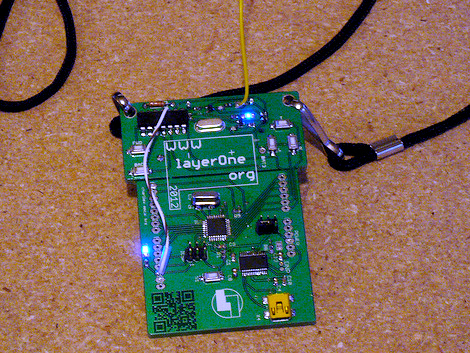
Ham skills prevail in this year’s LayerOne badge hacking contest. [Jason] was the winner with this Morse Code beacon hack.He got a head start on the competition after seeing our preview feature on the badge hardware development. It got him thinking and let him gather his tools ahead of arrival.

The hardware is segregated into two parts of the board. The lower portion is a take on the Arduino, and the upper portion is a wireless transmitter meant to control some cheap RC cars. [Jason] figured this was perfect for conversion as a CW beacon (continuous wave is what Morse Code is called if you’re a ham). The first issue he encountered was getting the badge to play nicely with the Arduino IDE. It was setup to run Slowduino firmware which uses the internal oscillator. [Jason] soldered on his own crystal and reflashed the firmware. He found that the transmitter couldn’t be directly keyed because of the shifting used in the RC car protocol. He cut the power to the transmitter, and found that it could be more accurately keyed by injecting power to one of the other pins. Check out the video after the break for a better explanation of his technique.


Filed under: cons
Hack a Day 30 May 21:01
arduino  badge  beacon  cons  cw  layerone  morse code