Posts with «arduino» label

Maker Faire New York: Pulse Sensor: Incorporating Biofeedback into your Arduino Projects


For the last couple of years, I’ve become interested in the “quantified self” movement (also known as self-tracking and bio-hacking). QSers like to measure everything they can about themselves: how long they sleep, how well they sleep, how many calories they consume and burn, their blood pressure, their blood glucose levels, their brainwaves, and so on. They do this because they want to find out how their health and sense of well being is affected by their behavior. To find out more about the quantified self movement, visit the Quantified Self blog, started by Kevin Kelly and Gary Wolf.

The Pulse Sensor is a quantified self device designed by Joel Murphy and Yuri Gitman of New York University. As they describe it, it’s a “well-designed plug-and-play heart-rate sensor for Arduino. It can be used by students, artists, athletes, makers, and game & mobile developers who want to easily incorporate live heart-rate data into their projects.”

They’ll be showing the Pulse Sensor at World Maker Faire New York this weekend, and will also be giving a presentation called “Incorporating Biofeedback into your Arduino Projects” on Sunday at 3:30pm. I’m definitely going to sit in on this!

I interviewed Yuri Gitman the Make: Talk podcast. Here’s the interview with Yuri. I also have an upcoming interview with Joel. In addition, MAKE ran an article about the Pulse Sensor in Volume 29.

Maker Faire Project Profile

Pulse Sensor

Pulse Sensor is a well-designed plug-and-play heart-rate sensor for Arduino. It can be used by students, artists, athletes, makers, and game & mobile developers who want to easily incorporate live heart-rate data into their projects.

Pulse Sensor


Filed under: Arduino

Crystal doorbell helps class up the joint

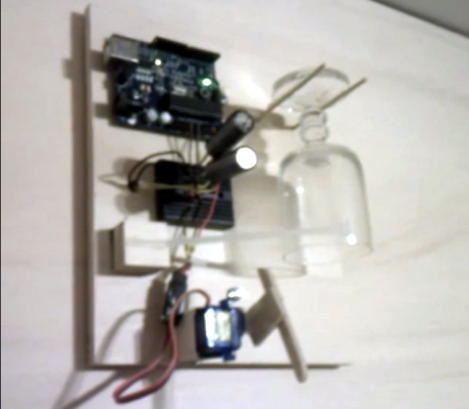
Even if you live in a dump this quick build will make your doorbell sound high-class. The new rig uses a crystal goblet to alter you of guests at the door. We suppose the room-silencing sound of flatware on a wine glass does make a great attention getter.

For [Tobias] the hardest part of the build was getting his wife to sign off on it. But he says the 1970′s era original was looking pretty shabby, which kind of made his argument for him. It took just two hours to develop and install the replacement. It uses a servo motor with an articulated striker to ping the glass which is hanging inverted between two pegs. The original AC transformer (which are most often 16V) was used to power the Arduino. He built a simple rectifier along with a big smoothing capacitor to make sure the Arduino doesn’t reset when voltage dips. Although it’s not mentioned in his comments, we’d bet the doorbell wire has been rerouted to connect directly to the Arduino, rather than remain patched into the power loop.

Don’t miss the clip after the break to hear how great this thing really does sound.


Filed under: arduino hacks, home hacks
Hack a Day 26 Sep 17:01

Personal Energy Orb prevents your life from being swallowed by the Internets

We love the Internet, but we are definitely guilty of losing track of the time we spend traipsing around our virtual haunts. This project will not only remind you to get out and exercise, it will cripple your digital experience if you don’t heed its colorful warning.

[Janko Hofmann] calls it the Personal Energy Orb. It’s really just an Arduino and an RGB LED. But as with most creations, the idea is what makes it great. The orb has a dock next to your computer. It tracks how much time you spend online, changing colors as you rack up the hours. If you don’t heed the warning signs of overuse it will even start to slow down your mouse cursor. But never fear. Full functionality can be restored by topping off your personal energy. As you can see above, there’s also a docking station on [Janko's] bicycle. The orb monitors your mileage, moving out of the red zone so that your computer will be unencumbered the next time you sit down for a long session of flash games. Don’t miss his video presentation embedded after the break.

[Technabob via The Verge]


Filed under: arduino hacks, lifehacks

Hexy the Hexapod: Available at Maker Faire New York

Hexy is a robotic hexapod kit from Arcbotics. It’s a cute, cheap, easy and fun intro to advanced robots. It’s Arduino compatible, and 100% Open Hardware/Software.

Unless you were one of the over-500 Kickstarter backers who supported Hexy at $175 or higher, a Hexy kit is going to be hard to come by. But you’ve got another shot at it: we’ll have a number of Hexy kits for sale. $250 gets you:

  • Everything needed to build the kit, including the screwdriver.
  • Ultrasonic distance sensor eyes.
  • Acrylic laser-cut pieces in your choice of several colors, with extra pieces.
  • 20 Servos (18 for legs, 1 for eyes, 1 extra).
  • Full Arduino-compatible Servotor32 robot controller capable of controlling up to 32 Servos.
  • All the screws and nuts you need to assemble the kit, with extras.
  • A serial-bluetooth adapter that plugs straight into the Servotor32 robot controller.

On top of that, the makers, Arcbotics, will be on hand as well. Look for Arcbotics and Hexy in the smaller of the two Maker Sheds (the one embedded in the Arduino pavilion).


Filed under: Arduino, Maker Faire, Robotics
MAKE » Arduino 25 Sep 18:30

Wii Nunchuck controlled robot exhibits rock solid balancing

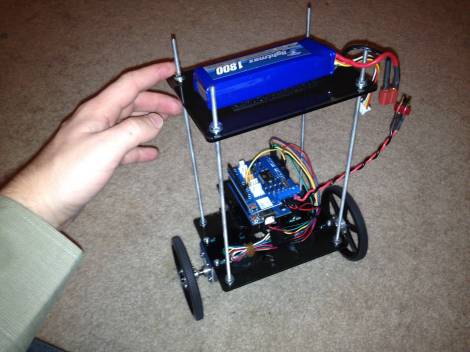
[Willy Wampa] is showing off his self-balancing robot. What strikes us about the build is how well tuned his feedback loop seems to be. In the video after the break you will see that there is absolutely no visible oscillation used to keep its balance.

The parts used are quite easy to obtain. The acrylic mounting plates are his wife’s design and were custom cut through the Pololu service. They were also the source of the gear motors. He’s using a SparkFun IMU with an Arduino and a motor shield. He first posted about the build about a month ago, but the new revision switches to a Pololu motor driver shield which he says works much better, and adds control via a wireless Wii Nunchuck.

The PID loop which gives it that remarkably solid upright stance is from a library written by [Brett Beauregard]. Once again the concept of open source lets us build great things by standing on the shoulders of others.

[via Reddit]


Filed under: robots hacks
Hack a Day 25 Sep 18:01

Monsters Robot Challenge (With Real Prizes)

The time is soon upon us, that frightful time of the year when monsters and ghosts and things that go bump in the night come out to play. Be afraid, be very afraid...

read more

Let's Make Robots 25 Sep 02:16

Mechanical Donkey Kong game tests your barrel-jumping skills, patience

We've seen quite a few NES mods in our day, but we can't say we've ever seen one hooked up to anything quite like this. Built by DIY-er Martin Raynsford, this contraption / work-of-art makes use of an Arduino (naturally) to relay signals from the NES controller to the Donkey Kong screen brought to life above, which was constructed with near pixel-perfect accuracy out of laser-cut parts. As Raynsford points out, though, things are still a bit limited in the game's V1 state. There isn't much of an actual "game," for starters -- just Mario stuck in the middle with a never-ending loop of barrels / ball bearings that you can jump over. A second version is planned with a greater degree of control, but we're guessing the video for it won't be quite as hypnotic as the one after the break.

Continue reading Mechanical Donkey Kong game tests your barrel-jumping skills, patience

Filed under: Misc, Gaming, Alt

Mechanical Donkey Kong game tests your barrel-jumping skills, patience originally appeared on Engadget on Mon, 24 Sep 2012 19:11:00 EST. Please see our terms for use of feeds.

Permalink | Email this | Comments

Speech recognition on an Arduino

Speech recognition is usually the purview of fairly high-powered computers chugging along at hundreds of Megahertz with megabytes of RAM. Bringing speech recognition to the low-power microcontroller you’d find in an Arduino sounds like the work of a mad scientist or Ph.D. candidate, but that’s exactly what [Arjo Chakravarty] did. He developed the μSpeech library for the Arduino to allow for speech recognition for a limited set of voice commands.

Where most speech recognition systems use FFT and very fancy math to determine what phonemes a user is saying, [Arjo]‘s system does away with this unnecessary complexity in favor of using very, very basic integral and differential calculus.

From [Arjo]‘s user guide for μSpeech (PDF warning) we can see it’s possible to connect a small microphone to the analog input of an Arduino and accept voice commands such as ‘left’, ‘right’, and ‘stop’. The accuracy is pretty good, as well – 80% if μSpeech is trying to recognize words, and 30-40% if μSpeech is programmed to recognize single phonemes.

Sadly we couldn’t find a demo video of μSpeech in action, but you’re more than welcome to grab it via github for your own project. Send us a video of μSpeech in action and we’ll put it up.


Filed under: arduino hacks

REG•E the Robot

Primary image

What does it do?

Obstacle avoidance

This is REG•E and he is my first obstacle avoiding robot.

He works off two Lego motors powered by 4 AA batteries and for a brain he has an Arduino Duemilanove. He uses an ultrasonic range finder to 'see' what's in front of him. Motor control is thanks to the TIP120 transistor and this tutorial here: http://www.instructables.com/id/Use-Arduino-with-TIP120-transistor-to-control-moto/

Cost to build

Embedded video

Finished project

Number

Time to build

Type

URL to more information

Weight

read more

New in the Maker Shed: Parallax Emic 2 Text-to-Speech Module

This unassuming little board can give your project the power of speech! Parallax’s new Emic 2 Text-to-Speech Module (now available in the Maker Shed) is an easy to use speech synthesis board capable of speaking both English and Spanish. You simply pass it text or numbers over serial and it converts them into a natural sounding voice. Project possibilities include talking GPS units, clocks, thermometers, timers, or giving your robot a voice. You can even have it read your e-mail or twitter feeds! It’s easy to hook up to an Arduino, runs on 5V, and only uses up two data pins for serial communication. Just plug in a speaker and you’ll have your projects talking in no time.

Features:

  • High-quality speech synthesis for English and Spanish languages
  • Nine pre-defined voice styles comprising male, female, and child
  • Dynamic control of speech and voice characteristics, including pitch, speaking rate, and word emphasis
  • Industry-standard DECtalk text-to-speech synthesizer engine (5.0.E1)

Filed under: Arduino, Electronics, Maker Shed