Posts with «arduino» label

Hackaday Links: April 27, 2014

 

The HackFFM hackerspace in Frankfurt finally got their CO2 laser up and running, and the folks there were looking for something to engrave. They realized the labels on IC packages are commonly laser engraved, so they made a DIP-sized Arduino. The pins are labelled just as they would be on an Arduino, and a few SMD components dead bugged onto the pins provide all the required circuitry. Video here.

A few years ago, we heard [David Mellis] built a DIY cell phone for an MIT Media Lab thingy. Apparently it’s making the blog rounds again thanks to the Raspi cell phone we featured yesterday. Here’s the Arduino cell phone again. Honestly we’d prefer the minimalist DIY Nokia inspired version.

The Raspberry Pi is now a form factor, with the HummingBoard, a Freescale i.MX6-powered clone, being released soon. There’s another form factor compatible platform out there, the Banana Pi, and you can actually buy it now. It’s an ARM A20 dual core running at 1GHz, Gig of RAM, and Gigabit Ethernet for about $60. That SATA port is really, really cool, too.

[Richard] has been working on a solar-powered sun jar this winter and now he’s done. The design uses two small solar panels to charge up two 500F (!) supercapacitors. There’s a very cool and very small supercap charging circuit in there, and unless this thing is placed in a very dark closet, it’ll probably keep running forever. Or until something breaks.

Here’s something awesome for the synth heads out there: it’s an analog modeling synthesizer currently on Indiegogo. Three DCOs, 18dB lowpass filter, 2 envelopes and an LFO, for all that classic Moog, Oberheim, and Roland goodness. It’s also pretty cheap at $120 USD. We really don’t get enough synth and musical builds here at Hackaday, so if you’re working on something, send it in.

A glass-based PCB? Sure. Here’s [Masataka Joei] put gold and silver on a piece of glass, masked off a few decorative shapes, and sandblasted the excess electrum away. [Masataka] is using it for jewelery, but the mind races once you realize you could solder stuff to it.


Filed under: Hackaday links

Mirobot—a WiFi robotics kit at Maker Faire UK

The Mirobot, the brain child of Ben Pirt, brings long buried memories of the Logo Turtle flooding back. It's a Wi-Fi robot designed kit help children learn about technology and programming.

Read more on MAKE

The making of Terrors of the breakfast table

Visual artist and filmmaker Tyler Tekatch worked with Kyle Duffield, interactive programmer to create an interactive video installation called Terrors of the breakfast table, currently on view at the Art Gallery of Hamilton in Ontario, Canada, until May 25 2014:

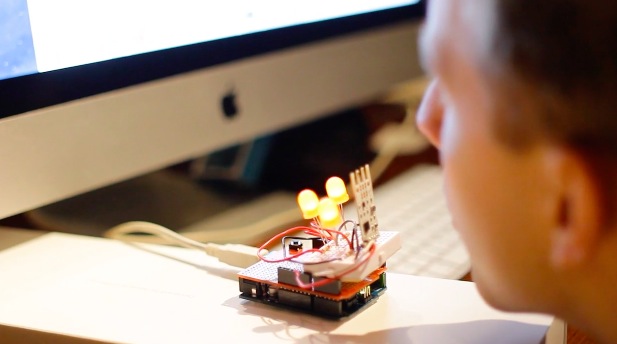
The visitor approaches a table and chair in the centre of the space, and blows into a sculptural device on the table, when the device glows orange. Subtle technologies sense the viewer’s breath, triggering thought-provoking interactive elements, such as a dream montage, the pace of a scene, the ambient sound, and the brightness of the visuals. The viewer discovers the interactions at their own pace, and some of the effects are more subtle than others.

They used a combination of cameras to shoot the project, including the Canon C100, the 5d markiii, and the Sony FS700 to achieve some of the super slow motion shots. The film was edited in FCP7, graded in DaVinci Resolve, and effects were done with Cinema 4d and 3ds Max.

For the interactive elements, they used Max 6 for all of the programming, including the Arduino library, AHarker Externals library, Ambisonics Externals from ICST, and externals from Jamoma. They experimented with a number of different approaches to the sensor, including sound analysis, but finally settled on an anemometer designed especially for breath by the company Modern Device.

The sensor was paired with an Arduino Uno,  to which they also added LEDs in order to illuminate the sensor housing sculpture, and which were also mapped to the viewer’s breathe.


Arduino Blog 26 Apr 16:01

Small-Scale Projects Use Snail-Mail Mail-Scale

Stamps.com offers a free USB scale when you sign up for their service. The first versions of this scale did not have a display. In order to find the weight of an object the scale had to be connected to a computer running the stamps.com software. If you happen to have one of these old scales or are able to pick one up cheap, you may be interested in using it outside of the stamps.com service. There are several options on how to do that.


Stamps.com Scale Tool

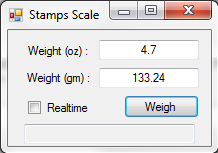
Although ‘stamps.com’ is in the title, the two are not affiliated. This is a simple program that displays the scales output in both ounces and grams. There are 2 modes, Realtime that constantly updates the displayed output and Snapshot where the ‘Weigh’ button records and displays the weight at that moment.


Stamps.com USB Scale Reader

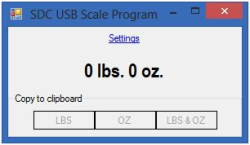
Here’s another similar Windows-based scale reader program. It claims to work with all stamps.com scale models. This has a unique feature where it hangs out in the system tray and pops up when it detects a change in weight. When an amount is displayed, the 3 lower buttons let you quickly copy the values to the clipboard.


Ultimate Scale

If you don’t own a Windows-based computer and/or you would like to weigh an apple, then Ultimate Scale is for you. This Android App automatically starts when the scale is connected and proceeds to display the weight on your phone. Tapping the main weight text zeros the scale. The amount is also spoken out loud for those too lazy to use their eyes. If you know the density of the object being weighed, this app will also calculate the volume!


Still not enough options for you? We’ve previously covered an Arduino project that displays the scale’s measurement on an LCD screen.


Filed under: hardware
Hack a Day 26 Apr 15:00

DIY Multimeter, Arduino Sold Seperately

You can’t argue that Arduinos are extremely popular with the maker/hacker community. Some would say that there is certainly no shortage of projects to make using them. [Milen] thought otherwise and felt it was time to create an Arduino-based multimeter.

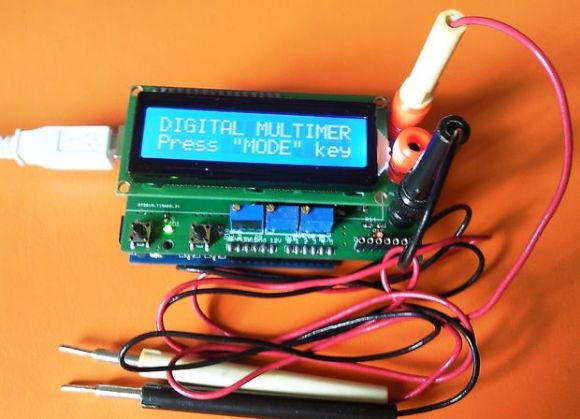
At the heart of this project  is a common Arduino Uno. The additional parts were kept to a minimum in order to keep down the overall cost and project complexity. The finished product can measure voltage from 0-100v, amperage up to 500mA and resistance between 0-250 kohm. If you need to check for continuity, it can do that too.

All of the parts required to make the multimeter fit on a shield that plugs directly into the Arduino. Banana plugs allow for attaching test leads. The measurement values are displayed on an LCD screen and/or (if connected) to the Arduino IDE Serial Monitor. If only using the serial monitor, the LCD screen can be omitted to save a few bucks.

If you would like to build one for yourself, the above link has detailed instructions, schematics and a bill of material. The best bang-for-the-buck multimeter available is still the Harbor Freight Special that you can usually get for free with purchase.

[Thanks Karl]


Filed under: Arduino Hacks

Arduino’s Servo Library: Angles, Microseconds, and “Optional” Command Parameters

A closer look at Arduino's servo library and the optional parameters you should be aware of.

Read more on MAKE

MAKE » Arduino 23 Apr 18:28
arduino  robotics  

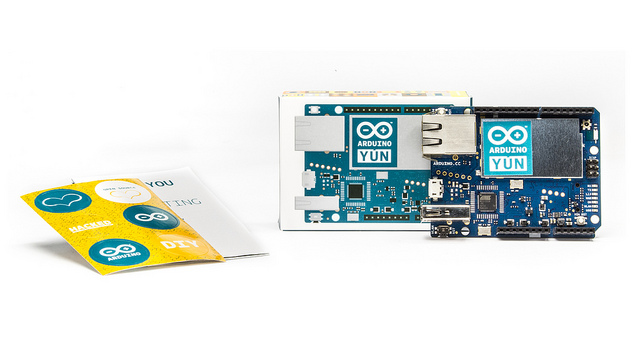
Upgrading the OpenWrt-Yun image on the Yún

Today we released the upgraded version of the OpenWrt-Yun image on the Arduino Yún.
This version includes all the latest and greatest from stable OpenWrt, the latest (Python) Bridge (with a php contribution and fixes to the file module), we also added Mailbox support to REST api and other fixes to some open issues.

The new image contains also the fix to the well known Heartbleed bug, a big security issue that impacted on almost all websites of the world.

If you own an Arduino Yún we suggest you to follow the link and read the procedure to update the board.
You’ll need to download the zip file from the download page. Remember that updating the OpenWrt-Yun image will cause the loss of all files and configurations you previously saved on the flash memory of the Yún.
Enjoy!

Arduino Blog 23 Apr 10:00
arduino  hearbleed  openwrt  python  yún  

Paper-Thin Arduino Enables DIY Dirigible

Build your own balloon-based blimp with Printoo, a new paper-thin Arduino-compatible microcontroller.

Read more on MAKE

MAKE » Arduino 22 Apr 19:43

MakerFaire Rome: the european call for makers is online! Join us


It’s time to start tinkering on new projects or pimp-up some old ones because MakerFaire Rome is calling!

Last year it was an overwhelming experience for all of us: more than 35.000 people from all over the world gathered for the first edition of the European edition of MakerFaire. Around 24o makers presented their projects ( 60% from Italy and 40% from the rest of the continent) and showed to a crowd of enthusiasts and newbies  the impact of open source community and DIY on our lives.

If you want to join us with your project in Rome from the 3rd to the 5th of October, take a look at the Call for Makers and fill it before the 25th of May:

The first step to participate in Maker Faire Rome as Maker is to submit an entry that tells us about yourself and your project. Entries can be submitted from individuals as well as from groups.
Please provide a description of what you make and what you would like to bring to Maker Faire, including links to photographs and/or videos of your project. We particularly encourage exhibits that are interactive and that highlight the process of making things. Continue >>

Here’s Arduino’s video from last year experience:


Arduino Blog 22 Apr 11:10

Building a Final Key


Remembering passwords is a pain, and there’s a number of devices out there to make it easier. If you’re looking to roll your own, this guide to building a Final Key will walk you through the process.

We talked about the Final Key before. It’s a one button password manager that encrypts and stores your password. It acts as a virtual serial port for configuration. When you hit the button, it becomes a keyboard and types in the correct password.

The creator has no intentions of making this a commercial project for a number of reasons. Instead, easy build instructions are provided based on the Arduino Pro Micro. The 24LC512 EEPROM can be soldered directly to the Arduino by bending out the DIP legs. A few resistors, a button, and an LED finish off the project. The last step is to fill it with hot glue to prevent tampering.

The Final Key firmware is available on Github, and the case can be ordered from Shapeways. If you’re interested in hardware password management, you can also check out the Mooltipass which is being developed on Hackaday.

[Thanks to Lars for the tip!]


Filed under: Arduino Hacks, security hacks