Posts with «arduino» label

Electric Go-Cart Has Arduino Brains

Oh how times have changed. Back in the 30′s the VW Beetle was designed to be cheap, simple and easy for the typical owner to maintain themselves. Nowadays, every aspect of modern cars are controlled by some sort of computer. At least our go-carts are spared from this non-tinkerable electronic nightmare…. well, that’s not completely true anymore. History is repeating itself as [InverseCube] has built an electronic go-cart fully controlled by an Arduino. Did I forget to mention that [InverseCube] is only 15 years old?

The project starts of with an old gas-powered go-cart frame. Once the gas engine was removed and the frame cleaned up and painted, a Hobbywing Xerun 150A brushless electronic speed controller (ESC) and a Savox BSM5065 450Kv motor were mounted in the frame which are responsible for moving the ‘cart down the road. A quantity of three 5-cell lithium polymer batteries wired in parallel provide about 20 volts to the motor which results in a top speed around 30mph. Zipping around at a moderate 15mph will yield about 30 minutes of driving before needing to be recharged. There is a potentiometer mounted to the steering wheel for controlling the go-cart’s speed. The value of the potentiometer is read by an Arduino which in turn sends the appropriate PWM signal to the ESC.

In addition to the throttle control, the Arduino is also responsible for other operational aspects of the vehicle. There are a bunch of LED lights that serve as headlights, tail lights, turn signals, brake lights and even one for a backup light. You may be wondering why an Arduino should be used to control something as simple as brake or headlights. [InverseCube] has programmed in some logic in the code that keeps the break lights on if the ESC brake function is enabled, if the throttle is below neutral or if the ESC enable switch is off. The headlights have 3 brightnesses, all controlled via PWM signal provided by the microcontroller.

There is also an LCD display mounted to the center of the steering wheel. This too is controlled by the Arduino and displays the throttle value, status of the lights and the voltage of the battery.


via reddit


Filed under: Arduino Hacks, transportation hacks

Pwning Timberman with Electronically Simulated Touchscreen Presses

What do you do if you suck at a smartphone game? Buy some in-game upgrades to pretend like you’re good? Screw that! [Valentin] did what any self-respecting hacker would: developed an automated system to play for him.

Granted, when you see the demo video embedded below you’ll realize there isn’t much strategy involved in this game. But that setup to simulate the touchscreen presses is pretty neat. We’re used to seeing mechanical touchscreen hacks but this one is electronic, using a couple of pads of copper foil tape and some relays to make it happen. Here’s the one caveat: you still need to be touching something with your hand. This just uses the relays to switch the connection between the pads and your body.

We’ve looked around for this before. Does anyone have a cheap, simple, and effective hack to fully automate presses on a modern touchscreen? Can we use a potato or something? Tell us below, but send it in to the tips line too!


Filed under: Cellphone Hacks

This Arduino Hookup is Perfect for Microgrowery

All it takes is one little seed. One tiny little seed, that when planted into the ground and nourished correctly, can flourish into a healthy and happy plant. But there are some challenges involved. For example, maintaining a steady temperature and keeping moisture at an optimum level can be difficult at times, especially when just starting out.

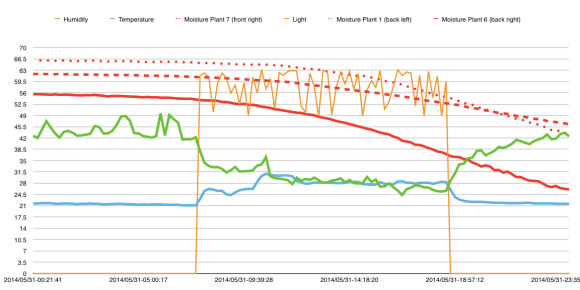
This Arduino grow-op monitoring solution helps to solve those problems. It was built by [growershower] as a fun side project to monitor the vital signs of 3 marijuana plants. The board is an Uno and has an SD card shield with a DHT22 temperature sensor plus a soil moisture sensor. A photo diode is also used to measure light.

The graph produced from the data is a weed grower’s wet dream:

Humidity, temperature, moisture, and light can all be regularly logged into the system. This empirical data gathering is key for keeping track of how the plants are doing, giving the grower the option to make educated changes.

Obviously these sensors and the attached cables are not waterproof, so they need to be removed when watering, which is very inconvenient. However, this system will be refined over time as more people contribute to the design. [growershower] plans to seal the electronics with some sort of resin for the next grow. In addition, the use of a Raspberry Pi instead of an Arduino will allow [growershower] to check the data in real time remotely through a web browser.

The next steps after all that will be to run the lights and ventilation. Watering schedules could be included as well. Just be careful when adding H2O into the equation, especially when dealing with the high voltages associated with grow lights. You don’t want to accidentally zap yourself into oblivion! Safety first. Safety first.


EDITORIAL NOTE: The editorial staff chose to publish this post after considering the following items: First, the gathering and graphing of data by this project is both interesting and useful in other applications. Second, the cultivation of marijuana is legal in some jurisdictions.


Filed under: misc hacks
Hack a Day 26 Jul 03:01

Hacklet #8: The Animals

This week on the Hacklet we’re looking at Hackaday.io projects that are all about animals! Hackers and makers are well-known animal lovers, in fact many a hacker can be found with a pet curled up at their feet, or on their keyboard!
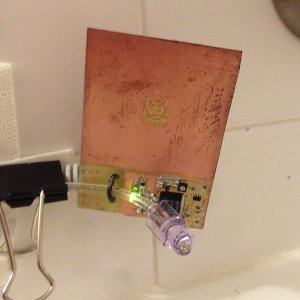
[Brian's] cat Roger loves drinking from the bathtub faucet. Unfortunately Roger hasn’t learned how to operate the faucet himself, so it gets left on quite a bit. To keep Roger happy while saving water, [Brian] created the Snooty Cat Waterer. Cat’s still don’t have thumbs, so [Brian] turned to capacitive sensing in the form of a Microchip MTCH10 capacitive proximity sensor chip. Coupled with a home etched PC board, the waterer can detect a cat at 3 inches. A valve and water feed teed off the toilet provide the flow. The project is moving along well, though Roger has been slow to warm up to this new water source.

 

[Jsc] has the opposite problem. His cat has decided that bathtubs are the perfect litter boxes. [Jsc] is taking aim at this little problem with his Cat Dissuader. After a servo controlled squirt bottle proved too anemic for his needs, [Jsc] turned to the Super Soaker Hydrostorm. These electric water guns can be had for as little as $16 on sale. [JSC] didn’t want to permanently modify the gun, so he 3D printed a switchable battery pack.The replacement pack is actually powered by a simple wall wart. Power to the gun is controlled by an Arduino, which senses his cat with a passive infrared sensor. Since the dissuader was installed, [Jsc's] cat has been a model citizen!


Cat’s don’t get all the love though, plenty of engineers and hackers have dogs around the house. [Colin] loves his dog, but he and his family were forgetting to feed it. He created Feed the Dog to help the household keep its four-legged member from going hungry. [Colin] tried a microcontroller, but eventually settled on implementing the circuit with old-fashioned 4000 series CMOS logic chips. He used a 4060 (14-stage ripple counter w/ internal oscillator) as an 8 hour timer, and 4013 dual flip-flop. Operation of Feed the Dog is as simple as wagging your tail. Once the dog is feed, the human presses a button. A green “Just fed” LED will glow for 30 minutes, then go dark. After about 6 hours, a red LED turns on. After 8 hours, the red LED starts blinking, letting everyone know that it’s time to feed the dog.


[Steve] has outdoor pets. Chooks to be exact, or chickens for the non Australians out there. He loves watching his birds, especially Darth Vader, who is practicing to become a rooster. To keep track of the birds, he’s created What the Chook?, a sensor suite for the hen-house. He’s using a GCDuiNode with a number of sensors. Temperature, humidity, even a methane detector for when the bedding needs to be replaced. An OV528 JPEG camera allows [Steve] to get pictures of his flock. The entire project connects via WiFi. Steve hopes to power it from a couple of AA batteries. [Steve] also entered What the Chook? in The Hackaday Prize. If he wins, this will be the first case of flightless birds sending a human to space!

 

Hey – Did you know that Hackaday is building a Hackerspace in Pasadena California? We’re rounding up the local community while our space is being built out. Join us at a Happy Hour Show & Tell Meetup Event hosted by our own [Jasmine Brackett] August 18th! It’s an informal show and tell, so you don’t have to bring a hack to attend. If you’re local to Pasadena, come on down and say hello!


Filed under: Hackaday Columns

Hacked e-cigarette vaporizer can send smells…in space!

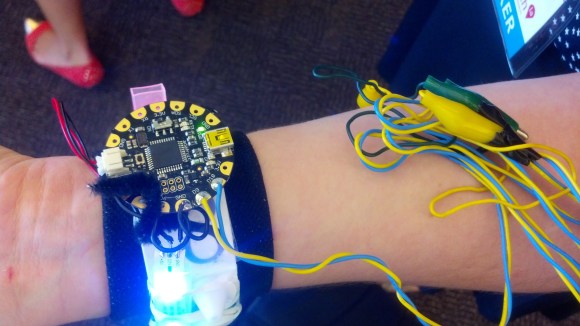
This 3D printed scent distributor was put together by eight people from three states during the 2014 NYC NASA Space Apps Challenge. The team went on to take 1st place in the competition.

The project is called Senti8 and uses a FLORA Arduino micro-controller and a Neopixel LED strip purchased from Adafruit. A smartphone mobile app then remotely connects to the device allowing the user to choose which scent they would like to send to their friend, who is also wearing one of the wristbands.

They came up with the idea by simply asking an American astronaut named [Doug Wheelock] what he missed the most while travelling through the boundless reaches of outer space. To their surprise, he said that the thing he missed the most was his sense of smell.

Originally, the project was envisioned to be a wearable technology for space tourism. But over time, the project morphed into a wristband that would allow people to remember places or planets visited. Even memories unique to those places through scent could be experimented with.

One of the team members, [Brooks], was spotted wearing the Senti8 at the Wearable Tech LA conference in Pasadena, CA on July 17, 2014. The LED lights lining the outside could be seen all the way across the large auditorium as she chatted up with local Crashspace members as they prepared to present their design-oriented hacks to the public.

She gave an interview demoing the wristband which can be seen in the video posted below:

The Senti8 Intro video can be see here as well:


Filed under: wearable hacks

THP Entry: Cut Energy Consumption by 30 percent with this WiFi XBee Setup

Let’s be honest. Paying electricity bills sucks. The amount paid is always too much, and the temperatures in the building are rarely set at a comfortable level. But now, with the help of this DIY Climate Control system, power-users can finally rejoice knowing that the heating and cooling process of their home (or commercial space) can be easily controlled through the utilization of an XBee Remote Kit and a process called zoning.

The team behind the project is [Doug], [Benjamin] and [Lucas]. They hope to solve the inconsistent temperature problems, which are caused by a moving sun, by open-sourcing their work into the community.

Their XBee system runs on a mesh network making it a perfect tool for sensing and communicating which areas in the house are too hot or too cold. Once the data is collected, XBee modules route the information wirelessly to each other until it reaches a central Arduino gatekeeper; which then decides if it wants to heat, ventilate, or air condition the room.

Not to mention all the added benefits posted below:

For one, you can hook-up temperature ICs like the TMP36 (PDF) without the need to buy extra parts. Better yet, the XBee can be programmed to fall asleep thus saving battery life. This means that the whole module can run on rechargeable AAA batteries.

Even further, it can be coded at its various ports to read other devices. This is great because it gives the setup the potential to turn on and off devices that are hooked to the module, transforming it into a networked hub of interconnected devices.

This approach not only allows you to be involved in saving the planet, but it keeps your home, warehouse, or office building at a much more comfortable level in the process, a real win-win.


The project featured in this post is an entry in The Hackaday Prize. Build something awesome and win a trip to space or hundreds of other prizes.


Filed under: home hacks, The Hackaday Prize

A Robotic Arm Made from Recycled Bicycle Parts

Building an 8'-long robotic arm with a chainsaw on the end is no small feat. Here's how it was done.

Read more on MAKE

Opensourcing imagination and sharing knowledge in Nepal

David Cuartielles held a worshop at Campus Party Berlin introducing  Arduino and the cool things you can do with it. Some months later, on of the students, Sanjeet Raj Pandey, wrote him to reveal that the event was a life changing moment.

After that Sajeet decided  to share his knowledge and experience organising workshops in a rural city called Janakpur in Nepal. In that occasion a 100 participants got introduced to Arduino. They learnt how to blink LEDs, work with a temperature sensor, light sensor, ultrasound sensor and also to make a DIY Arduino:

Most of it was financed by myself and a bit of donation from Telecommunication department -Technical University of Berlin and Berlin Promotion Agency.

I like to make things which are real and can be put to work for society . Making things, one just cannot see but also touch is awesome.

Hope you will share Janakpur (Nepal) as one more place with Arduino. I would be keeping up pace and will be doing more such projects, workshops, seminars, remote sessions, etc for students in Nepal.

These are some pictures from the workshops:

Do you have a similar story to share? Submit it to our blog!

POV Display Does it on the Cheap

[Sholto] hacked together this ultra low-budget spinning display. He calls it a zoetrope, but we think it’s actually an LED based Persistence Of Vision (POV) affair. We’ve seen plenty of POV devices in the past, but this one proves that a hack doesn’t have to be expensive or pretty to work!

The major parts of the POV display were things that [Sholto] had lying around. A couple of candy tins, a simple brushed hobby motor, an Arduino Pro Mini, 7 green LEDs, and an old hall effect sensor were all that were required. Fancy displays might use commercial slip rings to transfer power, but [Sholto] made it work on the cheap!

The two tins provide a base for the display and the negative supply for the Arduino. The tins are soldered together and insulated from the motor, which is hot glued into the lower tin. A paper clip contacts the inside of the lid, making the entire assembly a slip ring for the negative side of the Arduino’s power supply. Some copper braid rubbing on the motor’s metal case forms the positive side.

[Sholto] chose his resistors to slightly overdrive his green LEDs. This makes the display appear brighter in POV use. During normal operation, the LEDs won’t be driven long enough to cause damage. If the software locks up with LEDs on though, all bets are off!

[Sholto] includes software for a pretty darn cool looking “saw wave” demo, and a simple numeric display. With a bit more work this could make a pretty cool POV clock, at least for as long as the motor brushes hold up!

[via Instructables]


Filed under: led hacks

Two steampunk espresso machines running on Arduino Mega

There’s a team of designers based in Korea who are passionate about coffee machines. Their name is Vidastech and recently shared with us two new hand-assembled machines prototyped  with Arduino Mega called Hexagon and Revolucion.

Take a look at the gallery for more pictures:


Arduino Blog 22 Jul 15:50