If you are a fan of cosplay, props and hand built creations you can’t miss the work of James Bruton. Based in Uk he’s got a personal project YouTube channel with a new video every week describing his work in details. At the end of June he posted the 34th “episode” of the project started nearly a year ago about building an Iron Man Hulkbuster giant suit you can actually wear!
In the video below you can follow how he’s sorting out the arm mechatronics for the elbow, hand and cuff weapon with some 3D printing with Lulzbot and controlling the interaction with Arduino Uno (electronic part starting around minute 10):
Last weekend saw the announcement of ProxyHam, a device that anonymizes Internet activity by jumping on WiFi from public libraries and cafes over a 900MHz radio link. The project mysteriously disappeared and was stricken from the DEFCON schedule. No one knows why, but we spent some time speculating on that and on what hardware was actually used in the undisclosed build.
[Samy Kamkar] has just improved on the ProxyHam concept with ProxyGambit, a device that decouples your location from your IP address. But [Samy]’s build isn’t limited to ProxyHam’s claimed two-mile range. ProxyGambit can work anywhere on the planet over a 2G connection, or up to 10km (6 miles) away through a line-of-sight point to point wireless link.
The more GSM version of ProxyGambit uses two Adafruit FONA GSM breakout boards, two Arduinos, and two Raspberry Pis. The FONA board produces an outbound TCP connection over 2G. The Arduino serves as a serial connection over a reverse TCP tunnel and connects directly to the UART of a Raspberry Pi. The Pi is simply a network bridge at either end of the connection. By reverse tunneling a TCP connection through the ‘throwaway’ part of the build, [Samy] can get an Internet connection anywhere that has 2G service.
Although it’s just a proof of concept and should not be used by anyone who actually needs anonymity, the ProxyGambit does have a few advantages over the ProxyHam. It’s usable just about everywhere on the planet, and not just within two miles of the public WiFi access point. The source for ProxyGambit is also available, something that will never be said of the ProxyHam.
Not everyone can agree on what good music is, but in some cases you’ll find that just about everyone can agree on what is awful. That’s what the people over at Neo-Pangea discovered when they were listening to Internet radio. When one of those terrible songs hits their collective eardrums, the group’s rage increases and they just need to skip the track.
This is how Engineers act if the song is super-awful
Rather than use a web app or simple push button to do the trick, they turned the “skip” button into a NERF target. They call their creation the Boom Box Blaster and made a fantastic demo film video about it which is found after the break.
Inspired by a painting in the office, the target takes the form of a small hot air balloon. The target obviously needed some kind of sensor that can detect when it is hit by a NERF dart. The group tried several different sensor types, but eventually settled on a medium vibration sensor. This sensor is connected to an Arduino, which then communicates with a Raspberry Pi over a Serial connection. The Pi uses a Python script to monitor the Arduino’s vibration sensor. The system also includes some orange LEDs to simulate flames and a servo attached to the string which suspends the balloon from the ceiling. Whenever a hit is registered, the flames light up and the balloon raises into the air to indicate that the shot was on target.
The Pi was required in order to interface with the group’s streaming music service of choice; Sonos. The Sonos API made it easy for the team to interface their target with the “skip track” function. They just wrote a Node.js script that runs on the Pi and sends the proper command as necessary. Now whenever the radio asks the group if they want to build a snowman, they can all answer with a resounding, “no!”. They just need to make sure they have enough ammo to spare. Be sure to check out the comical demonstration video on the project page.
Yesterday, while I was in the circuits lab, I checked the calibration of the voltage references on the KL25Z boards and the 4 Arduino boards I had with me.
What I did was to measure the power-supply voltage on the board with a good multimeter and make several of the PteroDAQ self-calibrations of the reference voltage (v0.2b1 does a new calibration every time the “pause” button is pressed).
For the KL25Z board, the voltage regulator on the board was well calibrated—I got a reading of 3.3001V with the bench multimeter. The 33 PteroDAQ calibrations I recorded gave an average reading of 3.3095V with a standard deviation of 400.6µV. That means that the PteroDAQ reported voltages will be about 0.28±0.01% too high (much better than the ±3% specification for the bandgap voltage reference on the chip). This is probably better than any of the cheap meters I have at home.
For the Arduino boards, the reference is normally the USB 5V power supply, which was not stable enough to do these comparisons with—I couldn’t get a constant reading on the good voltmeters but saw fluctuations of almost 10mV. I should have had a 9V wall-wart power supply with me, so that I could get a more stable voltage source from the on-board regulators, but lacking that, I used a bench power supply directly connected to the +5V and Gnd pins of the Arduino to force specific voltages around 5V and did the same comparisons as for the KL25Z board.
board
measurements
voltage reading
KL25Z
33
+0.28±0.01%
Sparkfun Redboard
10
+0.08±0.10%
Duemilanove
11
–0.26±0.15%
Leonardo
10
–1.81±0.13%
Uno
8
+1.68±0.05%%
The greater fluctuation for the Arduino boards is probably due to the lower resolution of the ADC—the 10-bit ADC should have a reading around 225 at 1.1V with a 5V reference, so ±0.15% is only ±1/3 LSB. The ATMega chips are guaranteed to have ±10% accuracy on the bandgap reference, but that is over the full temperature range, so ±2% seems about right for room temperature.
The USB power-supply is not a constant voltage, and the fluctuation in the USB power-supply voltage (which can be as much as ±10%) is a problem when using the Arduino boards, so powering them off of a wall wart is a good idea when trying to measure signals accurately.
The voltage measurements are as good as with super-cheap handheld voltmeters (which generally have a specification of about ±1%), so the PteroDAQ system is good enough for first electronics courses and hobbyist labs.
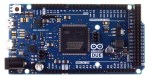
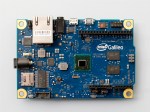
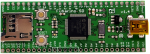
Speak with those who consider themselves hardcore engineers and you might hear “Arduinos are for noobs” or some other similar nonsense. These naysayers see the platform as a simplified, overpriced, and over-hyped tool that lets you blink a few LEDs or maybe even read a sensor or two. They might say that Arduino is great for high school projects and EE wannabes tinkering in their garage, but REAL engineering is done with ARM, x86 or PICs. Guess what? There are Arduino compatible boards built around all three of those architectures. Below you can see but three examples in the DUE, Galileo, and Fubarino SD boards.
This attitude towards Arduino exists mainly out of ignorance. So let’s break down a few myths and preconceived biases that might still be lurking amongst some EEs and then talk about Arduino’s ability to move past the makers.
Arduino is NOT the Uno
When some hear “Arduino”, they think of that little blue board that you can plug a 9v battery into and start making stuff. While this is technically true, there’s a lot more to it than that.
An Arduino Uno is justanAVR development board.AVRs are similar to PICs. When someones says “I used a PIC as the main processor”, does that mean they stuck the entire PIC development board into their project? Of course not. It’s the same with Arduino (in most cases), and design is done the same way as with any other microcontroller –
Use the development board to make, create and debug.
When ready, move the processor to your dedicated board.
What makes an Arduino an “Arduino” and not justan AVR but the bootloader. Thus:
An Atmega328P is an AVR processor.
An Atmega328P with the Arduino bootloader is an Arduino.
The bootloader allows you to program the AVR with the Arduino IDE. If you remove the bootloader from the AVR, you now have an AVR development board that can be programmed with AVR Studio using your preferred language.
There Is No Special Arduino Language
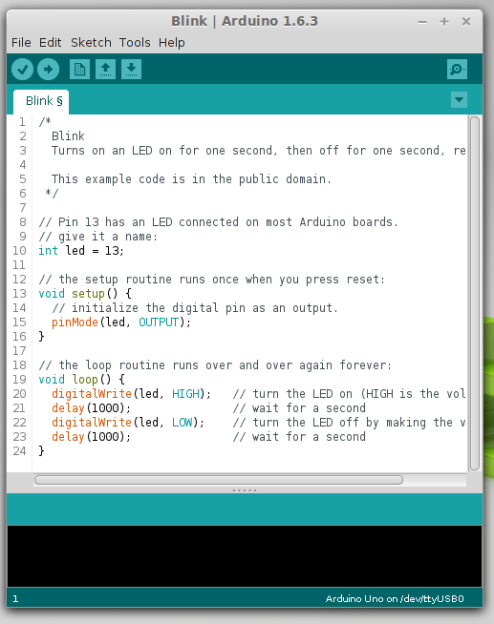
Arduino “blink” sketch should run on any Arduino compatible board.
Yes, I know they call them sketches, which is silly. But the fact is it’s just c++. The same c++ you’d use to program your PIC. The bootloader allows the IDE to call functions, making it easy to code and giving Arduino its reputation of being easy to work with. But don’t let the “easy” fool you. They’re real c/c++ functions that get passed to a real c/c++ compiler. In fact, any c/c++ construct will work in the Arduino IDE. With that said – if there is any negative attribute to Arduino, it is the IDE. It’s simple and there is no debugger.
The strength comes in the standardization of the platform. You can adapt the Arduino standard to a board you have made and that adaptation should allow the myriad of libraries for Arduino to work with your new piece of hardware. This is a powerful benefit of the ecosystem. At the same time, this easy of getting things up and running has resulted in a lot of the negative associations discussed previously.
So there you have it. Arduino is no different from any other microcontroller, and is fully capable of being used in consumer products along side PICs, ARMs etc. To say otherwise is foolish.
What is the Virtue of Arduino in Consumer Products?
This is Ask Hackaday so you know there’s a question in the works. What is the virtue of Arduino in consumer products? Most electronics these days have a Device Firmware Upgrade (DFU) mode that allows the end user to upgrade the code, so Arduino doesn’t have a leg up there. One might argue that using Arduino means the code is Open Source and therefore ripe for community improvements but closed-source binaries can still be distributed for the platform. Yet there are many products out there that have managed to unlock the “community multiplier” that comes from releasing the code and inviting improvements.
What do you think the benefits of building consumer goods around Arduino are, what will the future look like, and how will we get there? Leave your thoughts below!
Solenoids (a type of electromagnet) are at the heart of pinball machines, and at one time, many other machines. They work by inducing a magnetic field using a coil of copper wire. This makes them ideal for pushing or pulling mechanical things fast and with force. They have become unnecessary […]
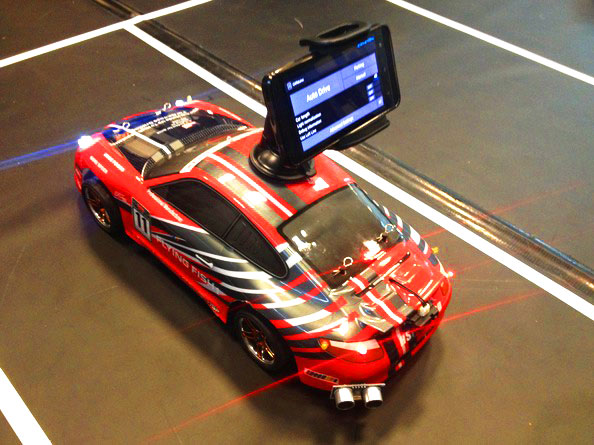
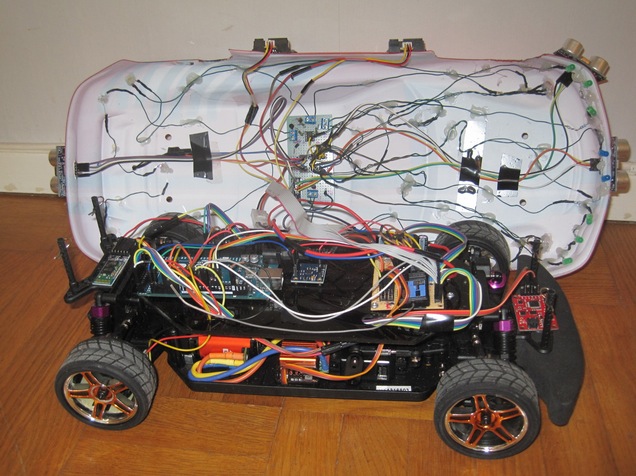
Dimitri Platis is a software engineer who’s been working with his team on an Android-based self-driving vehicle which uses machine vision algorithms and techniques as well as data from the on-board sensors, in order to follow street lanes, perform parking manoeuvres and overtake obstacles blocking its path:
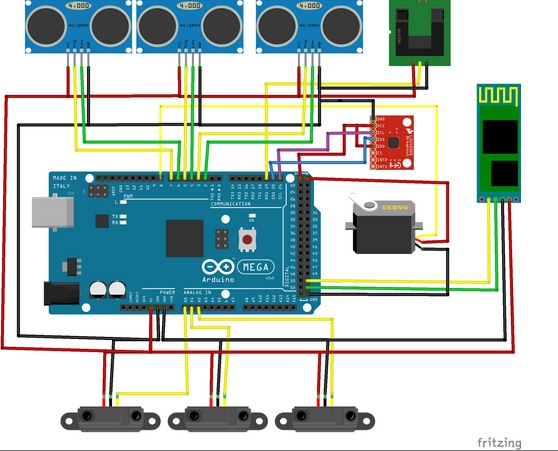
The innovational aspect of this project, is first and foremost the use of an Android phone as the unit which realizes the image processing and decision making. It is responsible for wirelessly transmitting instructions to an Arduino Mega, that controls the physical aspects of the vehicle. Secondly, the various hardware components (i.e. sensors, motors etc) are programmatically handled in an object oriented way, using a custom made Arduino library, which enables developers without background in embedded systems to trivially accomplish their tasks, not caring about lower level implementation details.
[...]
On the software dimension of the physical layer, an Arduino library was created (based on a previous work of mine [1], [2]) which encapsulated the usage of the various sensors and permits us to handle them in an object oriented manner. The API, sports a high abstraction level, targeting primarily novice users who “just want to get the job done”. The components exposed, should however also be enough for more intricate user goals. The library is not yet 100% ready to be deployed out of the box in different hardware platforms, as it was built for an in house system after all, however with minor modifications that should not be a difficult task. This library was developed to be used with the following components in mind: an ESC, a servo motor for steering, HC-SR04 ultrasonic distance sensors, SHARP GP2D120 infrared distance sensors, an L3G4200D gyroscope, a speed encoder, a Razor IMU. Finally, you can find the sketch running on the actual vehicle here. Keep in mind that all decision making is done in the mobile device, therefore the microcontroller’s responsibility is just to fetch commands, encoded as Netstrings and execute them, while fetching sensor data and transmitting them.
For the past couple of years, I’ve been using the PteroDAQ data acquisition system that my son wrote for the KL25Z board (a second-generation system, replacing the earlier Arduino Data Logger he wrote). Over the past week, he has been transferring the project to me, and together we did a lot of debugging and enhancements.
Today, we tested the code on the ancient Windows 7 machines in the circuits lab at UCSC (we only have Mac OS 10 and Linux at home), and decided it was ready for a beta release.
The new code is way better than the old code! Here are a few of the bigger changes:
We now support all the ATMega-based Arduino boards, while still supporting the KL25Z. The KL25Z board is a better choice for a new user, since it is cheaper and has a much better analog-to-digital converter than the Arduinos, but there are a lot of Arduinos and Arduino clones already in hobbyist hands, and PteroDAQ now works for them with no new hardware.
Sampling rates have improved enormously, particularly for the KL25Z and the Leonardo Arduino boards, which have USB serial communication without the bottleneck of a UART, but even the UART-based Arduino boards have a decent throughput of 2600Hz for a single analog channel. Leonardo gets 5370Hz, and the KL25Z is limited by the Python program on the host—7.8kHz on the old Windows machines, almost 10kHz on my old MacBook Pro (buffer overflow in the operating system loses some packets after a million samples), and about 19kHz on my son’s Linux laptop (again starting to lose samples after about 1 million). That’s not fast enough for high-quality audio, but it would do for speech-quality audio. It’s a lot better than the old v0.1 PteroDAQ, which was much more limited by the host, having trouble getting even 180Hz on the old Windows machines.
For short stretches, PteroDAQ can run somewhat faster—I can get 15kHz for about 400,000 samples on my MacBook Pro, which is long enough for a lot of lab experiments.
We’ve removed the need for PySerial. My son reimplemented the USB serial interface (based heavily on the PySerial implementation), so that we could have everything in a single download with no dependencies outside the standard modules that come with Python. The implementation may still be a bit inefficient (like the PySerial one), and we are considering working on it.
Sparklines for the different signals now scroll smoothly even at the highest sampling rates, without taking up much of the host processor.
Most recent data for each channel is shown numerically next to the channel (which is particularly useful when doing single samples).
Resizing the window now works well, shrinking and stretching in the appropriate places.
The GUI now reports errors when PteroDAQ can’t keep up with the requested sampling rate, which makes trading off the sampling rate and averaging easier.
The speed limitations are partly in how fast the Python program on the host machine can accept and process the data, and partly in how fast the KL25Z or Arduino board can do the analog-to-digital conversion. The Arduino boards hit the conversion limits before any of the host machines we used ran into Python limitations, but the KL25Z board with 1× averaging can produce data faster than any of our machines can accept it, so there is still work to be done on improving the efficiency of the Python code.
The software now needs a few users to test it out and find out what problems remain. Some things we won’t be able to do anything about—if Python crashes or the operating system messes up the communication link, there isn’t a lot we can do. Some things are not worth our time (like internationalizing the interface—though we do plan to get unicode characters properly handled in the Notes field—getting that to work in both Python2 and Python3 may be a bit tricky).
I encourage any one who has an Arduino or KL25Z board to try out the new system and tell what problems they have (other than the dire lack of documentation, which I will try to work on with my son over the summer). Ideas for new features are welcome also, though probably won’t come soon.
The software was a complete refactoring of the previous code, with much cleaner interfaces between the modules, which should help with maintenance and extension in future. I have a huge wish list for new features to add to PteroDAQ, but my son needs to get back to work on the new product for Futuristic Lights, and I need get back to work on my book, so I’ll mainly be putting ideas onto the issue tracker, with the intent of getting back to them later.
After the release of Mortal Kombat X, [Zachery’s] gaming group wanted to branch out into the fighter genre. They quickly learned that in order to maximize their experience, they would need a better controller than a standard gamepad. A keyboard wasn’t going to cut it either. They wanted a fight stick. These are large controllers that look very much like arcade fighting controls and include a joystick and large buttons. [Zachery’s] group decided to build their own fight stick for use with a PC.
[Zachery] based his build around the TeensyLC, which is a 32 bit development board with an ARM processor. It’s also compatible with Arduino. The original version of his project setup the controller as a HID, essentially emulating a keyboard. This worked for a while until they ran into compatibility issues with some games. [Zachery] learned that his controller was compatible with DirectInput, which has been deprecated. The new thing is Xinput, and it was going to require more work.
Using Xinput meant that [Zachery] could no longer use the generic Microsoft HID driver. Rather than write his own drivers, he decided to emulate the XBOX 360 controller. When the fight stick is plugged into the computer, it shows up as an XBOX 360 controller and Windows easily installs the pre-built driver. To perform the emulation, [Zachery] first had to set the VID and PID of the device to be identical to the XBOX controller. This is what allows the Microsoft driver to recognize the device.
Next, the device descriptor and configuration descriptor had to be added to the Teensy’s firmware. The device descriptor includes information such as USB version, device class, protocol, etc. The configuration descriptor includes additional information about the device configuration. [Zachery] used Microsoft Message Analyzer to pull the configuration descriptor from a real XBOX 360 controller, then used the same data in his own custom controller.
[Zachery] programmed the TeensyLC using the Arduino IDE. He ran into some trouble here because the IDE did not include the correct device type for an Xinput device. [Zachery] had to edit the boards.txt file and add three lines of code in order to add a new hardware device to the IDE’s menu. Several other files also had to be modified to make sure the compiler knew what an Xinput device type was. With all of that out of the way, [Zachery] was finally able to write the code for his controller.
Digistump has recently announced a partnership with Particle over cloud infrastructure that may well be a signal that the diasporan expansion in microcontroller market may be coming to an end.