Posts with «arduino» label

The Newest Graphing Calculator Game

Certainly everyone remembers passing time in a boring high school class playing games on a graphing calculator. Whether it was a Mario-esque game, Tetris, or BlockDude, there are plenty of games out there for pretty much all of the graphing calculators that exist. [Christopher], [Tim], and their colleagues from Cemetech took their calculator game a little bit farther than we did, and built something that’ll almost surely disrupt whatever class you’re attempting to pay attention in: They built a graphing calculator whac-a-mole game.

This game isn’t the standard whac-a-mole game, though, and it isn’t played on the calculator’s screen. Instead of phyiscal “moles” the game uses LEDs and light sensors enclosed in a box to emulate the function of the moles. In order to whack a mole, the player only needs to interrupt the light beam which can be done with any physical object. The team made extensive use of the ArTICL library which allows graphing calculators to interface with microcontrollers like the MSP432 that they used, and drove the whole thing with a classic TI-84.

This project is a fun way to show what can be done with a graphing calculator and embedded electronics, and it was a big hit at this past year’s World Maker Faire. Calculators are versatile in other ways as well. We’ve seen them built with open hardware and free software, And we’ve even seen them get their own Wi-Fi.


Filed under: handhelds hacks

Monitor your Bonsai with the help of Arduino Uno

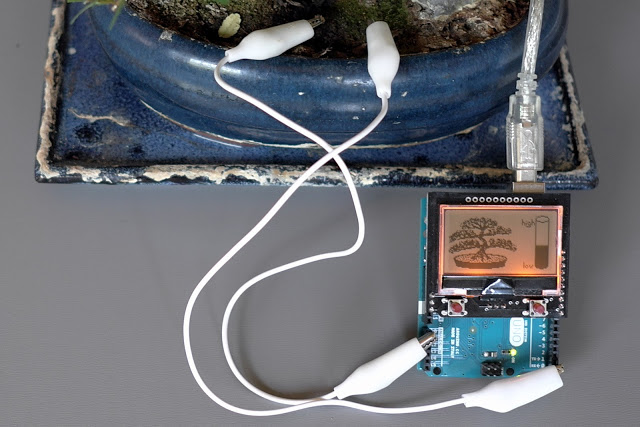
Bonsai trees are not like other plants. There’s no single watering schedule that can be applied to a bonsai and the best way to tell if the bonsai needs water is to touch the soil. Experienced growers know when a tree needs to be watered by observing the foliage or just by the weight of the pot. If you are not used to taking care of this type of tree, Bonsai Watchdog could be the perfect project for you. It runs on Arduino and Genuino Uno and makes it really easy to monitor the moisture level in the soil.

Thomas Baum, created it and shared it some days ago on the Arduino Community on G+ :

Two pencil leads, an Arduino and a 12864 (ST7565) LCD watches out my little bonsai. The filling level shows how often the sapling need to be watered.
source and discription (in german) you can find here:
http://tiny.systems/categorie/lcdProjekt/BonsaiWatchdog.html


Lego Technic of the Past Eliminates Apple ][ with Arduino and Touchscreen

[JAC_101], the Director of Legal Evil Emeritus for LVL1 Hackerspace (don’t ask me, it’s their title system), was challenged to a hacking duel. It all started years ago. The person who is now president of LVL1, visited the space for the first time and brought with her a discarded Apple II controller for Lego bricks which had previously belonged to her father. Excited to test it, the space found that, unfortunately, LVL1’s Apple II wouldn’t boot. An argument ensued, probably some trash talking, and [JAC_101] left with the challenge: Could he build an Arduino interface for the Apple II Lego controller quicker than the hackerspace could fix its Apple II?”

Other things that belonged to people’s fathers.

In the end, a concentrated force by one hacker over two years overcame the collective ADHD of many. He began by opening the interface to look inside, a completely unnecessary step since he found it was already thoroughly documented. Next he forgot about the project for a year. Then he remembered it, and built an interface for an Arduino Uno to hook to the controller and wrote a library for the interface. Realizing that sending serial commands was not in line with the original friendly intention of the device, he added a graphical display to the project; which allowed the user to control the panel with touch. In the end he won the challenge and LVL1 still doesn’t have a working Apple II. We assume some gloating occurred. Some videos of it in action after the break.


Filed under: classic hacks, toy hacks
Hack a Day 25 Jan 09:01

There Is No Spoon; Automatic Self Stirring Mug

Sometimes it’s helpful to realize the truth that there is no spoon. At least, not with [Ronaldo]’s automatic self-stirring mug. At first it was just a small propeller in the bottom of the mug that turned on by pushing a button in the handle, but this wasn’t as feature-rich as [Ronaldo] hoped it could be, so he decided to see just how deep the automatic beverage-mixing rabbit hole goes.

The first thing to do was to get a microcontroller installed to handle the operation of the motor. The ATtiny13a was perfect for the job since it’s only using one output pin to control the motor, and can be configured to only draw 0.5 microamps in power-saving mode. This ensures a long life for the two AAA batteries that power the microcontroller and the motor.

As far as operation goes, the motor operates in different modes depending on how many times the button in the handle is pushed. It can be on continuously or it can operate at pre-determined intervals for a certain amount of time, making sure to keep the beverage thoroughly mixed for as long as the power lasts. Be sure to check out the video below for a detailed explanation of all of the operating modes. We could certainly see some other possible uses for more interesting beverages as well.


Filed under: cooking hacks
Hack a Day 24 Jan 21:00

Man Shoots Lamp

What do you get when you mix together all of the stuff that you can get for cheap over eBay with a bit of creativity and some PVC pipe? [Austiwawa] gets a table lamp, remote-controlled by a toy gun, that turns off and falls over when you shoot it. You’ve got to watch the video below the break.

This isn’t a technical hack. Rather it’s a creative use of a bunch of easily available parts, with a little cutting here and snipping there to make it work. For instance, [Austiwawa] took a remote control sender and receiver pair straight off the rack and soldered some wires to extend the LED and fit it inside the toy gun. A relay module controls the lamp, and plugs straight into the Arduino that’s behind everything. Plug and play.

Which is not to say the lamp lacks finesse. We especially like the screw used as an end-of-travel stop for the servo motor, and the nicely fabricated servo bracket made from two Ls. And you can’t beat the fall-over-dead effect. Or can you? Seriously, though, great project [Austiwawa]!


Filed under: home hacks

Cricket Scoreboard is a Big Win for Novice Hackers

The game of cricket boggles most Americans in the same way our football perplexes the rest of the world. We won’t even pretend to understand what a “wicket” or an “over” is, but apparently it’s important enough to keep track of that so an English cricket club decided to build their own electronic scoreboard for their – pitch? Field? Help us out here.

This scoreboard build was undertaken by what team member [Ian] refers to as some “middle-aged blokes from Gloucestershire” with no previous electronics experience. That’s tough enough to deal with, but add to it virtually no budget, a huge physical size for the board, exposure to the elements, and a publicly visible project where failure would be embarrassingly obvious, and this was indeed an intimidating project to even consider. Yet despite the handicaps, they came up with a great rig, with a laser-cut acrylic cover for a professional look. A Raspberry Pi runs the LED segments and allows WiFi connections from a laptop or phone in the stands. They’ve even recently upgraded to solar power for the system.

And we’ll toot our own horn here, since this build was inspired at least in part by a Hackaday post. The builders have a long list of other links that inspired or instructed them, and we think that says something powerful about the hacker community that we’ve all been building – a group with no previous experience manages a major build with the guidance of seasoned hackers. That’s something to feel good about.


Filed under: misc hacks, Raspberry Pi
Hack a Day 24 Jan 12:01

An Arduino-Powered Laser Engraver That You Can Build

A teenage maker created this impressive laser engraver for around $220

Read more on MAKE

The post An Arduino-Powered Laser Engraver That You Can Build appeared first on Make: DIY Projects, How-Tos, Electronics, Crafts and Ideas for Makers.

Link Trucker is a Tiny Networking Giant

If you’re a networking professional, there are professional tools for verifying that everything’s as it should be on the business end of an Ethernet cable. These professional tools often come along with a professional pricetag. If you’re just trying to wire up a single office, the pro gear can be overkill. Unless you make it yourself on the cheap! And now you can.

[Kristopher Marciniak] designed and built an inexpensive device that verifies the basics:

  • Is the link up? Is this cable connected?
  • Can it get a DHCP address?
  • Can it perform a DNS lookup?
  • Can it open a webpage?

What’s going on under the hood? A Raspberry Pi, you’d think. A BeagleBoard? Our hearts were warmed to see a throwback to a more civilized age: an ENC28J60 breakout board and an Arduino Uno. That’s right, [Kristopher] replicated a couple-hundred dollar network tester for the price of a few lattes. And by using a pre-made housing, [Kristopher]’s version looks great too. Watch it work in the video just below the break.

Building an embedded network device used to be a lot more work, but it could be done. One of our favorites is still [Ian Lesnet’s] webserver on a business card from way back in 2008 which also used the ENC28J60 Ethernet chip.


Filed under: Network Hacks, tool hacks

FogFinder turns foggy air into a reliable water source

Scientists in Chile are turning foggy air into a reliable water source for nearby residents using a new sensor connected to  Arduino Mega and XBee module. The project is called FogFinder and was developed by Richard LeBoeuf in collaboration with Juan Pablo Vargas and Jorge Gómez at the Universidad de los Andes. It’s a system to generate new renewable source of water for communities and reforestation through use of a probe and wireless communications technology to develop a liquid water flux map for fog harvesting.

Fog collectors are common in arid climates in Chile where rain runs scarce and are typically installed on hillsides and remote areas where fog is abundant. The innovative part of the project lies in determining where to install these collectors, how to orient them, and understanding how efficient they are at collecting water from the air. This can be done with a new type of sensor called the “Liquid Water Flux Probe” to measure the availability of water at current and potential fog collector sites. The sensor measures the liquid water content and speed of the fog and can be used to understand the optimal location and orientation for each of the collectors.

Matt Ahart  of Digi, the company producing Xbee modules , told us:

“The primary function of the Arduino Mega is to simplify data collection and processing. The development team also made use of software libraries that simplified the use of sensors and API mode configuration for the XBee radios.
Another important reason for using Arduino, is that the Fog Finder project was created by students with only a few months to complete the design and creation of the device. A great thing about Arduino is that the learning curve is very fast and students can quickly start making contributions instead of spending weeks or months trying to understand the software and hardware.”

The FogFinder project has received support from the Universidad de los Andes through its Fondo de Ayuda de Investigación, Andes Iron – Dominga, and the Pontificia Universidad Católica de Chile. In 2014 it was finalist in the Wireless Innovation Project sponsored by the Vodafone Americas Foundation.

Arduino Blog 21 Jan 21:06

Meet the Arduino and Genuino resellers!

In 2015 we’ve been setting-up an independent, modular production network with world-class partners that share our very own approach to open source hardware. We partnered with manufacturers and resellers including Adafruit in United States, Seeedstudio in China, Axel in Italy.

Now we are happy to share with our community the updated page dedicated to resellers, making Genuino and Arduino products available around the world. On the  page you can find all the info and links to get in touch if you are interested in purchasing  boards in your country, or you want to become one of our resellers.

From today  we’ll be also highlighting new resellers on the Arduino blog, so you can get to know them better.


Watterott Electronic (Germany)

The team of Watterott Electronic is manufacturing Genuino boards and is the official Genuino reseller for Germany. We started selling Genuino boards manufactured by Watterott during Maker Faire Rome 2015.

In the picture you can see Stephan Watterott of Watterott Electronic (Germany) holding brand new Genuino boards ready to be shipped!


- Tell us a bit more about Watterott

I founded the company Watterott Electronic in early 2008 as a hobby project in Hausen (Thuringia, Germany). The goal was to offer some own microcontroller boards and special hard to find development components.
My first warehouse was in the garage of my parents house. After about 2 years the garage was to small and I moved to the city of Leinefelde (only 5km away). Until today I added more and more products to our portfolio and also the manufacturing of own boards has increased. Finally at the end of 2015 we became a manufacturer and reseller for Genuino boards.

- What’s your company’s super power?

We can do nearly everything in-house and so we a very short time from the idea to a prototype or final product/board.

- What’s your favorite Arduino or Genuino project?

I have two favorite Arduino/Genuino projects:

  • DIY-Thermocam (previously Cheap Thermocam) from Max Ritter.
    I followed the project from the first hour and I also supported Max on his first prototypes.
    http://www.diy-thermocam.net
  • FabScan (DIY 3D Scanner).
    The project shows how 3D scanning is working and I also designed the Arduino FabScan Shield in 2012.
    http://www.fabscan.org

Contacts

Watterott Store Website – Twitter – Facebook  – Google+