Posts with «arduino» label

Twitter Roach takes guidance from tweets, ushers in a terrifying 2013 (video)

We've already seen cockroaches turned into unwitting puppets for human overlords, but never have we seen dominance quite so casual as with Brittany Ransom's recent Twitter Roach art project. While part of the exhibition, one of the insects wore a modified RoboRoach backpack with an Arduino add-on that took commands from Twitter: mentions including specific hashtags steered the roach left or right by stimulating its nerves. Yes, that meant the poor roach rarely had the dignity of seeing its master face to face, although there's some consolation in knowing that it wore the backpack for limited periods and had a required 30-second pause between instructions.

As to why Twitter Roach came to be? Ransom tells CNET she imagined the currently dormant project as a reflection of the "overstimulation" us humans encounter in a digital world. We can certainly sympathize given our livelihoods, although its existence makes us nervous about 2013. If we're fighting off remote-controlled insect armies a year from now, we'll have to admit we had fair warning.

Continue reading Twitter Roach takes guidance from tweets, ushers in a terrifying 2013 (video)

Filed under: Robots, Alt

Comments

Via: CNET

Source: Chicago Artists' Coalition

Data logging software for circuits course working

Over winter break, my son has been working nearly full time on writing data logging software for my students to use in the Applied Circuits for Bioengineers course. He has made the first public beta release (v1.0.0b1) today on BitBucket. (Note: you may have to click on the “tags” tab to get to the view that shows the v1.0.0b1 link. The BitBucket link directly to that view seems to be broken—that’s open issue 5504 in BitBucket’s own issue tracker.)

We’ve only tested the code on Mac OS X computers with Arduino Duemilanove and Uno boards, though we’ve tested a slightly earlier version on Windows.  The code should also run on Linux and with Leonardo and Mega boards, but has not been tested on these platforms. We welcome users testing the code for us—report any problems using the BitBucket issue tracker for the project.  The documentation is still in a fairly primitive state—report issues with that also, so that they can be fixed.

The overall goal is fairly simple: to have an easy-to-use way to record timestamps, voltages, and digital values from the Arduino into files on a host computer, without needing auxiliary hardware (like the Adafruit data logger shield that I bought for myself and assembled yesterday).

The user can specify what analog and digital pins to record and when to record the values.  When to record can be specified either   as interrupts on pins or as fixed timing intervals:
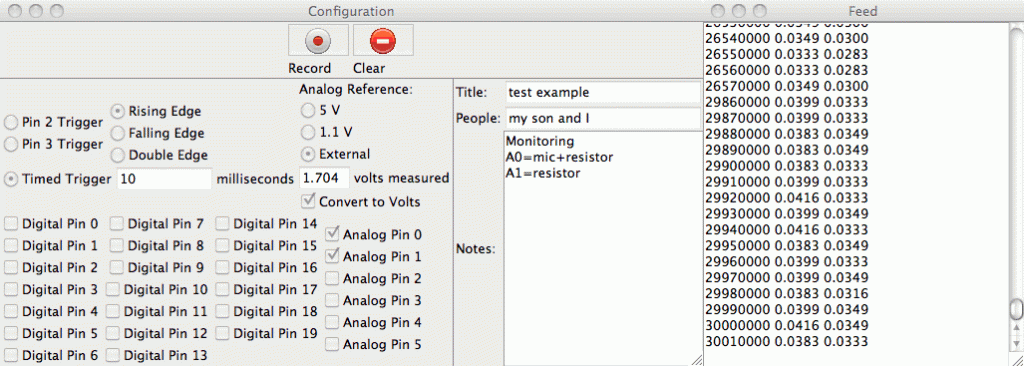
View of the two windows of the user interface.

The “volts measured” for the reference is stored as metadata in the output file and can be used for scaling the Arduino numbers (if “Convert to Volts” is checked).  The scaling can be an arbitrary value for the full-scale reading or can be the voltage measured with an external multimeter at the AREF pin.

This software has been through several versions:

  1. The first version of the code was one I wrote last spring that just recorded interrupt times in an Arduino array and dumped them out over the USB cable after it was done (see Homemade super pulley).
  2. My son was not happy with that crude program of mine and rewrote it in June to have use the Arduino memory as a queue and send the time stamps to a Python program on the laptop (see Improved super pulley code).  That program introduced him to three new concepts: circular buffers for queues, interrupts, and multi-threading, all of which he researched for himself. That version of the code mainly used a command line interface, but he used the curses package for a crude user interface.
  3. He added a PyGUI graphical user interface, but that slowed down the code on the laptop and eventually grew to be difficult to maintain.
  4. He decided to try to make the software by portable between three platforms (Mac OS X, Windows, and Linux) despite their very different ways of dealing with the USB serial ports, to run under both Python2.7 and Python3, and to require only minimal non-standard packages (mainly PySerial and the Arduino package Timer1).  He refactored the code completely and built the GUI using Tkinter. This has lead to the current version of the code, which is finally working robustly enough to let the bioengineering students use it.

It has been a good software-engineering experience for my son, and he has learned a lot.  In the process of developing this code, he has learned a lot about interrupts, using queues to communicate between processors and between threads, platform-independence, a couple of different GUI libraries, the value of version control and bug-tracking, race conditions, interface design for non-expert users, and even some things about documentation.

I’ve been acting mainly as a customer for this code, entering bug reports and suggesting new features, though I have occasionally helped him debug.  For example, we just spent fifteen minutes reading Section 15 “16-bit Timer/Counter1 with PWM” of the ATMega328 data sheet, trying to figure out why the first time interval was wrong.  It turns out that timer interrupt is raised immediately when the interrupt is enabled, unless the timer-overflow flag is turned off first.

My son may use this project as a science fair entry this year, though it was not started with that idea, and we discussed that possibility for the first time today.  The big problem is that this is purely an engineering project, not a “science” project, and trying to fake a hypothesis is not something we’ll consider.


Filed under: Circuits course, Data acquisition, home school, Science fair Tagged: Arduino, bioengineering, BitBucket, circuits, data logger

Data logging software for circuits course working

Over winter break, my son has been working nearly full time on writing data logging software for my students to use in the Applied Circuits for Bioengineers course. He has made the first public beta release (v1.0.0b1) today on BitBucket. (Note: you may have to click on the “tags” tab to get to the view that shows the v1.0.0b1 link. The BitBucket link directly to that view seems to be broken—that’s open issue 5504 in BitBucket’s own issue tracker.)

We’ve only tested the code on Mac OS X computers with Arduino Duemilanove and Uno boards, though we’ve tested a slightly earlier version on Windows.  The code should also run on Linux and with Leonardo and Mega boards, but has not been tested on these platforms. We welcome users testing the code for us—report any problems using the BitBucket issue tracker for the project.  The documentation is still in a fairly primitive state—report issues with that also, so that they can be fixed.

The overall goal is fairly simple: to have an easy-to-use way to record timestamps, voltages, and digital values from the Arduino into files on a host computer, without needing auxiliary hardware (like the Adafruit data logger shield that I bought for myself and assembled yesterday).

The user can specify what analog and digital pins to record and when to record the values.  When to record can be specified either   as interrupts on pins or as fixed timing intervals:

View of the two windows of the user interface.

The “volts measured” for the reference is stored as metadata in the output file and can be used for scaling the Arduino numbers (if “Convert to Volts” is checked).  The scaling can be an arbitrary value for the full-scale reading or can be the voltage measured with an external multimeter at the AREF pin.

This software has been through several versions:

  1. The first version of the code was one I wrote last spring that just recorded interrupt times in an Arduino array and dumped them out over the USB cable after it was done (see Homemade super pulley).
  2. My son was not happy with that crude program of mine and rewrote it in June to have use the Arduino memory as a queue and send the time stamps to a Python program on the laptop (see Improved super pulley code).  That program introduced him to three new concepts: circular buffers for queues, interrupts, and multi-threading, all of which he researched for himself. That version of the code mainly used a command line interface, but he used the curses package for a crude user interface.
  3. He added a PyGUI graphical user interface, but that slowed down the code on the laptop and eventually grew to be difficult to maintain.
  4. He decided to try to make the software by portable between three platforms (Mac OS X, Windows, and Linux) despite their very different ways of dealing with the USB serial ports, to run under both Python2.7 and Python3, and to require only minimal non-standard packages (mainly PySerial and the Arduino package Timer1).  He refactored the code completely and built the GUI using Tkinter. This has lead to the current version of the code, which is finally working robustly enough to let the bioengineering students use it.

It has been a good software-engineering experience for my son, and he has learned a lot.  In the process of developing this code, he has learned a lot about interrupts, using queues to communicate between processors and between threads, platform-independence, a couple of different GUI libraries, the value of version control and bug-tracking, race conditions, interface design for non-expert users, and even some things about documentation.

I’ve been acting mainly as a customer for this code, entering bug reports and suggesting new features, though I have occasionally helped him debug.  For example, we just spent fifteen minutes reading Section 15 “16-bit Timer/Counter1 with PWM” of the ATMega328 data sheet, trying to figure out why the first time interval was wrong.  It turns out that timer interrupt is raised immediately when the interrupt is enabled, unless the timer-overflow flag is turned off first.

My son may use this project as a science fair entry this year, though it was not started with that idea, and we discussed that possibility for the first time today.  The big problem is that this is purely an engineering project, not a “science” project, and trying to fake a hypothesis is not something we’ll consider.


Filed under: Circuits course, Data acquisition, home school, Science fair Tagged: Arduino, bioengineering, BitBucket, circuits, data logger

Building a hardware security module

[Stefan] was nervous about putting the secret key for his Amazon Web Services account in his config file. In the security world, storing passwords in plain text is considered a very bad thing. but luckily there are ways around it. [Stefan]‘s solution was to make a hardware security module out of the newest ARM-powered Arduino Due.

The build puts the secret key for [Stefan]‘s AWS account right in the firmware of the Arduino Due (with the security bit on the Arduino flipped, of course). A Python web service then receives sign requests and talks to the Due over a serial port. The Due then signs the request and sends it off to another bit of Python code that handles the AWS API.

Hardware security modules are frequently used by three-letter government agencies to manage cryptography keys and ensure their data are encrypted properly. Instead of a hardware module costing tens of thousands of dollars, [Stefan]‘s only cost the price of an Arduino Due; not too shabby for a hardware security module that can sign more than 2000 requests per second.


Filed under: security hacks

By comparing temperatur, Arduino tells you with RF Link if your room is too cold or too warm.

I would like to share my code. With this code your Arduino tells you by RF Link  if your room is too cold or too warm. You need 2 Arduino's.

It is just a part of a bigger project. But you can modify the code and make some great stuff. If their are some questions feel free to ask. RF link is amazing.


read more

Question about sending integers using virtualwire.

// Tested with IDE 20 and VirtualWire 1.4, only working with those.
// RF Link using VirtualWire to Transmit messages
// simplex (one-way) receiver with a 315MHz RF Link Transmitter module
// tx pin 3 on Duemilanova (arduino)
//vw_setup(300)&n

read more

Let's Make Robots 30 Dec 18:13
arduino  avr  int  integer  virtual wire  

Not receiving the correct data. Using VirtualWire

I would like to use a code for sending the temperatur and humidity. One day before, I started with sending just a short message like: LMR is cool. TX= Transmitter RX=Reciever

It only worked when I used:

Arduino IDE 020 and VirtualWire 1.10 for RX

and Arduino IDE 020 and VirtualWire 1.10 for TX.


When I use Arduino IDE 1.0.3 and VirtualWire 1.4 for RX 

and Arduino IDE 1.0.3 and VirtualWire (VW) 1.4 for TX it didn't. 


read more

Let's Make Robots 30 Dec 13:13
arduino  avr  data  virtual wire  

Problems when sending float (temperatur) with VirtualWire Arduino


// Tested with IDE 20 and VirtualWire 1.4, only working with those.

// RF Link using VirtualWire to Transmit messages

// simplex (one-way) receiver with a 315MHz RF Link Transmitter module

// tx pin 3 on Duemilanova (arduino)

#include "DHT.h" 

#include <VirtualWire.h>  // you must download and install the VirtualWire.h to your hardware/libraries folder

#define DHTPIN 4     // what pin we're connected to

#define DHTTYPE DHT11   // DHT 11 

#undef int

#undef abs

#undef double

read more

Let's Make Robots 29 Dec 22:24
arduino  avr  float  virtual wire  

Best of 2012: Arduinio Projects

As 2012 concludes, let’s look back at all the cool Arduino projects that we’ve featured on the site. There were a ton! We’ve been big fans of the Arduino since its release, and there are hundreds of posts on the blog as a testament to this love affair–with more to [...]

Read the full article on MAKE

MAKE » Arduino 28 Dec 23:00
2012  arduino  best of  

Nerf Sentry Gun for the Apocalypse

If you’ve ever wanted to shoot someone with a Nerf gun, but just didn’t have the energy to get off the couch, this hack may be for you. It’s also a good way to ward off zombies if another apocalypse, Mayan or otherwise, is on the horizon.

Although the effects are very cool, as seen in the video after the break, the method for making this setup was quite simple. The requirements for this project were that the gun could not be permanently modified, and everything had to fire automatically. These restrictions may have contributed to the simplicity of the design as many of us would start breaking things before we had to.

Instead of some elaborate hack, the trigger was tied back in the firing position at all times. A relay was then used to interrupt the power supply to the mechanism allowing an Arduino equipped with an infrared sensor to automatically control the firing. The setup is explained after the break, but skip to around 1:55 if you’d rather just see the guns in action.


Filed under: arduino hacks, weapons hacks
Hack a Day 28 Dec 19:31