Posts with «arduino» label

Creeper

Primary image

What does it do?

Navigate around via ultrasound or controlled by bluetooth

Inspired by this one: http://www.instructables.com/id/Strandbot-a-solar-arduino-powered-RC-motorize/ Autonomous walker, based on a model of the strandbeest. This unit runs on 20rpm 6 volt motors and walks real slow. On the other hand, it's very silent. Due to it's sweeping sensor it can run autonomous, but it can also be controlled with a bluetooth enabled device. On the front a small speaker, connected to a voice record and playback chip; when it runs into something, it does a Uh-Oh :)


Things still to work on:

- give it a paint job

Cost to build

$40,00

Embedded video

Finished project

Number

Time to build

10 hours

Type

legs

URL to more information

Weight

350 grams

read more

Updates on some earlier lessons

In Still better I-V plot for Schottky diodes, I had some lessons learned at the end of the post:

  1. Higher-resolution ADCs do give smoother curves, with less digitization noise, but they aren’t a panacea for measurement problems. To get most of the resolution, I had to set the ADC to use long sample times and do a lot of averaging. I understand that Freescale Kinetis M series include 24-bit sigma-delta converters for higher precision at much lower speed (24 bits is 7 decimal digits), as well as the high-speed 16-bit successive-approximation converters. Unfortunately, they don’t have a low-cost development board for this series.
  2. Stay away from the bottom end of the ADC range on the KL25Z.  Scale single-ended inputs to have values at least 50, and differential inputs to have values at least 20.  There may be similar problems at the top end of the range, but I did not test for them.
    I wondered if the problem may be switching from the large value for the voltage across the diode to the small voltage across the shunt resistor that was the problem. I tried putting in a dummy read between the voltage and the current reads, but that didn’t help at all. At first I thought that the low-count readings were good with the large shunt resistors, but this is probably an illusion: errors in the current measurement for small currents aren’t visible on the plot, because the voltage across the diode is not changing, and so large horizontal errors in the plot are not visible there.
  3. Watch out for AC noise when trying to measure DC parameters.  If there are semiconductor junctions around, the noise may be rectified to produce an unwanted DC signal.
  4. The differential ADC settings have a range of ±VDDA, not ±VDDA/2. This means that the least-significant bit step size is twice as big for differential inputs as for single-ended inputs. For some reason the Freescale documentation never bothers to express what the differential range is.
  5. Serial USB connections are a bit flakey—the Arduino serial monitor missed a byte about every 200–300 lines.  I looked for anomalous points on the plot, then commented out the lines that produced them—they were almost all explainable by one character having been missed by the serial monitor; e.g., I commented out “662401069     86      19″ right after “660001069       865     17″,  because the last digit of the voltage (the second field) was missing.  The fields were a timestamp (in 24MHz ticks), voltage across the diode (in ADC units), and voltage across the shunt resistance (in ADC units).  [Actually, this was not a new lesson for me—I've had to do the same on almost all files collected from the Arduino serial monitor.  My son's data logger code is better at not losing data, but it is still worthwhile to check for anomalies.]
  6. The 3.3v supply from the Freedom board is much cleaner than the 5v USB supply that I get from the Arduino (unless I use an external power supply with the Arduino), but I can only take about 10mA from the 3.3v supply before it begins to droop.  If I want  more than that, I’d better provide my own power supply (or at least my own LDO regulator from the USB 5v supply).

I’d like to correct a few of those lessons in this post.

  1. A 24-bit sigma-delta converter is really only about 7 bits of accuracy—you are relying on oversampling with a single-bit comparator, then low-pass filtering.  Your resolution is a function of frequency, but the “24-bit” number is misleading—that’s how much precision they carry in the low-pass filter computations, and has little to do with the amount of information you can actually extract from the ADC. I think I was confusing sigma-delta converters (which are fast, cheap, and not very accurate) with dual-slope converters (which are slow and more accurate).
  2. no update.
  3. no update.
  4. no update.
  5. The UART communication from the Freescale KL25Z boards, using MBED’s code on OpenSDA chip to do the UART to USB conversion is much less reliable than the Arduino serial connections.  My son has been doing testing and has found that he can run the Arduino boards up to about 500k baud without losing characters (aside from a small number right after a reset), but the MBED-implemented UART communication on the KL25Z lost tens of character per second even at fairly low speeds (tested own to 62.5kbaud). We suspect a bug in their code in which they ignore the UART port for too long while dealing with the USB side.  (He’s not the first to notice that the MBED serial communication is broken on the KL25Z boards.) Using the MBED USB stack natively on the KL25 chip (not the SDA port), he had no noticeable character losses, so the problem is not on the host computer or the software he was testing with, but on the MBED implementation of the USB serial connection on the OpenSDA chip.
    This bug in MBED’s serial implementation has raised the complexity of the port of the data acquisition system to the KL25Z enormously, as he’ll have to implement a USB stack (or enough of one to do USB serial) on the KL25, rather than using the buggy one on the OpenSDA chip.  The MBED USB stack (written in C++) is not compatible with the bare metal ARM platform he’s been using for the port (which only seems to support C).  He’s gotten the USB code to compile and link, but is having trouble getting it to run—we suspect that some part of the C++ memory management has not been initialized properly.
    We have not checked whether the PEMicro OpenSDA software works for serial communication—since it doesn’t work for downloading software from the Mac, we can’t use it anyway.
  6. As I reported in Diode-connected nFET characterisitics, the 3.3V LDO on the KL25Z boards is actually pretty good: it can be modeled as 3.32V source with a 55mΩ series resistor. I got a steeper voltage drop above 500mA, but that was from overloading the USB 5v supply that was powering the board, not from problems with the LDO.
    I’ve not yet tried powering the board with a beefier power supply on the P5-9V_VIN pin. I suspect that it will be able to handle up to 1.5A without problems (maintaining the 55mΩ impedance).

Filed under: Circuits course Tagged: Arduino, KL25Z, MBED

Updates on some earlier lessons

In Still better I-V plot for Schottky diodes, I had some lessons learned at the end of the post:

  1. Higher-resolution ADCs do give smoother curves, with less digitization noise, but they aren’t a panacea for measurement problems. To get most of the resolution, I had to set the ADC to use long sample times and do a lot of averaging. I understand that Freescale Kinetis M series include 24-bit sigma-delta converters for higher precision at much lower speed (24 bits is 7 decimal digits), as well as the high-speed 16-bit successive-approximation converters. Unfortunately, they don’t have a low-cost development board for this series.
  2. Stay away from the bottom end of the ADC range on the KL25Z.  Scale single-ended inputs to have values at least 50, and differential inputs to have values at least 20.  There may be similar problems at the top end of the range, but I did not test for them.
    I wondered if the problem may be switching from the large value for the voltage across the diode to the small voltage across the shunt resistor that was the problem. I tried putting in a dummy read between the voltage and the current reads, but that didn’t help at all. At first I thought that the low-count readings were good with the large shunt resistors, but this is probably an illusion: errors in the current measurement for small currents aren’t visible on the plot, because the voltage across the diode is not changing, and so large horizontal errors in the plot are not visible there.
  3. Watch out for AC noise when trying to measure DC parameters.  If there are semiconductor junctions around, the noise may be rectified to produce an unwanted DC signal.
  4. The differential ADC settings have a range of ±VDDA, not ±VDDA/2. This means that the least-significant bit step size is twice as big for differential inputs as for single-ended inputs. For some reason the Freescale documentation never bothers to express what the differential range is.
  5. Serial USB connections are a bit flakey—the Arduino serial monitor missed a byte about every 200–300 lines.  I looked for anomalous points on the plot, then commented out the lines that produced them—they were almost all explainable by one character having been missed by the serial monitor; e.g., I commented out “662401069     86      19″ right after “660001069       865     17″,  because the last digit of the voltage (the second field) was missing.  The fields were a timestamp (in 24MHz ticks), voltage across the diode (in ADC units), and voltage across the shunt resistance (in ADC units).  [Actually, this was not a new lesson for me—I've had to do the same on almost all files collected from the Arduino serial monitor.  My son's data logger code is better at not losing data, but it is still worthwhile to check for anomalies.]
  6. The 3.3v supply from the Freedom board is much cleaner than the 5v USB supply that I get from the Arduino (unless I use an external power supply with the Arduino), but I can only take about 10mA from the 3.3v supply before it begins to droop.  If I want  more than that, I’d better provide my own power supply (or at least my own LDO regulator from the USB 5v supply).

I’d like to correct a few of those lessons in this post.

  1. A 24-bit sigma-delta converter is really only about 7 bits of accuracy—you are relying on oversampling with a single-bit comparator, then low-pass filtering.  Your resolution is a function of frequency, but the “24-bit” number is misleading—that’s how much precision they carry in the low-pass filter computations, and has little to do with the amount of information you can actually extract from the ADC. I think I was confusing sigma-delta converters (which are fast, cheap, and not very accurate) with dual-slope converters (which are slow and more accurate).
  2. no update.
  3. no update.
  4. no update.
  5. The UART communication from the Freescale KL25Z boards, using MBED’s code on OpenSDA chip to do the UART to USB conversion is much less reliable than the Arduino serial connections.  My son has been doing testing and has found that he can run the Arduino boards up to about 500k baud without losing characters (aside from a small number right after a reset), but the MBED-implemented UART communication on the KL25Z lost tens of character per second even at fairly low speeds (tested own to 62.5kbaud). We suspect a bug in their code in which they ignore the UART port for too long while dealing with the USB side.  (He’s not the first to notice that the MBED serial communication is broken on the KL25Z boards.) Using the MBED USB stack natively on the KL25 chip (not the SDA port), he had no noticeable character losses, so the problem is not on the host computer or the software he was testing with, but on the MBED implementation of the USB serial connection on the OpenSDA chip.
    This bug in MBED’s serial implementation has raised the complexity of the port of the data acquisition system to the KL25Z enormously, as he’ll have to implement a USB stack (or enough of one to do USB serial) on the KL25, rather than using the buggy one on the OpenSDA chip.  The MBED USB stack (written in C++) is not compatible with the bare metal ARM platform he’s been using for the port (which only seems to support C).  He’s gotten the USB code to compile and link, but is having trouble getting it to run—we suspect that some part of the C++ memory management has not been initialized properly.
    We have not checked whether the PEMicro OpenSDA software works for serial communication—since it doesn’t work for downloading software from the Mac, we can’t use it anyway.
  6. As I reported in Diode-connected nFET characterisitics, the 3.3V LDO on the KL25Z boards is actually pretty good: it can be modeled as 3.32V source with a 55mΩ series resistor. I got a steeper voltage drop above 500mA, but that was from overloading the USB 5v supply that was powering the board, not from problems with the LDO.
    I’ve not yet tried powering the board with a beefier power supply on the P5-9V_VIN pin. I suspect that it will be able to handle up to 1.5A without problems (maintaining the 55mΩ impedance).

Filed under: Circuits course Tagged: Arduino, KL25Z, MBED

Success! OSLRF (LIDAR) successfully Scanning and providing accurate results.


I've been working on getting the OSLRF01 prov

read more

Let's Make Robots 10 Mar 12:49
arduino  lidar  oslrf01  

How many versions of arduino have you got?

I've got a few versions of arduino on my pc and I'm probably wasting space but I bet I'm not the only one.
Just wondering what versions are best to keep. I believe there are incompatabilities with existing code for some older or newer versions.
At the moment I've got 21,22 and 23 and 1.0.3.
Are there any I haven't got I should have and which of these should I ditch.
Also is there a way to tell each version where it's sketchbook is and keep it. I've noticed that when I switch ide's I have to change the sketchbook back. Really annoying.

Let's Make Robots 08 Mar 05:29

Sixteenth day: Arduino demo

Today’s class in the freshman design seminar went well. I started by returning the drafts of the design reports and giving some generic feedback. I realized on reading the reports that I had not given a good explanation of what I meant by describing the components of the system—two of the groups had given me long parts lists on the first page of their reports, something that would only really be appropriate in an appendix. I explained that what I wanted was what the main blocks in the block diagram were, and that they should use the block diagram to organize their report, writing a page for each block. I also suggested that they use the block diagram to partition the project among the group members, with each group member working on a different component, then getting back together to reconcile any discrepancies. Note that this is much more like real engineering group work than the usual K–12 group project, which is usually done most efficiently by turning the whole project over to the most competent member of the group.

After the feedback on design reports, I offered the students a chance to get a demo of building an Arduino program with sensing and motor control. This was a completely extemporaneous demo—I had gathered a number of possibly useful components, but had not tested anything ahead of time nor even figured out what order to do the demo in.  I asked the students if they wanted me to start with sensing or control—they asked for the motor control first.

I started by pulling a motor out of box of motors I had gotten when the elementary school my wife works at cleaned out their closets.  I told the students that I had no idea what the spec of the motor were, but since it came from an elementary school, it probably ran on 3v batteries.  I tested the motor by hooking it up first to the 3.3v, then to the 5v power on my Arduino Uno.  It spun just fine on 3.3v, but squealed a bit on 5v, so we decided to run it on 3.3v.

I then pulled out the Sainsmart 4-relay board that I had bought some time ago but never used.  I explained how a relay worked, what single-pole double-throw meant, and normally open (NO) and normally closed (NC) contacts. I used the board unpowered with the NC contacts to spin the motor, then moved the wire over to the NO contacts to turn the motor off.  I then hooked up power to the board and tried connecting input IN1 to power to activate the relay.  Nothing happened. I then tried connecting IN1 to ground, and the relay clicked and the motor spun.  The inputs to the Sainsmart board are active low, which I explained to the students (though I did not use the terminology “active low”—perhaps I should have).  I did make a point of establishing that the relay provides very good isolation between the control logic and the circuitry being controlled—you can hook up AC power from the walls to the relay contacts without interfering with the logic circuitry.

Having established that the relay worked, the next step was to get the class (as a group) to write an Arduino program to control the motor using the relay. With me taking notes on the whiteboard, they quickly came up with the pinMode command for the setup, the digitalWrite and delay for the loop, and with only a tiny bit of prompting with a second digitalWrite and delay to turn the motor back off.  They even realized the need to have different delays for the on and off, so we could tell whether we had the polarity right on the control.  Here is the program we came up with:

#define RELAY_PIN (3)

void setup()
{   pinMode(RELAY_PIN, OUTPUT);
}

void loop()
{
  digitalWrite(RELAY_PIN,LOW); // turn motor ON via relay (or off via transistor)
  delay(1000);  // on for 1 second
  digitalWrite(RELAY_PIN,HIGH); // turn motor OFF via relay (or on via transistor)
  delay(3000); // off for 3 seconds
}

I typed the code in and downloaded it to the Arduino Uno, and it worked as expected.  (It would be nice if the Arduino IDE would allow me to increase the font size, like almost every other program I use, so that students could have read the projection of what I was typing better.)

I then offered the students a choice of going on to sensing or looking at pulse-width modulation for proportional control.  They wanted PWM. I explained why PWM is not really doable with relays (the relays are too slow, and chattering them would wear them out after a while.  I did not have the specs on the relay handy, but I just looked up the specs for the SRD-05VDC-SL-C relays on the board: They have a mechanical life of 10,000,000 cycles, but an electrical life of only 100,000 cycles.  The relay takes about 7msec to make a contact and about 3msec to break a contact, so they can’t be operated much faster than about 60 times a second, which could wear them out in as little as half an hour.

So instead of a relay, I suggested an nFET (Field-Effect Transistor). I gave them a circuit with one side of the motor connected to 3.3V, the other to the drain of an nFET, with the source connected to ground.  I explained that the voltage between the gate and the source (VGS) controlled whether the transistor was on or off, and that putting 5v on the gate would turn it on fairly well. I then got out an AOI518 nFET and stuck it in my breadboard, explaining the orientation to allow using the other holes to connect to the source, gate, and drain.

I mentioned that different FETs have the order of the pins different, so one has to look up the pinout on data sheet. I pulled up the AOI518 data sheet, which has on the first page “RDS(ON) (at VGS = 4.5V) < 11.9mΩ”. I explained that if we were putting a whole amp through the FET (we’re not doing anywhere near that much current), the voltage drop would be 11.9mV, so the power dissipated in the transistor would be only 11.9mW, not enough to get it warm. I mentioned that more current would result in more power being dissipated (I2R), and that the FETs could get quite warm. I passed around my other breadboard which has six melted holes from FETs getting quite hot when I was trying to debug the class-D amplifier design. The students were surprised that the FETs still worked after getting that hot (I must admit that I was also).

I hooked up the AOI518 nFET using double-headed male header pins and female jumper cables, and the motor alternated on for 3 seconds, off for one second. We now had the transistor controlling the motor, so it was time to switch to PWM. I went to the Arduino reference page and looked around for PWM, finding it on analogWrite(). I clicked that link and we looked at the page, seeing that analog Write was like digitalWrite, except that we could put in a value from 0 to 255 that controlled what fraction of the time the pin was high.

I edited the code, changing the first digitalWrite() to analogWrite(nFET_GATE_PIN, 255), and commenting out the rest of the loop. We downloaded that, and it turned the motor on, as expected. I then tried writing 128, which still turned the motor on, but perhaps not as strongly (hard to tell with no load). Writing 50 resulted in the motor not starting. Writing 100 let the motor run if I started it by hand, but wouldn’t start the motor from a dead stop. I used this opportunity to point out that controlling the motor was not linear—1/5th didn’t run at 1/5th speed, but wouldn’t run the motor at all.

Next we switched over to doing sensors (with only 10 minutes left in the class). I got out the pressure sensor and instrumentation amp from the circuits course and hooked it up. The screwdriver I had packed in the box had too large a blade for the 0.1″ screw terminals, but luckily the tiny screwdriver on my Swiss Army knife (tucked away in the corkscrew) was small enough. After hooking up the pressure sensor to A0, I downloaded the Arduino Data Logger to the Uno, and started it from a terminal window. I set the triggering to every 100msec (which probably should be the default for the data logger), the input to A0, and convert to volts. I then demoed the pressure sensor by blowing into or sucking on the plastic tube hooked up to the sensor. With the low-gain output from the amplifier, the output swung about 0.5 v either way from the 2.5v center. Moving the A0 wire over to the high-gain output of the amplifier gave a more visible signal. I also turned off the “convert to volts” to show the students the values actually read by the Arduino (511 and 512, the middle of the range from 0 to 1023).

Because the class was over at that point, I offered to stay for another 10 minutes to show them how to use the pressure sensor to control the motor. One or two students had other classes to run to, but most stayed. I then wrote a program that would normally have the motor off, but would turn it full on if I got the pressure reading up to 512+255 and would turn it on partway (using PWM) between 512 and 512+255. I made several typos when entering the program (including messing up the braces and putting in an extraneous semicolon), but on the third compilation it downloaded successfully and controlled the motor as expected.

One student asked why the motor was off when I wasn’t blowing into the tube, so I explained about 512 being the pressure reading when nothing was happening (neither blowing into the tube nor sucking on it). I changed the zero point for the motor to a pressure reading of 300, so that the motor was normally most of the way on, but could be turned off by sucking on the tube. Here is the program we ended up with

#define nFET_GATE_PIN (3)

void setup()
{   pinMode(nFET_GATE_PIN, OUTPUT);
    pinMode(A0, INPUT);
}

void loop()
{ int pressure;
  pressure=analogRead(A0);
  if (pressure < 300)
  {    digitalWrite(nFET_GATE_PIN,LOW);  // turn motor off
  }
  else
  {   if (pressure>300+255)
      { digitalWrite(nFET_GATE_PIN,HIGH);  // turn motor on full
      }
      else
      {    analogWrite(nFET_GATE_PIN,pressure-300); // turn motor partway on
      }
  }
}

Note: this code is not an example of brilliant programming style. I can see several things that I would have done differently if I had had time to think about the code, but for this blog it is more useful to show the actual artifact that was developed in the demo, even if it makes me cringe a little.

Overall, I thought that the demo went well, despite being completely extemporaneous. Running over by 10 minutes might have been avoidable, but only by omitting something useful (like the feedback on the design reports). The demo itself lasted about 70 minutes, making the whole class run 80 minutes instead of 70. I think I compressed the demo about as much as was feasible for the level the students were at.

Based on how the students developed the first motor-control program quickly in class, I think that some of them are beginning to get some of the main ideas of programming: explicit instructions and sequential ordering. Because we were out of time by the point I got to using conditionals, I did not get a chance to probe their understanding there.


Filed under: freshman design seminar, Pressure gauge Tagged: Arduino, FET, motor, nMOS FET, pressure sensor, PWM, relay

Sixteenth day: Arduino demo

Today’s class in the freshman design seminar went well. I started by returning the drafts of the design reports and giving some generic feedback. I realized on reading the reports that I had not given a good explanation of what I meant by describing the components of the system—two of the groups had given me long parts lists on the first page of their reports, something that would only really be appropriate in an appendix. I explained that what I wanted was what the main blocks in the block diagram were, and that they should use the block diagram to organize their report, writing a page for each block. I also suggested that they use the block diagram to partition the project among the group members, with each group member working on a different component, then getting back together to reconcile any discrepancies. Note that this is much more like real engineering group work than the usual K–12 group project, which is usually done most efficiently by turning the whole project over to the most competent member of the group.

After the feedback on design reports, I offered the students a chance to get a demo of building an Arduino program with sensing and motor control. This was a completely extemporaneous demo—I had gathered a number of possibly useful components, but had not tested anything ahead of time nor even figured out what order to do the demo in.  I asked the students if they wanted me to start with sensing or control—they asked for the motor control first.

I started by pulling a motor out of box of motors I had gotten when the elementary school my wife works at cleaned out their closets.  I told the students that I had no idea what the spec of the motor were, but since it came from an elementary school, it probably ran on 3v batteries.  I tested the motor by hooking it up first to the 3.3v, then to the 5v power on my Arduino Uno.  It spun just fine on 3.3v, but squealed a bit on 5v, so we decided to run it on 3.3v.

I then pulled out the Sainsmart 4-relay board that I had bought some time ago but never used.  I explained how a relay worked, what single-pole double-throw meant, and normally open (NO) and normally closed (NC) contacts. I used the board unpowered with the NC contacts to spin the motor, then moved the wire over to the NO contacts to turn the motor off.  I then hooked up power to the board and tried connecting input IN1 to power to activate the relay.  Nothing happened. I then tried connecting IN1 to ground, and the relay clicked and the motor spun.  The inputs to the Sainsmart board are active low, which I explained to the students (though I did not use the terminology “active low”—perhaps I should have).  I did make a point of establishing that the relay provides very good isolation between the control logic and the circuitry being controlled—you can hook up AC power from the walls to the relay contacts without interfering with the logic circuitry.

Having established that the relay worked, the next step was to get the class (as a group) to write an Arduino program to control the motor using the relay. With me taking notes on the whiteboard, they quickly came up with the pinMode command for the setup, the digitalWrite and delay for the loop, and with only a tiny bit of prompting with a second digitalWrite and delay to turn the motor back off.  They even realized the need to have different delays for the on and off, so we could tell whether we had the polarity right on the control.  Here is the program we came up with:

#define RELAY_PIN (3)

void setup()
{   pinMode(RELAY_PIN, OUTPUT);
}

void loop()
{
  digitalWrite(RELAY_PIN,LOW); // turn motor ON via relay (or off via transistor)
  delay(1000);  // on for 1 second
  digitalWrite(RELAY_PIN,HIGH); // turn motor OFF via relay (or on via transistor)
  delay(3000); // off for 3 seconds
}

I typed the code in and downloaded it to the Arduino Uno, and it worked as expected.  (It would be nice if the Arduino IDE would allow me to increase the font size, like almost every other program I use, so that students could have read the projection of what I was typing better.)

I then offered the students a choice of going on to sensing or looking at pulse-width modulation for proportional control.  They wanted PWM. I explained why PWM is not really doable with relays (the relays are too slow, and chattering them would wear them out after a while.  I did not have the specs on the relay handy, but I just looked up the specs for the SRD-05VDC-SL-C relays on the board: They have a mechanical life of 10,000,000 cycles, but an electrical life of only 100,000 cycles.  The relay takes about 7msec to make a contact and about 3msec to break a contact, so they can’t be operated much faster than about 60 times a second, which could wear them out in as little as half an hour.

So instead of a relay, I suggested an nFET (Field-Effect Transistor). I gave them a circuit with one side of the motor connected to 3.3V, the other to the drain of an nFET, with the source connected to ground.  I explained that the voltage between the gate and the source (VGS) controlled whether the transistor was on or off, and that putting 5v on the gate would turn it on fairly well. I then got out an AOI518 nFET and stuck it in my breadboard, explaining the orientation to allow using the other holes to connect to the source, gate, and drain.

I mentioned that different FETs have the order of the pins different, so one has to look up the pinout on data sheet. I pulled up the AOI518 data sheet, which has on the first page “RDS(ON) (at VGS = 4.5V) < 11.9mΩ”. I explained that if we were putting a whole amp through the FET (we’re not doing anywhere near that much current), the voltage drop would be 11.9mV, so the power dissipated in the transistor would be only 11.9mW, not enough to get it warm. I mentioned that more current would result in more power being dissipated (I2R), and that the FETs could get quite warm. I passed around my other breadboard which has six melted holes from FETs getting quite hot when I was trying to debug the class-D amplifier design. The students were surprised that the FETs still worked after getting that hot (I must admit that I was also).

I hooked up the AOI518 nFET using double-headed male header pins and female jumper cables, and the motor alternated on for 3 seconds, off for one second. We now had the transistor controlling the motor, so it was time to switch to PWM. I went to the Arduino reference page and looked around for PWM, finding it on analogWrite(). I clicked that link and we looked at the page, seeing that analog Write was like digitalWrite, except that we could put in a value from 0 to 255 that controlled what fraction of the time the pin was high.

I edited the code, changing the first digitalWrite() to analogWrite(nFET_GATE_PIN, 255), and commenting out the rest of the loop. We downloaded that, and it turned the motor on, as expected. I then tried writing 128, which still turned the motor on, but perhaps not as strongly (hard to tell with no load). Writing 50 resulted in the motor not starting. Writing 100 let the motor run if I started it by hand, but wouldn’t start the motor from a dead stop. I used this opportunity to point out that controlling the motor was not linear—1/5th didn’t run at 1/5th speed, but wouldn’t run the motor at all.

Next we switched over to doing sensors (with only 10 minutes left in the class). I got out the pressure sensor and instrumentation amp from the circuits course and hooked it up. The screwdriver I had packed in the box had too large a blade for the 0.1″ screw terminals, but luckily the tiny screwdriver on my Swiss Army knife (tucked away in the corkscrew) was small enough. After hooking up the pressure sensor to A0, I downloaded the Arduino Data Logger to the Uno, and started it from a terminal window. I set the triggering to every 100msec (which probably should be the default for the data logger), the input to A0, and convert to volts. I then demoed the pressure sensor by blowing into or sucking on the plastic tube hooked up to the sensor. With the low-gain output from the amplifier, the output swung about 0.5 v either way from the 2.5v center. Moving the A0 wire over to the high-gain output of the amplifier gave a more visible signal. I also turned off the “convert to volts” to show the students the values actually read by the Arduino (511 and 512, the middle of the range from 0 to 1023).

Because the class was over at that point, I offered to stay for another 10 minutes to show them how to use the pressure sensor to control the motor. One or two students had other classes to run to, but most stayed. I then wrote a program that would normally have the motor off, but would turn it full on if I got the pressure reading up to 512+255 and would turn it on partway (using PWM) between 512 and 512+255. I made several typos when entering the program (including messing up the braces and putting in an extraneous semicolon), but on the third compilation it downloaded successfully and controlled the motor as expected.

One student asked why the motor was off when I wasn’t blowing into the tube, so I explained about 512 being the pressure reading when nothing was happening (neither blowing into the tube nor sucking on it). I changed the zero point for the motor to a pressure reading of 300, so that the motor was normally most of the way on, but could be turned off by sucking on the tube. Here is the program we ended up with

#define nFET_GATE_PIN (3)

void setup()
{   pinMode(nFET_GATE_PIN, OUTPUT);
    pinMode(A0, INPUT);
}

void loop()
{ int pressure;
  pressure=analogRead(A0);
  if (pressure < 300)
  {    digitalWrite(nFET_GATE_PIN,LOW);  // turn motor off
  }
  else
  {   if (pressure>300+255)
      { digitalWrite(nFET_GATE_PIN,HIGH);  // turn motor on full
      }
      else
      {    analogWrite(nFET_GATE_PIN,pressure-300); // turn motor partway on
      }
  }
}

Note: this code is not an example of brilliant programming style. I can see several things that I would have done differently if I had had time to think about the code, but for this blog it is more useful to show the actual artifact that was developed in the demo, even if it makes me cringe a little.

Overall, I thought that the demo went well, despite being completely extemporaneous. Running over by 10 minutes might have been avoidable, but only by omitting something useful (like the feedback on the design reports). The demo itself lasted about 70 minutes, making the whole class run 80 minutes instead of 70. I think I compressed the demo about as much as was feasible for the level the students were at.

Based on how the students developed the first motor-control program quickly in class, I think that some of them are beginning to get some of the main ideas of programming: explicit instructions and sequential ordering. Because we were out of time by the point I got to using conditionals, I did not get a chance to probe their understanding there.


Filed under: freshman design seminar, Pressure gauge Tagged: Arduino, FET, motor, nMOS FET, pressure sensor, PWM, relay

Daily Roundup: the travels of Myspace Tom, a business card that plays Tetris, and more!

You might say the day is never really done in consumer technology news. Your workday, however, hopefully draws to a close at some point. This is the Daily Roundup on Engadget, a quick peek back at the top headlines for the past 24 hours -- all handpicked by the editors here at the site. Click on through the break, and enjoy.

Filed under: Misc, Microsoft

Comments

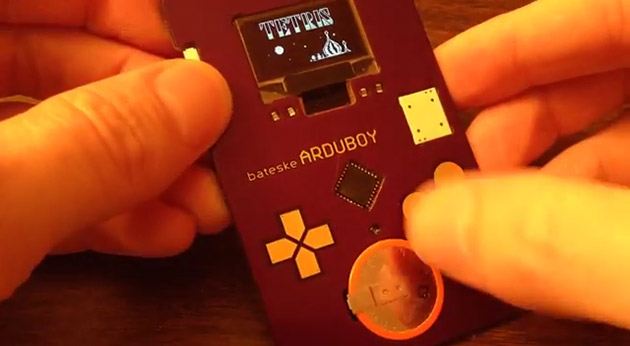
This Arduino-powered business card looks like a Game Boy and runs Tetris (video)

Off-white business cards with Silian Rail lettering are so passé -- these days; it's all about creativity. This Game Boy look-alike, for instance, demonstrates its creator's skills in one fell swoop: It doesn't just display a résumé, it's also a simple gaming handheld that can play Tetris. The device was made by Oregon programmer Kevin Bates, who calls it the Arduboy, because it uses a barebones Arduino board (the tiny computer also found inside Kegbot and Fish on Wheels) connected to an OLED screen. To make the hand-held gaming experience as authentic as possible, he also equipped the card with capacitive touch buttons, a speaker and a replaceable battery that lasts up to nine hours.

Comments

Via: Boing Boing

Source: Bateske

Twelfth day of freshman design seminar

My counts of which days were which in the freshman design seminar were all messed, so three of my blog posts were misnamed:

date which day of class blog post
Mon 2014 Jan 6 1 First day of freshman design seminar
Wed 2014 Jan 8 2 Second day of freshman design seminar
Mon 2014 Jan 13 3 (Baskin lab tour) Third day of freshman design seminar
Wed 2014 Jan 15 4 Fourth day of freshman design seminar
Wed 2014 Jan 22 5 Fifth day of freshman design seminar
Mon 2014 Jan 27 6 Sixth day of freshman design seminar
Wed 2014 Jan 29 7 (Biomed lab tour) Biomed lab tours and online discussions
Mon 2014 Feb 3 8* Seventh day of freshman design seminar
Wed 2014 Feb 5 9 no post (ill and group tutor ran class)
Mon 2014 Feb 10 10* Ninth day of freshman design seminar
Wed 2014 Feb 12 11* Tenth day of freshman design seminar
Wed 2014 Feb 19 12 Twelfth day of freshman design seminar (this post)

Today we started by having the students turn in their Arduino programming homework, then start writing the program as a group. I told them that I particularly wanted those who had trouble with the assignment to provide input—I’m trying to get them to realize that questions and confusion are normal, and that the right action to take in college is to ask questions, rather than to hide ignorance.

This particular assignment was expected to be hard for them—I had not done the scaffolding for it that I had originally planned, but threw them into it with very little preparation. I told them that, but also that I was trying to get them used to looking things up and figuring them out, rather than waiting to be told exactly what to do. Again, I’m trying to get them out of the “regurgitate what the teacher said” mode that K–12 education has trained them into. If I accomplish nothing else this quarter, I hope to increase their willingness to ask questions (of their teachers and of the things they read).

We did get the program written, with some digressions into the difference between “==” and “=” in C++ and the convention in C and C++ that 0 is false and any other value is true. I also managed to work in the importance of good variable names to tell people what things meant, though this particular program doesn’t need any variables.  The students now have the notions of serial execution, conditional expressions, if-statements, digital I/O, serial communication (we had a digression into baud rate), and the Arduino setup/loop structure, which may be enough for their projects—they may also need analogRead(), which I should be sure to demo on Monday.

I then typed in the program we had created together and demoed it with Arduino. I had deliberately left in a bug that I had spotted (no space between the printing of the different fields), and the class spotted it and came up with a reasonable correction when the first output came out.

We only had about 10 minutes left, so I gave them feedback on their project proposals:

  • Type homework for college classes!  Two of the groups had turned in hastily scribbled notes.
  • Give explicit specifications for the project.  How big an incubator? How precisely does the temperature need to be controlled? How fast does temperature have to change for PCR? What temperatures are needed and how precisely? How many tubes need to be run through the PCR machine at once?  How much acceleration does the centrifuge need to produce? How precisely does the speed need to be controlled?
  • Provide a block diagram giving all the components of the system (power supply, motor, fan, rotor, temperature sensor, … ) and lines showing the connections.  I talked about the importance of specifying the interfaces between components so that people could work simultaneously on different parts, and the need to renegotiate interfaces if the initial specification of them caused problems.

We talked a bit about prototyping—I want them to build something and learn enough to make an improved design, even if they don’t get a fully functional prototype.

For Monday, I assigned them the task of fleshing out the specifications for their project and producing a block diagram, filling in as many details as they could.  The group tutor is going to try to find time to meet with each group for an hour before then, to help them with flesh out their designs.


Filed under: freshman design seminar Tagged: Arduino, block diagram, computer science education, specifications