Posts with «arduino» label

An origami night light

Trent Brook is a designer based in Sydney who created an elefant-shaped night lamp for his daughter Harpa (1 and a half years old). It has evolved from a small paper origami elephant with blinking LEDs, to a large 3-d printed elephant lamp shade with Wifi controlled RGB LEDs, microphone, speaker, and a custom designed iPad application to teach her about colour:

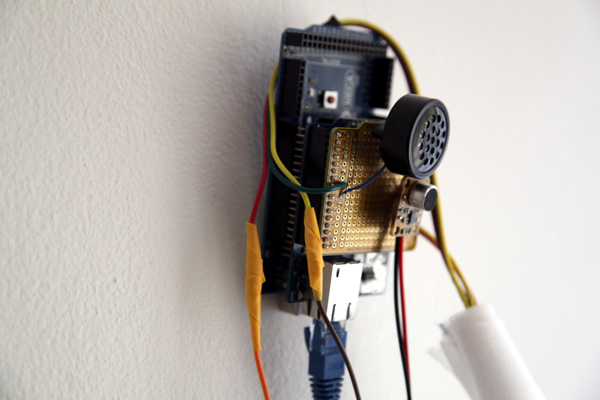
The electronics are driven by an Arduino MEGA 2560 microcontroller with ethernet shield for network control. Connected to the board is a 50cm 5V RGB addressable LED strip with 30 LEDs, a 3.3V microphone module for sound detection, and an 8ohm speaker for playing back generated ‘white-noise’ audio. Total cost for the all the electronics was less than $100.

Check the details of this cute project on his page on Behance.


Arduino Blog 12 Jun 19:35

Make it Great: Bluetooth Multimedia Remote

I recently put an old laptop in my room as an XBMC computer. However, whenever I wanted to switch the content that was playing, I would have to drag myself out of my warm bed to change the content on the computer. I searched far and wide for a glitch […]

Read more on MAKE

LittleBits and Arduino Giveaway – Win a collection of Kits!

To celebrate the new littleBits ArduinoAtHeart Module, littleBits has partnered with Arduino for a huge give away!

Entering is easy, just sign up on this page for your chance to win an incredible littleBits + Arduino collection. One lucky winner will receive a littleBits Deluxe Kit, littleBits Arduino Starter Bundle, and Arduino Starter Kit. All together a $400 value!

The contest started Monday, June the 9th and runs through June 22nd, so enter soon!

The winner will be announced on or before June 27th.

Sign in with your Facebook account on this page >>>

640×480 VGA On An Arduino

There are dozens, if not hundreds of examples around the Intertubes of an Arduino generating a VGA video output. The Arduino isn’t the fastest chip by far, and so far, all of these VGA generation techniques have peaked out at lower resolutions if you want to control individual pixels.[PK] has an interesting technique to generate 640×480 VGA at 60 frames per second without overclocking. It’s hacky, it’s ugly, but surprisingly, it actually works.

The VGA standard of 640×480 @ 60 fps requires pixels to be clocked out at 25.175 MHz, and the ATMega chips found in Arduinos top out at 20 MHz. [PK] wanted to generate VGA signals without overclocking, He did this by doubling the clock frequency with digital logic. The ATMega generates a clock, an inverter delays that clock so it is 90 degrees out of phase, and the two clocks are XORed, doubling clock output of the micro. It produces a very ugly square wave at 32 MHz – an error of 27% compared to the VGA spec. Somehow it still works.

With a hilariously out of spec clock, the rest of the project was pulled together from [Nick Gammon]‘s VGA library, a 16×16 font set, and a project from [lft]. Video below.


Filed under: Arduino Hacks

A garment transporter made with Arduino Robot

Last March  RS Components, in collaboration with RobotChallenge, launched the Hack the Arduino Robot competition.

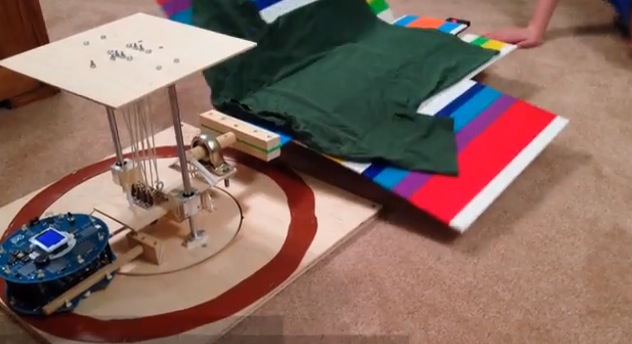
Jacob Glueck submitted a great hack for the Arduino Robot:

“A couple of years ago, I built an Arduino-powered shirt-folding machine which folds clothes. Using the Arduino robot from the RobotChallenge, I will build a device to remove folded clothes from the machine and to stack them. My idea is special because it will involve two Arduinos (the Arduino Uno in the shirt folder, and the Arduino Robot) which will have to communicate, and because it will be very useful. The robot will solve the real life problem of laundry folding by making the task easier and faster and by doing so nicely; the robot will use a custom-designed gripper to transport garments while keeping them perfectly folded.”

On his blog you can look at the pictures of the construction  phase , and below watch the video of the final project:

Arduino Blog 10 Jun 20:31

A Speed Suit Activated with Motion #ArduinoMicroMonday

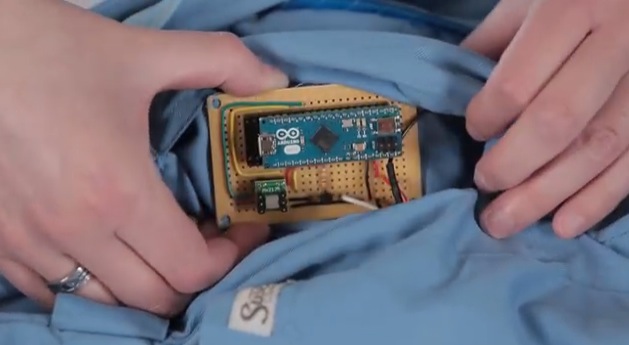
Instructables user Beaconsfield posted a great project of a suit controlled by  Arduino Micro, lighting up EL wires when the wearer starts to walk and lights them up completely when the wearer runs or dances:

Most of the time EL wire is used as is, with manual on/off control. However, I wanted to control it with an Arduino, so it would react to results from a sensor. This motion-activated suit flashes when the wearer starts to walk and lights up completely when the wearer runs. Perfect for those late-night runs! (or dance parties – it lights up when the wearer moves, and this includes dancing)

The suit itself is a set of zip-up coveralls decorated with EL wire and controlled via an Arduino Micro. An accelerometer monitors the wearer’s motion and sends that data to the Arduino.

In 19 steps you can make yours: follow the instructions.

Arduino Blog 09 Jun 19:28
arduino  el wire  micro  suit  wearables  

Beating Simon

Virtually everyone has played Simon, that electronic memory game from the 70s, but who among us has actually beaten it? That was the goal of [Ben] and his 7-year-old daughter, and after a year of work, an Arduino, some servos, and a few Lego bricks, they’ve finally done it.

Instead of the large original Simon, [Ben] is using a key chain version of the game: much smaller, and much easier to build a device to sense the lights and push the buttons. The arms are made from Lego bricks, held up with rubber bands and actuated with two servos mounted on a polycarbonate cutting board.

To detect Simon’s lights, [Ben] connected four phototransistors to an Arduino. The Arduino records the pattern of lights on the Simon, and activates the Lego arms in response to that pattern. [Ben]‘s version of Simon has only a maximum of 32 steps in the final sequence, but that still means each game takes 528 button presses – and a lot of annoying beeps – to complete.

Videos below.


Filed under: Arduino Hacks
Hack a Day 09 Jun 12:00

This smart hoodie lets you message friends on the sly

You don't have to be a forward-thinking fashion designer or scientist to produce tech-savvy clothing. Need evidence? Just look at the smart hoodie developed by New York University grad students Alina Balean and Rucha Patwardhan. They've integrated a cellular-equipped Arduino board and switches into the wearable, letting you send messages through discreet movements; you can cover your head to text your mom, or roll up your sleeve to post on Facebook.

Filed under: Wearables

Comments

Via: The Verge

Source: Alina Balean

Track Your Dog With This DIY GPS Harness

Have you ever wondered how far your dog actually runs when you take it to the park? You could be a standard consumer and purchase a GPS tracking collar for $100 or more, or you could follow [Becky Stern's] lead and build your own simple but effective GPS tracking harness.

[Becky] used two FLORA modules for this project; The FLORA main board, and the FLORA GPS module. The FLORA main board is essentially a small, sewable Arduino board. The GPS module obviously provides the tracking capabilities, but also has built-in data logging functionality. This means that [Becky] didn’t need to add complexity with any special logging circuit. The GPS coordinates are logged in a raw format, but they can easily be pasted into Google Maps for viewing as demonstrated by [Becky] in the video after the break. The system uses the built-in LED on the FLORA main board to notify the user when the GPS has received a lock and that the program is running.

The whole system runs off of three AAA batteries which, according to [Becky], can provide several hours of tracking. She also installed a small coin cell battery for the GPS module. This provides reserve power for the GPS module so it can remember its previous location. This is not necessary, but it provides a benefit in that the GPS module can remember it’s most recent location and therefore discover its location much faster.


Filed under: gps hacks, wearable hacks
Hack a Day 07 Jun 21:01

A Tweeting Litter Box

How can you not be interested in a project that uses load cells, Bluetooth, a Raspberry Pi, and Twitter. Even for those of our readers without a cat, [Scott's] tweeting litter box is worth the read.

Each aspect of this project can be re-purposed for almost any application. The inexpensive load cells, which available from eBay and other retailers, is used to sense when a cat is inside the litter box. Typically sensors like the load cell (that contain a strain gauge) this use a Wheatstone bridge, which is very important for maximizing the sensitivity of resistive sensor. The output then goes to a HX711, which is an ADC specifically built for load cells. A simple alternative would be using an instrumentation amplifier and the built-in ADC of the Arduino. Now, the magic happens. The weight reading is transmitted via an HC-06 Bluetooth module to a Raspberry Pi. Using a simple Perl script, the excreted weight, duration, and the cat’s resulting body weight is then tweeted!

Very nice work! This is a well thought out project that we could see being expanded to recognize the difference between multiple cats (or any other animal that goes inside).


Filed under: Arduino Hacks, Raspberry Pi, wireless hacks