Posts with «arduino» label

Battery Shield Mounts Underneath The Arduino

So, what do you do when your Arduino project needs to operate in a remote area or as a portable device? There are LiPo battery shields available, and although they may work well, recharging requires access to a USB port. You can also go the 9v battery route plugged into the on-board regulator of the Arduino but the low mAh rating of a 9v won’t allow your project to stay running for very long. [AI] needed a quick-change battery option for his Arduino project and came up with what he is calling the AA Undershield.

As the name implies, AA sized batteries are used in the project, two of them actually. Yes, two AA batteries at 1.5v each would equal only 3 volts when connected in series. The Arduino needs 5v so [AI] decided to use a MAX756 DC-to-DC step-up regulator to maintain a steady stream of 5v. This article has some nice graphs showing the difference in performance between a 9v battery being stepped down to 5v verses two AA’s being bumped up to 5v.

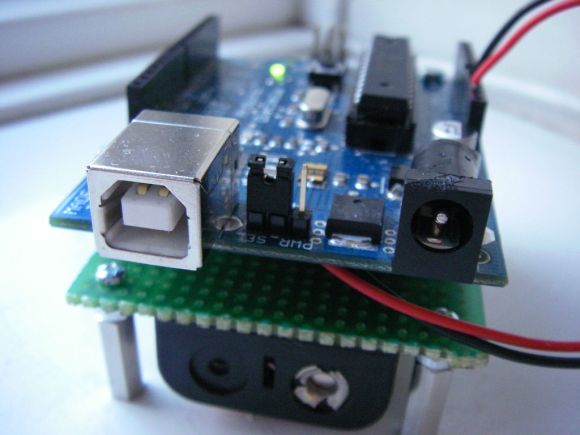
The ‘under’ in Undershield comes from this shield being mounted underneath the Arduino, unlike every other shield on the planet. Doing so allows use of a standard 0.100″-spaced prototype PCB and is an easy DIY solution to that odd-sized space between the Arduino’s Digital 7 and 8 pins. The Arduino mounts to the Undershield via its normal mounting holes with the help of some aluminum stand offs.

[AI] did a great job documenting his build with schematics and lots of photos so that anyone that is interested in making one for themselves can do so with extreme ease.


Filed under: Arduino Hacks

E-traces creates visual sensations from ballerinas

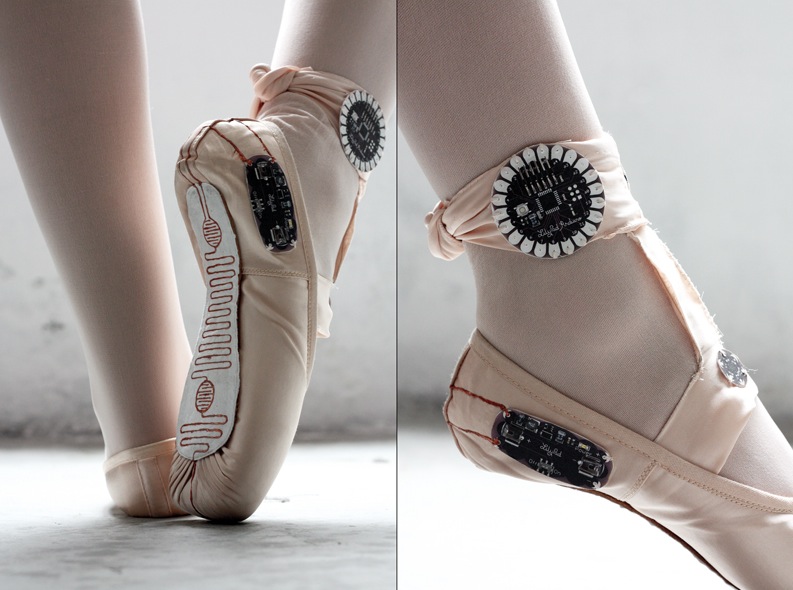
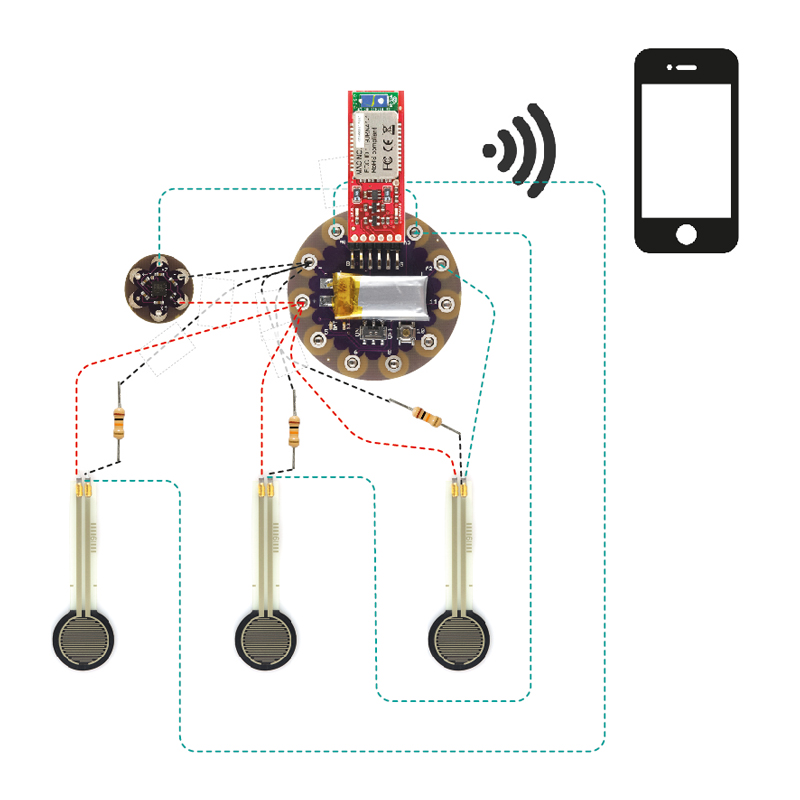
Electronic Traces is an interactive project designed to allow ballet dancers to recreate their movements in  digital pictures using a customizable mobile application. It was prototyped by product-designer Lesia Trubat mixing technological, artisanal skills and using Arduino Lilypad, force sensitive resistors and accelerometer:

The concept of Electronic Traces is based on capturing dance movements and transforming them into visual sensations through the use of new technologies. To do this we focused on the ballet shoes themselves, which through the contact with the ground, and thanks to Lilypad Arduino technology, record the pressure and movement of the dancer’s feet and send a signal to an electronic device. A special application will then allow us to show this data graphically and even customize it to suit each user, through the different functions of this app.

The user can then view all the moves made in video format, extract images and even print them. Dancers can interpret their own movements and correct them or compare them with the movements of other dancers, as graphs created with motion may be the same or different depending on the type of movements execute.


A Custom Control Surface for Audio/Video Editing

Control surfaces (input devices with sliders, encoders, buttons, etc) are often used in audio and video editing, where they provide an easy way to control editing software. Unfortunately even small control surfaces are fairly expensive. To avoid shelling out for a commercial control surface, [Victor] developed his own custom control surface that sends standard MIDI commands which can be interpreted by nearly any DAW software.

[Victor]‘s control surface includes several buttons, a display, and a rotary encoder. His firmware sends MIDI commands whenever a button is pressed or the rotary encoder is turned. [Victor] plans on adding menu functionality to the currently unused LCD display which will allow the user to change the scrubbing speed and other various settings.

One advantage of making your own control surface is that you can customize it to your own needs. [Victor] has posted a model of his 3d-printed enclosure and his source code on the project page so you can easily modify his design with any button configuration you might want.


Filed under: digital audio hacks

New Project: Color Recognition Lock

How to make an basic electronic color sensor and how to use it to make a color activated lock box

Read more on MAKE

The Tale of Two Wearable Game Boys

We’re well past the time when Halloween costume submissions stop hitting the tip line, but like ever year we’re expecting a few to trickle in until at least Thanksgiving. Remember, kids: documentation is the worst part of any project.


[Troy] sent us a link to his wearable Game Boy costume. It’s exactly what you think it is: an old-school brick Game Boy that [Troy] wore around to a few parties last weekend. This one has a twist, though. There’s a laptop in there, making this Game Boy playable.

The build started off as a large cardboard box [Troy] covered with a scaled-up image of everyone’s favorite use of AA batteries. The D-pad and buttons were printed out at a local hackerspace, secured to a piece of plywood, and connected to an Arduino Due. The screen, in all its green and black glory, was taken from an old netbook. It was a widescreen display, but with a bezel around the display the only way to tell it’s not original is from the backlight.

Loaded up with Pokemon Blue, the large-scale Game Boy works like it should, enthralling guests at wherever [Troy] ended up last Friday. It also looks like a rather quick build, and something we could easily put together when we remember it next October 30th.

[Troy] wasn’t the only person with this idea. A few hours before he sent in a link to his wearable Game Boy costume, [Shawn] sent in his completely unrelated but extremely similar project. It’s a wearable brick Game Boy, a bit bigger, playing Tetris instead of Pokemon.

[Shawn]‘s build uses a cardboard box overlaid with a printout of a scaled-up Game Boy. Again, a laptop serves as the emulator and screen, input is handled by a ‘duino clone, and the buttons are slightly similar, but made out of cardboard.

Both are brilliant builds, adding a huge Game Boy to next year’s list of possible Halloween costume ideas. Videos of both below.


Filed under: Arduino Hacks, Holiday Hacks, nintendo gameboy hacks

Becoming Alina with a couple of interactive Gauntlets

We’ve been amazed by the great projects coming up the week before Halloween on Twitter and Gplus community and still being submitted to our blog.

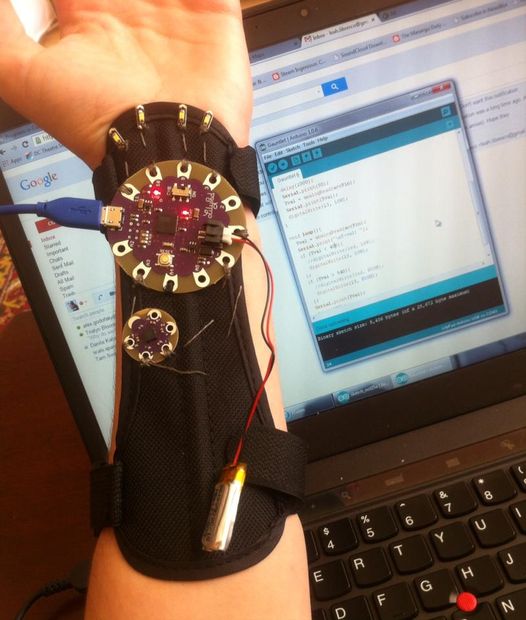
Leah Libresco published an Instructables about a pair of interactive gauntlets made with Arduino Lilypad:

This Halloween, I decided to be Alina Starkov from the Grisha Trilogy by Leigh Bardugo. In the books, she’s the one and only Sun Summoner, doing magic with light and heat.

Since those powers were beyond me, I put together a set of Arduino-controlled gauntlets instead, that would light up on gesture commands and slip under my sleeves. [This set up, with a few tweaks, would probably serve you well for Iron Man, too]

Instead of using a single position value from the accelerometer to turn the LEDs on and off, I picked two different triggers, so that it would be easy to *choose* whether I wanted my hands illuminated when they were straight out in front of me (a necessity, since I plan to host a party in these!)

Full construction and code are available at this link, below you can see the project in action!

Chameleon Jacket Project Aims to Let People Experience The World Like An Animal

A group in Oslo have created an interactive jacket that changes color based upon what the wearer touches. It is based upon Chameleons' ability to blend into their environment.

Read more on MAKE

Raspberry Pi and Arduino Home Automation

Electronichamsters design home automation platform using Raspberry Pi and Arduino

Read more on MAKE

Halloween Hack Night at Pololu

Have some servos and an Arduino lying around? It isn’t too late to get your freaky on! Last night, tech enthusiasts of Las Vegas gathered at Pololu Robotics to show off their hacks for a Halloween flavored edition of their bi-monthly robot club. These projects created by those in the community as well as the Pololu engineers themselves are fun and have a relatively short list of materials. So, if the examples below give you some inspiration, this is permission to Macgyver something together before your big Halloween party tonight…

Impatient Severed Fingers – [Amanda] came up with a cute use for some mini servos and a zombie hand prop. The five severed fingers were attached to one end of a plastic rod. The other end was mounted to each of five servos which were laid out in the appropriate hand shape and attached to a fixed base. An Arduino running a basic sweep sketch animated the motors at slightly staggered intervals, creating a nice rolling effect. Even with the moving parts exposed this prop would be awesome to have on display, or set the ambiance with its continuous tapping…

Angry Spectral Delta – [Nathan Bryant] made an actual costume for his delta robot from Robot Army. By attaching a small plastic skull to the end effector and draping a tattered piece of fabric over the rest of the mechanism he effectively transformed the delta into a little ghost with a sassy personality. The head swiftly bobbed about, all while staying parallel to the table… until it intermittently came unhinged and hung limply, which was a nice added effect!


Robotic Exorcism Baby – This doll could turn its half skeleton, half baby face 180 degrees and then laugh at your fear. By attaching two servo motors together, [Jeremy] was able to create a pan and tilt mechanism which acted as the baby’s contorting neck and chattering jaw. The micro controller sending commands to the motors was hidden modestly under her dress.


Stabby Animated Cardboard Shadowbox - Among the animatronic devices seen at the event was a shadowbox made by [Brandon] hidden in a dark conference room nearby. When one happened to walk past the seemingly unoccupied space, they’d glimpse the silhouette of an arm stabbing downward with a knife through a windowsill. Being lured in for further investigation you’d find that the shadow was being cast by some colored LEDs through a charmingly simple device. A cutout made from recycled card stock was attached to a single servo. This whole mechanism itself rocked back and forth slightly as the motor moved, which wasn’t intentional but added some realism to the motion of the stabby arm.

There were many interesting projects present last night ranging from remote-controlled skeletal arms to other reactive devices ready to deliver a scare. If you’re interested in knowing more, those made by the Pololu crew are documented on their blog. Since video does these projects better justice, you can check out a compilation of clips here:


Filed under: robots hacks

Replace Your Car’s Clock with an On Board Diagnostics Display

If you’re a car lover, or simply someone who is bothered by not knowing what’s going on in your “machine” at all times, you might be interested in having a customizable diagnostics display. If so, you would probably like it to look as close to a stock part as possible. […]

Read more on MAKE

MAKE » Arduino 31 Oct 18:01
arduino  car  display