


Posts with «arduino» label


Using HID Tricks to Drop Malicious Files
[Nikhil] has been experimenting with human interface devices (HID) in relation to security. We’ve seen in the past how HID can be exploited using inexpensive equipment. [Nikhil] has built his own simple device to drop malicious files onto target computers using HID technology.
The system runs on a Teensy 3.0. The Teensy is like a very small version of Arduino that has built-in functionality for emulating human interface devices, such as keyboards. This means that you can trick a computer into believing the Teensy is a keyboard. The computer will treat it as such, and the Teensy can enter keystrokes into the computer as though it were a human typing them. You can see how this might be a security problem.
[Nikhil’s] device uses a very simple trick to install files on a target machine. It simply opens up Powershell and runs a one-liner command. Generally, this commend will create a file based on input received from a web site controlled by the attacker. The script might download a trojan virus, or it might create a shortcut on the user’s desktop which will run a malicious script. The device can also create hot keys that will run a specific script every time the user presses that key.
Protecting from this type off attack can be difficult. Your primary option would be to strictly control USB devices, but this can be difficult to manage, especially in large organizations. Web filtering would also help in this specific case, since the attack relies on downloading files from the web. Your best bet might be to train users to not plug in any old USB device they find lying around. Regardless of the methodology, it’s important to know that this stuff is out there in the wild.
Filed under: Arduino Hacks, security hacks


A Remote for CHDK Cameras Made Possible with Arduino
[AlxDroidDev] built himself a nice remote control box for CHDK-enabled cameras. If you haven’t heard of CHDK, it’s a pretty cool software modification for some Canon cameras. CHDK adds many new features to inexpensive cameras. In this case, [AlxDroidDev] is using a feature that allows the camera shutter to be activated via USB. CHDK can be run from the SD card, so no permanent modifications need to be made to the camera.
[AlxDroidDev’s] device runs off of an ATMega328p with Arduino. It operates from a 9V battery. The circuit contains an infrared receiver and also a Bluetooth module. This allows [AlxDroidDev] to control his camera using either method. The device interfaces to the camera using a standard USB connector and cable. It contains three LEDs, red, green, and blue. Each one indicates the status of a different function.
The Arduino uses Ken Shirrif’s IR Remote library to handle the infrared remote control functions. SoftwareSerial is used to connect to the Bluetooth module. The Arduino code has built-in functionality for both Canon and Nikon infrared remote controls. To control the camera via Bluetooth, [AlxDroidDev] built a custom Android application. The app can not only control the camera’s shutter, but it can also control the level of zoom.
Filed under: Arduino Hacks


Fifty speakers for an interactive sound sculpture

Hive (2.0) is the second iteration of an interactive sound sculpture consisting of fifty speakers and seven audio channels. The sensors detect the proximity of people and Arduino manipulates audio according to it.

It was created by Hopkins Duffield, a Toronto-based collaborative duo exploring ways to combine both new and familiar mediums with artistically technological practices. In this work they used Arduino Uno together with Max 6 / Max For Live.
Check the video to listen to the sculpture:
Using RC Transmitters With Flight Simulators
It’s winter, and that means terrible weather and very few days where flying RC planes and helicopters is tolerable. [sjtrny] has been spending the season with RC flight simulators for some practice time. He had been using an old Xbox 360 controller, but that was really unsuitable for proper RC simulation – a much better solution would be to use his normal RC transmitter as a computer peripheral.
The usual way of using an RC transmitter with a computer is to buy a USB simulator adapter that emulates a USB game pad through a port on the transmitter. Buying one of these adapters would mean a week of waiting for shipping, so [sjtrny] did the logical thing and made his own.
Normally, a USB simulator adapter plugs in to a 3.5mm jack on the transmitter used for a ‘buddy box’, but [sjtrny] had an extra receiver sitting around. Since a receiver simply outputs signals to servos, this provides a vastly simpler interface for an Arduino to listen in on. After connecting the rudder, elevator, aileron, and throttle signals on the receiver to an Arduino, a simple bit of code and the UnoJoy library allows any Arduino and RC receiver to become a USB joystick.
[sjtrny] went through a second iteration of hardware for this project with a Teensy 3.1. This version has higher resolution on the joystick axes, and the layout of the code isn’t slightly terrible. It’s a great project for all the RC pilots out there that can’t get a break in the weather, and is also a great use for a spare receiver you might have sitting around.
Filed under: peripherals hacks, radio hacks


The Light Blue Bean, now on Windows
 Punch Through Design has announced the beta release of its long awaited Bean Loader application for Windows 8, so you can now program your Bean directly from your Windows desktop.
Arduino + Servo + Scotch tape == An Interesting Conversation
If one could temporarily remove their sense of humor and cast a serious look into a Rube Goldberg machine, they would not say to themselves “well that looks simple.” Indeed, it would almost always be the case that one would find themselves asking “why all the complexity for such a simple task?”
Too often in hacking are we guilty of making things more complicated than they really need to be. Maybe it’s because we can see many different paths to a single destination. Maybe it’s because we want to explore a specific path, even though we know it might be a little harder to tread. Maybe it’s just because we can.

But imagine approaching a hack as simply a means to an end. Imagine if you did not have all of that knowledge in your head. All of those tools at your disposal. How would this change your approach? When [yavin427] decided to automate the leveling up process in his favorite video game, odds are he had never taken a game controller apart. Had never touched an oscilloscope. Indeed, he might have no knowledge of what a transistor or microcontroller even is. While many of our readers would have taken the more difficult path and tapped directly into the TTL of the controller to achieve maximum efficiency; it is most likely that [yavin427] would not have known how to do this, and thus would not have seen the many other paths to his end goal that would have been obvious to us. Yet he achieved his end goal. And he did it far easier and with less complication than many of us would have done.
Thoughts?
Thanks to [euqinimod] for the tip! Keep them coming!
Filed under: Arduino Hacks, xbox hacks


Get Better at Mortal Kombat by Hacking Your PS3 Controller
Fighting games like Mortal Kombat provide you with a variety of different available moves. These include kicks, punches, grabs, etc. They also normally include various combination moves you can perform. These combo moves require you to press the proper buttons in the correct order and also require you to time the presses correctly. [Egzola] realized that he could just hack his controller to simulate the button presses for him. This bypasses the learning curve and allows him to perform more complicated combinations with just the press of a single button.
[Egzola] started by taking apart his Playstation 3 controller. There were two PCB’s inside connected by a ribbon cable. Luckily, each individual pad for this cable was labeled with the corresponding controller button. This made it extremely simple to hack the controller. [Egzola] soldered his own wires to each of these pads. Each wire is a different color. The wires then go to two different connectors to make them easier to hook up to a bread board.
Each wire is then broken out on the breadboard. The signal from each button is run through a 4n25 optoisolator. From there the signal makes its way back to various Arduino pins. The 4n25 chips keeps the controller circuit isolated from the Arduino’s electrical circuit. The Arduino also has two push buttons connected to it. These buttons are mounted to the PS3 controller.
Now when [Egzola] presses one of the buttons, the Arduino senses the button press and simulates pressing the various controller buttons in a pre-programmed order. The result is a devastating combination move that would normally require practice and repetition to remember. You might say that [Egzola] could have spent his time just learning the moves, but that wasn’t really the point was it? Check out the video below for a demonstration.
Filed under: Arduino Hacks


New Project: Make an EEG Beanie That Reads Your Mind
 Time required: A weekend Cost: $100 — $130 Ever wanted to visualize your brain activity? Electroencephalography (EEG) uses electrodes placed against the scalp to detect the tiny electrical changes that occur when neurons fire. By amplifying these signals through a computer, you can observe brain activity in real-time. Using an […]
An Arduino at Heart prototyping board you can DIY
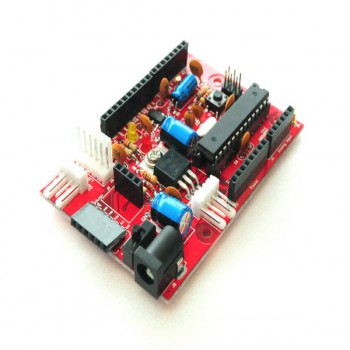
Newtc is our latest partner joining the Arduino At Heart program with three new products of the same family.
The Prototyping Board by Newtc is an Arduino At Heart coming in a couple of versions: the DIY version you can assemble and solder yourself and the Assembled version ready to be used. The CPU of the boards ( ATMEGA328P-PU ) is already burned with Arduino Uno bootloader. In addition to the boards, Newtc provides also the Arduino At Heart USB to Serial uploader for Arduino compatible boards.
In the picture below you can see the components of the DIY Version and in the video you can follow the tutorial and learn how to assembled it!
