Posts with «arduino» label

Fake Eyeballs, Digital Koi, and 10 More Amazing Creations from Autodesk’s Artists

The current class of Autodesk Artists in Residence was bigger than ever, and their work was on display at Pier 9 in San Francisco over the weekend. Check out just a sampling of some of our favorites.

Read more on MAKE

The post Fake Eyeballs, Digital Koi, and 10 More Amazing Creations from Autodesk’s Artists appeared first on Make: DIY Projects, How-Tos, Electronics, Crafts and Ideas for Makers.

Testing a Heart Pulse Alarm based on Arduino Uno

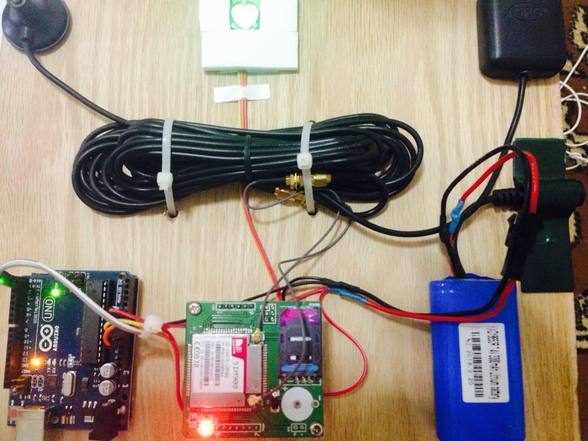
Murad is a student of Mechatronics and Engineering at Tafila Technical University in the town of Tafila, in Jordan. He made a submission to our blog presenting his DIY project of a Heart Pulse Alarm based on Arduino Uno.

The HPA (Heart Pulse Alarm) is a portable device prototyped to measure the pulse rate and the body temperature of who’s wearing it. If the device receives an unusual heart pulse, it will send a sms message to paramedics to act quickly. He designed the device to help people who have cardiac problems and they lack  the resources for personal and professional assistants in his country.

Check the bill of materials and code on his blog.


Arduino Blog 18 Nov 16:59
arduino  arduino uno  diy  featured  gps  heart-beat  sms  uno  

DIY Garage Door KeyPad Project

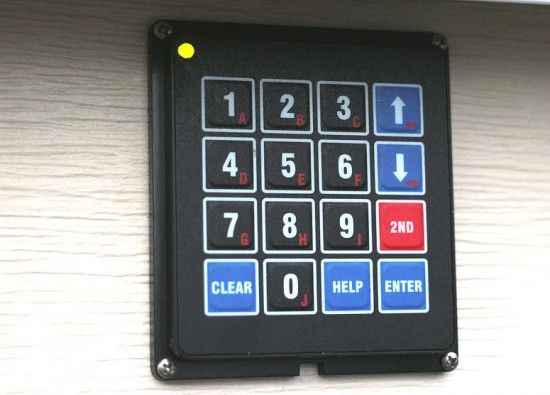
Arduino user SamJBoz needed a way to quickly gain access to his garage when he did not have the remote. He designed a simple entry system with 4 digit access codes to allow himself, family and friends to gain quick access to the garage when a remote is not at hand, running on a 5V Arduino Pro Mini. The keypad allows for up to 10 4-digit pin numbers, has a user set master pin number to create and delete user pin numbers and flashes 2 color error codes if something goes wrong.

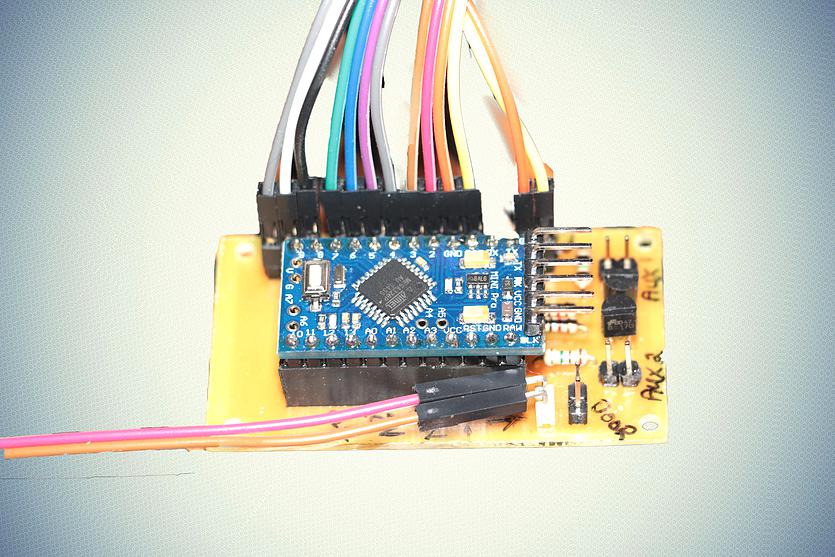
The hardware BoM consists of a 4×4 keypad, an Arduino Pro Mini, a small custom PCB and a few external electronic parts to complete the design.

He’s been using it flawlessly for a year and you could try to build one too: all the documentation is on github comprehensive of Eagle PCB files for the main board, the Arduino code, BoM, a user manual and some useful construction tips.

XLR8 Project Blends FPGA Speed with Arduino Coding

The XLR8 is an FPGA based board that looks and feels like an Arduino Uno. But not all is what it seems on the surface.

Read more on MAKE

The post XLR8 Project Blends FPGA Speed with Arduino Coding appeared first on Make: DIY Projects, How-Tos, Electronics, Crafts and Ideas for Makers.

A low-cost approach to Intrinsic optical signal

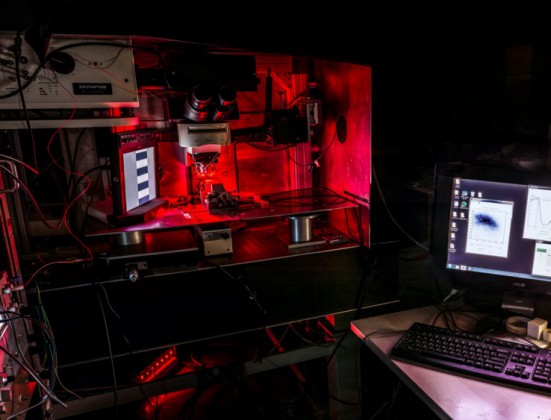
Leonardo Lupori and Raffaele Mazziotti are active in the field of neuroscience at Tommaso Pizzorusso’s lab at Neuroscience Institute CNR of Pisa respectively as molecular biologist and experimental psychologist. They created an Arduino-based and MATLAB-controlled tool called IOSIC (Intrinsic Optical Signal Imaging Chamber), powered by an Arduino Micro and focused on intrinsic optical signal (IOS) imaging apparatus to run experiments on the plasticity of the brain.

Intrinsic optical signal (IOS) imaging is a functional imaging technique that has revolutionized our understanding of cortical functional organization and plasticity since it was first implemented, around 30 years ago. IOS is produced by the brain when processing information and is similar to the information recorded with the plethysmograph (the instrument to measure heart rate from a finger) and it is useful to investigate how the brain works. The researchers are especially interested to investigate how the brain is able to adapt to the environment to store information but also acquire new skills and these studies are really useful to understand what happens to the brain when is in good health or during a disease.
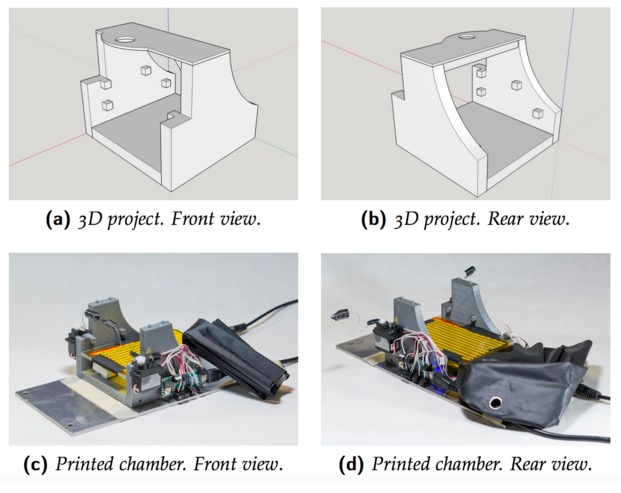
Even if their lab has a long-standing expertise in electrophysiological studies, they decided to  developed a fully functional apparatus for IOS with tools already available and low-cost:

To set up the entire system we used a mix of components commercially available and custom-made. The most expensive tool we used is an imaging camera from Hamamatsu (it is necessary because we need to analyze data quantitatively), but you can also use a cheaper camera (at least with a CCD chip 12-bit depth is recommended). The rest is stuff collected from old tools of the lab. For example, the microscope, that in our case is an old Olympus confocal microscope, but any transmitted light microscope or macroscope should be ok, was already in the lab and is currently used also for other purposes. For light illumination, we used a custom made crown-shaped LED holder that can be attached to the objective and provide a really stable light source. Afterwards, we wrote a MATLAB script to control the camera and then we built an imaging chamber to analyze the animal preparation. The imaging chamber is essential to keep the animal stable during the imaging session (about 7 minutes) and also to maintain its physiological temperature during the time course of anesthesia. An additional feature added to the chamber is the possibility to change the animal’s visual field automatically allowing us to measure rapidly, efficiently and repeatedly a very important parameter of plasticity called ocular dominance. The chamber is composed by a 3D printed structure on which an Arduino MICRO, two servo motors, a heating pad, an IR thermometer and a magnetic ring have been installed. Currently we are using this system with success and we hope to discover something really relevant.

You can download IOSIC code for the Arduino MICRO here. The code uses third-party libraries : TMP006 and Servo. MATLAB code to control shutters is available here.

Try Not to Have a Heart Attack While Watching This Egg/Pendulum Dance

It's just an egg, placed in a vulnerable position. "I thought it would be fun to pit a large metal machine against a small fragile object," says Mendoza.

Read more on MAKE

The post Try Not to Have a Heart Attack While Watching This Egg/Pendulum Dance appeared first on Make: DIY Projects, How-Tos, Electronics, Crafts and Ideas for Makers.

Visualizing Ballet Movements with E-Traces

When we think of wearable technologies, ballet shoes aren’t the first devices that come to mind. In fact, the E-Traces pointé shoes by [Lesia Trubat] may be the first ever “connected ballet shoe.” This project captures the movement and pressure of the dancer’s feet and provides this data to a phone over Bluetooth.

The shoes are based on the Lilypad Arduino clone, which is designed for sewing into wearables. It appears that 3 force sensitive resistors are used as analog pressure sensors, measuring the force applied on the ground by the dancer’s feet. A Lilypad Accelerometer measures the acceleration of the feet.

This data is combined in an app running on an iPhone, which allows the dancer to “draw” patterns based on their dance movements. This creates a video of the motion based on the dance performed, and also collects data that can be used to analyze the dance movements after the fact.

While these shoes are focused on ballet, [Lesia] points out that the same technique could be extended to other forms of dance for both training and visualization purposes.


Filed under: wearable hacks

Slap Yourself Awake with This Ridiculous “Wake-Up Machine” Alarm Clock

Swedish tech artist and comedienne Simone Giertz tries her hand at creating the most annoying alarm clock possible

Read more on MAKE

The post Slap Yourself Awake with This Ridiculous “Wake-Up Machine” Alarm Clock appeared first on Make: DIY Projects, How-Tos, Electronics, Crafts and Ideas for Makers.

An e-Waste 3D Printer for Every Child?

The lofty goal of making sure every school kid has access to a laptop has yet to be reached when along comes an effort to put a 3D printer in the hands of every kid. And not just any printer – a printer the kid builds from a cheap kit of parts and a little e-waste.

The design of the Curiosity printer is pretty simple, and bears a strong resemblance to an earlier e-waste 3D printer we covered back in December. This one has a laser-cut MDF frame rather than acrylic, but the guts are very similar – up-cycled DVD drives for the X- and Z-axes, and a floppy drive for the Y-axis. A NEMA 17 frame stepper motor provides the oomph needed to drive the filament into an off-the-shelf hot end, and an Arduino runs the show. The instructions for assembly are very clear and easy to follow, although we suspect that variability in the sizes of DVD and floppy drives could require a little improvisation at assembly time. But since the assembly of the printer is intended to be as educational as its use, throwing a little variability into the mix is probably a good idea.

The complete kit, less only the e-waste drives and power supply, is currently selling for $149USD. That’s not exactly free, but it’s probably within range of being funded by a few bake sales. Even with the tiny print volume, this effort could get some kids into 3D printers early in their school career.


Filed under: 3d Printer hacks, green hacks

Halloween Doorbell Prop in Rube-Goldberg Overdrive

[Conor] wired up his 3D-printed coffin doorbell to an array of RGB LEDs, a screaming speaker, and a spinning skull on a cordless screw driver to make a “quick” Halloween scare. Along the way, he included half of the Adafruit module catalog, a relay circuit board, and ESP8266 WiFi module, a Banana Pi, and more Arduinos of varying shapes and sizes than you could shake a stick at.

Our head spins, not unlike [Conor]’s screaming skull, just reading through this Rube Goldbergy arrangement. (We’re sure that’s half the fun for the builder!) Smoke ’em if ya got ’em!

Start with the RGB LEDs; rather than control them directly, [Conor] connected them to a WiFi-enabled strip controller. Great, now he can control the strip over the airwaves. But the control protocol was closed, so he spent a week learning Wireshark to sniff the network data, and then wrote a Bash script to send the relevant UDP packets to turn on the lights. But that was not fancy-schmancy enough, so [Conor] re-wrote the script in Go.

Yes, that’s right — a Go routine on a Banana Pi sends out custom UDP packets over WiFi to a WiFi-to-LED-driver bridge. To make lights blink. Wait until you see the skull.

The plastic skull has Neopixels in each ping-pong ball eye, controlled by an Arduino Nano and battery taped to the skull’s head. The skull is cemented to a driver bit that’s chucked in a cordless drill. A relay board and another Arduino make it trigger for 10 seconds at a time when the doorbell rings. Finally (wait for it!) an Arduino connected to the doorbell gives the signal, and sets a wire high that all the other Arduini and the Banana Pi are connected to.

Gentle Hackaday reader, now is not the time for “I could do that with a 555 and some chewing gum.” Now is the time to revel in the sheer hackery of it all. Because Halloween’s over, and we’re sure that [Conor] has unplugged all of the breadboards and Arduini and put them to use in his next project. And now he knows a thing or two about sniffing UDP packets.


Filed under: Arduino Hacks, Holiday Hacks, misc hacks