Serial vs I2C communication
Hi, please, can you tell me difference between I2C and Serial communication and which is the best for communication Raspberry Pi 2 with Arduino (T'Rex Controller). Thanks

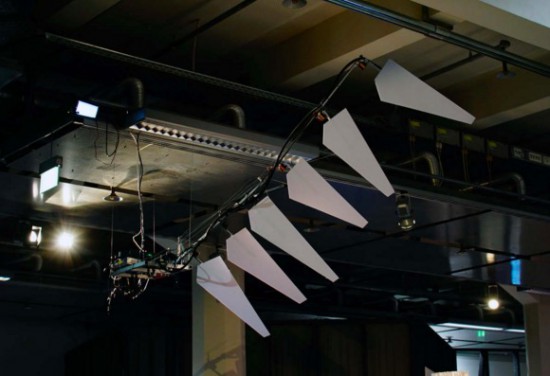
Wing is an interactive installation created by Dmitry Morozov and commissioned by the Center for Art and Media (ZKM) in Karlsruhe, special for GLOBALE: Exo-Evolution exhibition, 2015. It’s a 2,5-meter wing that can be flapped by visitors thanks to compact dermal myLeaographic sensors (sensors measuring the electrical potential of muscles) installed behind their ears and connected to an Arduino Uno:
The main idea of the project is an ironical and at the same time serious research on the topic of development of new instruments and prostheses as “extensions” of human body and accordingly its possibilities and potentials, which are being revealed by new technologies. At the same time, it’s an attempt to stimulate people to perceive and train the body in a different way, expanding the limits of self-control and self-organisation in order to adapt to the new conditions. At the same time, just like many spiritual practices aiming at the elevation of human soul through deep relaxation and control over seemingly uncontrollable muscles, this project uses the metaphor of flying as a reward for the ability to direct your mind to solving of non-standard tasks.

What’s a hacker going to do with an oven? Reflow solder? Dry out 3D printing filament? If you are [Alicia Gibb] you’d be baking a cake. While complaining that projects aren’t a hack seems to be a favorite past time for Hackaday commentators, we think [Alicia] will be in the clear. Why? Because these cakes have Arduinos, LEDs, and motorized candles among other gizmos.
The Game Boy cake is undeniably cool, although we have to admit the cake that screams when cut got our attention (see video below), even if it would unnerve guests.
As you might expect, you can’t bake the electronics directly into the cake. [Alicia] uses Tupperware or parchment paper to create cavities for the electronics. Connections and other solder joints get professional grade Saran wrap to keep the lead and other awful chemicals out of the cake.
We’ve seen embedded electronics in cakes before, including some that tie into the Star Wars merchandising that seems unavoidable lately. If you aren’t much of a baker, you could always just forego the cake part.
Making your own booze involves a lot of sitting around waiting for things to happen, like waiting for the fermentation process to finish so you can get on with bottling and drinking it. That involves watching the bubbles in the airlock: once the frequency of the bubbles falls below a certain level, your hooch is ready for the next step.
[Waldy45] decided to automate this process by building a bubble catcher that measures the frequency of bubbles passing through the airlock. He did this using an optocoupler, a combination of LED and light sensor that changes resistance when something passes between them. You can’t see it in the image, but the horseshoe-shaped optocoupler is slotted around the thin neck in the bubble tube to sense when a bubble passes through.
The optocoupler is connected to an Arduino, running a bit of code that generates an interrupt when the optocoupler is triggered. At the moment, this just outputs an average time between bubbles to the serial port, but [Waldy45] is looking to add an ESP8266 to wirelessly connect the Arduino and contact him when the bubble frequency falls, indicating that the booze is ready for bottling.
We’ve seen a couple of over the top beer breweries before (here and here), but none of them have automated the actual fermentation stage, so something like this would definitely be an addition. Cheers!
Think you could take on this flopping, knife-wielding tentacle?
The post Ever Been in a Knife Fight with an Octopus? appeared first on Make: DIY Projects, How-Tos, Electronics, Crafts and Ideas for Makers.

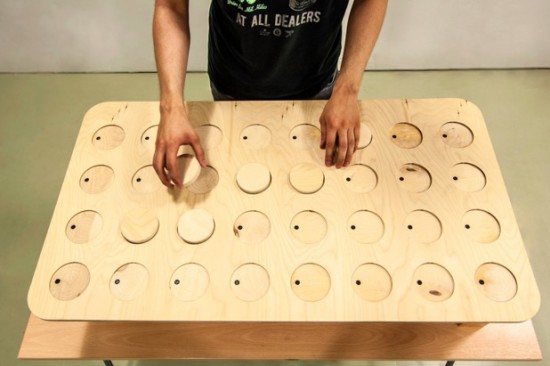
During the Physical Computing and Creative Coding course at School of Form a team composed by Ernest Warzocha, Jakub Wilczewski, Maciej Zelaznowski worked on a project starting from the keyword “the aesthetics of interaction”. With the help of their lecturers – Wies?aw Bartkowski and Krzysztof Golinski – they decided to rethink about typical button-like interface of audio sequencer and design a unique tangible interface for it.

The Wooden Sequencer runs on Arduino Uno and works by using familiarity of real objects and manipulating them similarly to the idea of Durell Bishop’s Marble Answering Machine:
Instead of regular buttons we created wooden discs (4×8 circles) that placed in holes generate audio sequence. Each line corresponds to different instrument and columns are responsible for time when sample is played. To know in which point at timeline our sequence plays there is hidden LED on top of each column that blink through wood and informs user which one is currently played.
To create good-looking round shapes of table we used CNC router at our university. After the milling process we connected all electronics with table and sensors for each hole. The core of our project is Arduino UNO with multiplexers and MP3 module. With rendered samples and build-in speakers our project doesn’t require computer plugged in.
Important and somehow unique in our sequencer is usage of IR reflective sensors to change played instrument sample. To decide which sample we want to play sensor recognizes different grayscale color and intensity of the reflected light at bottom of our discs – actually everything placed on table can generate sound. Creating grayscale-based controller is experimental way to interact with device. Furthermore, using grayscale palette might be great idea for MIDI instrument. For this project we used two colors to show the concept. It’s possible to add more but it’s more sensitive to non-constant background light.
Take a look at the video below and explore more pictures on Behance:
Akiba of Freaklabs helped design sequenced lighting like those used in the Wrecking Crew Orchestra shows
The post How to Sequence LEDs to Music: A Tutorial by Freaklabs appeared first on Make: DIY Projects, How-Tos, Electronics, Crafts and Ideas for Makers.
If you buy expensive computer speakers, they often have a volume knob you can mount somewhere on your desk so you aren’t dependent on the onboard volume control. [Kris S] decided to build his own version of the remote volume control. Not surprisingly, it uses an Arduino-compatible Digispark board and a rotary controller. The Digispark (that [Kris S] bought for $2) is compatible with the Adafruit Trinket. This is key because the Trinket libraries are what make it easy to send media keys over the USB (using the HID interface) to control the volume.
Really, though, the best part of the build is the good looking knob made out of a pill bottle (see the video below). The micro Digispark is small enough to fit in the lid of the pill bottle, and some wax and pellets add some heft to the volume control.
The standard Arduino library has trouble sending multimedia keys, but in a previous post I built a gesture-based volume control that managed to pull it off. We’ve also covered a similar volume control in the past. That one is also very good looking, but was a more complicated build than what [Kris S] pulled off here.
There’s a new documentary series on Al Jazeera called Rebel Geeks that looks at the people who make the stuff everyone uses. The latest 25-minute part of the series is with [Massimo], chief of the arduino.cc camp. Upcoming episodes include Twitter co-creator [Evan Henshaw-Plath] and people in the Madrid government who are trying to build a direct democracy for the city on the Internet.
Despite being a WiFi device, the ESP8266 is surprisingly great at being an Internet of Thing. The only problem is the range. No worries; you can use the ESP as a WiFi repeater that will get you about 0.5km further for each additional repeater node. Power is of course required, but you can stuff everything inside a cell phone charger.
I’ve said it before and I’ll say it again: the most common use for the Raspberry Pi is a vintage console emulator. Now there’s a Kickstarter for a dedicated tabletop Raspi emulation case that actually looks good.
Pogo pins are the go-to solution for putting firmware on hundreds of boards. These tiny spring-loaded pins give you a programming rig that’s easy to attach and detach without any soldering whatsoever. [Tom] needed to program a few dozen boards in a short amount of time, didn’t have any pogo pins, and didn’t want to solder a header to each board. The solution? Pull the pins out of a female header. It works in a pinch, but you probably want a better solution for a more permanent setup.
Half of building a PCB is getting parts and pinouts right. [Josef] is working on a tool to at least semi-automate the importing of pinout tables from datasheets into KiCad. This is a very, very hard problem, and if it’s half right half the time, that’s a tremendous accomplishment.
Last summer, [Voja] wrote something for the blog on building enclosures from FR4. Over on Hackaday.io he’s working on a project, and it’s time for that project to get an enclosure. The results are amazing and leave us wondering why we don’t see this technique more often.