Posts with «arduino» label

Build an electric go-kart on a budget with Arduino

Growing up, there was nothing cooler than hopping in a go-kart for a quick spin around the neighborhood. But you know what would make it even cooler? If you built your own electric set of wheels. That’s exactly what two engineering students, Adrian Georgescu and Masoud Johnson, have done using commonly available components along with a secondhand frame they picked up for $125 and a few Arduino.

Although they initially targeted a motor power output of 3kW, they were unable to find any that fit their budget. So as any true Makers would do, the duo settled on creating one out of an old Subaru alternator instead. Price tag? $30.
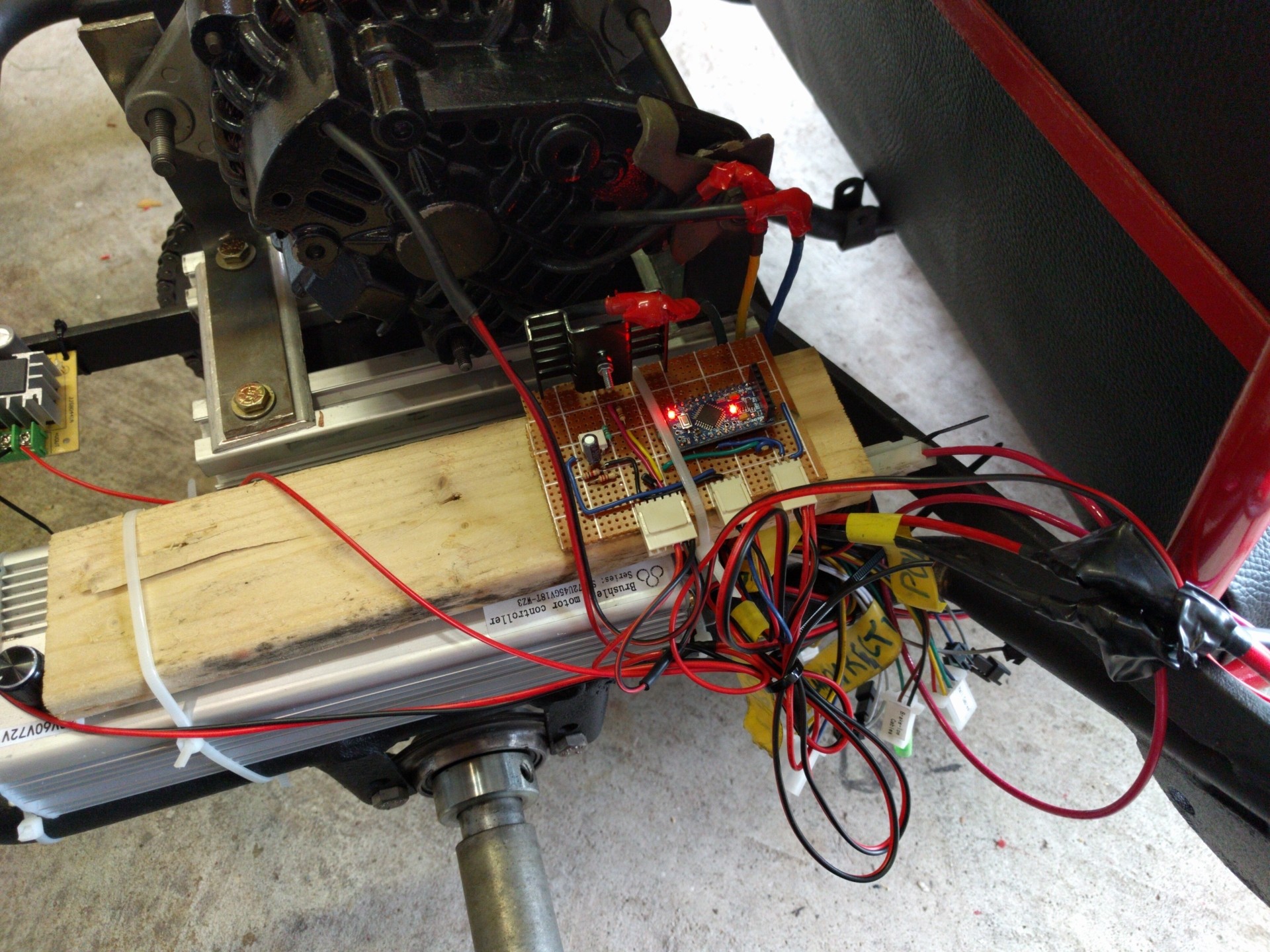
For the rest of their project, Georgescu and Johnson used an electric scooter’s three-phase motor controller, three LiPo battery packs, a trio of Arduino Pro Minis, and an Arduino Mega. The Arduinos are tasked with throttle control, speed sensing, RPM measurement, and transmitting the data over to a virtual dashboard on an Android app.
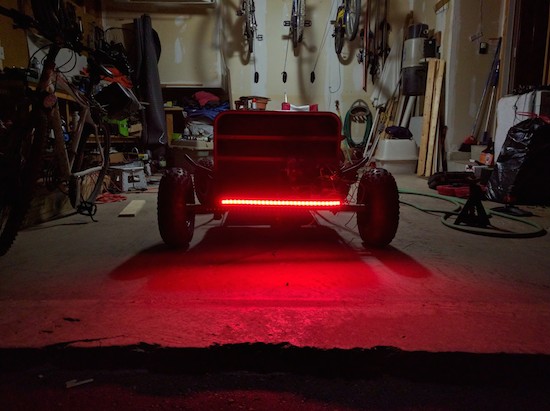
To finish off the build, the students reupholstered the seat, painted the chassis red and black, and threw on 60 LEDs. You can see the end result in action below, as the e-kart reaches a top speed of roughly 33mph (53km/h).

Laser Sequencer uses Arduino to Enable Super-Microscope!

[Philip]’s Laser control Arduino shield.

[Philip Nicovich] has been building laser sequencers over at the University of New South Wales. His platform is used to sequence laser excitation on his fluorescence microscopy systems. In [Philip]’s case, these systems are used for super-resolution microscopy, that is breaking the diffraction limit allowing the imaging of structures of only a few nanometers (1 millionth of a millimeter) in size.

Using an Arduino shield he designed in Eagle, [Philip] was able to build the system for less than half the cost of a commercial platform.

The control system is build around the simple Arduino shield shown to the right, which uses simple 74 series logic to send TTL control signals to the laser diodes used in his rig. The Arduino runs code which allows laser firing sequences to be programmed and executed.

[Philip] also provides scripts which show how the Arduino can be interfaced with the open source micro manager control software.

As well as the schematics [Philip] has provided STEP files and drawings for the enclosure and mounts used in the system and a detailed BOM.

More useful than all this perhaps is the comprehensive write-up he provides. This describes the motivation for decisions such as the use of aluminum over steel due to its ability to transfer heat more effectively, and not to use thermal paste due to out-gassing.

While I can almost hear the cries of “not a hack”, the growing use of open source platforms and tool in academia fills us with joy. Thanks for the write-up [Philip] we look forward to hearing more about your laser systems in the future!


Filed under: misc hacks

Laser Sequencer uses Arduino to Enable Super-Microscope!

[Philip]’s Laser control Arduino shield.

[Philip Nicovich] has been building laser sequencers over at the University of New South Wales. His platform is used to sequence laser excitation on his fluorescence microscopy systems. In [Philip]’s case, these systems are used for super-resolution microscopy, that is breaking the diffraction limit allowing the imaging of structures of only a few nanometers (1 millionth of a millimeter) in size.

Using an Arduino shield he designed in Eagle, [Philip] was able to build the system for less than half the cost of a commercial platform.

The control system is build around the simple Arduino shield shown to the right, which uses simple 74 series logic to send TTL control signals to the laser diodes used in his rig. The Arduino runs code which allows laser firing sequences to be programmed and executed.

[Philip] also provides scripts which show how the Arduino can be interfaced with the open source micro manager control software.

As well as the schematics [Philip] has provided STEP files and drawings for the enclosure and mounts used in the system and a detailed BOM.

More useful than all this perhaps is the comprehensive write-up he provides. This describes the motivation for decisions such as the use of aluminum over steel due to its ability to transfer heat more effectively, and not to use thermal paste due to out-gassing.

While I can almost hear the cries of “not a hack”, the growing use of open source platforms and tool in academia fills us with joy. Thanks for the write-up [Philip] we look forward to hearing more about your laser systems in the future!


Filed under: misc hacks

Alternator Becomes Motor for This Electric Go-kart

Growing up in the 70s and 80s, a go-kart was a quick ticket to coolness, second maybe to a mini-bike. In both cases, a welded steel tube frame and a cast-off lawnmower engine were all that stood between you and neighborhood glory. Looks like a couple of engineering students caught the retro juvenile delinquent bug and built this electric go-kart for their final project.

While the frame for [Adrian Georgescu] and [Masoud Johnson]’s build was a second-hand find, the powertrain is all custom. They targeted a power output of 3 kW but found no affordable motors in that range. So, in true hacker fashion, they rolled their own motor from a used Subaru alternator. The three-phase motor controller came from an electric scooter, three LiPo packs provide the juice, and a pair of Arduinos takes care of throttle control, speed sensing, and sending data to the virtual dashboard on an Android phone. Some lights and a snappy red and black paint job finished off the build. While the video below shows that the acceleration isn’t exactly neck-snapping in the Tesla style, the e-kart can build up to a good speed – 53 km/h. Not too shabby, and no deafening engine right behind your head.

If you’ve got the e-kart bug, best check out some of our previous posts, like this kart built from off-the-shelf components, or this four-wheel-drive mini-kart. Any way you build it, you’ll rule the cul-de-sac.


Filed under: transportation hacks

These Arduino bots move plants to sunny and shady spots

What do you do when you want your plants to grow but you lack a green thumb? Give them wheels and the ability to seek out sunny and shady spots on their own. This was media artist Kathleen McDermott has done.

The aptly named Sunbot and Shadebot are robots that help houseplants tour the outside world. Sunbot uses photocell (light) sensors to look for sunny places to rest, while Shadebot employs the same sensors to locate shadowy spots.

Both platforms are made out of a recycled fan case and wood, along with an Arduino, DC motors, rechargeable batteries and solar panels.

See them in action below!

Arduino Blog 12 Aug 21:21

Build a simple VU meter with an Arduino Uno and LEDs

If you’ve been looking for a simple audio Arduino project, you may want to check out this VU meter from YouTuber RZtronix. The Maker built the device using an Uno along with some LEDs, a couple wires, a breadboard, a sound sensor, and a 5V power supply.

Maker Spotlight: Miriam Langer

Miriam, a Professor of Media Arts & Technology, started using Arduino in 2008 to bring new possibilities to her interactive exhibits.

Read more on MAKE

The post Maker Spotlight: Miriam Langer appeared first on Make: DIY Projects and Ideas for Makers.

Throwback: Machine pours a drink every time the U.S. wins a medal

What do you get when you combine the Olympics, alcohol, and Arduino? An awesome machine that automatically pours a shot whenever your country wins a medal. Although a throwback, we can’t see why this project can’t be replicated for Rio!

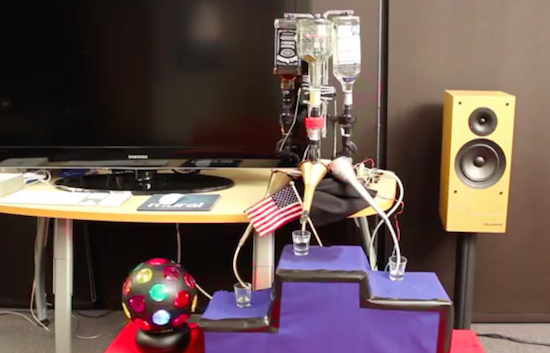
It all began four years ago when a bunch of Makers were given early access to the SmartThings platform. To coincide with the London 2012 Summer Games, the team developed a device that would celebrate a U.S. victory by dispensing one of three different drinks–Goldschläger for gold, Jose Cuervo for silver, and Jack Daniels for bronze–while waving the American flag, turning on a strobe light, and playing the national anthem.

An Arduino is connected to a SparkFun XBee shield and the ZigBee network links it to the SmartThings platform online. The Arduino controls the servos responsible for releasing the liquid into the glass, and the relays that switch the power strip on/off for the party effects. Of course, you can always just pour a drink manually by selecting the appropriate medal on the accompanying SmartThings Medal app.

With the 2016 Games now underway, check out the entire build below to help get you started on a machine of your own!


Arduino Blog 11 Aug 21:43

Pimoroni Wash Their Hands Of Arduino

One of the big stories of last year was the fracture of the official Arduino supply into two competing organisations at daggers drawn, each headed by a different faction with its origins in the team that gave us the popular single board computers. Since then we’ve had Arduinos from Arduino LLC (the [Massimo] Arduino.cc, arguably the ‘original’, and Arduino trademark holder in the United States) and Arduino SRL (the [Musto] Arduino.org, and owner of the Arduino trademark everywhere except the US) , two websites, two forks of the IDE, and “real” Arduino boards available under a couple of names depending on where in the world you live due to a flurry of legal manoeuvres. Yes. it’s confusing.

Today came news of a supplier throwing its hands up in despair  at the demands imposed on them as part of this debacle. Pimoroni, famous as supplier of Raspberry Pi goodies, has put up a blog post explaining why they will henceforth no longer be selling Arduinos. They took the side of Arduino LLC, and the blog post details their extensive trials and delays in making contact with the company before eventually being told they would have to agree to purchase substantial stocks both Arduino and Genuino branded versions of identical products and agree to sell them through separate supply channels for both Europe and the rest of the world before they could proceed. This is not a practical proposition for a small company, and the Pimoroni people deliver a very pithy explanation of exactly why towards the bottom of their post.

We’ve covered the Arduino versus Arduino debacle extensively in the past, this is simply the latest in a long line of stories. Pimoroni have hit the nail on the head when they make the point that the customers and suppliers really don’t care about spats between the various inheritors of the Arduino legacy, they just want an Arduino. And with so many other Arduino-compatible boards available they don’t have to look very hard to find one if the right shade of blue solder-resist or the shape of the map of Italy on the back isn’t a special concern. Can we be the only ones wishing something like this might knock a bit of sense into the various parties?


Filed under: Arduino Hacks, news
Hack a Day 11 Aug 21:00

Fun Audio Waveform Generator Is More Than The Sum Of Its Parts

[Joekutz] wanted to re-build an audio-rate function generator project that he found over on Instructables. By itself, the project is very simple: it’s an 8-bit resistor-ladder DAC, a nice enclosure, and the rest is firmware.

[Joekutz] decided this wasn’t enough. He needed an LCD display, a speaker, and one-hertz precision. The LCD display alone is an insane hack. He reverse-engineers a calculator simply to use the display. But instead of mapping each key on the calculator and typing each number in directly, he only taps the four 1, +, =, and clear keys. He can then enter arbitrary numbers by typing in the right number of ones and adding them up. 345 = 111 + 111 + 111 + 11 + 1. In his video, embedded below, he describes this as a “rather stupid” idea. We think it’s hilarious.

The meat of the project is the Arduino-based waveform generator, though. In the second video below, [joekutz] walks through the firmware in detail. If you’d like a simple introduction to DDS, check it out (or read up our more in-depth version).

He also makes custom detents for his potentiometers so that he can enter precise numerical values. These consist of special knobs and spring-clips that work together to turn a normal pot into a rough 8-way (or whatever) switch. Very cool.

So even if you don’t need an R-2R DAC based waveform generator, go check this project out. There’s good ideas at every turn.


Filed under: Arduino Hacks