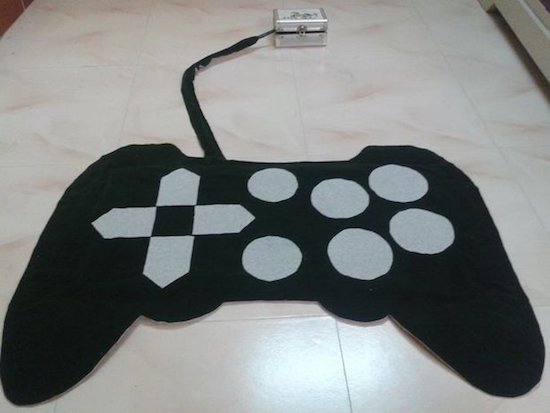
Cut in the shape of a gamepad, this controller sits on the floor for kids to enjoy!
Maker Jegatheesan Soundarapandian had gotten bored with computer games, and decided he, or rather his daughter, needed a new way to interact with the PC. What he came up with was a controller covered in cloth, with switches embedded between this covering and a wooden base.
Switches were made out of CDs and aluminum foil, which could be a good technique for others experimenting with unique interface devices. Control is accomplished with an Arduino Uno that communicates with a PC via a Bluetooth module.
Need a gift idea for that special person in your life? A present that inspires his or her creative side is always a good option. With the holiday season officially underway, we’ve rounded up a few guides to help with your search, ranging from kits for young Makers to stocking stuffers for techies. Whatever you choose, be sure to spend over $150/€100 and take advantage of our FREE SHIPPING all December long!
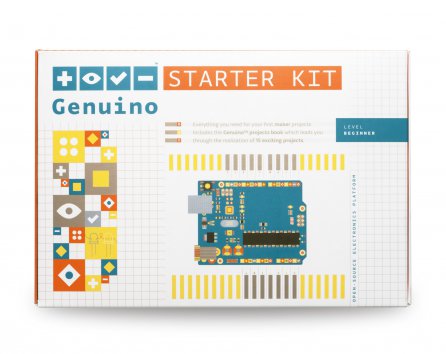
Arduino and Genuino Starter Kit – It’s a classic! With 15 projects, this kit is the perfect starting point for anyone looking to tinker around with electronics and coding. Available also in German, Spanish and Italian!
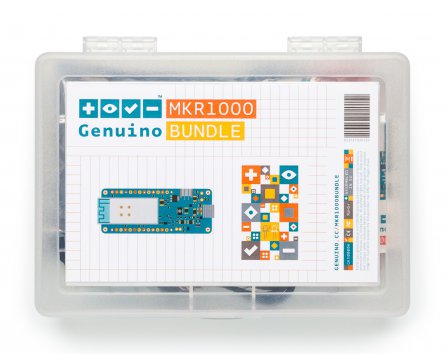
MKR1000 Bundle – Ready to spend your holiday break building your first Internet of Things device? The MKR1000 Bundle is based on our powerful Wi-Fi board and includes all the components needed to add connectivity to your design.
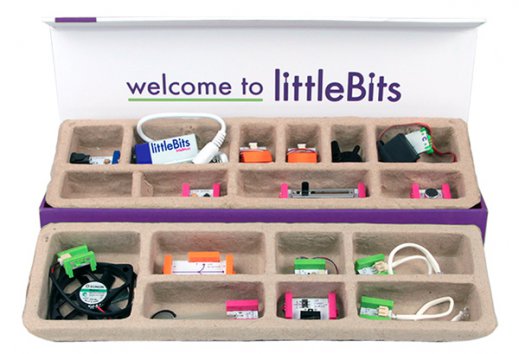
littleBits Premium Kit – Might as well call it a box o’ fun! With this set, kids can learn the basics of electronics, explore STEAM principles and form the foundations of critical thinking, all while creating whirring, buzzing gadgets. The littleBits Premium Kit consists of 14 color-coded modules that magnetically snap together to form larger circuits, guaranteed to keep curious minds engaged for hours. With over 600,000 possible combinations, you can let your imagination run wild!
Bare Conductive Celebration Circuit Set – Create three flashing greeting cards using Electric Paint. This interactive kit guides users through drawing a circuit, and attaching LEDs and batteries.
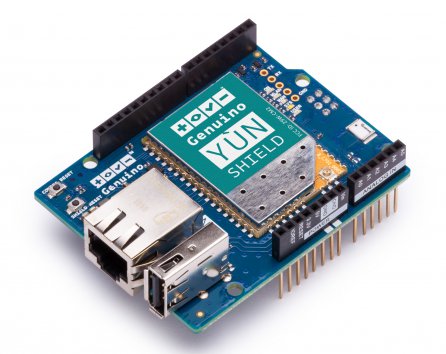
Yún Shield – A powerful IoT shield that brings Yún features to your Arduino or Genuino, enabling you to remotely upload sketches to your boards. Connecting to your WiFi network is simplified with the Yún Web Panel and dedicated ”YunFirstConfig” sketch.
Imagine trying to make a ball-shaped robot that rolls in any direction but with a head that stays on. When I saw the BB-8 droid doing just that in the first Star Wars: The Force Awakens trailer, it was an interesting engineering challenge that I couldn’t resist. All the details for how I made it would fill a book, so here are the highlights: the problems I ran into, how I solved them and what I learned.
The Design Criteria: Portable and Inexpensive
Carrying BB-8
I had two design criteria in mind. The first was to keep it low-cost. Some spend $1000 to $1500 on their BB-8s. I wanted to spend as little as I could, so as many parts as possible had to come from my existing stock and from online classifieds and thrift stores. Not counting the parts that were discarded along the way, the cost came in just shy of $300.
The second design criteria was to make it portable. It had to be something I could take on the bus or carry while walking a reasonable distance (I once carried it twenty-five minutes to a nearby school).
Both of these criteria meant that it had to be smaller than full size. A full size ball is 20″ in diameter. Mine has a 12″ ball which makes it 3/5 scale. Also, the larger it is, the more powerful and costly the motors, batteries, motor controllers, magnets, and so on.
Version One: Quick And Easy
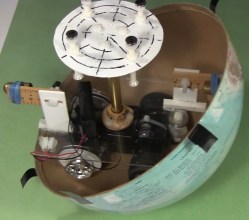
First I tried a minimalist approach. For the ball, I found my 12″ cardboard globe on kijiji.ca. I bought an RC toy truck at a yard sale and attached a pole to it for holding magnets near the top of the globe. I then made a head with corresponding magnets under it. The head magnets attract to the pole magnets, keeping the head on. Meanwhile, the truck rolling inside the ball makes the ball move.
Making the ball roll around was easy. Making it roll around while keeping the head on was very hard. The magnets at the top of the pole attract the magnets under the head, pulling them down hard onto the surface of the globe. That essentially glues the truck to the top of the globe.
To overcome that the truck needs sufficient traction. That also means the truck needs to be heavy. And lastly, the truck’s motor needs to be powerful enough to overcome its own weight and the grip of the magnets on the ball. The alternative is to make the magnetic attraction weaker, but if it’s too weak the head falls off. It’s a tricky balancing act, in both senses of the word.
But the most dome-like head I could make stay on was just a cardboard skeleton. Anything more filled out would be heavier and require a stronger magnetic attraction. The toy truck’s motor would not be up to it.
Version Two: Drill Motors And Drill Batteries
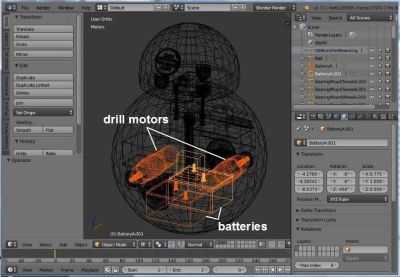
Batteries and motors in Blender
For more powerful motors and more mass I figured I could kill two birds with one stone by going with drill motors and drill batteries in a hamster drive configuration. Using drill parts kept costs down as the batteries and one drill came from yard sales while the other drill was free through freecycle.org. Meanwhile, both are heavy.
To make sure it all fit, I drew up a 3D model in Blender, the free 3D modelling and animation software that I use a lot. In fact, finding out how to make the batteries and motors fit was the first step. They had to be as low as possible. Their large mass low down is what keeps the droid vertical, with the much lighter head at the highest point.
Batteries Velcroed and a connector
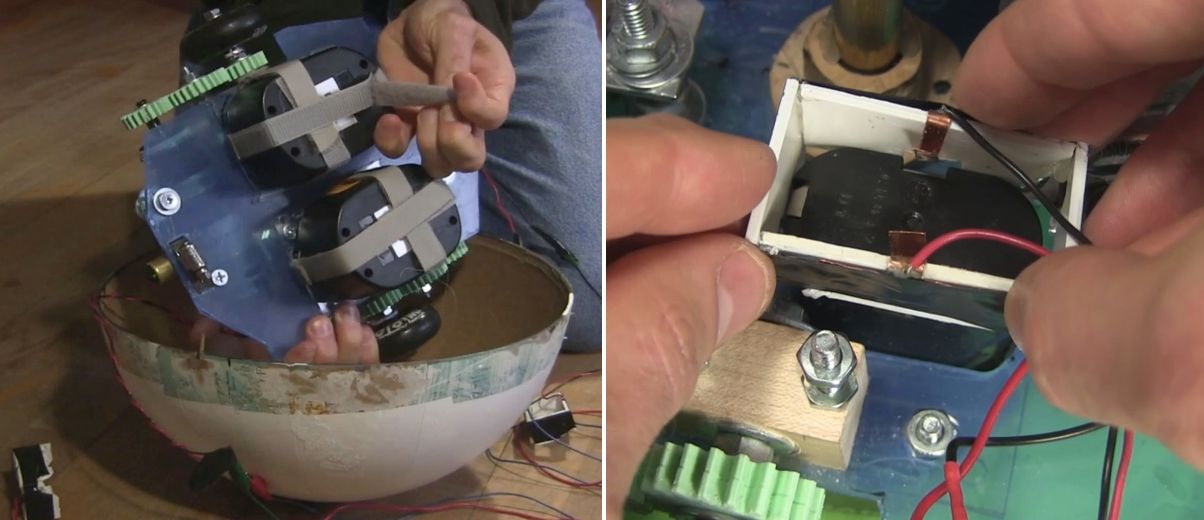
The drill batteries had to be easily removable for recharging. To hold them under the drive plate I simply used Velcro. Meanwhile, the drill battery stems went up through a hole in the drive plate. I made a connector to electrically connect to the battery terminals. It is a plastic rectangle with thin copper sheet metal for the contacts. Once the battery was Velcroed in place, this plastic and metal piece was lowered down onto the stem, the copper metal making contact with the battery terminals.
The Electronics
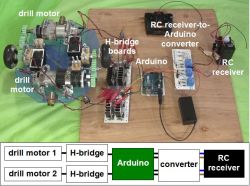
For the brains I used an Arduino UNO. To drive the motors I had all the parts for making two H-bridge driver boards, with the exception of 4 MOSFETs and some fuses. The Arduino does pulse width modulation (PWM) to the driver boards for speed control, as well as playing sounds at certain times when the motors are turned on.
For remote control, I hacked the RC receiver from the toy truck and added an extra set of AA batteries in parallel for more runtime. A problem I ran into right away though, was that the RC receiver put out voltages of both polarities based on which direction the motors should rotate, whereas the Arduino’s pins take only positive voltages. To solve that I came up with a converter board to go between them.
Getting all that to work reliably took a while. Before I added fuses, I burned a few MOSFETs. At one point I’d put an N-type MOSFET where a P-type should have gone and vice versa. That resulting problem alone took a few days of spare time to figure out.
The wheels were old Rollerblade wheels — I keep a small bucket of these in my shop. I decided I wanted the ball to roll at around 1 foot per second and doing the math, that meant the wheels would have to rotate at around 2 rotations per second or 120 RPM. I found a PWM value that would give something close to that and started blowing fuses. I started with 1 amp fuses, then 2, 5, and finally settled on 10 amp fuses.
My final hurdle was that the motors would behave oddly when the motors were told to turn in opposite directions but were fine when they were told to turn in the same direction. This turned out to be a bad assumption on my part about how the RC receiver was wired internally — none of the output wires were common inside. After some changes to the circuit, I now had stable electronics.
I had basically been treating the RC receiver as a black box, but when I asked for help about my converter board here on Hackaday, it was pointed out that the receiver likely contained H bridges. Opening it up, that’s exactly what I found. The converter board works fine for now, but in the near further I’ll use one of the suggestions from that Hackaday post to eliminate the board altogether. I might even try all of the suggestions, just for fun.
The Drive System
The drive system
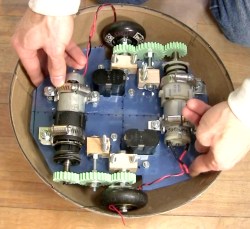
The motors were too long to fit in line between the wheels and so had to be mounted off to the sides. To transfer rotation to the wheels, I drew up some gears in Blender and 3D printed them at our local University of Ottawa Makerspace. In the print settings I used 2 shells and only 50% infill. The gears are held firmly onto the shafts solely using nuts and washers on either side. They’ve held up amazingly well, even with slipping and grinding during development.
For the bearings for the center gears and the wheels I used an old trick of making bearing blocks from hardwood.
Putting Loctite and screwing gear to motor shaft
I wanted to keep as much room as possible on the drive plate available for adding things later and so initially I’d mounted the motors at only three points. But this allowed the motors to move a little causing the gears to slip. To fix that I later added a fourth mounting point and haven’t had any slipping since.
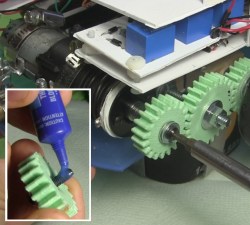
At the end of the shaft for the drill motors is a hole that a screw goes into. That’s part of how the chuck is kept on a drill motor, and that’s how one gear was kept on. However, this screw had a tendency to get loose. Putting a little Loctite on the threads fixed that.
Stability
Rearranging BB-8’s internals
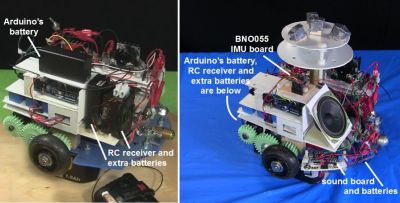
Given that I was trying to fit a lot in a small droid, I had to mount some things higher than I’d have liked to. When the droid stops, mass high up causes the droid to wobble. In the BB-8 droid used for promotional events they’ve gone to a great extent to keep the majority of the mass as low as possible. Originally I had the Arduino batteries and the RC receiver with its extra batteries fairly high up. I later mounted them much lower. When holding the internals in my hands I could tell the difference but it didn’t make a noticeable difference with the wobble.
Instead, for that I added Adafruit’s BNO055 inertial measurement unit (IMU) board. With it I could tell what angle the droid was at when stopping and experimented with PID loops and other algorithms of my own to minimize wobble. That helped.
The Ball
As I said, I used a 12″ cardboard globe. To increase the traction of the wheels inside the globe I sprayed the globe’s interior with an anti-slip spray from a hardware store. This made a huge difference. However, over time the anti-slip coating vanished, and so I’m looking for another, more permanent coating, perhaps urethane or something. If anyone has any suggestions, please let me know in the comments. It also has to stop off-gassing eventually. The anti-slip spray had an odor for a long time.
Sealing globes – cardboard and fiberglass
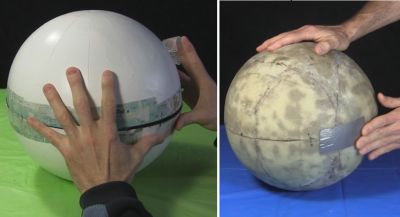
But the main problem with the cardboard globe was its thinness. With the huge weight of the internals pushing down on it where the wheels are, it warped significantly and required a lot of effort and a copious amount of tape to keep the two hemispheres together. This large amount of tape also made an uneven ridge for the head to slide over, making it get stuck. At that point either the drive system continued to move while the head fell off or the drive system couldn’t move at all.
The solution was to carefully coat a new globe in three layers of fiberglass. I took my time doing this, over a month and a half, applying one piece at a time and then sanding before putting the next piece. The result was a fantastic improvement. It no longer deformed and now it takes a minimal effort to attach the two hemispheres with only eight narrow strips of transparent duct tape.
The Never-ending Saga
My DIY BB-8 in action
My BB-8 is now at the point that I can call it finished. At least it’s finished as far as all the engineering is concerned, and that’s usually where I call it quits.
While the paint job worked out well, up close you can see that the details are painted on. It’d be nice to have at least the lines on the head be actual grooves. Also, these drill motors are brushed motors and I’ve since learned that doing high frequency PWM to brushed motors damages them over time. I’d like to replace them with brushless motors. And as anyone who’s use cordless drills a lot knows, drill batteries don’t last long, and so it’d be great to switch to LiPos.
But for now, the reactions I get from both kids and adults is beyond my wildest expectations. Kids threat it like a friend while adults have petted it and called to it like it was a baby or a dog wagging its tail. I’d call that a success.
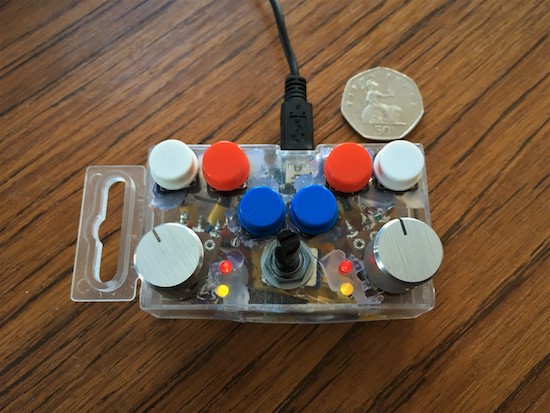
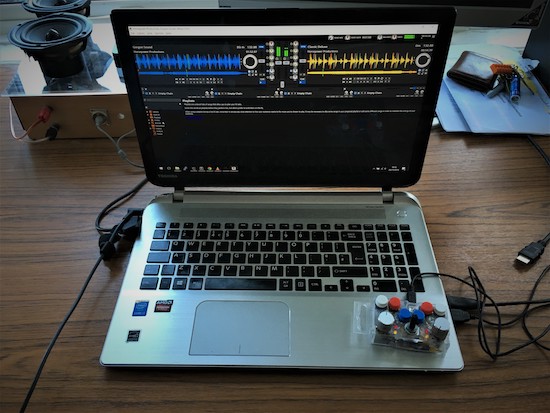
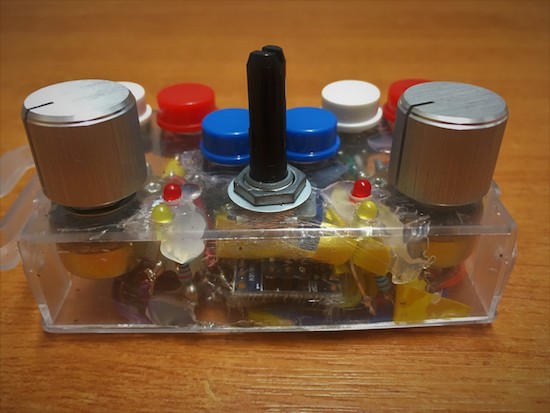
Electronic music seems to be ripe for hacking, as a new device can be fun as well as quite useful. Imgur user “fatcookies” decided to create a small DJ controller using an Arduino Nano, six push buttons, three potentiometers, and four configurable LEDs.
In this setup, each input is fed into the Arduino, then sent to a computer over USB to be used as a MIDI interface (with the help of a couple pieces of intermediate software). A neat build for sure, but what really sets this tiny beast apart is that it’s about the size of a notebook’s trackpad.
The electronics are all stored inside a transparent nuts and bolts storage box, while fatcookies rounded out the design with some arcade buttons and brushed aluminium knobs on two of the pots.
There’s an iconic scene from the movie Big where [Tom Hanks] and [Robert Loggia] play an enormous piano by dancing around on the floor-mounted keys. That was the first thing we thought of when we saw [jegatheesan.soundarapandian’s] PC joystick rug. His drum playing (see the video below) wasn’t as melodious as [Hanks] and [Loggia] but then again they probably had a musical director.
At the heart of the project is, of course, an Arduino. An HC-05 provides a Bluetooth connection back to the PC. We thought perhaps an Arduino with USB input capability like the Leonardo might be in use, but instead, [jegatheesan] has a custom Visual Basic program on the PC that uses SendKeys to do the dirty work.
The switches are more interesting made with old CDs, foil, and sponges. The sponge holds the CDs apart until you step on them and the foil makes the CDs conductive. He uses a lot of Fevicol in the project–as far as we can tell, that’s just an Indian brand of PVA glue, so Elmer’s or any other white glue should do just as well.
The glue also handles the fabric parts. When a project says “no sewing” we realize how some people feel about soldering. The CD/foil/sponge switches might be useful in other contexts. We’d be interested in how the sponges wear with prolonged use.
We’ve seen other giant controllers before. Of course, if you really want a big controller, you can’t beat a Nissan (the link is dead, but the video will give ou the idea).
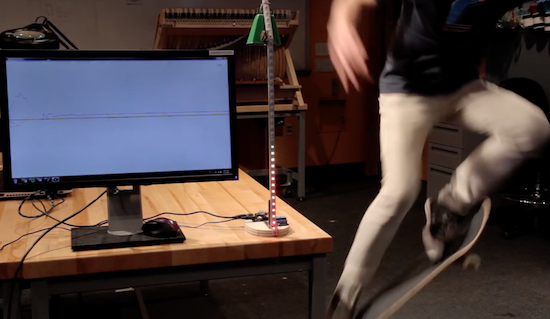
In skateboarding, the ollie is a fundamental trick used to leap onto, over or off obstacles, or over gaps of unfriendly terrain such as grass or stairs. But how do you know just how sick your ollie actually was? Josh Sheldon has a solution.
The Maker has built a device that judges the sickness of your ollie and visualizes your score, rewarding the bestones with the chiming of a cowbell. Sheldon describes the project as something “like one of those hammer games at carnivals, but instead of trying to hit that thing with a hammer as hard as you can, the goal is to land the sickest ollie.”
The aptly named Sick Ollie Machine consists of two parts: a stand with LEDs and the skateboard itself. Underneath the board is an Arduino Uno, a 9V battery, and an accelerometer. The stand is equipped with another Arduino, a relay, and an RGB LED strip that goes up mast, as well as a solenoid on top. When the relay closes, the solenoid hits the bell. Both units also contain a wireless transmitter, allowing them to communicate with one another.
Watch Sheldon discuss his project in more detail below!
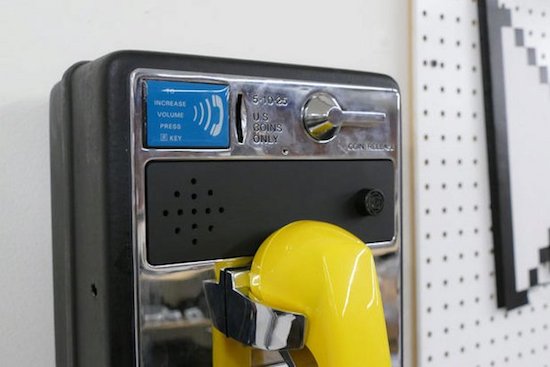
If you grew up in the ’90s and would love to play some of your favorite hit songs through something a bit more nostalgic than your smartphone, perhaps you can do what “digital alchemist” Fuzzy Wobble has done and transform an old-school payphone into a fully-functional boombox.
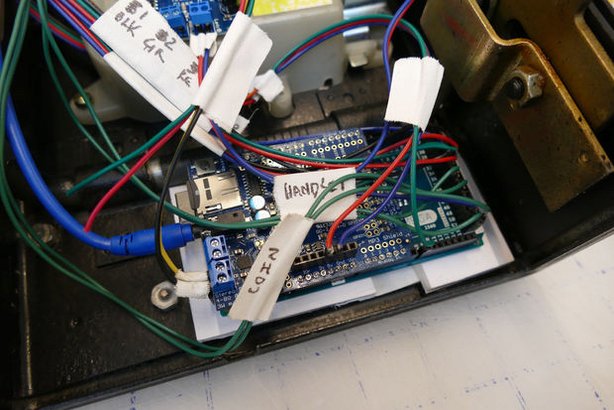
Fuzzy Wobble was able to get his hands on an inexpensive payphone and hacked it using an Arduino Mega, an Adafruit MP3 Maker Shield, a 20W amplifier, a 20W speaker, and some other components. The unique boombox is also equipped with a rangefinder that detects whenever someone walks by, triggering the phone to ring and enticing someone to answer the call.
The phone is programmed with a recorded menu along with instructions on how to select one of several pre-loaded song. Hitting the star key sends the device into broadcast mode.
What’s neat is that there’s a tiny booklet filled with images of ’90s tunes, from Coolio to Sugar Ray to Semisonic, each with a four-digit number on the back. Simply punch in the code and the payphone begins to play music.
Today on In Case You Missed It: Pairing an Arduino with a skateboard produces the Sick Ollie Machine, capable of measuring angular and X-,Y- or Z-axis accelerations to measure who is hitting their tricks the hardest. Courtesy of Josh Sheldon, the ollie machine uses an Arduino beneath the trucks of the board paired with a relay to measure the stats of each trick. Those who are producing truly sick ollies are rewarded with a chime from the attached cowbell.
Meanwhile, over at CERN a set of robot twins have been enlisted to provide live video feeds and environmental measurements for the massive underground complex. The robots, called TIM twins for Train Inspection Monorail, move along a -- you guessed it -- overhead rail that runs throughout the facility in order to monitor stats like oxygen concentration and radiation emissions.
Also, don't forget to check out what happens when a frog is run through Google's Deep Dream project (which is easily the weirdest sentence I've written yet today). As always, please share any interesting tech or science videos you find by using the #ICYMI hashtag on Twitter for @mskerryd.
Today on In Case You Missed It: Pairing an Arduino with a skateboard produces the Sick Ollie Machine, capable of measuring angular and X-,Y- or Z-axis accelerations to measure who is hitting their tricks the hardest. Courtesy of Josh Sheldon, the ollie machine uses an Arduino beneath the trucks of the board paired with a relay to measure the stats of each trick. Those who are producing truly sick ollies are rewarded with a chime from the attached cowbell.
Meanwhile, over at CERN a set of robot twins have been enlisted to provide live video feeds and environmental measurements for the massive underground complex. The robots, called TIM twins for Train Inspection Monorail, move along a -- you guessed it -- overhead rail that runs throughout the facility in order to monitor stats like oxygen concentration and radiation emissions.
Also, don't forget to check out what happens when a frog is run through Google's Deep Dream project (which is easily the weirdest sentence I've written yet today). As always, please share any interesting tech or science videos you find by using the #ICYMI hashtag on Twitter for @mskerryd.