Posts with «arduino» label

Join the Arduino workshop in Berlin, March 9th-12th

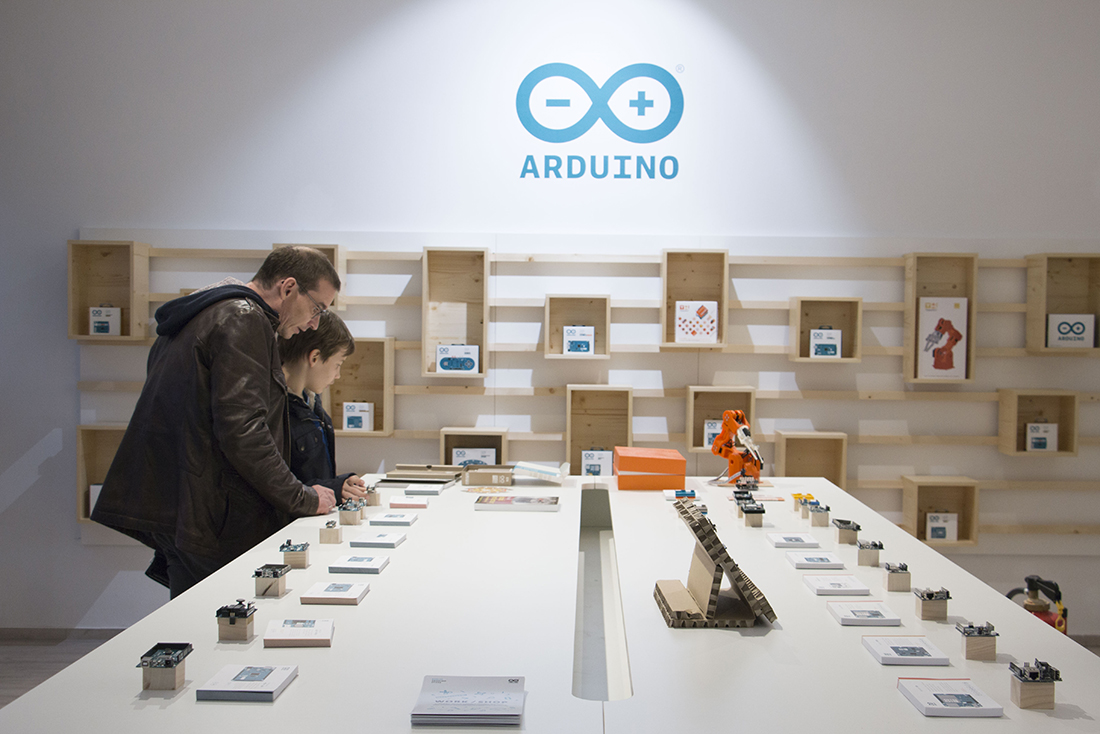
Join us for a special weekend of workshops at the Arduino Store Berlin! Activities will kick off on Thursday, March 9th with teacher training. On Friday, March 10th and Saturday, March 11th, the Arduino team featuring Tenaya Hurst will present some of the latest products, like the Primo and the Otto; in the afternoon, the focus will shift towards the Arduino Uno WiFi and the Arduino Libretto Kit.

Everyone (ages 8 and up) is welcome to attend the workshops. Teachers, in particular, will have the opportunity to learn how to present and replicate projects with their students, as well as meet and greet each other during a social brunch on Sunday morning. The Arduino Store is also looking to collaborate with more educators, so don’t forget to bring your CV!

Registration is now open. The cost of each workshop, which includes an Arduino kit, is €59 +VAT and will be processed at the Berlin store. Please remember your laptop and power cord, and to download the Arduino IDE before attending! Have questions? Do not hesitate to contact events@arduino.org!

Arduino WORK/SHOP

Venue: Arduino Store, Danziger Str. 22, 10435 Berlin, Germany

Thursday, March 9th 
17:00-17:45: Meet, greet and network
18:00-20:00: Teacher training workshop
20:00-20:30: Followup Q&A for teachers interested in collaborating with Arduino Berlin Store

Friday, March 10th
12:30-13:45: New Arduino products introduction (Primo, Otto and more)
14:00-15:45: Workshop 1 – Getting started with Arduino Uno WiFi 
16:00-17:45: Workshop 2 – Getting started with Arduino Uno Libretto Kit
18:00-19:45: Workshop 3 – Getting started with Arduino Uno Libretto Kit

Saturday, March 11th 
9:30-10:45: New Arduino products introduction (Primo, Otto and more)
11:00-12:45: Workshop 4 – Getting started with Arduino Uno WiFi
13:00-14:45 Workshop 5 – Getting started with Arduino Uno Libretto Kit
15:00-16:45: Workshop 6 – Getting started with Arduino Primo 
17:00-18:45: Workshop 7 – Getting started with Arduino Uno Libretto Kit

Sunday, March 12th
10:00-12:00: Teacher brunch

Hull Pixel Bot, A Mobile Pixel

There are many designs for little two-wheeled robots available to download for constructors with an interest in simple robotics. You might even think there are so many that there could not possibly be room for another, but that has not deterred [Rob Miles]. He’s created HullPixelBot, a platform for a mobile pixel as well as for simple robotic experimentation.

So what makes HullPixelBot more than just Yet Another Arduino Powered Robot? For a start, it’s extremely well designed, and has a budget of less than £10 ($12.50). But the real reason to take notice lies in the comprehensive software, which packs in a language interpreter and MQTT endpoint for talking to an Azure IoT hub. This is much more than a simple Arduino bot on which you must craft your own sketches, instead, it is a platform for which the Arduino bot is merely the carrier.

The project has had quite a while to mature since its initial release, and now has the option of a single pixel or a ring of pixels. The eventual aim is to use swarms of networked HullPixelBots to create large autonomous moving pixel displays, containing more than a hundred individual pixels.

There is an early video of some PixelBots in action which we’ve placed below the break, but it serves more as eye candy than anything else. If you have a spare ten quid, download and print yourself a chassis, install Arduino and motors, and have a go yourself!


We’ve certainly come a long way since the days when a cheap Arduino robot cost $100.


Filed under: robots hacks
Hack a Day 06 Mar 09:00

A Command-Line Stepper Library with All the Frills

When you already know exactly where and how you’d like your motor to behave, a code-compile-flash-run-debug cycle can work just fine. But if you want to play around with a stepper motor, there’s nothing like a live interface. [BrendaEM]’s RDL is a generic stepper motor driver environment that you can flash into an Arduino. RDL talks to your computer or cell phone over serial, and can command a stepper-driver IC to move the motor in three modes: rotary, divisions of a circle, and linear. (Hence the acronumical name.) Best of all, the entire system is interactive. Have a peek at the video below.

The software has quite a range of capabilities. Typing “?” gets you a list of commands, typing “@” tells you where the motor thinks it is, and “h” moves the motor back to its home position. Rotating by turns, degrees, or to a particular position are simple. It can also read from an analog joystick, which will control the rotation speed forward and backward in real time.

Division mode carves the pie up into a number of slices, and the motor spins to these particular locations. Twelve, or sixty, divisions gives you a clock, for instance. Acceleration and deceleration profiles are built in, but tweakable. You can change microstepping on the fly, and tweak many parameters of the drive, and then save all of the results to EEPROM. If you’re playing around with a new motor, and don’t know how quickly it can accelerate, or what speeds it’s capable of, nothing beats playing around with it interactively.

Right now, there’s not much documentation aside from the code itself and the attached video, but actually that looks like all you’d need to get started. So if you’re looking to replicate Hackaday’s [Moritz Walter]’s excellent stepper-driver shootout, a tool like this is just the ticket.


Filed under: misc hacks

See the Weather at a Glance with this WiFi Wall Mounted Display

Whether you’re lodged in an apartment with a poor view of the sky like [Becky Stern] or are looking for an at-a-glance report of the current weather, you might consider this minimalist weather display instead of checking your computer or your phone every time you’re headed out the door.

The first order of business was to set up her Feather Huzzah ESP8266 module. [Becky] started with a blink test to ensure it was working properly. Once that was out of the way, she moved on to installing a few libraries. Temperature data fetched by an IFTTT feed is displayed on a seven-segment display, while additional feeds separately retrieve information for each basic weather type: sunny, overcast, rain, snow.

All it took to create the sleek display effect was a few pieces of cardboard inside a shadow box frame, a sheet of paper as a diffuser, and twelve Neopixel RGB LEDs hidden inside. Trimming and securing everything in place as well as notching out the back of the frame for the power cable finished the assembly. Check out the build video after the break.

Pair this weather frame with a shoe rack that spotlights the appropriate footwear depending on the weather to really streamline your exit.


Filed under: Arduino Hacks, misc hacks

This animatronic device turns speech into sign language

Using a couple Arduinos, a team of Makers at a recent McHacks 24-hour hackathon developed a speech-to-sign language automaton.

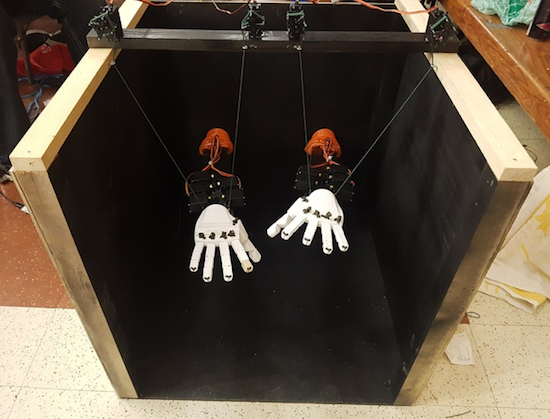
Alex Foley, along with Clive Chan, Colin Daly, and Wilson Wu, wanted to make a tool to help with translation between oral and sign languages. What they came up with was an amazing animatronic setup that can listen to speech via a computer interface, and then translate it into sign language.

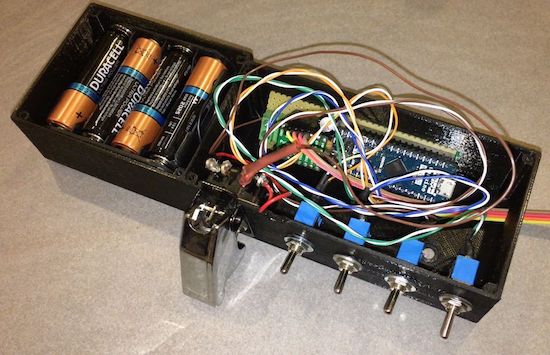
This device takes the form of two 3D-printed hands, which are controlled by servos and a pair Arduino Unos. In addition to speech translation, the setup can sense hand motions using Leap Motion’s API, allowing it to mirror a person’s gestures.

You can read about the development process in Foley’s Medium write-up, including their first attempt at control using a single Mega board.

Need desk lighting? How about 1,200+ LEDs?

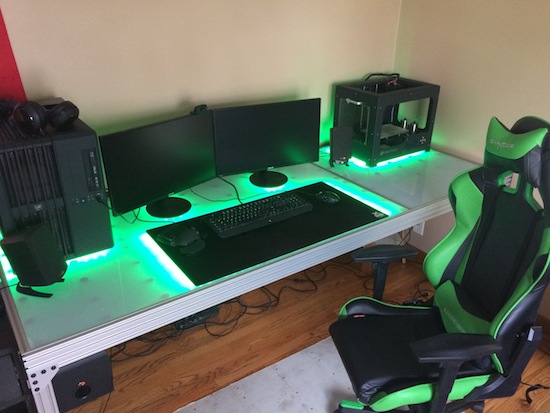
After he’d just finished a project using RGB LEDs, Imgur user nolobot’s brother mentioned he needed a new computer desk. Most people would probably just let their brother buy one, others would make something out of wood, but nolobot instead decided to create something truly amazing using more than 1,200 WS2812 RGB LED modules, an Arduino Mega, aluminum extrusion, and translucent polycarbonate.

The Mega controls these LEDs with the FastLED library, which are sandwiched between a base piece of plywood and a strip of polycarbonate using custom spacers. This diffuses the light nicely, allowing for beautiful light animations directly on the desk’s surface.

You can find more on this awesome build on the project’s Imgur page!

Raiders of the Lost OS: Reclaiming A Piece of Polish IT History

In today’s digital era, we almost take for granted that all our information is saved and backed up, be it on our local drives or in the cloud — whether automatically, manually, or via some other service.  For information from decades past, that isn’t always the case, and recovery can be a dicey process.  Despite the tricky challenges, the team at [Museo dell’Informatica Funzionante] and [mera400.pl], as well as researchers and scientists from various museums, institutions, and more all came together in the attempt to recover the Polish CROOK operating system believed to be stored on five magnetic tapes.
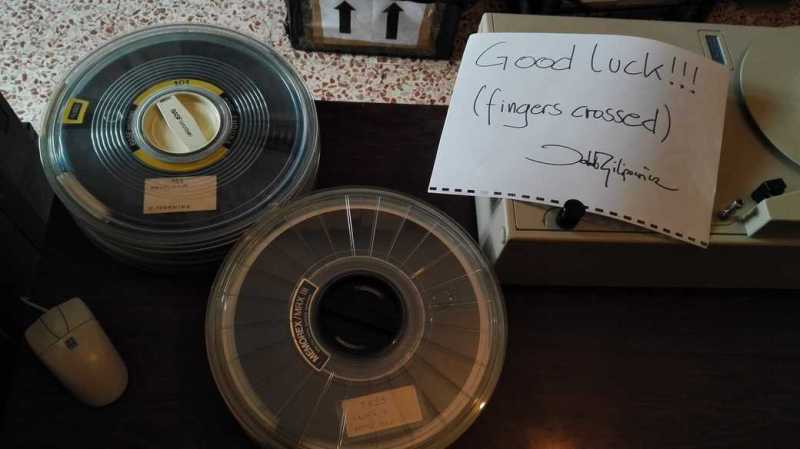
Originally stored at the Warsaw Museum of Technology, the tapes were ideally preserved, but — despite some preliminary test prep — the museum’s tape reader kept hanging at the 800 BPI NRZI encoded header, even though the rest of the tape was 1600 BPI phase encoding. Some head scratching later, the team decided to crack open their Qualstar 1052 tape reader and attempt to read the data directly off the circuits themselves!!
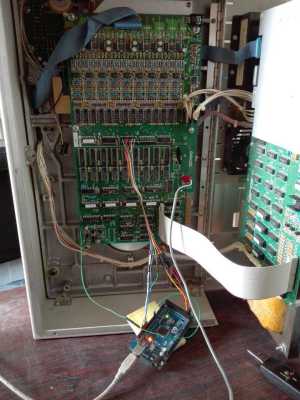
Using an Arduino Mega as a sampling device and the tape in test mode, the team were able to read the tapes, but the header remained inscrutable and accompanied by errors in the rest of the data. Promising nonetheless!

Switching gears, the decision was made to use a logic analyzer to read the tapes and use software to decode the data. While they waited for their new analyzer to ship, one of the team members, [Jacob Filipowicz] harnessed the power of Python to write a program called Nine Track Labs (pictured below) which would allow them to read any kind of magnetic tape, at any speed, BPI, and writing standard. Armed with the software and analyzer, the team was able to successfully recover the data from the tapes in its entirety without errors!

Among the data recovered, there were numerous versions of the CROOK operating system — allowing them to reproduce the OS’s development process, as well as hundreds of other files containing programs and tools hitherto believed to be lost. There was also a backup of a ‘live’ MERA-400 system with a binary CROOK-3 OS, ready to run in emulation. All things considered, the techno-archeological tour-de-force was a smashing success.

If — in your more modern travels — you need to recover an audio recording gone awry, know that you can retrieve that data with a hex editor.


Filed under: classic hacks, computer hacks

The Best of Both Worlds: Arduino + 555 Should Confuse Commenters

Hardly a week goes by that some Hackaday post doesn’t elicit one of the following comments:

That’s stupid! Why use an Arduino when you could do the same thing with a 555?

And:

That’s stupid! Why use a bunch of parts when you can use an Arduino?

However, we rarely see those two comments on the same post. Until now. [ZHut] managed to bring these two worlds together by presenting how to make an Arduino blink an LED in conjunction with a 555 timer. We know, we know. It is hard to decide how to comment about this. You can consider it while you watch the video, below.

On the plus side, there probably is a use case for this. The LED will blink with absolutely no intervention from the Arduino. You could put the Arduino in deep sleep, if you wanted to and that LED will still blink. With a little work, you could probably adapt this idea to any number of circuits out of the 555 playbook, like a PWM generator, for example.

There’s almost nothing a 555 can’t do. If you want to see what’s under its expressionless face, this teardown is an interesting read. We just hope the comment section doesn’t overload like a Star Trek computer being asked by Captain Kirk to compute every digit of pi.


Filed under: Arduino Hacks
Hack a Day 03 Mar 03:00

Making a Mega LED Desk

Few things beat a sturdy, home-built desk — especially when it’s jam-packed with over 1200 WS2812 LEDs.

[nolobot] and his bother struggled with setting up and squaring-off the t-slotted, extruded aluminium frame which makes up the desk. He recommends practicing with a smaller frame for anyone else attempting a similar build. The surface of the desk has a few inches between the polycarbonate top and the 1/4″ plywood painted black serving as the substrate for the LEDs. Those LEDs come in strip form but still required several hundred solders, and wiring headaches in an attempt to make future upgrades manageable. Dozens of support bolts with adjustable feet support the desk surface throughout. These all had to be individually adjusted and can be made out if you look closely at the demo videos.

An Arduino Mega controls the LEDs with the help of the FastLED library. Custom code was necessary because one of the major issues [nolobot] faced was the power draw. 1200 LEDs at 5V draw quite a bit of current, so the LEDs were coded to peak at about 50% brightness. The matrix was split into different banks, while also limiting the 40A PSU to only 15A.

Regarding the final product, all we can say is: woah.

Not a fan of putting this much work into a piece of furniture? There are also ultra-minimalist options at your disposal.

[via /r/arduino]


Filed under: Android Hacks, led hacks
Hack a Day 02 Mar 12:01

Netflix becomes your personal trainer with its new DIY device

Working out can be tough, but inversely, watching Netflix is super easy. The streaming giant doesn't want to distract you from your fitness goals, though. Netflix would much rather be your workout buddy, which is why it posted instructions for making a DIY personal trainer gadget.