Posts with «arduino» label

Arduino into NAND Reader

[James Tate] is starting up a project to make a “Super Reverse-Engineering Tool”. First on his list? A simple NAND flash reader, for exactly the same reason that Willie Sutton robbed banks: because that’s where the binaries are.

As it stands, [James]’s first version of this tool is probably not what you want to use if you’re dumping a lot of NAND flash modules. His Arduino code reads the NAND using the notoriously slow digital_read() and digital_write() commands and then dumps it over the serial port at 115,200 baud. We’re not sure which is the binding constraint, but neither of these methods are built for speed.

Instead, the code is built for hackability. It’s pretty modular, and if you’ve got a NAND flash that needs other low-level bit twiddling to give up its data, you should be able to get something up and working quickly, start it running, and then go have a coffee for a few days. When you come back, the data will be dumped and you will have only invested a few minutes of human time in the project.

With TSOP breakout boards selling for cheap, all that prevents you from reading out the sweet memory contents of a random device is a few bucks and some patience. If you haven’t ever done so, pull something out of your junk bin and give it a shot! If you’re feeling DIY, or need to read a flash in place, check out this crazy solder-on hack. Or if you can spring for an FTDI FT2233H breakout board, you can read a NAND flash fast using essentially the same techniques as those presented here.


Filed under: Arduino Hacks, hardware

This device converts gestures into keystrokes

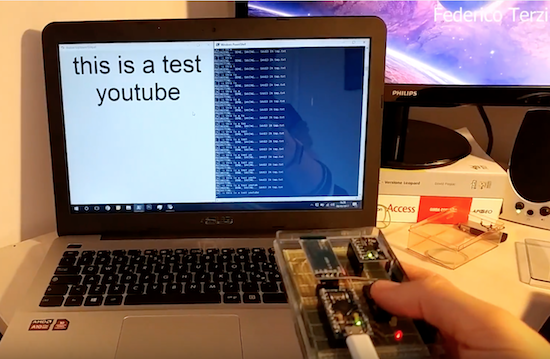
Engineering student Federico Terzi has built an impressive computer interface device reminiscent of a Wiimote.

When talking in person,  you can express meaning using facial expressions, and your hands. Usually this acts to add emphasis to a statement or perhaps to point out a certain object, but what if you could actually type letters based on how your hands move?

Terzi’s aptly named “Gesture Keyboard” does just this, using an Arduino Pro Micro, an MPU-6050 accelerometer, and an HC-06 Bluetooth module for sending signals to his laptop. A Python library using Scikit-learn’s SVM (Support Vector Machine) algorithm then translates the motion readings into characters that appear on the screen.

You can find the code and more information on Terzi’s GitHub page.

Arduino + Geometry + Bicycle = Speedometer

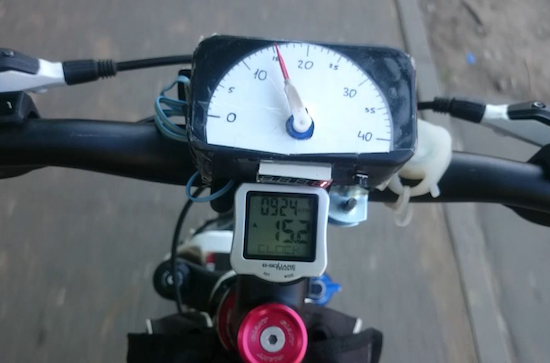
It is pretty easy to go to a big box store and get a digital speedometer for your bike. Not only is that no fun, but the little digital display isn’t going to win you any hacker cred. [AlexGyver] has the answer. Using an Arduino and a servo he built a classic needle speedometer for his bike. It also has a digital display and uses a hall effect sensor to pick up the wheel speed. You can see a video of the project below.

[Alex] talks about the geometry involved, in case your high school math is well into your rear view mirror. The circumference of the wheel is the distance you’ll travel in one revolution. If you know the distance and you know the time, you know the speed and the rest is just conversions to get a numerical speed into an angle on the servo motor. The code is out on GitHub.

Granted, reading a magnet, keeping time, and driving a servo isn’t exactly cutting edge. On the other hand, it made us think about what other kinds of outputs you could drive. We haven’t seen a nixie tube speedometer (well, not on a bicycle, anyway), for example. Or maybe one built with mechanical flip numbers like an old clock.

We have seen some with Arduinos and lots of LEDs (although, again, not really for a bicycle). This speedometer might still be our favorite, though.


Filed under: Arduino Hacks, transportation hacks

An Arduino-controlled Team Fortress 2 sentry gun prop

If you’ve played Team Fortress or its sequel TF2, you’ve certainly run into a sentry gun. This unit can be set up by an engineer character to guard various positions, and looks like something that could make an amazing prop.

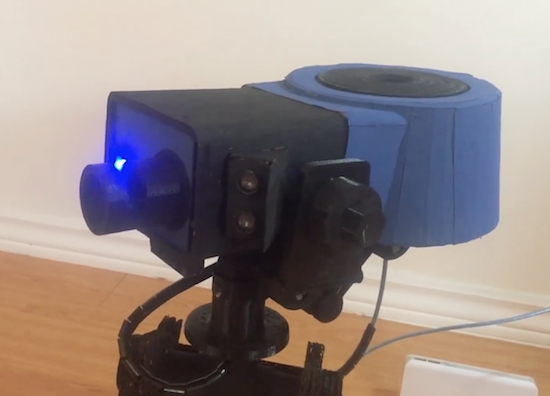
YouTuber “henry3136” apparently agrees, and spent an estimated 400-500 hours building and programming his own out of cardboard, plastic bottles, and a few 3D-printed bits.

His Arduino-controlled gun pans back and forth using a servo and “fires” whenever it senses a target with its ultrasonic sensor. An Adafruit Audio FX Sound Board helps produce some fun effects, while the barrel moves in and out to scare off the bad guys.

You can see it in action below!

Heat up a small pool with this solar-powered system

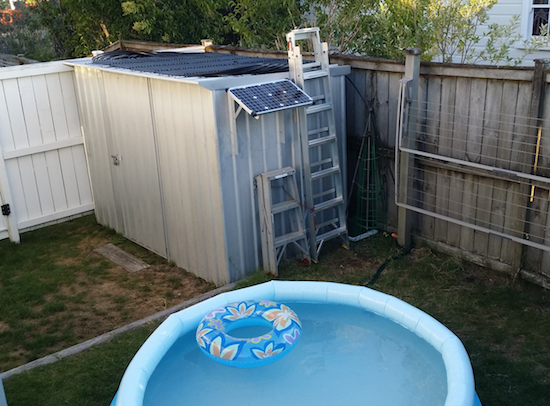
Imgurian “ElectricYFronts” has created an Arduino-controlled solar heating system for his kids’ paddling pool.

Small semi-portable above ground pools can be fun, but are generally not heated. The “Solar Paddle” system, however, raises the temperature of the pool from a chilly 68 degrees Fahrenheit to a much warmer 83 degrees (20 to 28 Celsius). It does this by piping water into and out of the pool, then heating it in over 200 yards of black watering pipe on top of a shed.

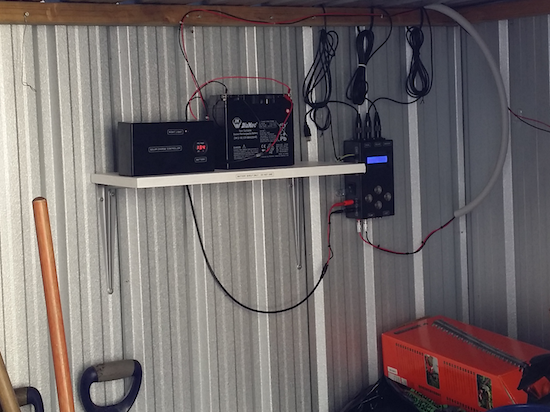
Water is cycled via an impeller pump, which is powered by a solar panel along with a battery to keep power even over fluctuations. A few buttons and an LCD panel allow things to be changed around without opening up the Arduino Uno’s enclosure.

You can see more on how this heater was made on Imgur.

Make an “analog” bike speedometer with Arduino

As Maker Alex Gyver points out in his video, Chinese bike computers are quite cheap, but “why not?” It’s a great question, and one that motivates many of the hacks seen here, including his mountain bike speedometer.

Although he could have simply used a numerical display to show how fast his bike was going, he instead employed a small servo to point to the speed like an analog gauge. The custom speedometer is based on an Arduino Nano, and wheel revolutions are measured by a magnetic and Hall effect sensor.

This may seem like a silly project, but if you need to take a very short glance at something, analog gauges tend to be much easier to read than digital. Perhaps this concept could be quite useful! You can see exactly how to make this hack on Instructables and in his video here with a few action shots. Code can be found on GitHub if you’d like to check that out as well!

A cool infinity mirror-style bottle opener

In his quest to create “the coolest wall-mounted bottle opener in the entire world,” it would appear that YouTuber “Never Stop Seeking” has succeeded.

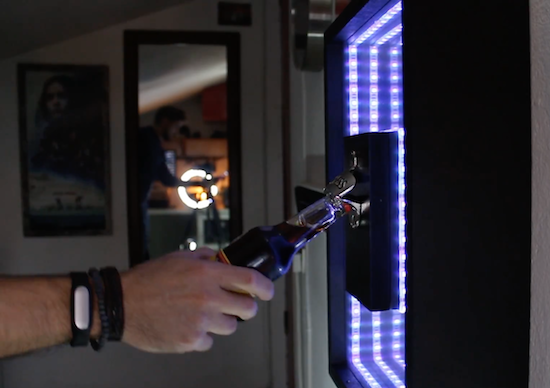
As seen below, the infinity mirror-style unit is made of plexiglass and two-way mirror film, and equipped with Arduino Uno-controlled RGB LED strips that are activated by a proximity sensor as you open a beer or soda. He even included a magnetic catch for his bottle caps!

Want to build one of your own? Good news, Never Stop Seeking plans on sharing more details along with a how-to video in the coming days.

Display time on a 1950s multimeter

Given an input and some sort of indicator, is there any device that can’t be hacked into a timepiece? With the help of an Arduino Nano and an ESP8266 module, Guilio Pons has created a unique clock out of a 1950s-era multimeter.

Pons’ project not only displays time with an indicator originally meant to reveal electrical values, but is also able to output sounds as needed using a speaker recovered from an old toy. He integrated three LEDs as well as a PIR sensor, so the unit can light up at night.

PWM control from the Arduino takes care of moving the gauge, while the ESP8266 allows the time to be synchronized via the Internet and the alarm adjusted over WiFi.

Want to retrofit a vintage tester of your own? Be sure to check out the Pons’ entire log on Hackaday.io. You can find the software library that he used to play sounds here.

Join the Arduino workshop in Berlin, March 9th-12th

Join us for a weekend of special events at the Arduino Store Berlin! Activities will kick off on Thursday, March 9th with teacher training. On Friday, March 10th and Saturday, March 11th, the Arduino team featuring Tenaya Hurst will present some of the latest products, like the Primo and the Otto; in the afternoon, the focus will shift towards the Arduino Uno WiFi and the Arduino Libretto Kit.

Everyone (ages 8 and up) is welcome to attend the workshops. Teachers, in particular, will have the opportunity to learn how to present and replicate projects with their students, as well as meet and greet each other during a social brunch on Sunday morning. The Arduino Store is also looking to collaborate with more educators, so don’t forget to bring your CV!

Registration is now open. The cost of each workshop, which includes an Arduino kit, is €59 +VAT and will be processed at the Berlin store. Please remember your laptop and power cord, and to download the Arduino IDE before attending! Have questions? Do not hesitate to contact events@arduino.org!

Arduino WORK/SHOP

Venue: Arduino Store, Danziger Str. 22, 10435 Berlin, Germany

Thursday, March 9th 
17:00-17:45: Meet, greet and network
18:00-20:00: Teacher training workshop
20:00-20:30: Followup Q&A for teachers interested in collaborating with Arduino Berlin Store

Friday, March 10th
12:30-13:45: New Arduino products introduction (Primo, Otto and more)
14:00-15:45: Workshop 1 – Getting started with Arduino Uno WiFi 
16:00-17:45: Workshop 2 – Getting started with Arduino Uno Libretto Kit
18:00-19:45: Workshop 3 – Getting started with Arduino Uno Libretto Kit

Saturday, March 11th 
9:30-10:45: New Arduino products introduction (Primo, Otto and more)
11:00-12:45: Workshop 4 – Getting started with Arduino Uno WiFi
13:00-14:45 Workshop 5 – Getting started with Arduino Uno Libretto Kit
15:00-16:45: Workshop 6 – Getting started with Arduino Primo 
17:00-18:45: Workshop 7 – Getting started with Arduino Uno Libretto Kit

Sunday, March 12th
10:00-12:00: Teacher brunch

Arduino Blog 07 Mar 08:26

Motorize any camera slider with Arduino!

Using a stepper motor, an Arduino Micro, and various mechanical bits, “Max Maker” shows us how to motorize a camera slider.

According to his video below, “There are many cheap sliders available, but none that are motorized.” On the other hand, in this project he demonstrates that with a little bit of work, and an excellent attention to detail, you can make the conversion yourself.

Even if you’re not interested in this kind of application, the video reveals some interesting tricks, such as transferring a hole pattern using tape at 0:30, and using nail polish/recessed lettering to label switches at 3:55. The slider can be set to slide down the rail between 10 seconds and 8 hours depending on your video or photography needs. Video results, seen around 5:00 in, are really amazing!

You can find more details on how to create a slider like this on the project’s Instructables page.