Posts with «arduino» label

Capacitive sensing with Schmitt trigger

Capacitive sensing with op amps and Capacitive sensing with op amps, continued used a rather complicated circuit to make a Schmitt-trigger oscillator out of op amps:

Modified circuit for longer period. C1 is just the stray capacitance of the touch sensor, with no deliberately added capacitance.

But if we use an off-the-shelf Schmitt trigger chip (like a 74HC14), then a very simple circuit can be made to oscillate:
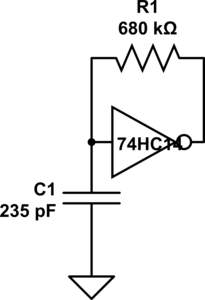
Schmitt-trigger oscillator.

Without a touch sensor, it oscillates at about 10 kHz. With an untouched touch sensor, the frequency drops to about 9.5 kHz. With a touched sensor, the frequency drops further to around 6.7 kHz. I can make the touch sensor have a bigger relative frequency change by reducing the capacitor to 157pF (3 470pF in series), from 15kHz down to 8kHz. This oscillator works fine with the code I wrote for the op-amp oscillator. Neither the resistor nor the capacitor values are particularly critical (as long as the addition of about 140pF from the touch drops the frequency enough to be measurable).

The Schmitt trigger is a useful device for students to learn about, since hysteresis is an important concept in detecting signals. In fact, it might not be a bad idea to have the code that detects the frequency and turns the LED on or off have some hysteresis, as code that just uses a time-out for debouncing tends to make the LED flash on and off when a near-touch is done.

This circuit is too simple for a full 3-hour lab. It can be wired in a couple of minutes and tested in a few more. I’ll have to think of other things to do with a Schmitt trigger to make this into a full lab.  Perhaps this could be an Arduino programming lab, where they start with just a simple pulseIn program and make some modifications:

void setup(void)
{  pinMode(2,INPUT);
   pinMode(13,OUTPUT);
}

void loop(void)
{
    uint8_t on = (pulseIn(2,HIGH) >= 50) ;
    digitalWrite(13, on);
}

Perhaps a simple hysteresis program:

void setup(void)
{  pinMode(2,INPUT);
   pinMode(13,OUTPUT);
}

void loop(void)
{   digitalWrite(13, LOW);
    while (pulseIn(2,HIGH) <= 50) {}
    digitalWrite(13, HIGH);
    while (pulseIn(2,HIGH) >= 40) {}
}

Students would have to measure their oscillator waveforms on the oscilloscope, then play with the constants in the code to get reliable switching. It’s still not a 3-hour lab, but it gives another view of hysteresis.

I’ll have to think about this some more.


Filed under: Circuits course Tagged: Arduino, bioengineering, capacitive touch sensor, circuits, course design, op amp, Schmitt trigger, sensors, teaching

Build a Basic Infrared Motion Alarm with Weekend Projects

Build a motion-sensing alarm by combining a few common components: an Arduino, a PIR sensor, a piezo buzzer, and a breadboard. All you need is some jumper wire to connect them all, and the software to run it.

Read the full article on MAKE

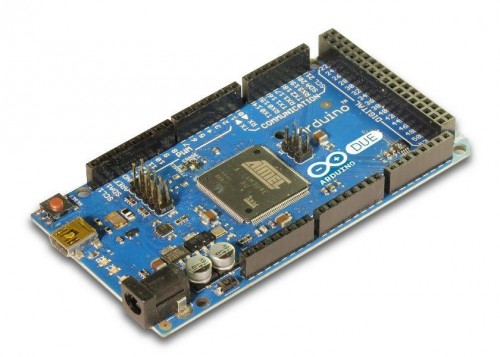
Arduino DUE. Everything changes, but still it is an Arduino

After a long wait, Arduino DUE is available for 39 Euro plus taxes: an aggressive price for ambitious makers.

The key factor for Arduino success has been the ease of use and a very smooth learning curve. Thanks to its basic set of functionalities, a clear hardware design and the multiplatform Integrated Development Environment (IDE), Arduino has become the reference device for many projects: from simple LED based gadgets to sophisticated projects that follow the Internet of things approach. Currently Arduino boasts a huge community of users that across the globe, with forums, interest groups and a variety of pages. In more than 5 years, the community has developed so many projects that it is easy to find an inspiration or an almost finished solution for the majority of the common needs.
With its 8 bit avr core and the IDE framework for libraries, Arduino has been the solution of choice for many, but sometimes its limits in terms of code space and hardware resources were too tight to reach the desired result. These limits are well known by Arduino Team and the long awaited Arduino DUE should represent the quantum leap needed for more complex projects. Arduino Mega was a first step towards a more powerful hardware and computing platform, but a 32bit ARM Cortex-M3 SAM3X8E is a completely different story.

Arduino Style
It took some time to set up the whole project for DUE as it involved every single aspect of the Arduino architecture. In the design process, the Team had some clear objectives, as the look and feel of IDE, the hardware pin strip compatibility with existing Shields and the programming style. It wasn’t easy and the timing for the whole process was rescheduled more than once. At the end the result is a very interesting “evolved Arduino” that shares many of the successful traits of UNO, but it also rises the bar for designers.

The full description of Arduino DUE is available for Arduino Website at “http://arduino.cc/en/Main/ArduinoBoardDue” and the shortlist of technical specification is the following:

  • Microcontroller AT91SAM3X8E
  • Operating Voltage 3.3V
  • Input Voltage (recommended) 7-12V
  • Input Voltage (limits) 6-20V
  • Digital I/O Pins 54 (of which 12 provide PWM output)
  • Analog Input Pins 12
  • Analog Outputs Pins 2 (DAC)
  • Total DC Output Current on all I/O lines 130 mA
  • DC Current for 3.3V Pin 800 mA
  • DC Current for 5V Pin 800 mA
  • Flash Memory 512 KB all available for the user applications
  • SRAM 96 KB (two banks: 64KB and 32KB)
  • Clock Speed 84 MHz

IDE version is 1.5.0 and supports the new multi core architecture, where AVR and ARM now have separate folder hierarchies to host different compilers and different libraries. IDE 1.0.1 will become obsolete soon and all the efforts will continue with this new release. Apparently a lot of the IDE looks the same, but the code behind it is quite different as the SAM3X8E requires a new programming procedure that the software has to perform in order to maintain the same “one click” programming experience.
New instructions have been added to support the USB Host and DAC, while CAN bus has still to be implemented through libraries that are under development. Serial ports hardware based are now four and may be used concurrently.
All these changes and new implementations have been carefully evaluated in the design process to limit the amount of changes a sketch needs to be ported form UNO to DUE.

Hardware issues
The main concern about Arduino DUE is the 3,3V architecture, already foreseen and planned with the UNO design, but the IOREF Pin hasn’t got the expected attention from Shield designers and each shield might work straight away or cause some issues (even the microcontroller damage) if it sends signals to digital and analog input ports at 5 volts. The IOREF pin is indeed the reference provided by designers so that any “well behaving” shield may test this pin and find out if it has to work and interact at 5 or 3,3V.
Any shield has very good chances of finding proper voltage as power supply as DUE supports 5V on its 5V power I/O pin, but any attempt to feed that level to the Arduino DUE digital or analog input will be fatal: the shield works but kills the DUE.

USB all new
The two ports labelled as Programming USB and Native USB are very interesting in terms of computer and peripherals interfacing as they allow new roles of DUE, as USB Host and Client. Again more details on Arduino website (http://arduino.cc/en/Reference/USBHost and http://arduino.cc/en/Reference/MouseKeyboard).
Also programming has been redesigned, with a bootloader pre-programmed on the SAM3X8E before it leaves ATmel factory. It doesn’t occupy FLASH memory and there is no easy way, or need, to reprogram it. Program memory and RAM share a linear addressing space, while Flash can be fully erased pressing the new “Erase” button on the board. This allows a failsafe recovery of the programming functionalities when everything else doesn’t work.

No comments before a real test
The availability of the board has just been announced and everybody is waiting for the first shipments. We hadn’t the chance of running any test, therefore we keep the comments for a more detailed forthcoming story.

Open Electronics 01 Nov 22:16
arduino  featured  headline  news  

Arduino DUE. Everything changes, but still it is ad Arduino

After a long wait, Arduino DUE is available for 39 Euro plus taxes: an aggressive price for ambitious makers.

The key factor for Arduino success has been the ease of use and a very smooth learning curve. Thanks to its basic set of functionalities, a clear hardware design and the multiplatform Integrated Development Environment (IDE), Arduino has become the reference device for many projects: from simple LED based gadgets to sophisticated projects that follow the Internet of things approach. Currently Arduino boasts a huge community of users that across the globe, with forums, interest groups and a variety of pages. In more than 5 years, the community has developed so many projects that it is easy to find an inspiration or an almost finished solution for the majority of the common needs.
With its 8 bit avr core and the IDE framework for libraries, Arduino has been the solution of choice for many, but sometimes its limits in terms of code space and hardware resources were too tight to reach the desired result. These limits are well known by Arduino Team and the long awaited Arduino DUE should represent the quantum leap needed for more complex projects. Arduino Mega was a first step towards a more powerful hardware and computing platform, but a 32bit ARM Cortex-M3 SAM3X8E is a completely different story.

Arduino Style
It took some time to set up the whole project for DUE as it involved every single aspect of the Arduino architecture. In the design process, the Team had some clear objectives, as the look and feel of IDE, the hardware pin strip compatibility with existing Shields and the programming style. It wasn’t easy and the timing for the whole process was rescheduled more than once. At the end the result is a very interesting “evolved Arduino” that shares many of the successful traits of UNO, but it also rises the bar for designers.

The full description of Arduino DUE is available for Arduino Website at “http://arduino.cc/en/Main/ArduinoBoardDue” and the shortlist of technical specification is the following:

  • Microcontroller AT91SAM3X8E
  • Operating Voltage 3.3V
  • Input Voltage (recommended) 7-12V
  • Input Voltage (limits) 6-20V
  • Digital I/O Pins 54 (of which 12 provide PWM output)
  • Analog Input Pins 12
  • Analog Outputs Pins 2 (DAC)
  • Total DC Output Current on all I/O lines 130 mA
  • DC Current for 3.3V Pin 800 mA
  • DC Current for 5V Pin 800 mA
  • Flash Memory 512 KB all available for the user applications
  • SRAM 96 KB (two banks: 64KB and 32KB)
  • Clock Speed 84 MHz

IDE version is 1.5.0 and supports the new multi core architecture, where AVR and ARM now have separate folder hierarchies to host different compilers and different libraries. IDE 1.0.1 will become obsolete soon and all the efforts will continue with this new release. Apparently a lot of the IDE looks the same, but the code behind it is quite different as the SAM3X8E requires a new programming procedure that the software has to perform in order to maintain the same “one click” programming experience.
New instructions have been added to support the USB Host and DAC, while CAN bus has still to be implemented through libraries that are under development. Serial ports hardware based are now four and may be used concurrently.
All these changes and new implementations have been carefully evaluated in the design process to limit the amount of changes a sketch needs to be ported form UNO to DUE.

Hardware issues
The main concern about Arduino DUE is the 3,3V architecture, already foreseen and planned with the UNO design, but the IOREF Pin hasn’t got the expected attention from Shield designers and each shield might work straight away or cause some issues (even the microcontroller damage) if it sends signals to digital and analog input ports at 5 volts. The IOREF pin is indeed the reference provided by designers so that any “well behaving” shield may test this pin and find out if it has to work and interact at 5 or 3,3V.
Any shield has very good chances of finding proper voltage as power supply as DUE supports 5V on its 5V power I/O pin, but any attempt to feed that level to the Arduino DUE digital or analog input will be fatal: the shield works but kills the DUE.

USB all new
The two ports labelled as Programming USB and Native USB are very interesting in terms of computer and peripherals interfacing as they allow new roles of DUE, as USB Host and Client. Again more details on Arduino website (http://arduino.cc/en/Reference/USBHost and http://arduino.cc/en/Reference/MouseKeyboard).
Also programming has been redesigned, with a bootloader pre-programmed on the SAM3X8E before it leaves ATmel factory. It doesn’t occupy FLASH memory and there is no easy way, or need, to reprogram it. Program memory and RAM share a linear addressing space, while Flash can be fully erased pressing the new “Erase” button on the board. This allows a failsafe recovery of the programming functionalities when everything else doesn’t work.

No comments before a real test
The availability of the board has just been announced and everybody is waiting for the first shipments. We hadn’t the chance of running any test, therefore we keep the comments for a more detailed forthcoming story.

Open Electronics 01 Nov 22:16
arduino  featured  news  

New in the Maker Shed: Arduino Mini R05

Arduino recently updated their small form-factor Arduino Mini and it's now shipping from the Maker Shed. The Arduino Mini R05 is based on the same ATmega 328 processor as the Arduino Uno, but measures a scant 1.25"x0.73" making it perfect for breadboards and embedded applications.

Read the full article on MAKE

Pumpktris, Tetris-in-a-Pumpkin

Pumpktris is a Tetris game enclosed in October's most celebrated squash, the pumpkin. My favorite part? The stem is the game's joystick.

Read the full article on MAKE

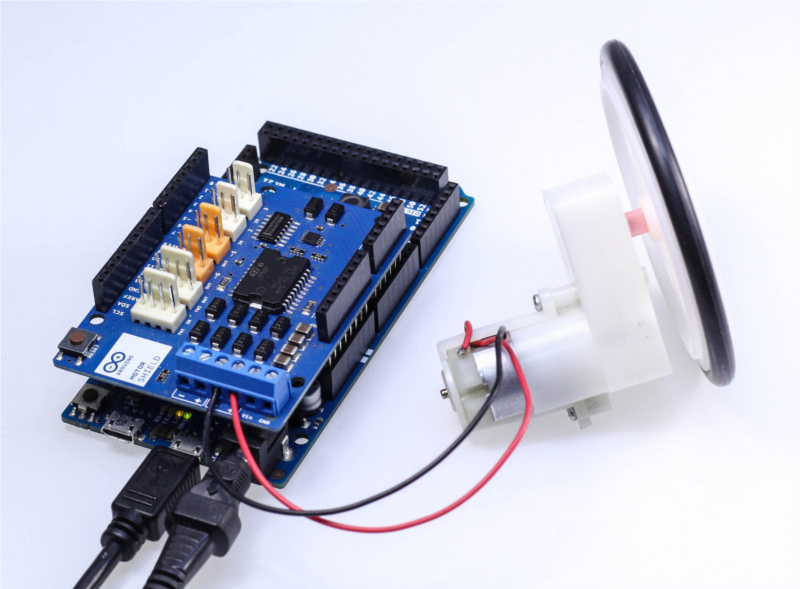
Drive a DC Motor With Arduino DUE


We are proud to show you a tutorial about using an Arduino Motor Shield with the  Arduino Due. This example shows the simplest thing you can do: driving a DC motor forward and backwards.

Read on the [tutorial]

Arduino Blog 31 Oct 18:59

ultrasonic sensor

i just got an ultrasonic sensor with 4 pins of ench pin it has

1.VCC

2.Trig

3.Echo

4.GND ( already know )


what do they mean?

Let's Make Robots 30 Oct 17:49
arduino  avr  

Math machine learning

Whenever I observe my daughter, I find that she likes to collect things. The more, the better. Usually as much as she can carry. As she can not count, how can she distinguish, what are more things and what are less things?

My daughter with objects in both hands

read more

How To: Arduino to Parallax Serial Terminal

Well folks, I finally got around to doing this...

read more

Let's Make Robots 29 Oct 02:16