


Posts with «arduino» label


Charlieplexing
Hi.
Having got the processing/arduino serial sorted, I thought I'd have a go with charliplexing. I downloaded this library, and wrote a bit of code to try it. However, whenever I try to verify a sketch using it (including the demo sketch), I get this error;no matching function to call to 'Charlieplex::Charlieplex(byte [3], int)'. I've tried re-extracting the library, but with no success. Does anyone have any ideas?
If this library is broken, does anyone know of a better one for charlieplexing?
Arduino Motor Shield Help!!!
I just got my first Arduino motor shield. However, all the servo ports have 4 pins. The problem is that my servos only have 3 pins. Any help is greatly appreciated! By the way, my shield is an Arduino Motor shield from Seeed.
FireHero: Raspberry Pi Controlled Pyrotechnics

To put on a live pyrotechnic show at a music festival, [Chris] built the FireHero 3. The result is remotely controlled flames shooting up to 100 feet in the air.
The system is controlled by a Raspberry Pi and an Arduino. A server runs on the Pi and allows a remote computer to control the system. The Pi sends commands over serial to the Arduino, which switches solid state relays that actuate the valves.
There’s also some built in safety features: the system won’t boot unless you have the right key and RFID tag, and there are pressure transducers and temperature sensors to ensure the system is operating safely. A CO2 actuated valve can quickly stop fuel flow in an emergency.
Vaporized propane creates the fireballs. The vapor is created by heating the supply tank in a hot water bath. An accumulation tank stores the vapor and custom built manifolds distribute it to the various flame cannons. At each cannon, a silicon nitride hot surface igniter (HSI) is used to ignite the flames once the valve is opened.
After the break, watch a video the the FireHero making some flames.
Filed under: Raspberry Pi


Arduino Water Thermostat
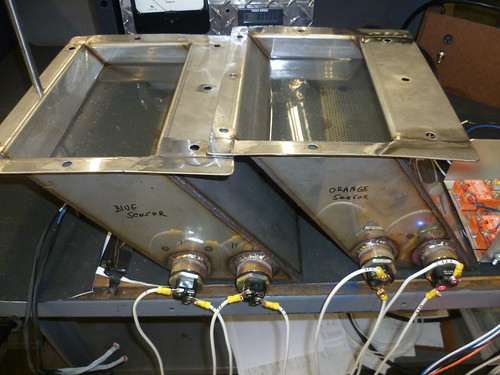
Arduino is not only for hobby projects, there are also good way to use it to semplify your work. This is a good example, submitted by [sspence65].
This is a project I did at work to control two water baths for a process control. Two custom tanks have to be kept at 180F, using DS18b20 temp sensors, an Arduino 2560, 4 SSR’s, and $15 1500 watt electric elements.
On the [website] you can find all about the project, included the code for the Arduino Mega.
Ben Heck's Naughty or Nice Meter knows if you've been bad or good (so be good for Arduino's sake)

Sometimes even Santa Claus needs help. Thankfully, the jolly fat guy's got one of our favorite modders on his side. We visited Ben Heck's Madison, Wisconsin workshop a few weeks ago for an Engadget Show segment and got to watch as the master put together a special holiday-themed project, the Naughty or Nice Meter, a big candy cane-accented box that'll help tired parents "keep the kids in line" this holiday season. The box itself is actually a mostly hollow shell, with an Arduino, TI LaunchPad and a few other select select components in the rear that communicate with a specialized app, letting the parent in question adjust the needle based on their kids' behavior. Nothing like a little manipulative fun in the spirit of the holidays! Check out our segment on Mr. Heckendorn just after the jump and click on through the source link to find out how to make a Naughty or Nice meter or your very own.


Filed under: Misc
Source: Element 14
Atom 1.2 Upgraded with Bluetooth
Primary image

What does it do?
users controlled through Tera Term - Using Bluetooth
Atom 1.0: http://letsmakerobots.com/node/31322
My previous Arduino project had a controller that was connected to Atom and powered by my laptop.
Parts:
Cost to build
$80,00
Finished project
Number
Time to build
15 hours
Type
tracks
URL to more information
Weight
250 grams
RGB LED Christmas Star
Hi LMRtians,
this is my actual christmas project. A star build out of Plexi and an Adafruit RGB LED strip. Controlled by an Arduino controller. It will be used as christmas decoration behind a window of our house. Looks pretty cool at night.
BouncyIrises, a Physical/Digital Interaction Game
 First year ITP student Xuedi ("Zoodie") Chen presented this awesome physical/virtual game installation as part of ITP's Winter Show.
Bluetooth on Smartphones PLUS and Xbee receiver on Robot
Hello,
I have a another Question for all of you guys :D
Q: CAN I Control via Blutooth on SmartPhones using Xbee Reciever on Arduino Robot...,?
OR it is POSSIBLE to Control the Xbee on Robot via Bluetooth on SmartPHONES...,?
If It can be,..., HOW ? and please Help me by Teaching me about it :D
Please Answer Prayer :D