Posts with «arduino» label
Making on Vacation with littleBits
Better Tea Brewing with DIY Robotics
NFC Ring Lock Box

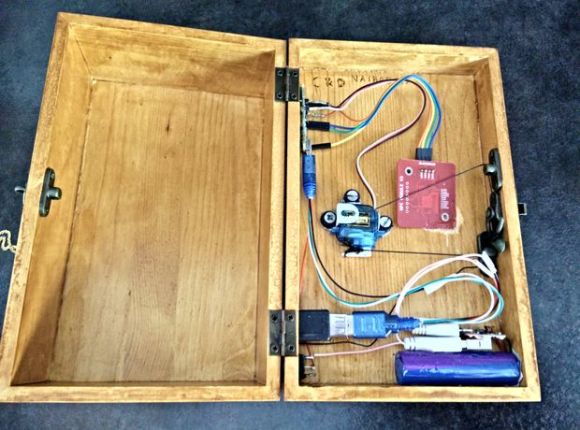
[Nairod785] wanted to build a lock box that would lock from the inside. He started with an inexpensive, plain wooden box. This kept the cost down but would also allow him to easily decorate the box later on using a wood burning tool.
To keep the box locked, he installed a simple latch on the inside. The latch is connected to a servo with string. When the servo rotates in one direction, it pulls the string and releases the latch. When the servo is rotated in the opposite direction, the latch closes and locks the box once again.
If you are going to have a locked box, then you are also going to need a key to open it. [Nairod785] used a ring with a built-in NFC tag, similar to the ring featured back in March. Inside of the box is a PN532 NFC module. The walls of the box were a little too thick for the reader to detect the ring, so [Nairod785] had to scratch the wall thickness down a bit. The NFC module is connected to an Arduino Nano. Communications are handled with I2C.
The NFC ring actually has two different NFC tags in it; one on each side. [Nairod785] had to program both of the tag ID’s into the Arduino to ensure that the ring would work no matter the orientation.
The system is powered by a small rechargeable 5V battery. [Nairod785] wired up a USB plug flush with the box wall so he can easily charge up the battery while the box is locked. It also allows him to reprogram the Arduino if he feels so inclined. There is also a power switch on the side to conserve energy.
Filed under: Arduino Hacks
The Berlin Cyberbeetle with Its Own TV

The evolution of the mere beetle has transformed from organic matter into robotic gears, circuits, and wires. This Cyberbeetle project was born during an open culture hackathon in Berlin throughout a few months time period. The event was called Coding for Vinci and was held from April into July 2014. The project used an Arduino and combined openly licensed biology related pictures and sounds from the museums in the area in a fun and playful way.
[Tomi] based the design on a gorgeous Chalcosoma atlas beetle species which was found in insect box scans that were taken from a nearby museum. The cool thing about this project is that the Cyberbeetle that [Tomi] created has its own hi-tech insect box with various special features. For instance, when the box was rotated on its side, small doors were revealed that when opened unveiled a tiny home theater system with a hi-definition flat screen, audio system and infrared communication. Inside the horn of the Cyberbeetle was an infrared receiver, which allowed the creature to interface with its TV program when it started. Music videos as well excited the robotic insect.
The project was awarded the “Funniest hack” prize during the hackathon. And a video of it can be seen after the break:
Filed under: robots hacks
Virtual touch screen (3D Ultrasonic Radar).
First things: there are no servo motors. No motors or any mechanical moving parts in this project.
There are 4 HC-SR04 ultrasonic sensor units, only one is working as transmitting – pinging module and receiver simultaneously, 3 others are just receivers. Arduino DUE, of course, is a prime violin of the whole project. Small prototype board has an additional 4-channel buffer amplifier (MCP6024).
Technical specification ( approximately ):
- Scanning range 3 m, limited very low power and sensitivity of the HC-SR04 devices.
- Spacial XY resolution depends on a distance, has to be determined. Two object should be position at least 5 cm apart and not on the same spherical surface around sensor board.
- Directivity diagram +-30 degree, or so.
- Spacial Z – (distance) resolution 12 um. No typo error, micrometers.
- Time to complete full scan 16 milliseconds, frame rate may vary from 60 Hz down to 10 Hz if there is strong reverberation.
Have to say, that ultrasonic units were slightly modified, to brought out an analog signal (40 kHz) before it gets quantization in the local uCPU. After amplification, 4-channels are digitized by arduino’s ADC (12-bits 1 MSPS).
Fast Fourier Transform, not much differs from the published on this blog library. I’m not ready to disclose complete signal processing algorithm, and is not publishing a code, at this time. Nevertheless, I don’t mind to answer reasonable /meaningful questions.
Video: have to practice more -);
A few comments on a video clip. I intentionally use a pen to draw a picture, even it’s almost violate the basic of the physics, because reflective area of the pen practically equals to wave length, 8.5 mm for 40 kHz in the air. You can see, that arduino is loosing track on a few occasions. Distance ~ 1m.
Computer is running Linux with regular “mtPaint 3.40″ from official source. Software is receiving a mouse commands, as its has no idea where this commands come from. In the same way, if you draw a picture manually. To interface with a host, arduino emulates a left button and XY move mouse commands using “build-in” mouse driver, and I copy ButtonMouseControl example from IDE.
The surface of the touch screen is “virtual”, first things arduino does after I send a command over serial monitor console to start a drawing, is “search – scan” an object. Whatever it finds first, the closest one, would be “locked” and distance to this object is interpreted as “touched – untouched”. This is first try, and I was not pushing hard on the gesture pattern recognition yet. But as you can guess, there is no limits to “slide” “rotate” “scroll” etc movement discrimination, with only one exception. There is no “multi-touch”, as I mentioned in the specification section, two object has to be 5 cm apart. This limitation is introduced by two shortcomings of the current hardware design. First one, because there is no phase array, only one unit is transmitting ( in the middle on right side ), so there is no way arduino could identify two objects on the same sphere. Second, is low sampling rate of the ADC. In order to “shrink” XY spatial resolution down to wave length (8.5 mm), sampling rate has to be at least 6 MSPS or so.
Tracking update rate (scan frame rate – don’t confuse with a video) is set to 32 fps.
Photo:
eddited: 14 Aug. 2014 “New technology is rising!”
Second video clip is posted, that demonstrates better tracking stability over bigger distance range.
Distance is 1.2 m, same pen. I think, that all for Virtual Touch Screen demonstration. Any improvements I could make in a code ‘d introduced only small changes in overall representativity of the project.
This HID technology is completely new area for me, and I’m not a professional programmer. Be curious, I look into “regular” touch screen (resistive – capacitive) library free accessible on the i-net. I find over 100 variables that initialized and updated in order to keep track on a bunch of real-time parameters, that “normal” TS supplies with 10 ms time interval. Another 100′s variables are buried inside proprietary driver in the OS. It would takes a years to run a test and debug effects each of this variables on stability, smoothness, susceptibility etc. And moreover, my invention Virtual TS – 3D would require a lot more than a 100′s….
edited: 26 Aug. 2014 Answering the question, modification to HC-SR04 module.
There is an electrical drawings, I was able to locate on-line:
http://uglyduck.ath.cx/HC-SR04E/HC-SR04E.svgz
As you can see, analog 40 kHz output is taken from pin 7, LM324. Conveniently, it’s the rightest one, close to the board edge. Module – transmitter has a jumper wire over B-E of the transistor, others 3 units may not have this wire. I find out, that unit doesn’t transmit anything till it gets a response, that may never happened for echo reflected from tiny object like a pen. It looks like on-board uCPU is waiting a transition in poling mode. And additional amplification stage I build with MCP6024, is similar to first stage of the LM324 (U2D), with a gain x50. In my first try, I connect output of LM324 directly to arduino DUE analog inputs, basically its not realy safe, as voltage goes close to 3.6-3.7 V. But than introducing MCP6024 (rail-to-rail) I decrease power voltage of the OPA down to 3.3V, not to worry about my DUE.
Virtual touch screen (3D Ultrasonic Radar).
First things: there are no servo motors. No motors or any mechanical moving parts in this project.
There are 4 HC-SR04 ultrasonic sensor units, only one is working as transmitting – pinging module and receiver simultaneously, 3 others are just receivers. Arduino DUE, of course, is a prime violin of the whole project. Small prototype board has an additional 4-channel buffer amplifier (MCP6024).
Technical specification ( approximately ):
- Scanning range 3 m, limited very low power and sensitivity of the HC-SR04 devices.
- Spacial XY resolution depends on a distance, has to be determined. Two object should be position at least 5 cm apart and not on the same spherical surface around sensor board.
- Directivity diagram +-30 degree, or so.
- Spacial Z – (distance) resolution 12 um. No typo error, micrometers.
- Time to complete full scan 16 milliseconds, frame rate may vary from 60 Hz down to 10 Hz if there is strong reverberation.
Have to say, that ultrasonic units were slightly modified, to brought out an analog signal (40 kHz) before it gets quantization in the local uCPU. After amplification, 4-channels are digitized by arduino’s ADC (12-bits 1 MSPS).
Fast Fourier Transform, not much differs from the published on this blog library. I’m not ready to disclose complete signal processing algorithm, and is not publishing a code, at this time. Nevertheless, I don’t mind to answer reasonable /meaningful questions.
Video: have to practice more -);
A few comments on a video clip. I intentionally use a pen to draw a picture, even it’s almost violate the basic of the physics, because reflective area of the pen practically equals to wave length, 8.5 mm for 40 kHz in the air. You can see, that arduino is loosing track on a few occasions. Distance ~ 1m.
Computer is running Linux with regular “mtPaint 3.40″ from official source. Software is receiving a mouse commands, as its has no idea where this commands come from. In the same way, if you draw a picture manually. To interface with a host, arduino emulates a left button and XY move mouse commands using “build-in” mouse driver, and I copy ButtonMouseControl example from IDE.
The surface of the touch screen is “virtual”, first things arduino does after I send a command over serial monitor console to start a drawing, is “search – scan” an object. Whatever it finds first, the closest one, would be “locked” and distance to this object is interpreted as “touched – non touched”. This is first try, and I was not pushing hard on the gesture pattern recognition yet. But as you can guess, there is no limits to “slide” “rotate” “scroll” etc movement discrimination, with only one exception. There is no “multi-touch”, as I mentioned in the specification section, two object has to be 5 cm apart. This limitation is introduced by two shortcomings of the current hardware design. First one, because there is no phase array, only one unit is transmitting ( in the middle on right side ), so there is no way arduino could identify two objects on the same sphere. Second, is low sampling rate of the ADC. In order to “shrink” XY spatial resolution down to wave length (8.5 mm), sampling rate has to be at least 6 MSPS or so.
Tracking update rate (scan frame rate – don’t confuse with a video) is set to 32 fps.
Photo:
eddited: 14 Aug. 2014 “New technology is rising!”
Second video clip is posted, that demonstrates better tracking stability over bigger distance range.
Arduino Gives Your Toilet Options

With the severe drought going on in California with no end in sight, [TVMiller] decided he could put an Arduino and a toilet together to try and save at least a few gallons of water per day. The invention fills a toilet to the minimum level, saving around two gallons per day for the average “user”.
A typical toilet functions by using gravity and moving water to create a vacuum, sucking the waste down and out of the toilet. As long as there is nothing, uh, solid in the bowl, the toilet will be able to function on the reduced amount of water. The Arduino cuts the flow of water off before the toilet fills up the entire way.
In the event that anyone -ahem- needs the toilet’s full capacity, there is a button connected to the Arduino that fills the reservoir to capacity. [TVMiller] notes that if 1,825 hackers installed this device on their toilets, we could save a million gallons of water per year and be well on our way to saving the planet.
The project site is full of more information and puns for your viewing pleasure. We might suggest that the “2” button would be very easy to integrate with the toilet terror level indicator as well.
Filed under: home hacks
Mobile Solar Power Plant
Doomsday preppers, hoarders, take note… Electrical power can go down at any time due to natural disasters, overwhelmed power stations and, of course, various apocalypses. Still, in those times, some of the more thrifty individuals turn to gas powered generators to keep their frozen burritos cool and their favorite shows […]Here's how you make your own 3D-printed virtual reality goggles
So you couldn't get your hands on a nice virtual reality headset like the Oculus Rift, but you'd still like something a little fancier than a cardboard display. Are you out of luck? Not if Noe Ruiz has anything to say about it. He has posted instructions at Adafruit for do-it-yourself 3D-printed goggles that can be used for either VR or as a simple wearable screen. The design mates an Arduino Micro mini computer with a display, a motion sensor and lenses; the 3D printing both adds a level of polish and lets you tailor the fit to your cranium. This definitely isn't the cheapest project (about $231 in parts) or the easiest, but it will give you head-tracking VR without having to wait for Oculus, Samsung or Sony to put out finished devices of their own. If you're up to the challenge, you'll find everything you need at the source link.
[Image credit: Noe Ruiz]
Filed under: Displays, Wearables
Source: Adafruit