Control your Halloween Props with Arduino

Jason from Make Magazine published a video tutorial on how to create an amazing choreography hacking your Halloween props using Arduino Uno:


Jason from Make Magazine published a video tutorial on how to create an amazing choreography hacking your Halloween props using Arduino Uno:
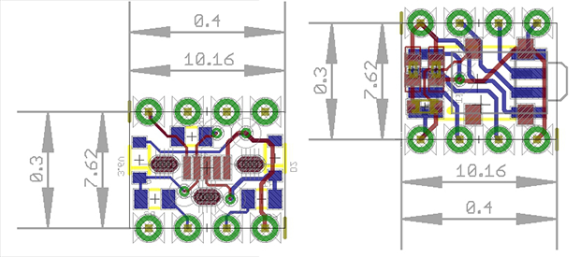
A few days ago we saw what would have been a killer Kickstarter a few years ago. It was the smallest conceivable ATtiny85 microcontroller board, with resistors, diodes, a USB connector, and eight pins for plugging into a breadboard. It’s a shame this design wasn’t around for the great Arduino Minification of Kickstarter in late 2011; it would have easily netted a few hundred thousand dollars, a TED talk, and a TechCrunch biopic.
[AtomSoftTech] has thrown his gauntlet down and created an even smaller ‘tiny85 board. it measures 0.4in by 0.3in, including the passives, reset switch, and USB connector. To put that in perspective, the PDIP package of the ‘tiny85 measures 0.4 x 0.4. How is [Atom] getting away with this? Cheating, splitting the circuit onto two stacked boards, or knowing the right components, depending on how you look at it.
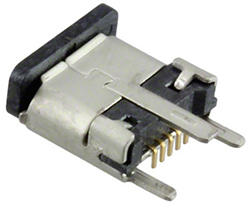 [Atom] is using a few interesting components in this build. The USB connector is a surface mount vertical part, making the USB cord stick out the top of this uC board. The reset button is extremely small as well, sticking out of the interior layer of the PCB sandwich.
[AtomSoft] has the project up on OSH Park ($1.55 for three. How cool is that?), and we assume he’ll be selling the official World’s Smallest Arduino-compatible board at Tindie in time.


 The all in one automatic aquarium feeder uses an Arduino Nano and drill bit feed fish at certain time intervals.
It doesn’t clean the tank or trim the plants but is immensely effective for feeding fish.
The all in one automatic aquarium feeder uses an Arduino Nano and drill bit feed fish at certain time intervals.
It doesn’t clean the tank or trim the plants but is immensely effective for feeding fish. 
 Rana, which is Italian for “frog,” is really an interesting six-legged robot design. The locomotion, which according to their writeup, has never been used before and combines the walking methods of an ant and a frog. This kind of locomotion, as opposed to three-servo based ‘bots that simply rock back […]
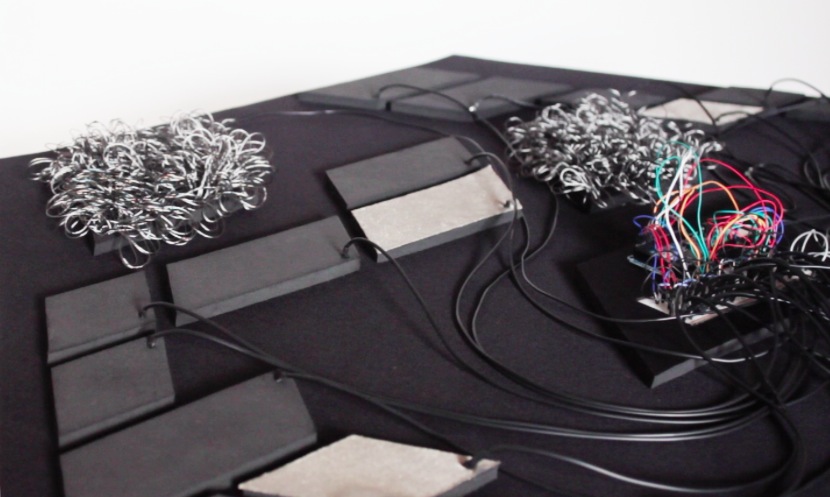
Some of you may have noticed that words like rhythm, texture, pattern, can be used both to describe fabrics, as well as sound. Focused on building an interface as a whole, using mostly textiles, OCHO TONOS invites the user to interact through touch, and experience sound in a multi-sensorial way. Ocho Tonos is an interactive installation by EJTech duo (Esteban de la Torre and Judit Eszter Kárpáti) I met last July during etextile summer camp while they were working on this experimental textile interface for tactile/sonic interaction by means of tangibles:
Exploring the relation between sound and textile and experimenting with the boundaries of our senses whilst changing the way we perceive fabric, surfaces and their manifestation as sound. Recontextualizing our tactile interaction with textile acting as an interface, where each element triggers, affects and modifies the generated sound’s properties. Creating a soundscape through sensor technology enticing audiophiles to interact and explore with reactive textile elements.The nexus of the body, the senses and technology.
OCHO TONOS is a symbiosis of the unique hand-crafted traditional textile techniques and the immaterial digital media.
Thanks to Arduino Mega ADK , all inputs coming from the touch of the user on the soft sensors are translated into a digital platform, parsed and filtered through MaxMSP, in order to control the generation of a soundscape in Ableton Live.
Ocho Tonos was chopped, spiced and cooked at Kitchen Budapest. Sounds used are samples from the working machinery at TextielLab.

You youngins probably don’t remember this, but a few years ago there was an arms race on Kickstarter to create the smallest Arduino-compatible microcontroller board. Since then, a few people have realized they can make more money on Kickstarter through fraud or potato salad, and the race to create the smallest ‘duino board petered out.
It’s a shame [Meizhu] wasn’t part of the great miniature Arduinofication of Kickstarter, because this project would have won. It’s an Atmel ATtiny85, with USB port, resistors, diodes, reset button, LED, and pin headers, that is just 72 mils larger than the PDIP package of the ‘tiny85. Outside of getting a bare die of ‘tiny85s, there isn’t much of a chance of this board becoming any smaller.
[Meizhu] was inspired to create this board from [Tim]‘s Nanite 85, which up until a few days ago was the current champion of micro microcontroller boards. With a bit of work in KiCAD, the new board layout was created that is just a hair larger than the 0.4″ x 0.4″ footprint of the PDIP ATtiny85. There were a few challenges in getting a working board this small; you’d be surprised how large the plastic bits around pin headers are, but with some very crafty soldering, [Meizhu] was able to get it to work.


If you’ve ever wanted to build a Tesla coil but found them to be prohibitively expensive and/or complicated, look no further! [Richard] has built a solid-state Tesla coil that has a minimum of parts and is relatively easy to build as well.
This Tesla coil is built around an air-core transformer that steps a low DC voltage up to a very high AC voltage. The core can be hand-wound or purchased as a unit. The drive circuit is where this Tesla coil built is set apart from the others. A Tesla coil generally makes use of a spark gap, but [Richard] is using the Power Pulse Modulator PWM-OCXi v2 which does the switching with transistors instead. The Tesla coil will function with one drive circuit but [Richard] notes that it is more stable with two.
The build doesn’t stop with the solid-state circuitry, though. [Richard] used an Arduino with software normally used to drive a speaker to get his Tesla coil to play music. Be sure to check out the video after the break. If you’re looking for a Tesla coil that is more Halloween-appropriate, you can take a look at this Tesla coil that shocks pumpkins!


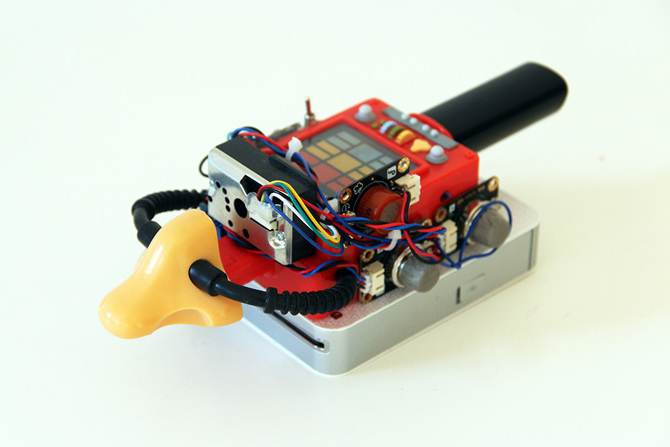
After Anywhere, Turbo-gusli and Solaris, Dmitry Morozov shared with us Digioxide, a new interactive work using Arduino Nano, hc-06 bluetooth module, gas and dust sensors, LG mobile printer :
This project aims to raise public awareness of the environmental pollution by artistic means.
Digioxide is a portable wireless device equipped with sensors of air pollution gases and dust particles that is connected to computer via bluetooth. This allows a person with digioxide to freely move around a city, seek out ecologically problematic places and turn their data into digital artworks.The information about the concentration of dust and harmful gases, such as CO, CO2, HCHO, CH4 and C3H8 and spme others is algorithmically transformed into generative graphics, forming an abstract image. The device’s mobile printer allows instant printing of this air “snapshot” that can be left as an evidence on the place, or given as a present to a passerby.
 I worked out a system that lets you control all your animated Halloween props with a single microcontroller.
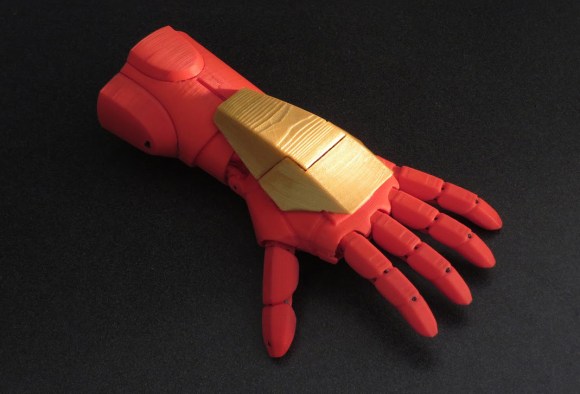
It’s exciting how much 3D printing has enabled us to produce pretty much any shape for any purpose on the fly. Among the most thoughtful uses for the technology that we’ve seen are the many functioning and often beautiful prosthetics that not only succeed in restoring the use of a limb, but also deliver an air of style and self-expression to the wearer. The immediate nature of the technology allows for models to be designed and produced rapidly at a low-cost, which works excellently for growing children. [Pat Starace’s] Iron Man inspired 3D printed hand and forearm are a perfect example of such personality and expert engineering… with an added dash of hacker flair.
With over twenty years of experience in animatronics behind him, [Starace] expertly concealed all of the mechanical ligaments within the design of his arm, producing a streamline limb with all the nuance of lifelike gesture. It was important that the piece not only work, but give the wearer that appropriate super hero-like feeling while wearing it. He achieves this with all the bells and whistles hidden within the negative space of the forearm, which give the wearer an armory of tricks up their sleeve. Concealed in the plating, [Starace] uses an Arduino and accelerometer to animate different sets of LEDs as triggered by the hand’s position coupled with specific voice commands. Depending on what angle the wrist is bent at, the fingers will either curl into a fist and reveal hidden ‘lasers’ on the back of the hand, or spread open around a pulsing circle of light on the palm when thrust outward.
The project took [Starace] quite a bit of time to print all the individual parts; around two days worth of time. This however is still considered quick in comparison to the custom outfitting and production of traditional prosthetics… not to mention, the traditional stuff wouldn’t have LEDs. This piece has a noble cause, and is an exciting example of how 3D printing is adding a level of heroism to everyday life.
Thank you Julius for pointing out this awesome project to us!

