Posts with «arduino» label

The Simplest Quadrupedal Robot Ever

Wheeled and tracked robots are easy mode, and thanks to some helpful online tutorials for inverse kinematics, building quadruped, hexapod, and octopod robots is getting easier and easier. [deshipu] came up with what is probably the simplest quadruped robot ever. It’s designed to be a walking robot that’s as cheap and as simple to build as possible.

The biggest problem with walking robots is simply the frame. Where a wheeled robot is basically a model car, a walking robot needs legs, joints, and a sturdy frame to attach everything to. While there are laser cut hexapod frames out there, [deshipu]’s Tote robot uses servos for most of the skeleton. The servos are connected to each other by servo horns and screws.

The electronics are based on an Arduino Pro Mini, with a PCB for turning the Arduino’s pins into servo headers. Other than that, a 1000uF cap keeps brownouts from happening, and a 1S LiPo cell provides the power.

Electronics are easy, and the inverse kinematics and walking algorithms aren’t. For that, [deshipu] has a few tutorials for these topics. It’s a very complete guide to building a quadruped robot, but it’s still a work in progress. That’s okay, because [deshipu] says it will probably remain a work in progress until every kid on Earth builds one.


Filed under: robots hacks
Hack a Day 07 May 15:00

School Kids Build Ontario Power Generation System Model

The STEAMLabs community makerspace teamed up with a grade 6 class from Vocal Music Academy, a public elementary school in downtown Toronto, to create a working model of the Ontario Power System. It pulls XML files and displays the live power generation mix from renewable and other sources on a 3D printed display on RGB LED strips. Arduino coding on a Spark Core provides the brains.

The kids learned HTML, CSS and Javascript to build a web interface to send commands to the Spark and explain how the system works. Their project was accepted as an exhibition at the TIFF DigiPlaySpace. The kids presented their project to adults and other kids at the event. STEAMLabs has also published a free, open source Internet of Things teaching kit to enable other educators to make projects with Internet brains.

STEAMLabs is currently crowd-funding a new makerspace in Toronto. They’re almost there, a few hundred dollars short of their target, with a couple of days to go. Help them help kids and adults make amazing things! When Hackaday visited Toronto recently, [Andy Brown] dropped in to show off this project. Projects like these which let kids become creators of technology, rather than mere consumers, is one of the best ways to get them hooked to hacking from an early age.


Filed under: misc hacks

Arduino IDE 1.6.4 released and available for download

Following our previous announcement, we are happy to inform you that Arduino IDE 1.6.4 is now available for download.

Here is a brief list of important changes:

  • Added support to the new Arduino Gemma
  • Tools submenu shows selected subentry. Thanks Paul Stoffregen
  • We added a command line interface to Boards and Libraries Managers: see –install-boards and –install-library actions in the documentation
  • We restored line highlighting when the sketch contains an error. This was actually a regression, something that stopped working since 1.5.7
  • Fixed an error that left the Tools > Port menu greyed out

And the most important feature: you can add additional, non official, boards to the Boards Manager by just adding a url in the preferences.
Click on File menu, then click Preferences. At the bottom of the page, you’ll find this new text field:

Fill the text field with the urls provided by your board manufacturer, separating each with a comma. Here you can find some example URLs.

There also are many other fixes and improvements. The complete list of fixes and credits is available here.

We are also happy to see the list of available libraries growing day after day: today we reached 190.

Experience a creative internship with a BLE board game

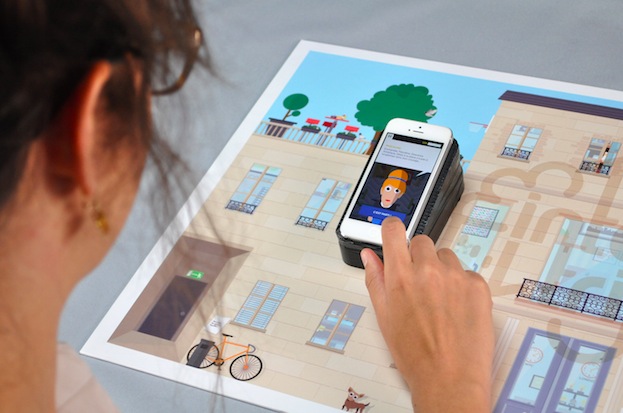
InternTrip is a board game prototyped by 2nd year Masters students at the École de Communication Visuelle Aquitaine (France) and running on Arduino at Heart Blend Micro.

Once again designers Guillaume Beinat and Alexandre Suné of Tazas Project directed a dozen students* into creating an  immersive game focusing on the experience of internship in a communication agency:

 The system they use relies on the use of an Arduino bluetooth card which calculates the player’s position on the board and simultaneously transmits this information to the smartphone. The coordinates received allow the player to discover the inside of the agency by moving their smartphone over the outer wall of the building, or in other words, the board. From table football to the terrasse, passing by the coffee machine or the photocopier, they invite us to visit the agency, to talk with the team and to compete with our colleagues in head to head questionnaires about the world of advertising. This is your time,  young,  exploited interns, to take your revenge and land that job!

* Manon Fauvel, Anna Borup, Benjamin Armel, Charlotte du Portal, Émilien Badoc, Guilhem Pacha, Isabelle Ducournau, Nicolas Pierre, Sandy Kauy, Sophie Cazes, Arnaud Bresson

A Tool For Spying On Serial Data

[Piotr] was working on a recent Arduino project when he ran into a problem. He was having trouble getting his Arduino Pro Mini to communicate with an ESP8266 module. He needed a way to snoop on the back and forth serial communications. Since he didn’t have a specialized tool for this task, [Piotr] ended up building his own.

The setup is pretty simple. You start with a standard serial cable containing the TX, RX, DTR, and GND wires. This cable connects the Arduino to the ESP8266 WiFi module. The TX and RX lines are then tapped into. Each wire is routed to the RX pin of two different serial to USB adapters. This way, the data being sent from the Arduino shows up on one COM port and the data being transmitted from the module shows up on the other.

The next piece of the puzzle was coming up with a way to see the data more clearly. [Piotr] could have opened two serial terminals simultaneously, but this wasn’t ideal because it would be difficult to compare the timing of the data. Instead, [Piotr] spent less than an hour writing his own simple serial terminal. This one connects to two COM ports at the same time and prints the data on the same screen. The data from each COM port is displayed in a separate color to make it easy to differentiate. The schematic and source code to this project can be found on [Piotr’s] website.


Filed under: Arduino Hacks, Microcontrollers

Pinball Simulator Makes The Neighbors Happy

There are a lot of simulators out there if you want to try something out that would be otherwise impossible. Great examples are flight simulators for simulating the piloting of a fighter jet, or goat simulators for simulating the life of a goat who destroys a town. [Erland] wanted a pinball machine, but like planes and goats, found it was impractical to get a real one because it would probably upset his neighbors in his apartment. Instead, he set out to build a pinball simulator.

The cabinet is miniature-sized compared to a regular pinball machine so it can more easily fit in the apartment. It utilizes three monitors, a 24″ one in portrait mode for the main playing area, a 20″ one for the back screen, and a smaller one for the “dot matrix” style scoreboard. Once the woodwork was completed, a PC was put together to control everything and an Arduino was installed to handle the buttons and output USB commands to the PC.

Of course, we’ve featured many other pinball simulators before, but this one is no slouch when it comes to features either. It is very well crafted and the project is very well documented, and the miniature size sets it apart as well. However, if you want to go a step further with your pinball simulator, you might want to check out this augmented reality pinball system.


Filed under: toy hacks

Knock knock! Who’s near your door? Learn how to sense it

Smart Doorbell is the name of the project for a new tutorial created for Intel Edison. It’s a motion detecting doorbell, that senses when someone is near the door(bell) and via a webcam sends a picture of the person approaching the door to a web address while playing a sound.

Motion detecting video streaming doorbell“, a medium-advanced level tutorial, is intended to be a good starting point for building basic IoT devices. You’ll learn how to use a webcam to detect motion: when activated, the device will play a greeting, take a photo and email it to someone to let them know who is at the door.
Take a look at the video to see how it works and follow these steps to make yours:

Making Servos Spin Right Round Without Stopping

[Brian B] found a handful of servos at his local hackerspace, and like any good hacker worth his weight in 1N4001’s, he decided to improve upon their design. Most servos are configured to spin only so far – usually 180 degrees in either direction. [Brian B’s] hack makes them spin 360 degrees in continuous rotation.

He starts off by removing the top most gear and making a small modification with a razor. Then he adds a little super glue to the potentiometer, and puts the thing back together again. A few lines of code and an arduino confirms that the hack performs flawlessly.

We’ve seen ways to modify other types of servos for 360 rotation. There’s a lot of servos out there, and every little bit of information helps. Be sure to check your parts bin for any Tower Pro SG90 9g servos and bookmark this article. It might come in handy on a rainy day.


Filed under: Arduino Hacks
Hack a Day 04 May 09:01

Control the 'GTA V' cellphone with an iPhone, Arduino and a hack

Grand Theft Auto V has a few mobile apps of its own, but one enterprising modder has taken the idea to its natural conclusion: an application that lets you control the in-game cellphone with an iPhone. With the application you can scroll through text messages on-screen, peep your current list of objectives and, among other things, even control the in-game phone's camera. The YouTube video's description (spotted by former Joystiq'r Dave Hinkle) does't offer much by way of details other than it's running on an Arduino Leonardo with an Ethernet shield connected to a PC, sadly.

Via: Dave Hinkle (Twitter)

Source: DIY Projects Planetleak (YouTube)

Control the 'GTA V' cellphone with an iPhone, Arduino and a hack

Grand Theft Auto V has a few mobile apps of its own, but one enterprising modder has taken the idea to its natural conclusion: an application that lets you control the in-game cellphone with an iPhone. With the application you can scroll through text messages on-screen, peep your current list of objectives and, among other things, even control the in-game phone's camera. The YouTube video's description (spotted by former Joystiq'r Dave Hinkle) does't offer much by way of details other than it's running on an Arduino Leonardo with an Ethernet shield connected to a PC, sadly.

Filed under: Cellphones, Gaming, Home Entertainment, HD, Mobile

Comments

Via: Dave Hinkle (Twitter)

Source: DIY Projects Planetleak (YouTube)