


Posts with «arduino» label

The Internet of Linux Things
The Linux Foundation is a non-profit organization that sponsors the work of Linus Torvalds. Supporting companies include HP, IBM, Intel, and a host of other large corporations. The foundation hosts several Linux-related projects. This month they announced Zephyr, an RTOS aimed at the Internet of Things.
The project stresses modularity, security, and the smallest possible footprint. Initial support includes:
- Arduino 101
- Arduino Due
- Intel Galileo Gen 2
- NXP FRDM-K64F Freedom
The project (hosted on its own Website) has downloads for the kernel and documentation. Unlike a “normal” Linux kernel, Zephyr builds the kernel with your code to create a monolithic image that runs in a single shared address space. The build system allows you to select what features you want and exclude those you don’t. You can also customize resource utilization of what you do include, and you define resources at compile time.
By default, there is minimal run-time error checking to keep the executable lean. However, there is an optional error-checking infrastructure you can include for debugging.
The API contains the things you expect from an RTOS like fibers (lightweight non-preemptive threads), tasks (preemptively scheduled), semaphores, mutexes, and plenty of messaging primitives. Also, there are common I/O calls for PWM, UARTs, general I/O, and more. The API is consistent across all platforms.
You can find out more about Zephyr in the video below. We’ve seen RTOS systems before, of course. There’s even some for robots. However, having a Linux-heritage RTOS that can target small boards like an Arduino Due and a Freedom board could be a real game changer for sophisticated projects that need an RTOS.
Filed under: Arduino Hacks, ARM, linux hacks, news


This Machine Prints Portraits with 8,000 Drops of Coffee
 This x-y plotter uses coffee drips — each carefully calibrated for size and height — to create these portraits.
The post This Machine Prints Portraits with 8,000 Drops of Coffee appeared first on Make: DIY Projects and Ideas for Makers.
A Slew of Open-Source Synthesizers
Hackaday reader [Jan Ostman] has been making microcontroller-based DIY synthesizers for quite a while now. Recently, he’s opened up the source for a lot of them so that you can play along at home. All of these virtual-analog synths and soundmakers can be realized on an Arduino or AVR ATmega328 if you happen to have one lying around.
Extra parts like a keyboard, some pushbuttons, or some potentiometer knobs to twiddle won’t hurt if you’d like to make something more permanent or more obviously playable, like [Jan] does. On the other hand, if you’d just like to get your feet wet, I’ve tweaked his code to be more immediately plug-and-play. The code is straightforward enough that it’s a good learning platform. So let’s take a quick tour through three drum machines and a string synth, each of which you can build on a breadboard in just a few minutes.
To install on an Arduino UNO, fetch the zip file from this GitHub repository, and move each subfolder to your Arduino sketch directory. You’re ready to play along.
Simple Drum Machines
[Jan] has two sample-playback~based drum machines that he’s published the code for: the dsp-D8 with straight-ahead drum samples and the dsp-L8 loaded with Latin percussion. They’re essentially the same code base, but with different samples, so we’ll treat them together.
Working through [Jan]’s code inspired me to write up a longer article on DDS playback, so if you want to brush up on the fundamentals, you can head over there. The short version is that you can change the pitch of playback of a sample by using a counter that’s much larger than the number of data points you’re going to play.
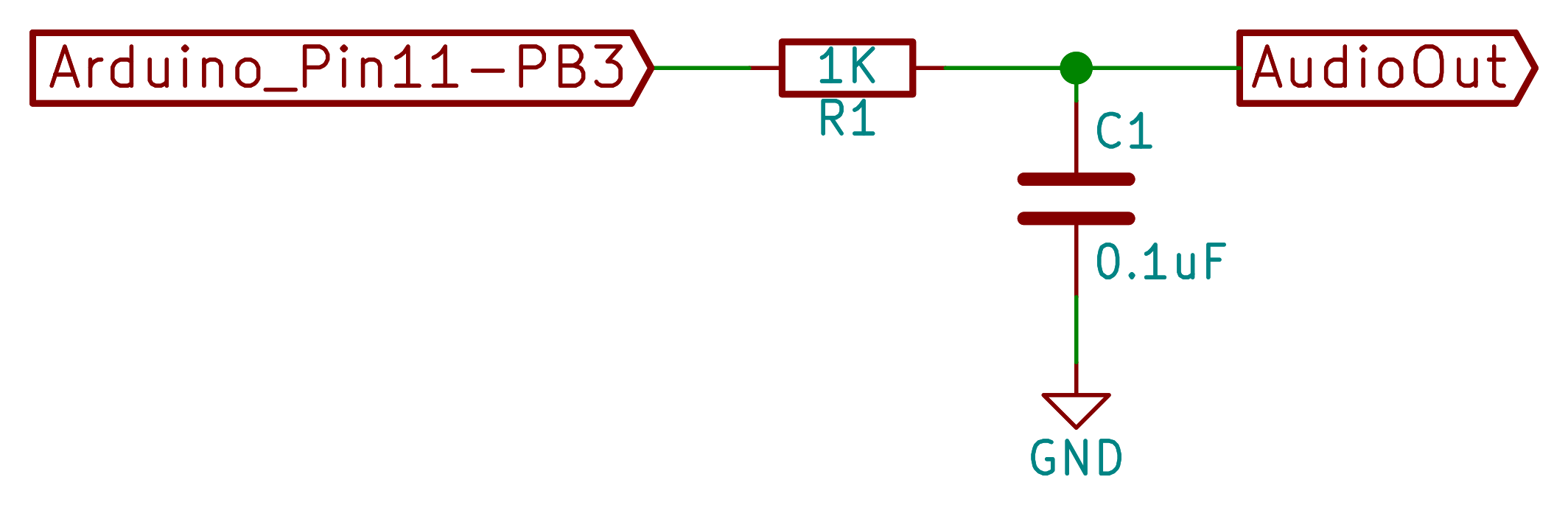 [Jan]’s drum machines all use the AVR’s hardware pulse-width modulation (PWM) peripherals to play the samples back out. You could use something fancier, but this gets the job done with just an optional resistor and capacitor filter on the output, bringing the total parts count to three: Arduino, 1 KOhm resistor, and a decent-sized (0.1 uF?) capacitor. An interrupt service routine (ISR) periodically loads a new sample value into the PWM register, and the AVR’s peripheral hardware takes care of the rest.
One nice touch is the use of a circular buffer that holds the playback sample values until the ISR is ready for them. In the case of the drum machines, there’s not much math for the CPU to do — it just combines the samples from all of the different simultaneous voices — but in his more complicated modules this buffer allows the CPU to occasionally take more time to calculate a sample value than it would otherwise have between updates. It buys [Jan]’s code some breathing room and still allows it to make the sample-playback schedule without glitching.
 [Jan] adds individual pitch control for each sample, which is great for live playing or tweaking, and you can watch him use them in his two videos: one for the dsp-D8 and another for the dsp-L8. Wiring up so many knobs is a breadboard-salad, though, so I’ve gone through the code for you with a fine-toothed chainsaw, and hacked off [Jan]’s button-and-knob interface and replaced it with the Arduino’s built-in serial I/O.
To play my version of [Jan]’s drum machines, each sample is mapped to a key in the home row: “asdfjkl;”. If you’ve got a proper serial terminal program that transmits each keystroke in real-time, you’ll be tapping out rhythms at 9600 baud in no time. Note that the Arduino IDE’s built-in terminal only sends the keystroke after you hit “enter” — this makes playing in tempo very difficult. (I use screen /dev/ttyACM0 9600 or the terminal that’s built-in with Python’s pyserial library myself. What do Windows folks use for a real-time terminal?)
If you haven’t already, download this zip file, move each sub-folder to your Arduino sketch directory, and connect an amplified speaker either directly to your Arduino’s pin 11 and ground, or include an RC filter. It’ll only take a second before you’re playing. When you want the full version with all the knobs, head on over to [Jan]’s site.
O2 Minipops
[Jan]’s O2 Minipops machine mimics an old-school rhythm box: the Korg mini pops 7. Whether this primitive drum machine is horribly cheesy or divinely kitschy is in the ear of the beholder, but it’s a classic that has been used all over. [Jan]’s named his after an epic album Oxygene by Jean-Michel Jarre. You’ll hear them starting around 1:40 into the clip. Jarre famously used to press multiple buttons on the Minipops, making more complex drum patterns by playing more than one at a time.
The nice thing about having your own Minipops in  firmware is that you can add the features you want to it. Instead of having to mash down multiple plastic buttons live on stage like poor Mr. Jarre, you can just tweak the firmware to suit. Need longer patterns? You’ve got the RAM. Emphasis? Swing? Tap tempo? It’s all just a matter of a few lines of code.
The sound playback code is just like the simpler drum machines above, so we won’t have to cover that again. The only real addition is the sequencer, but that’s where the real magic lies. After all, what’s a drum machine without some beats? Because there are eight possible drum sounds, each beat is a byte and so four bars of 4/4 time is just sixteen bytes stored in memory. I broke the data out into its own header file O2_data.h, so have a look there for the pre-programmed rhythms, and feel free to modify them to suit your own needs.
In order to make the O2 Minipops immediately playable, I stripped out the potentiometer code again (sorry [Jan]!) and passed off control over the serial port. The “user interface” has five controls. Press j and k to switch between patterns and f and d to speed up or slow down. (They’re under your first two fingers in the home row.) The space bar starts and stops the drum machine.
Try switching between the patterns on the fly with j and k — it’s a surprisingly fun way to create your own, slightly less cheesy, patterns. You need to download this code and give it a try. Trust me.
The Solina
[Jan] has also built up a full-fledged string synthesizer keyboard out of just an Arduino Nano. It’s patterned on the Eminent Solina String Ensemble, and we’ve got to say that it gets the sound spot on.

[Jan]’s Solina is a “virtual analog” in the sense that it builds up sawtooth waveforms in the microcontroller’s RAM and then outputs the corresponding voltage through PWM. And that’s a good start for a string synthesizer, because a filtered sawtooth waveform is a good first stab at the sound put out by a violin, for example.

The secret to the sound of the string section of an orchestra (and to string synthesizers that mimic it) is that it’s a combination of many different bowed instruments all playing at once. No matter how precise the players, they’re each slightly differently tuned, and none of the strings are resonating exactly in phase. The Solina mimics this by detuning each oscillator, naturally, and by moving them in and out of phase with each other. If you want to dig into the details of how exactly [Jan]’s Solina works, he explains it well in this blog post.
Again, I’ve converted it for direct-serial control, and you can control the envelope, detune, LFO speed, and modulation depth over the serial port. Press the spacebar once to simulate a keypress, and again to let go. Try the Solina with detune and pitch modulation around twenty, and play with the LFO rate and other parameters. That’s a lot of useful noise for just some sawtooth waves.
Keyboards and What’s Next
 [Jan]’s builds are much more than what we’re demonstrating here, of course. His blog kicks off (in 2009!) with a project that essentially shoe-horns a PC into a keyboard enclosure, and the Solina and others get their own keys too. We’ve just presented the kernel of any such project — there’s a lot of labor-of-love left in wiring up all of the diodes necessary to do detection on a keyboard matrix, to say nothing of building enclosures, wiring up potentiometers, and making nice-looking front panels. But if you want to start down that path, you’ve at least got a good start.
[Jan]’s current project is the Minimo miniature monophonic synth that takes the Solina a step further and adds a lowpass filter with (digital) resonance to it. The resulting sounds are great, so we’re excited to see where [Jan] takes this one in the future.
Thanks again, [Jan], for opening the code up. And if any of you build something with this, be sure to post in the comments and let us all know. Since I started playing around with these, I’ve got the hankering to modularize the code up a bit and make it into something that’s even easier to adapt and modify. Maybe we’ll have to start up a Hackaday.io project — these little simple synths are just too much fun!
Filed under: Arduino Hacks, Hackaday Columns, musical hacks


Monitoring Solitary Bees Using Open Technology
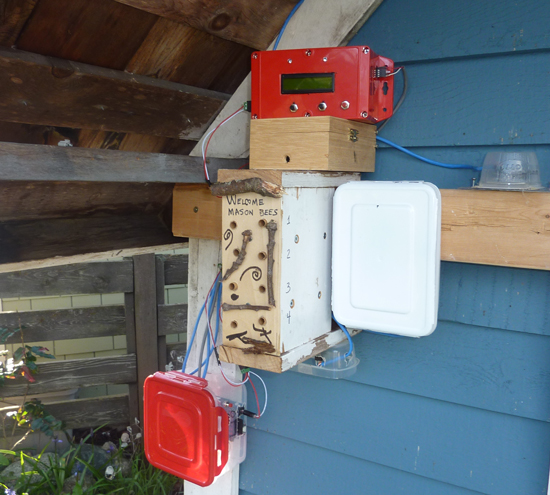
“Bees in the Backyard” is a citizen science technology project to investigate the nesting behavior of Mason bees, created by Mike Teachman, amateur bee enthusiast and Paul Perrault senior field applications engineer.
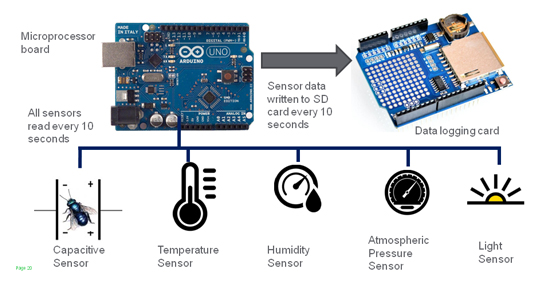
Mason bees are somewhat unique because, unlike honeybees, they are solitary, every female is fertile, there are no worker bees, they carry pollen on their bellies, they nest in holes and are vital to pollination of many fruit trees.
The idea behind the project was to turn each bee’s entire nest into a capacitive sensor with the use of off-the-shelf open source hardware like Arduino Uno:
Following the innovative work of the UPEI in using non-invasive capacitance sensors to detect bees entering and exiting a hive, we decided to extend this study to determine if we could measure not just a bee moving past an opening in a hive, but actually measure bee activity, along with a sense of their deliveries. This involved the invention of a new type of non-invasive sensor, along with the development of a measurement system that would be used to gather large amounts of data.
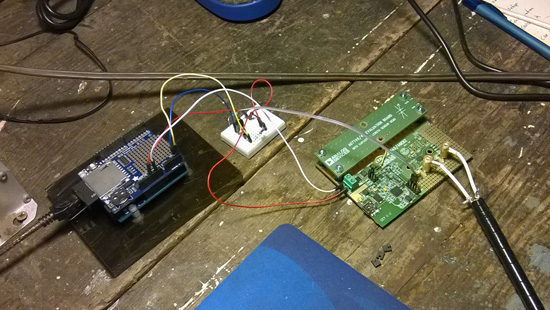


The plan for the team for 2016 is to improve the project deploying an improved monitoring system at the same site and in particular:
• Develop a new capacitance sensor tube with increased accuracy
• Improve the visual appeal of nesting block and associated electronics
• Develop algorithms to mine the measurement dataset for bee activity patterns
Watch other videos on this youtube channel and read more about the project on Spectrum IEEE.
Ski Buddy Jacket Uses Arduino to Teach Youngsters to Ski
Snow skiing looks easy, right? You just stay standing, and gravity does the work. The reality is that skiing is difficult for beginners to learn. [19mkarpawich] loves to ski, but he was frustrated seeing crying kids on skis along with screaming parents trying to coach them. Inspired by wearable electronics, he took an Arduino, an old jacket, some LEDs, and created Ski Buddy.
The brains in the jacket consist of an Adafruit Flora, accelerometer, and a battery pack. Conductive thread connects to LED sequins. The jacket can help teach linking turns, parallel skiing, hockey stops, and gradual pizza stopping. In addition to the build details and some notes on where not to place sensors (doubtlessly learned the hard way), [19mkarpawich] also does a detailed explanation of the software and how to use the jacket.
You can see a very short video demonstration of Ski Buddy below. We’ve seen more wearables lately, some of them pretty creative. Maybe it is time to learn how to sew if you can’t already.
Filed under: Arduino Hacks, wearable hacks


Trojan 77: a gamified simulation of the Trojan virus
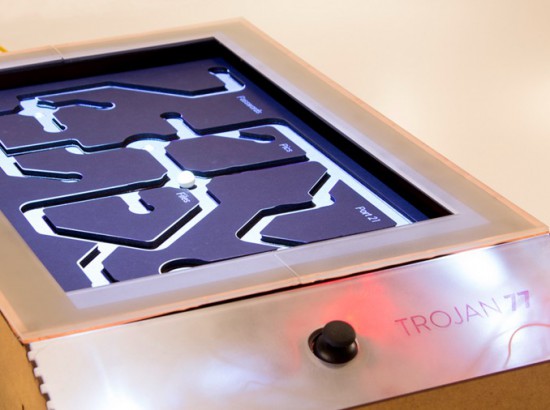
Trojan 77 is a gamified simulation of the Trojan virus running on Arduino Uno. The Trojan is a malware designed to provide unauthorised remote access to a user’s computer amongst other harmful possibilities and this prototype was designed to be exhibited at a technology museum to show the most important effects the virus. Inspired by the tilting labyrinth game, the prototype simulates a few key effects of the Trojan virus like passwords leaking out, files being deleted and culminating in a system crash.

Trojan 77 was created by a team of Physical Computing students (Dhrux Saxena, Gunes Kantaroglu, Liliana Lambriev, Karan Chaitanya Mudgal) at CIID:
The idea of designing something analog to explain a digital construct was an exciting challenge to undertake. The way that computer viruses operate can be very complicated and hard to explain without overloading people with detailed information. Making this information visual via animated projections helped to communicate the effects in a fun and memorable way.
The Trojan moved through several prototyping stages. Initially, the wooden structure was built, followed by the maze. The structure as a whole became functional with the addition of Arduino and Processing. Two servo motors controlled by a joystick enabled the tilt while the movement of the ball triggered distinct light sensors which in turn triggered events in a Processing sketch mapped onto the maze.
The students created also a great video documentary to explain the project with a style inspired by the work of Charles and Ray Eames:

Home-Made Solenoid Motor
Want to really understand how something works? Make one yourself. That’s the approach that Reddit user [Oskarbjo] took with this neat electric motor build. He made the whole thing from scratch, using an Arduino, 3D printing, and ample quantities of wire to create a solenoid motor. This transforms the linear force of a solenoid, where a magnet is moved by a magnetic field, into rotary force. It’s rather like an internal combustion engine, but driven by electricity instead of explosions. Hopefully.
[Oskarbjo]’s engine seems to work, including a rather neat mechanism to detect the rotation of the shaft and relay that back to the controller. He hasn’t posted much detail in the build process, unfortunately, but did say that “If you’d want to build something similar I can probably help you out a bit, but half the fun is coming up with your own solutions.” Amen to that. We’ve seen a few neat solenoid motor builds, but this one wins points for starting from scratch. There is an Instagram video of the motor running after the break.
Filed under: Arduino Hacks


Macchina poetica converts sounds into onomatopoeic words
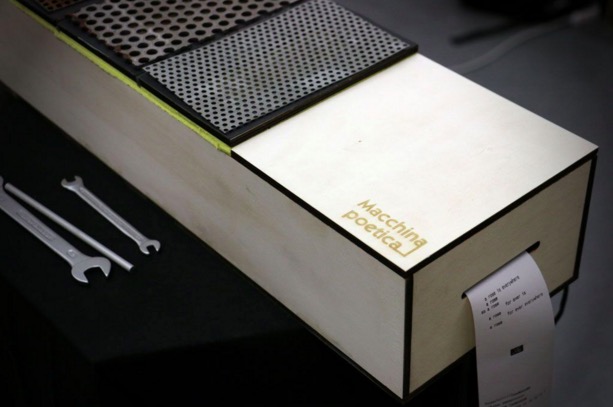
Macchina Poetica is a digital prototype converting sounds into onomatopoeic words and images and it’s inspired by the art of the Futurism movement.
Futurism is a modernist, avant-garde artistic movement originated in Italy in the early 20th century. Thanks to sound representation, Futurism artists aimed to emphasize speed, technology, youth and violence, all concepts arising from industrial innovations and war.
In order to keep continuity with this particular artistic movement, the authors, Alessandra Angelucci, Aris Dotti, Rebecca Guzzo, students at Master of Advanced Studies in Interaction Design SUPSI, decided to design an object that looks like the musical instrument of Futurism movement (precisely a Celesta). The object plays a metallic sounds and the user is facilitated in understanding how to use the object due to a instrument-like interface.
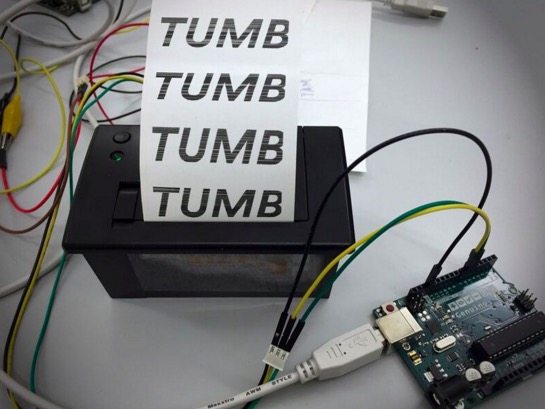
The machine is built using 4 piezo sensors, a thermal printer, a board, electrical cables, 4 resistors (1K), a 6 volt power supply and a Genuino Uno board.
The instrument’s interface is designed with plywood, metal plates and sponge that serves as a shock absorber. Between the metal plates and the sponge there are the piezo sensors along with resistors communicating with the Genuino Uno board every time the user interacts with the metallic plates. Once the Genuino receives the signal, it sends a command to the thermal printer that will print a word or a Futurism poem.
The interaction takes place when the user with the help of a metal tool (for example a screwdriver or a wrench) strikes the metal plates with different pressures. At the end of the performance the user and the viewers can have a clear overview of the produced sounds reviewing the printed paper outputs.
The prototype is the result of two weeks physical computing class Creating Tangible Interfaces held by Ubi De Feo at Maind program SUPSI in Lugano, the goal of the course is how to make tangible interfaces via learning fundamentals of electronics prototyping and interaction design. (Applications are open for the next edition 2016/2017 starting in September 2016)