Posts with «arduino» label

Bring IoT features to Arduino boards with the Yún Shield!

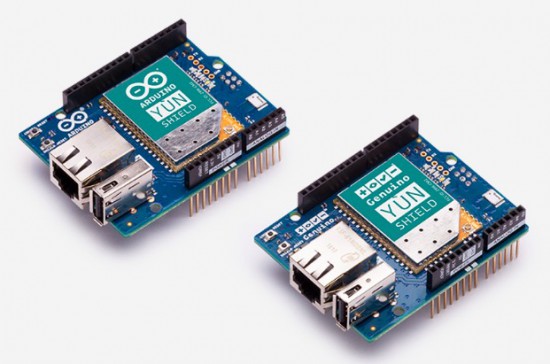
Great news for Makers working on IoT projects! The Arduino and Genuino Yún Shield — now available on our online store for $49.90/€43.90 — is a device that enables you to easily bring Yún features to Arduino and Genuino boards supporting shields.

It’s the perfect shield to start connecting your projects to the Internet thanks to the Yún Web Panel and the dedicated ”YunFirstConfig” sketch. This new feature, implemented in the new Arduino Software (IDE) 1.6.9, allows you to manage your shield preferences and upload your sketch on the attached Arduino or Genuino. Like the previous Yún board, the Yún Shield uses the Bridge library and extends your board capabilities using the Linux processor.

The new Yún family runs the latest version of OpenWRT (15.05 Chaos Calmer), which offers an additional layer of security and a large amount of bug fixes over previous Yún distribution. The precompiled package list is huge (we have more than 4,000 packages ready to be installed), and if you still can’t find what you are looking for, you can use the community provided repositories since the new release is fully modular (not a fork).

Want to learn more? Explore all there is to know about the Yún Shield, including its documentation via the links below:

Go hands-on with these dedicated tutorials:

Got any question? Join the forum!

Arduino Blog 10 May 11:51

Koka’s Beat Machines are electromechanical instruments

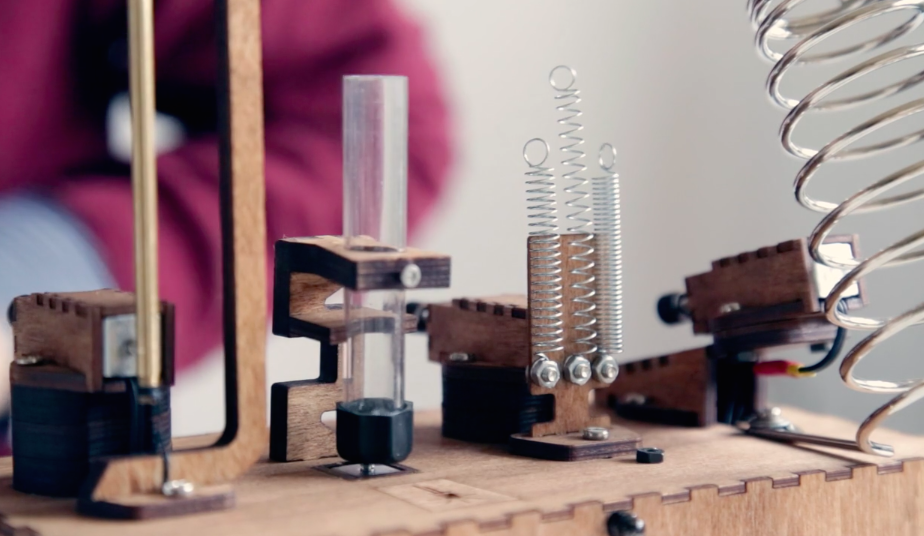
Whereas most musicians would prefer to program their beats on a computer, Koka Nikoladze has elected to take a different approach. The Norway-based violinist/composer/tech developer is the inventor of handmade analog beat making machines that use springs, coils, wood and metal to create sounds.

The instruments — known as Koka’s Beat Machines — are manually programmable to produce different kinds of rhythmic and melodic patterns. The newest member of the family is a bit more electromechanical, featuring an Arduino to amplify the notes and connect the various components inside the device’s wooden housing. There’s also a light on the front that flashes to each unique beat.

You can watch the second of Koka’s Beat Machines in action below.

Sci-fi masks glow to reflect Twitter sustainability trends

Twitter is not only a convenient way to consume daily news and converse with friends online, it has become an excellent platform for gaining insight on what’s important at any particular moment in time. With this in mind, Maker Chadwick John Friedman has decided to harness the social network’s data into web-connected physical representations with the help of Arduino and Temboo.

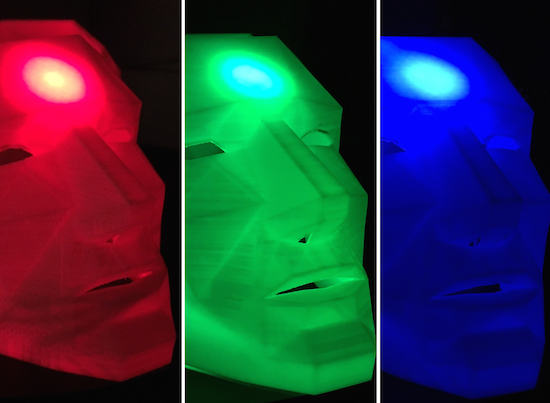
PrecogNation uses three 3D-printed geometric masks as real-time sci-fi future forecasters, which illuminate and change colors to reflect sustainability trends throughout the world.

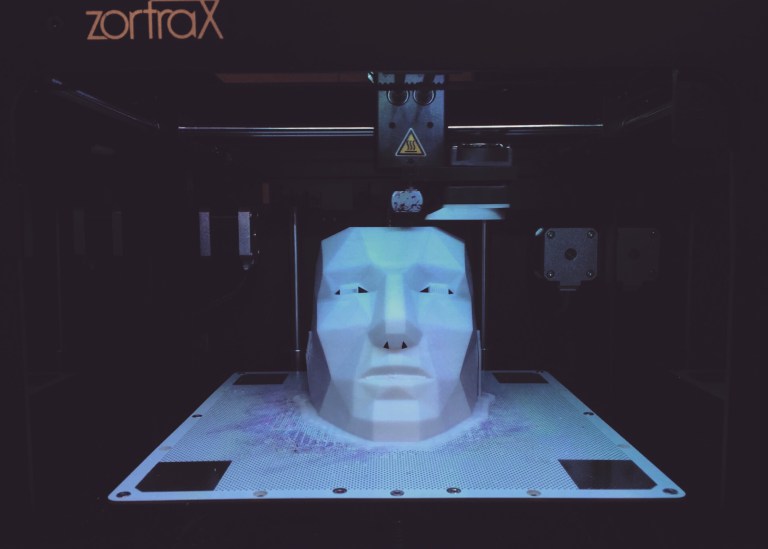
The three geometric 3D-printed masks are wirelessly connected to the Internet via an Arduino Yún. The masks were printed using a Zortrax 3D printer and white Z-ABS filament. The masks are a remixed version of Stephen Kongsle’s “Low Poly Mask.” Each mask took approximately 16 hours to print. The masks are constantly scraping data from Twitter in real-time via Temboo Choreos. Temboo assigns special API keys for Arduino devices that allow the user grab real-time data from Twitter that would otherwise be difficult to gather. That live data is then fed to the Arduino Yún, which illuminates a specific 10mm super bright LED, connected to the masks.

One of the largest challenges in representing this overload of data physically was finding the correct terms and/or keywords that activate a specific color/thought in the Precog’s faces. The three colors present in the faces are scraping the Twitterverse for terms relating to sustainability, environmental threats, and political involvement. PrecogNation has its very own Twitter account, which allows the masks to scan through data specifically submitted by sustainability related users, corporations, and initiatives.

As seen in the video below, progress in sustainable development (green) is represented by keywords such as renewable energy, clean coal, water treatment and wind turbines. Threats to sustainability (red) include deforestation, global warming, record heat, extinction, pollution, pandemics and so on. Meanwhile, blue denotes an overload of data and contradicting results.

The overload of data in the color blue works like this… say the word ‘polar’ is found, but then the words ‘melting-polar’ are found, followed by the words ‘polar bear.’ This is an unreadable thread of information – it’s not really giving us threats or progress related to sustainability so the face reflects the color blue to signify that confusion. Coming up with the correct terms to represent the overload of information was especially tricky, and writing the code to reflect that confusion was equally as challenging. I eventually found a series of keywords and demands that elicited the response I was hoping for in this category.

It is important to highlight the fact that although the colors red and blue may be perceived as negative (and usually appear more than the color green), they also mean that there are discussions about those negative sustainability issues happening every time those colors are activated. This is, in fact, a positive outcome, as one of the main goals of this project is to highlight the importance maintaining a dialogue – even if that dialogue surrounds daunting threats to sustainability. It is important that the masks provoke a highlighted continuation of focus surrounding social and political sustainability issues.

You can read all about the project on PrecogNation’s page.

Hacked IKEA table “dances” to your favorite music

Your coffee table can have many uses — it rests your drinks (with coasters, of course), stores miscellaneous items, adds some style to your living room, and even serves as the center of a conversation area. Up until now, though, one thing it hasn’t been was a music visualizer. But thanks to this guide from Make: Magazine, you’ll soon be able to start a dance party on demand using your $10 jumbo-sized IKEA side table.

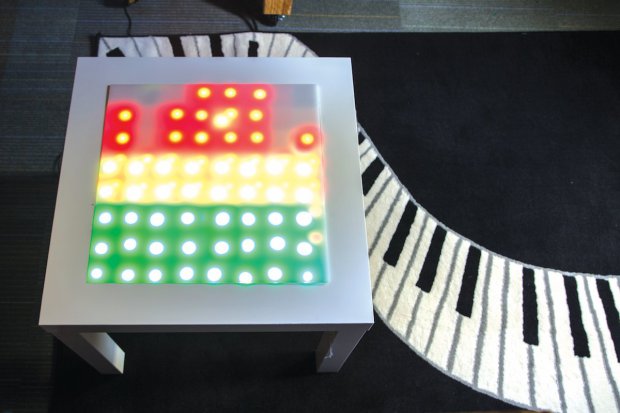
Aside from the inexpensive piece of furniture, the project calls for an LED matrix, tons of lights, a mic, some small electronic components, and an Arduino Uno for its brain. This allows its display to react and “dance” to the tunes coming from your speakers. Since it employs a minimal amount of current, the good news is that you’ll be able to run it off an iPhone charger or any other USB port that’s nearby.

It’s based on the Tiny Music Visualizer project from Adafruit, using their I2C multiplexer board for a tiny 8×8 bicolor LED matrix. The Arduino code is from there, the circuit is from there — all I really created was a big handmade LED matrix, and put it into an IKEA table!

Plug its USB cable into a phone charger or any USB port, then crank up the tunes and enjoy watching the giant tricolor pixels dance like splashing fountains of spectrum analyzer goodness!

If you’re looking for an accessory that’ll be the light of your next shindig, head over to Make:’s full tutorial here. 

Simone Giertz built a hair washing robot

From getting out of bed to applying lipstick to eating breakfast, Simone Giertz has seemingly found every possible way to automate her morning routine. Next on that list? A hair-washing robot made up of a rubber hand, a bottle of shampoo and some basic electronics that allows her to lather, rinse and repeat, while leaving her hands free for other tasks like brushing her teeth.

Giertz’s latest project features a pair of Hitec servo motors, Actobotics from Servocity, an Arduino Uno and a 6V battery pack. Although you’d probably never use this thing in an actual real shower, a shampoo robot is still pretty darn hilarious. See it in action below!

I built a hair washing robot. pic.twitter.com/TSEAugnlfJ

— Simone Giertz (@SimoneGiertz) May 6, 2016

Five students create the perfect grilling thermometer

For those of us who aren’t grill masters, knowing when a piece of meat is done can be quite the challenge. To help ensure they never under or overcook their steaks again, five Rice University students recently developed a seven-sensor grilling thermometer as part of their senior engineering design project.

The team — which goes by the name Five Guys and Ribeyes — considers the Meatmaster to be the perfect barbecue accessory, which will hopefully take the headaches and uncertainties out of grilling.

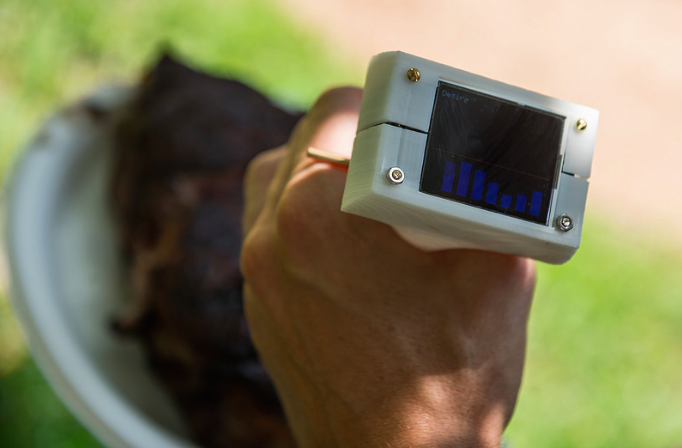
We are using a food-safe multimaterial sheath primarily made of plastic, but with horizontally placed gold-plated copper casings every quarter inch. Inside each of these casings, we have placed a small thermistor to measure the temperature. The thermistors are wired to a printed circuit board and Arduino, which displays the multiple temperatures on an LCD screen.

When inserted into the meat, the array of sensors will provide a temperature profile throughout the depth of the steak. This will enable error-free grilling.

By using a multimaterial sheath instead of solely stainless steel, the team eliminated any unwanted vertical heat flow along the length of the probe but still allowed for fast heat conduction between the meat and sensor. The probe was 3D-printed using PEEK plastic and holds thermistors enclosed in copper casings along the length of the probe; the thermistors then provide fast, accurate and discrete temperature readings.

So far Five Guys and Ribeyes says the thermometer is working great, and have already received some positive feedback. Although there are no plans to take the Meatmaster to production just yet, the team is looking to make several improvements before it becomes a consumer product. These enhancements include a more efficient power source (currently powered by a 9V battery with a life of six months), additional sensors, wireless connectivity that pushes updates to your phone, an increased temperature range, a decreased settling time and a better material for the probe itself.

(Photos: Rice University)

Autograph is a machine that creates art using nails and thread

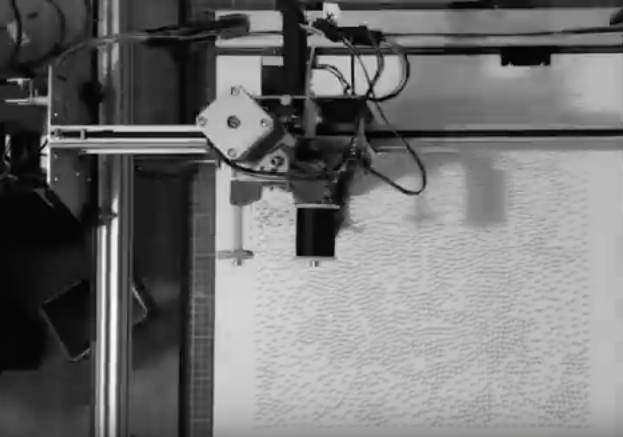
String art is a type of art characterized by an arrangement of thread strung between points to form abstract geometric patterns or representational designs. Thread or wire is wound around a grid of nails hammered onto a wooden board to make unique masterpieces. To expedite the assembly process, London-based studio Laarco has developed a machine capable of ‘printing’ large-scale, gallery-worthy artwork. Autograph uses thousands of nails and a single 500m-long string to construct detailed 40cm x 40cm (16” x 16”) images of celebrities, ranging from David Bowie to Matt Damon to the Beatles. (You can see them all here.)

In terms of hardware, Autograph is equipped with a Raspberry Pi at its core, which sends commands to an Arduino Mega fitted with a 3D printer shield to control the mechanism. The results are absolutely amazing, as you can see in the time-lapse video below.

Brew some iced coffee with an Arduino-controlled drip tower

Like the majority of us, John Edgar Park loves himself a nice cup of fresh-brewed iced coffee to get him through a warm summer day. Conventional hot-brewed coffee methods simply can’t compare; when chilled and served on ice they tend to taste diluted and acidic. Of course, you could always go buy a large cold-brew tower, but unless you’re willing to dig deep into your wallet, they’re usually only accessible to coffee shops. So, like any Maker would, he decided to build his own high-precision, automated tower from scratch using an Arduino-driven solenoid valve for exact drip rate.

For those unfamiliar with cold-brew coffee towers, these systems are comprised of three parts: a water receptacle at the top with a drip control valve, a chamber for grounds in the middle where the brewing takes place, and a carafe to receive the brewed coffee at the bottom. Park elaborates upon his project on MAKE: Magazine:

After much hunting I found the ideal components: a water serving pitcher for the top receptacle, a siphon brewing upper beaker as the grounds chamber, and a flat-bottomed boiling flask as the receiving vessel. For a bit of spiraling glass laboratory aesthetic I added a Graham condenser to the mix, purely for looks.

Since this behemoth would stand 4? tall and need quite a bit of support to hold the components, I decided to mount the tower on the wall using laser cut acrylic holders connected to angle brackets. If you don’t have access to a laser cutter, you can print the linked files and use them as a guide for cutting with a bandsaw or scroll saw.

For ultimate control over the water drip rate, I chose a food-safe solenoid valve and I built an Arduino-based controller for it. The controller consists of a transistor circuit mounted on a prototyping shield, two 1000-ohm potentiometers, and a bit of Arduino code running on an Arduino Uno. This allows you to use the two knobs to adjust the frequency of the valve opening and closing, and the length of time it remains open per drip. Since the volume of water the solenoid valve allows through is much more than we want per drip for a long, overnight brew, I needed to reduce the size of the drip tube inner diameter. I attempted this with various tubes, straws, and fairly janky contraptions, until I eventually succeeded when I “borrowed” the miniature drip valve from my small commercial brewer. A Hario valve (available from coffee parts suppliers online) press-fits very nicely inside ¼” tubing — you can use any food-safe stopcock valve that fits.

PUMA’s robot can beat you (and Usain Bolt) in a race

Man versus machine may sound like a bit of cliché at this point, but PUMA recently took this concept to a whole new level with a shoebox-sized, programmable robot that helps runners push themselves to the limits. The BeatBot — which the apparel company created together with ad agency J. Walter Thompson New York and a team of MIT engineers — is a self-driving, line-following device that provides athletes with a visual target to beat.

The robot works by scanning lines on the track using its nine IR sensors, while wheel rotations are monitored by an Arduino to measure speed and distance. BeatBot is equipped with front and rear-facing GoPro cameras, as well as LED lights on the back so you can see it in your peripheral vision. Data is processed in real-time, making more than 100 adjustment per second to remain on course, navigate turns and finish the race at a pre-determined pace.

To get started, runners enter the time and distance of the race they want, place the robot on the starting line next to them and go. BeatBot is managed through a companion iPhone app that enables the runner to set their own time and goals, which can be anything from surpassing a personal best, competing against a rival, or even breaking world record-holder Usain Bolt’s fastest time with speeds of up to 44.66 km/h (27.7 mph).

Unfortunately, BeatBot is only available for PUMA-sponsored athletes. So for now, you’ll just have do it the old-fashioned way: stopwatch or find a friend.

Don’t Take Photos of Your Arduino 101 Either, Its Light Sensitive

Wafer level chips are cheap and very tiny, but as [Kevin Darrah] shows, vulnerable to bright light without the protective plastic casings standard on other chip packages.

We covered a similar phenomenon when the Raspberry Pi 2 came out. A user was taking photos of his Pi to document a project. Whenever his camera flash went off, it would reset the board.

[Kevin] got a new Arduino 101 board into his lab. The board has a processor from Intel, an accelerometer, and Bluetooth Low Energy out of the box while staying within the same relative price bracket as the Atmel versions. He was admiring the board, when he noticed that one of the components glittered under the light. Curious, he pulled open the schematic for the board, and found that it was the chip that switched power between the barrel jack and the USB. Not only that, it was a wafer level package.

So, he got out his camera and a laser. Sure enough, both would cause the power to drop off for as long as the package was exposed to the strong light. The Raspberry Pi foundation later wrote about this phenomenon in more detail. They say it won’t affect normal use, but if you’re going to expose your device to high energy light, simply put it inside a case or cover the chip with tape, Sugru, or a non-conductive paint to shield it.


Filed under: Arduino Hacks
Hack a Day 06 May 00:01