Posts with «arduino» label

Quickie USB Keyboard Device

There are a ton of applications that we use that can benefit from keyboard shortcuts, and we use ’em religiously. Indeed, there are some tasks that we do so often that they warrant their own physical button. And the only thing cooler than custom keyboards are custom keyboards that you’ve made yourself.

Which brings us to [Dan]’s four-button Cherry MX USB keypad. It’s not really all that much more than four keyswitch footprints and an AVR ATmega32u4, but that plus some software is all you really need. He programs the Arduino bootloader into the chip, and then he’s using the Arduino Leonardo keyboard libraries. Bam! Check out the video below.

We see this design much more as a demo or collection of building-blocks than necessarily a one-size-fits-all solution. You might need five buttons, or want a different layout, or… It’s all open-source, so go nuts. And you’re not limited to key-clicks either — mouse buttons or even multiple scripted actions are within easy reach.

Building a special-function USB keypad or gaming device used to be hard work. But today between hardware and software design availability, it’s child’s play. Whether you need a footboard, a single-handed chording keyboard, or even just to update an old typewriter, the ability to control the input device that we use for eight hours per day is liberating. Experiment!


Filed under: Arduino Hacks, peripherals hacks

540 LEDs On A Geodesic Sphere

[burgerga] loves attending Music Festivals. He’s also a MechE who loves his LED’s. He figured he needed to put it all together and do something insane, so he build a huge, 15″ geodesic sphere containing 540 WS2812B addressable LED’s. He calls it the SOL CRUSHER. It sips 150W when all LED’s are at full intensity, making it very, very, bright.

As with most WS2812B based projects, this one too is fairly straightforward, electrically. It’s controlled by four Teensy 3.2 boards mounted on Octo WS2811 adapter boards. Four 10,000 mAh 22.2V LiPo batteries provide power, which is routed through a 5V, 30Amp heatsinked DC-DC converter. To protect his LiPo batteries from over discharge, he built four voltage monitoring modules. Each had a TC54 voltage detector and an N-channel MOSFET which switches off the LiPo before its voltage dips below 3V. He bundled in a fuse and an indicator, and put each one in a neat 3D printed enclosure.

The mechanical design is pretty polished. Each of the 180 basic modules is a triangular PCB with three WS2812B’s, filter capacitors, and heavy copper pours for power connections. The PCB’s are assembled in panels of six and five units each, which are then put together in two hemispheres to form the whole sphere. His first round of six prototypes set him back as he made a mistake in the LED footprint. But it still let him check out the assembly and power connections. For mechanical support, he designed an internal skeleton that could be 3D printed. There’s a mounting frame for each of the PCB panels and a two piece central sphere. Fibreglass rods connect the central sphere to each of the PCB panels. This lets the whole assembly be split in to two halves easily.

It took him over six months and lots of cash to complete the project. But the assembly is all done now and electrically tested. Next up, he’s working on software to add animations. He’s received suggestions to add sensors such as microphones and accelerometers via comments on Reddit. If you’d like to help him by contributing animation suggestions, he’s setup a Readme document on Dropbox, and a Submission form. Checkout the SolCrusher website for more information.

Thanks [Vinny Cordeiro], for letting us know about this build.


Filed under: led hacks
Hack a Day 12 Jun 12:00

Dtto is a self-reconfigurable modular robot

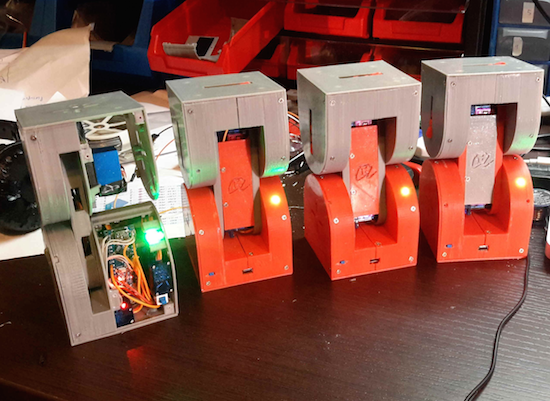
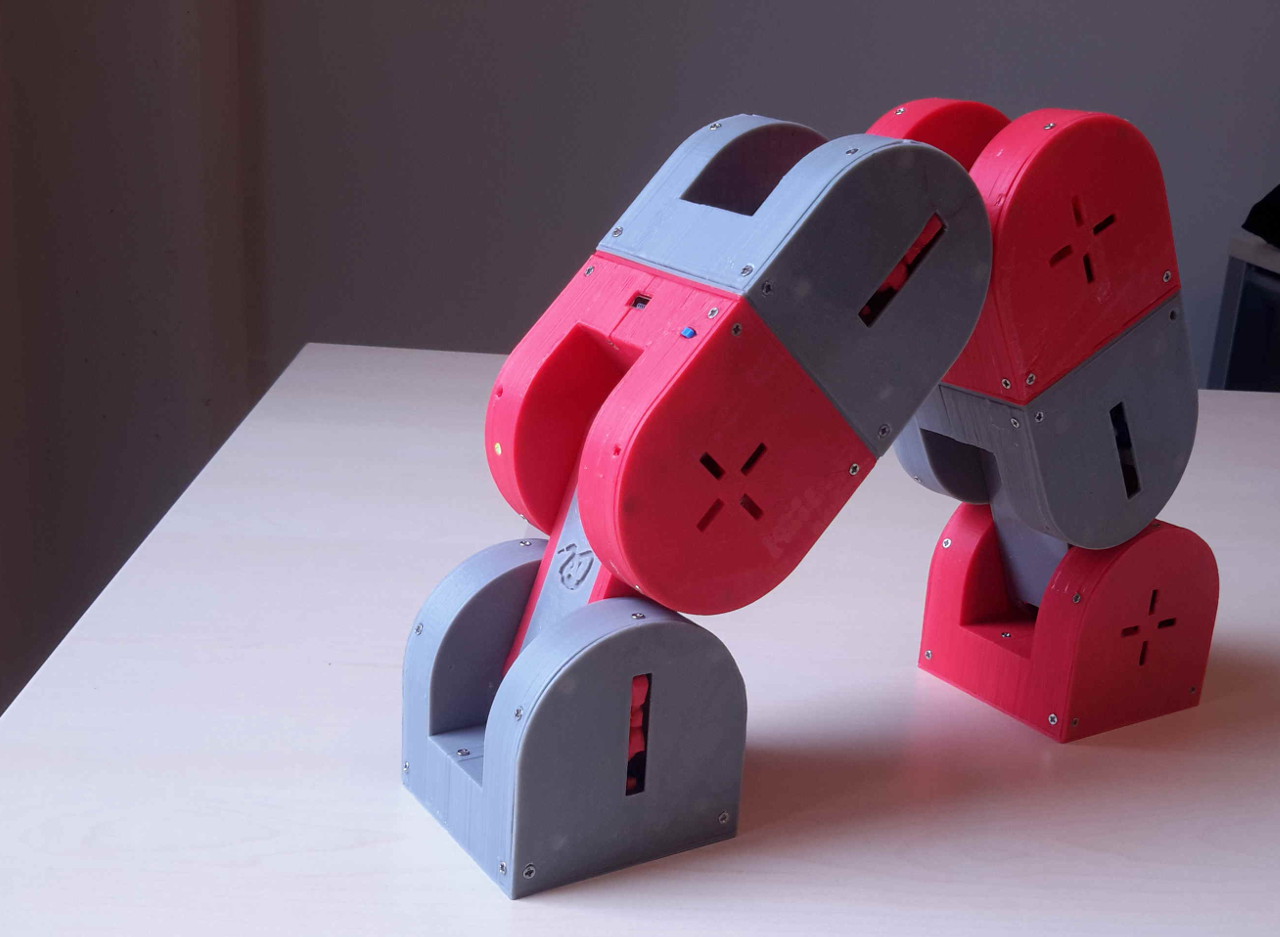
An entry in this year’s Hackaday Prize, Dtto is a snake-like robot designed to be modular and self-reconfigurable.

Inspired by Bruce Lee’s famous water quote, Dtto can transform into various shapes by changing the position and connection of its 3D-printed modules. As Hackaday points out, each section of Dtto is a double-hinged joint. When two come together, magnets help them align. A servo-controlled latch solidly docks the sections, which then work in unison. Impressively, it can connect and separate segments autonomously – without any human intervention. Creator Alberto believes the versatility of the bot will enable it to perform rescue missions, explore unknown environments, and operate in space.

The open-source robot consists of an Arduino Nano, a Bluetooth HC-06 module, an NRF2401+ radio transceiver, two SG92R Tower Pro servos for main movement, three Tower Pro SG90 micro servos for coupling, and a WS2812 RGB LED. For its latest iteration, the Maker has made a few design improvements to allot for 25% more internal space, a data bus connecting the two blocks and Tower Pro MG92B motors. Future modules will even include a built-in camera, an ultrasonic sensor, a gyroscope, an accelerometer, and a magnetometer, to name just a few. Until then, you can follow along on its project page and check out a few of its videos below.

Foxes Like Beacons explores alternative navigation systems

Jochen Maria Weber’s Foxes Like Beacons is an exploratory project using open data of public radio stations with inexpensive, low-power signal detection in order to create an open positioning system. According to the designer:

Today’s satellite based GPS enable and augment uncountable everyday processes, ranging from logistics to fitness trackers and even intimate dating applications. These proprietary systems are mostly invisibly controlled and curated by governments, military and economic actors. Since GPS ubiquitously affect our interactions and experiences with our environment, economy and privacy, Foxes Like Beacons questions this present model, thus opening up space for speculations about alternative navigation systems and new models for interaction.

Open data about public radio stations, transceivers and open source signal detection can be used to calculate geo positions.

So, Jochen developed three example devices based on the same technical structure using very low-power, open and off-the-shelf technology. This consists of an omnidirectional antenna, a 4.3″ TFT screen, a compass, gyroscope and barometric altitude sensor, a radio frequency tuner, a battery, an Arduino Nano (for signal processing), and a Rasperry Pi 2.

Precision and miniaturization can be extremely increased using customized parts, and by building on the distributed infratructure of public broadcast radio, Foxes Like Beacons is not subject to any kind of central control or curation.
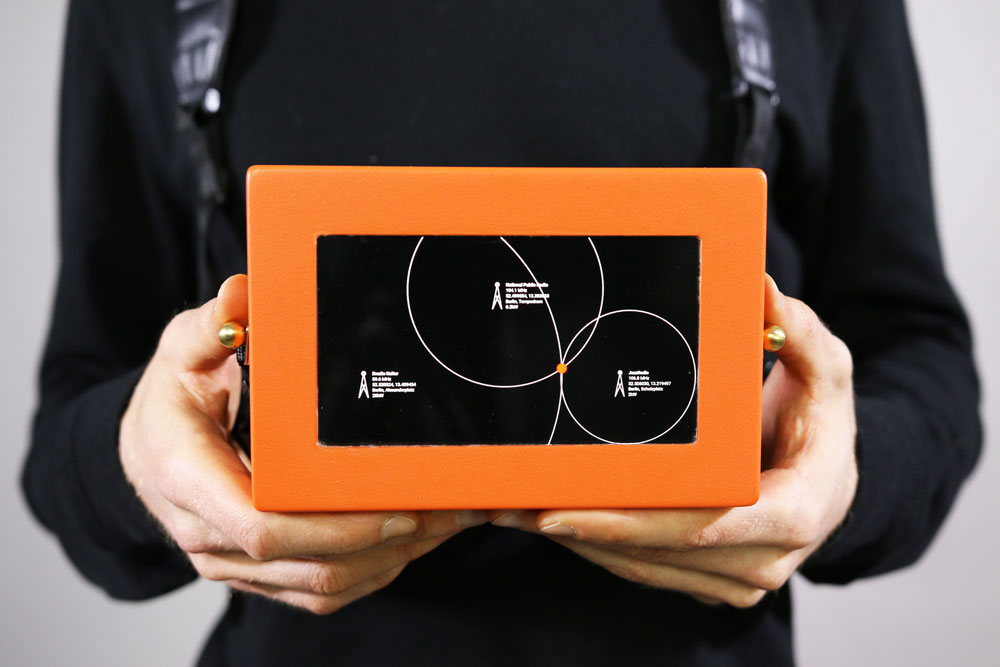
First, Device No.1 measures the received signal strengths and decodes the identifiers of minimum three stations. Open data about their transceiver locations and respective transmission power is used to calculate distance to each transceiver and which can therefore be triangulated, in order to get a users geo location. Incorporating more stations leads to a higher resolution and more accurate geo locations.

Next, Device No.2 enables users to navigate by pleasing of sound rather than geographical information, following “geo-acoustic” maps. It automatically adjusts the volumes of simultaneously played stations according to proximity.

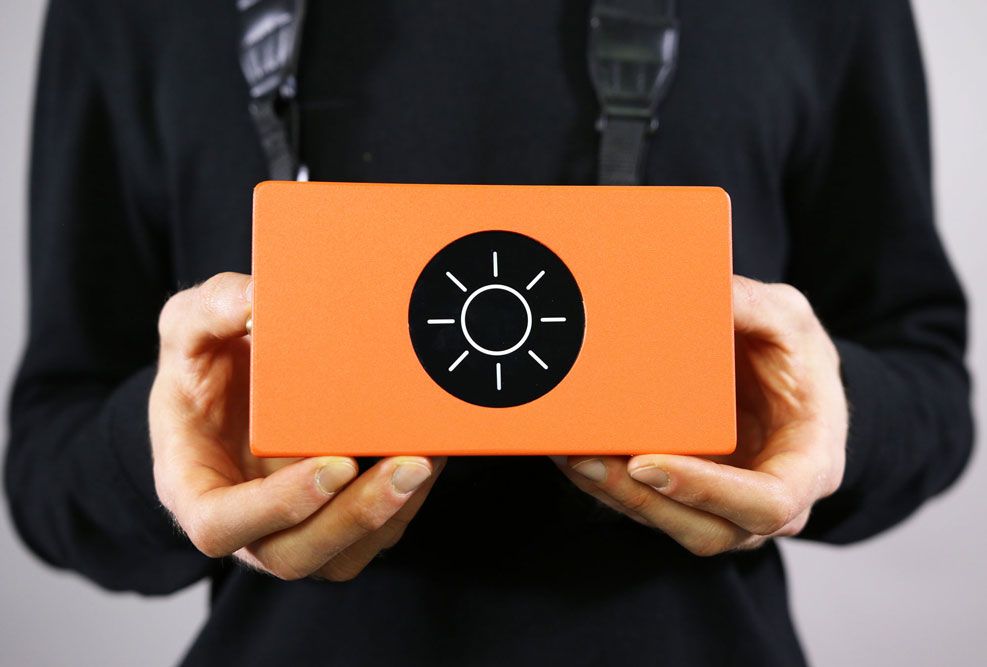
Finally, Device No.3 speculates about further applications by analyzing and interpreting signal modulations which occur due to factors like electromagnetic radiation, weather, and geographic conditions. These modulate radio signals in characteristc ways which can be interpreted and incorporated in navigation/exploration.
Foxes Like Beacons is part of the ongoing project “Stupid, Messy Networks,” which investigates the process of digital networks becoming ubiquitous infrastructures and moreover how these new infrastructures empower or constrain actors in economical, political and social interactions.

(via Creative Applications)

Makers bring the “Push Button, Receive Bacon” meme to life

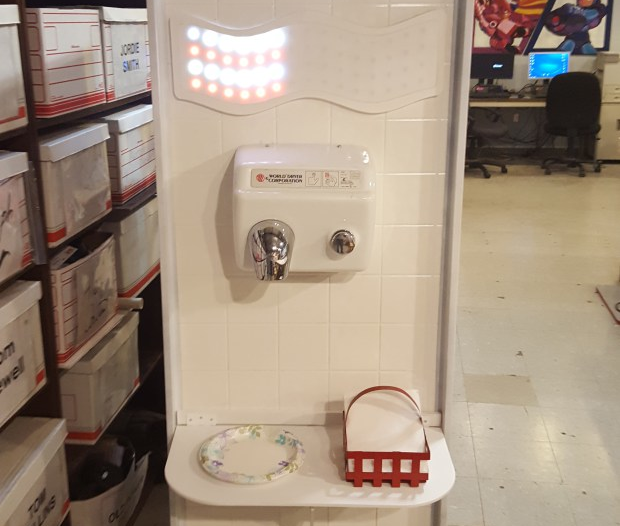
Push Button, Receive Bacon” is a popular catchphrase and graffiti tag often spotted next to the graphic instruction on hand dryers. Well, the Hammerspace Workshop team has decided to bring that meme to life with their latest project for the upcoming Maker Faire Kansas City.  In order to raise awareness of the link between bacon and hand health (kidding, of course), they’ve modified the standard bathroom accessory to display wait time and provide its user with a dose of bacon-related pop culture knowledge before dispensing.

A multi-segment display was CNC routed in the shape of bacon and populated with 10mm LEDs. A standard bacon dispenser relay board controls this display. To entertain and inform the user, a variety of bacon themed pop music will be dispensed immediately and continuously until bacon has been provided. An Adafruit audio FX board stores and plays back the .ogg files containing the bacon related wisdom and culture.

The Push Button – Receive Bacon machine has an extended magazine to supply bacon strips on command. For this prototype we have used a Sharper Image CD Power Tower to hold the bacon strips until they can be used to save a hand. The shelves are constructed of plasma cut stainless steel and held in place with 3D-printed clips that mount into the original device as if the bacon shelf was a jewel case. The tabs that are already present in the tower provide a kind of encoder to ensure repeatable precision and smooth delivery of the bacon. The folding flap design allows for tighter clearance between the bacon magazine and the bacon encrispenator.

And finally, the bacon motivator receives the bacon from the encrispenator and uses vibrational motivation to deliver the hot bacon down a custom engineered stainless chute.

The user then receives the bacon from the bacon nozzle in the usual fashion. After applying the bacon to both palms, the bacon may be eaten to replace lost electrolytes.

You can read more about the project on Make:, and see it in acton below.

Arduino Pro Mini powers this Pac-Man festival totem

Electric Daisy Carnival Las Vegas is just days away, and YouTuber “Korberos” is ready. The Maker has created an LED Pac-Man totem using 967 lines of code, 256 NeoPixels wired in succession and laid out in a game-inspired map, and an Arduino Pro Mini.

The controller and game lights are powered by a 5V power bank with 10,000mAh of storage, while blue EL wire lights (for the “walls”) are powered by a 12V supply coming from eight AA batteries wired in serial. A MAC7219 7-segment display shows the current level and score.

According to Korberos, two libraries were used in the project: FastLED to control the LED strips and LedControl2 to handle the scoreboard.

Build your own life-size, multipurpose robot with Arduino

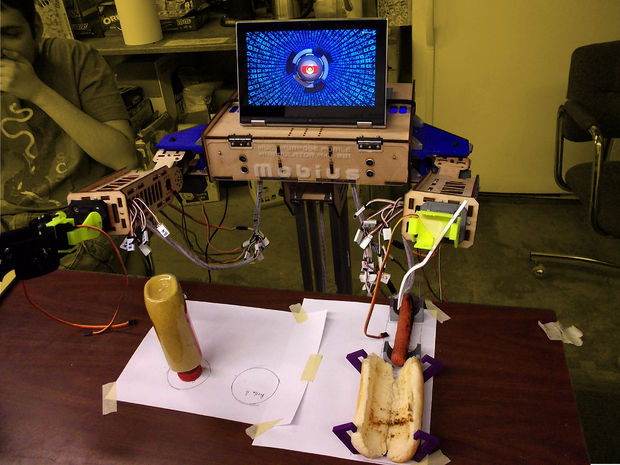
If you’ve always wanted a bot for a friend, personal assistant or butler, you’re in luck. John Choi, a Carnegie Mellon University computer science and arts student, has managed to build his own life-size robotics platform for about $2,000. Sure, a price tag like that may not seem “cheap” but in comparison to other research-grade platforms out there, it’s a bargain.

Ideal for Makers, students, educators, artists and researchers alike, the Multipurpose Mobile Manipulator Mk 1 is capable of playing the piano, drawing pictures, preparing meals, watering plants, and engaging in toy sword duels, among many other things.

The Multipurpose Mobile Manipulator is divided into three major parts: the base, the arms, and the chest. The base contains motors for mobility and batteries to power the robot, enabling it to navigate around. The arms contain adaptable grippers, shoulder and elbow joints, and an extensible limb for grabbing and moving things with its environment. Meanwhile, the chest connects all of these together with control electronics and serves as a platform for an intelligent laptop-for-a-face. An Arduino Mega at its heart makes interfacing with sensors and actuators super easy, while the robot’s functionality can also be expanded by simply attaching new electronics and sensors to its mounting areas.

The open-source platform is compatible with Windows, Mac and Linux, and supports Python 2.7 and Arduino libraries. According to Choi, libraries for Unity, Processing, ROS, MATLAB, C++, and Scratch are also in the works.

Those interested in building their own should check out Choi’s incredibly-detailed 80-step tutorial, and watch the robot take on some tasks below. Prepare to be amazed!


Hackaday Prize Entry: The Green Machine

For Hackers, rapid prototyping is made easier using basic building blocks such as the Raspberry Pi, Arduino and the huge variety of add on shields for home brew projects. But we don’t see too many real world Industrial applications or machines built using these off-the-shelf electronics. [SlyScience] built The Green Machine – an industrial grade, automated spray painting device to help coat polycarbonate tubes consistently.

The Green Machine is essentially a linear drive that can move a spray gun across a spinning clear tube and coat it evenly with the desired color. These tubes are used as color filters – they slide over standard T5, T8 or T12 fluorescent lamps – and are used in advertising, special effects, films and similar applications. For almost 10 years prior to this machine, the task was done manually. The HPLV (high pressure, low volume) spray gun used for this process needed skilled hands to get consistent results. It was easy to ruin a tube and cleaning them was not possible. [SlyScience] figured things out on the go – teaching himself and figuring out all of the software and hardware pieces of the puzzle. The welded steel frame is about the only “custom” part in this build. Everything else is COTS. Check out the video of The Green Machine in action below, and if you have any tips to help improve the build, chime in with your comments.

The HackadayPrize2016 is Sponsored by:

Filed under: The Hackaday Prize

Multipurpose Robot For the Masses

As the cost of almost every technology comes falling down, from electronics to batteries to even tools like 3D printers, the cost to build things formerly out of reach of most of us becomes suddenly very affordable. At least, that’s what [John Choi] has found by building a completely DIY general purpose robot for around $2000.

OK, so $2000 isn’t exactly “cheap” but considering that something comparable (like Baxter) costs north of what a new car would cost means that [John] has dropped the price for a general-purpose robot by an order of magnitude. And this robot doesn’t skimp on features, either. It has a platform that allows it to navigate rooms, two manipulating limbs with plenty of servos, a laptop “head” that allows for easy interface, testing, and programming, and an Arduino Mega that allows it to interface with any sensors or other hardware with ease. It’s also modular so it can be repaired and transported easily, and it uses open source software and open hardware so it’s easy to build on.

This robot is an impressive piece of work that should help bring this technology to more than just high-end factories and research labs. They’ve already demonstrated the robot watering plants, playing the piano, picking things up, and many other tasks. We’d say that they’re well on their way to their goal of increasing the number of students and hobbyists who have access to this technology. If the $2k price tag is still too steep, though, there are other ways of getting into robotics without diving headfirst into a Baxter-like robot.


Filed under: robots hacks

Watch 24 colorful acrylic blocks dance to music

Lights synchronized to music, what’s not to love? YouTuber “Robert Robert” has done just that using 24 acrylic blocks, an Arduino Uno, four 12-pixel WS2812B addressable LED strips, an Adafruit electret microphone amplifier, a 12000mAh external battery pack, and some code.

The blocks are divided into two sets of 12, held together by threaded rods and nuts, with LED strips hot glued to the back. A 60cm x 40cm stainless steel shelf rests underneath to reflect the light back.

In terms of code, the project uses Adafruit’s NeoPixel library:

The first part of the code is Adafruit’s own mic code which calibrates the sound level so that whether you’re using a big speaker or, as in the video, a tiny iPad speaker, the mic remains sensitive. The second part of the code maps the sound level onto 12 if statements so that when quiet it idles with the NeoPixel library rainbow but then as the sound level gets higher more effects are triggered. Within each if statement I have then included a random() function so that the display stays interesting. You can edit each individual strip pixel to create patterns in an infinite variety of ways and using the random () function you can keep on building so you never get bored. The code works best with music with a wide dynamic range (soft and loud parts).