Posts with «arduino» label

Keytar Made Out Of A Scanner To Make Even the 80s Jealous

Do any of you stay awake at night agonizing over how the keytar could get even cooler? The 80s are over, so we know none of us do. Yet here we are, [James Cochrane] has gone out and turned a HP ScanJet Keytar for no apparent reason other than he thought it’d be cool. Don’t bring the 80’s back [James], the world is still recovering from the last time.

Kidding aside (except for the part of not bringing the 80s back), the keytar build is simple, but pretty cool. [James] took an Arduino, a MIDI interface, and a stepper motor driver and integrated it into some of the scanner’s original features. The travel that used to run the optics back and forth now produce the sound; the case of the scanner provides the resonance. He uses a sensor to detect when he’s at the end of the scanner’s travel and it instantly reverses to avoid collision.

A off-the-shelf MIDI keyboard acts as the input for the instrument. As you can hear in the video after the break; it’s not the worst sounding instrument in this age of digital music. As a bonus, he has an additional tutorial on making any stepper motor a MIDI device at the end of the video.

If you don’t have an HP ScanJet lying around, but you are up to your ears in surplus Commodore 64s, we’ve got another build you should check out.


Filed under: Arduino Hacks, digital audio hacks, musical hacks

Build a pan and tilt camera with Raspberry Pi + Arduino

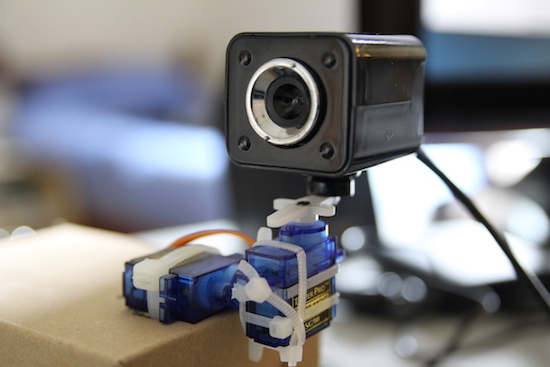
Although there are plenty of DIY surveillance cameras already out there, MakeUseOf has taken it to the next level with the ability to remotely control its view. This DIY pan tilt camera uses a Raspberry Pi, an Arduino Uno, a pair of servos, and a USB webcam.

The Pi streams video to a webpage and adds a few buttons to move the camera. Due to the lack of the hardware PWM pins, the servos are controlled by the Arduino that is connected to the Pi. Meanwhile, a Python server handles the web interface and commands.

Sound interesting? Be sure to check out the entire build on MakeUseOf’s page here.

Three Arduinos, Sixteen Square Waves

[Folkert van Heusden] sent us in his diabolical MIDI device. Ardio is a MIDI synthesizer of sorts, playing up to sixteen channels of square waves, each on its separate Arduino output pin, and mixed down to stereo with a bunch of resistors. It only plays square waves, and they don’t seem to be entirely in tune, but it makes a heck of a racket and makes use of an interesting architecture.

Ardio is made up of three separate el cheapo Arduino Minis, because…why not?! One Arduino handles the incoming MIDI data and sends note requests out to the other modules over I2C. The voice modules receive commands — play this frequency on that pin — and take care of the sound generation.

None of the chips are heavily loaded, and everything seems to run smoothly, despite the amount of data that’s coming in. As evidence, go download [Folkert]’s rendition of Abba’s classic “Chiquitita” in delicious sixteen-voice “harmony”. It’s a fun exercise in using what’s cheap and easy to get something done.


Filed under: musical hacks
Hack a Day 03 Aug 16:30
arduino  i2c  midi  music  musical hacks  

Coding an Interactive Map of Their Hometown Connects a Community

The people of Farmington, Connecticut, now have a beautiful, community-made interactive map to share the history of their town.

Read more on MAKE

The post Coding an Interactive Map of Their Hometown Connects a Community appeared first on Make: DIY Projects and Ideas for Makers.

Hackaday Prize Entry: Smart USB Hub And IoT Power Meter

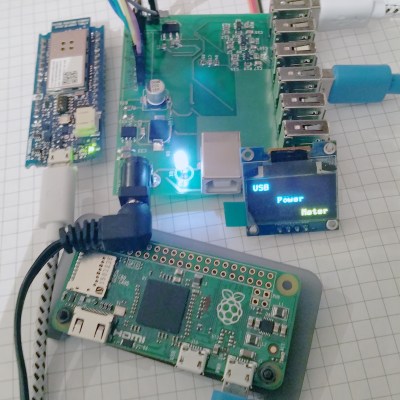
[Aleksejs Mirnijs] needed a tool to accurately measure the power consumption of his Raspberry Pi and Arduino projects, which is an important parameter for dimensioning adequate power supplies and battery packs. Since most SBC projects require a USB hub anyway, he designed a smart, WiFi-enabled 4-port USB hub that is also a power meter – his entry for this year’s Hackaday Prize.

[Aleksejs’s] design is based on the FE1.1s 4-port USB 2.0 hub controller, with two additional ports for charging. Each port features an LT6106 current sensor and a power MOSFET to individually switch devices on and off as required. An Atmega32L monitors the bus voltage and current draw, switches the ports and talks to an ESP8266 module for WiFi connectivity. The supercharged hub also features a display, which lets you read the measured current and power consumption at a glance.

Unlike most cheap hubs out there, [Aleksejs’s] hub has a properly designed power path. If an external power supply is present, an onboard buck converter actively regulates the bus voltage while a power path controller safely disconnects the host’s power line. Although the first prototype is are already up and running, this project is still under heavy development. We’re curious to see the announced updates, which include a 2.2″ touchscreen and a 3D-printable enclosure.


Filed under: The Hackaday Prize

Peak is a smart lamp that helps you form better habits

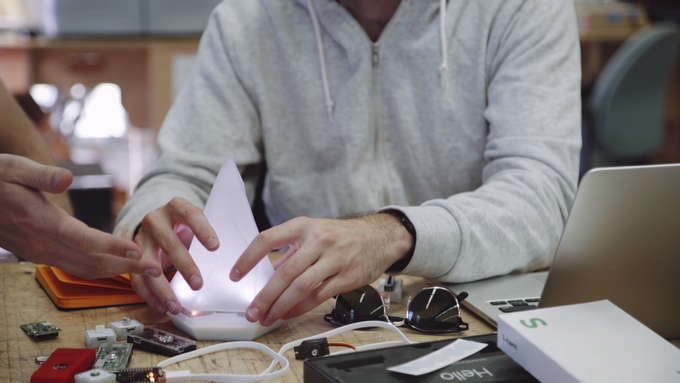
Breaking bad habits can be difficult, but developing better ones isn’t so easy either. Mindful of this, former Project Ara founder Dan Makoski and David Khavari have come up with a smart, Arduino-friendly lamp that combines light, encouraging messages and a personal improvement algorithm to help you inch closer to your goal day by day.

Connect Peak to your smartphone using its configuration app and set up a habit you’d like to master–whether that’s exercising, reading more, learning a new instrument, meditating, or spending quality time with loved ones. Simply touch the lamp and it will then send you a motivational text message. It recommends a step towards your target that you’ve either entered yourself or have chosen at Peak’s suggestion. You can schedule reminders if you need that extra little push as well. Once completed, touch it again or text Peak and it’ll record your progress, celebrating with a burst of light.

What’s even cooler is the fact that Makoski and Khavari were fortunate enough to work with whiz kids (and our friends) Cesare Cacitti and Quin Etnyre. Peak was actually prototyped using the Arduino platform and currently runs on Etnyre’s own Qduino Mini. Its creators are also exploring the idea of opening the lamp up so developers and Makers can hack their own projects. We’ll have to wait and see until the end of its crowdfunding campaign!

Looking to form a better habit? Enjoy mini light shows? Then head over to Peak’s Kickstarter page, where you can learn more about the product, the philosophy and the entire design process.

Custom robot transmitter and a few robots (Rpi, nodemcu and arduino)

Hi good people!

I have alot of robotic projects,and now I'm trying to make the one remote to control them all.

I have a lasercut box with a raspberry pi 3 inside, with the original 7 inch touch display, there is also two 3 axis joysticks. The touch display will do everything that I can't do with the joysticks. I currently have a quadroped robot using Phoenix Code controlled with a PS2 joypad. The interfacing on the touch display will be made in Kivy and python.

read more

Custom robot transmitter and a few robots (Rpi, nodemcu and arduino)

Hi good people!

I have alot of robotic projects,and now I'm trying to make the one remote to control them all.

I have a lasercut box with a raspberry pi 3 inside, with the original 7 inch touch display, there is also two 3 axis joysticks. The touch display will do everything that I can't do with the joysticks. I currently have a quadroped robot using Phoenix Code controlled with a PS2 joypad. The interfacing on the touch display will be made in Kivy and python.

read more

Custom robot transmitter and a few robots (Rpi, nodemcu and arduino)

Hi good people!

I have alot of robotic projects,and now I'm trying to make the one remote to control them all.

I have a lasercut box with a raspberry pi 3 inside, with the original 7 inch touch display, there is also two 3 axis joysticks. The touch display will do everything that I can't do with the joysticks. I currently have a quadroped robot using Phoenix Code controlled with a PS2 joypad. The interfacing on the touch display will be made in Kivy and python.

read more

Custom robot transmitter and a few robots (Rpi, nodemcu and arduino)

Hi good people!

I have alot of robotic projects,and now I'm trying to make the one remote to control them all.

I have a lasercut box with a raspberry pi 3 inside, with the original 7 inch touch display, there is also two 3 axis joysticks. The touch display will do everything that I can't do with the joysticks. I currently have a quadroped robot using Phoenix Code controlled with a PS2 joypad. The interfacing on the touch display will be made in Kivy and python.

read more