Posts with «arduino» label

The NRF24L01 Wireless Motor Speed Control System with Arduino

Let's Make Robots 19 Dec 07:26
arduino  avr  nrf24l01  

The NRF24L01 Wireless Motor Speed Control System with Arduino

Let's Make Robots 19 Dec 07:26
arduino  avr  nrf24l01  

The NRF24L01 Wireless Motor Speed Control System with Arduino

Let's Make Robots 19 Dec 07:26
arduino  avr  nrf24l01  

Speed-Test Your Toys with Die-Cast Drag Strip

I’m sure many of us remember building toy car race tracks as kids, racing the cars, and then arguing over which car came in first and who cheated because they let go of their car too soon. Ah, good times. [Phil] wanted to create a drag strip race track for his son to introduce him to die-cast cars. The only commercial drag strip [Phil] could find didn’t have an electronic start gate or a timer, so he created his own with the help of an Arduino, a servo, and some light dependent resistors.

The Arduino controls everything, the button input, the light sensor input, and the servo. A button press tells the Arduino to start the race by pulling the start gate down and starting the timer. When the light sensor is covered, the timer for that lane stops. The time is shown for each lane using a different colored 4-digit 7-segment LED.

There were a couple of problems that had to be solved. The servo launching the cars was pulling too much power when activated so that the IR LEDs used at the finish line would dim enough to trigger before the race had even begun! [Phil]’s article goes over these issues and his design ideas as he built the track.

It’s a simple build that should provide hours of fun for [Phil]’s son and his friends over the years and will hopefully put to rest any arguments over who won. There are lots of photos in [Phil]’s article, as well as several videos showing off how things work and at the end of the article, he includes the code he used to control everything. This would be a great surprise for any nieces and nephews coming to visit over the holidays — you might want to wait for final assembly and include them in the fun!

If you like these kind of projects, we’ve seen a similar Hot Wheels timing system, and a different kind of race track based on a turntable system.


Filed under: Arduino Hacks, toy hacks

This robot is a cool new way to use cassette tapes!

Though tape players persisted in vehicles for much longer than needed, cassettes are pretty much an obsolete format. That doesn’t mean they can’t be useful, as this project by Moscow-based media artist ::vtol:: shows.

His interactive robot, dubbed “pzr-10,” traverses a canvas littered with unwound tape, while two heads read the data off of it. Using an Arduino Uno, this data is then transmitted to the built-in loudspeaker and played aloud. Audio can be looped and processed in various ways, giving the user a unique audio experience!

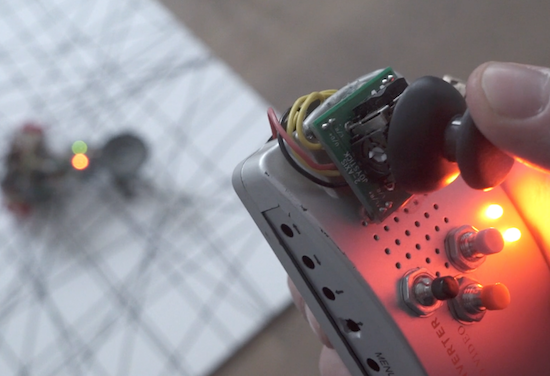
A customized remote operates the robot. The controller is equipped with an Arduino Nano and a joystick that guides pzr-10, while buttons manipulate the sound.

You can read more about the robotic installation on ::vtol::’s page.


Arduino Blog 16 Dec 22:14

Revealed: Homebrew Controller Working in Steam VR

[Florian] has been putting a lot of work into VR controllers that can be used without interfering with a regular mouse + keyboard combination, and his most recent work has opened the door to successfully emulating a Vive VR controller in Steam VR. He uses Arduino-based custom hardware on the hand, a Leap Motion controller, and fuses the data in software.

We’ve seen [Florian]’s work before in successfully combining a Leap Motion with additional hardware sensors. The idea is to compensate for the fact that the Leap Motion sensor is not very good at detecting some types of movement, such as tilting a fist towards or away from yourself — a movement similar to aiming a gun up or down. At the same time, an important goal is for any added hardware to leave fingers and hands free.

[Florian]’s DIY VR hand controls emulate the HTC Vive controllers in Valve’s Steam VR Tracking with a software chain that works with his custom hardware. His DIY controller doesn’t need to be actively held because by design it grips the hand, leaving fingers free to do other tasks like typing or gesturing.

Last time we saw [Florian]’s work, development was still heavy and there wasn’t any source code shared, but there’s now a git repository for the project with everything you’d need to join the fun. He adds that “I see a lot of people with Wii nunchucks looking to do this. With a few edits to my FreePIE script, they should be easily be able to enable whatever buttons/orientation data they want.”

We have DIY hardware emulating Vive controllers in software, and we’ve seen interfacing to the Vive’s Lighthouse hardware with DIY electronics. There’s a lot of hacking around going on in this area, and it’s exciting to see what comes next.


Filed under: Arduino Hacks, Virtual Reality

Create the ultimate Christmas jumper with Arduino

We’ve seen plenty of Arduino-equipped holiday sweaters over the years, but none as teched-out as this one. Last Christmas, UK-based Makerspace fizzPOP and electronics retailer Maplin teamed up to create quite the fun and festive jumper.

The aptly named “Ultimate Christmas Jumper” features an Uno, a Mega, an Adafruit FLORA, four 8×8 LED panels, some NeoPixels, a portable 10,000mAh power bank, as well as a pair of electret microphone amplifiers that enable it to react to sounds.

A sewn-on, 3D-printed fireplace holds the display, which as you can see in the video below, flashes a series of holiday images ranging from Santa, to Rudolph, to season’s greetings.

Want to wear one to your next party? Lucky for you, fizzPOP and Maplin have put together a video tutorial to help get you started!

10 Merry Circuits to Illuminate Your Holiday

This holiday season there are so many ways to customize your lights with DIY electronics.

Read more on MAKE

The post 10 Merry Circuits to Illuminate Your Holiday appeared first on Make: DIY Projects and Ideas for Makers.

Arduino Lighting Controller With Remote Twist

The time for putting up festive lights all around your house is nigh, and this is a very popular time for those of us who use the holiday season as an excuse to buy a few WiFi chips and Arduinos to automate all of our decorations. The latest in this great tradition is [Real Time Logic]’s cloud-based Christmas light setup.

In order to give public access to the Christmas light setup, a ESP8266 WiFi Four Relay board was configured with NodeMCU. This allows for four channels for lights, which are controlled through the Light Controller Server software. Once this is setup through a domain, all anyone has to do to change the lighting display is open up a web browser and head to the website. The creators had homeowners, restaurants, and church displays in mind, but it’s not too big of a leap to see how this could get some non-holiday use as well.

The holidays are a great time to get into the hacking spirit. From laser-projected lighting displays to drunk, animatronic Santas, there’s almost no end to the holiday fun, and you’ve still got a week! (Or 53!)


Filed under: Holiday Hacks
Hack a Day 16 Dec 03:00

This phone-controlled robot can beat you in air hockey

Air hockey is a classic arcade game consisting of two players, two paddles, a puck, and a low-friction table. But what happens if you don’t have an opponent? If you’re Jose Julio, you build a robotic one out of 3D printer parts.

An updated version of his earlier design from 2014, Julio upgraded the Air Hockey Robot’s original camera and vision system to a smartphone for its eyes and brain. Other components include an Arduino, an ESP8266-based shield, NEMA 17 stepper motors, stepper motor drivers, as well as some belts, bearings, rods, and a few more 3D-printed pieces.

As you can see in Julio’s video below, the robot moves along two different axes with a paddle to cover its half of the table. An Android phone running the Air Hockey Robot EVO app monitors the playing surface, and makes real-time decisions by tracking the puck’s location and predicting its trajectories.

The smartphone’s camera is looking at the playing court. The camera’s captured data is processed in real-time by the smartphone. Detecting the position of the puck and the “pusher robot” (and according to the current location of all the elements on the court), your smartphone makes decisions and commands the robot what to do via Wi-Fi.

Your smartphone will become an augmented reality device, showing predicted trajectories and position of all the objects involved in this game.

Want your own? Julio has made both the instructions and code available to everyone.