Posts with «arduino» label

Scare away unwanted guests with an eye-moving portrait

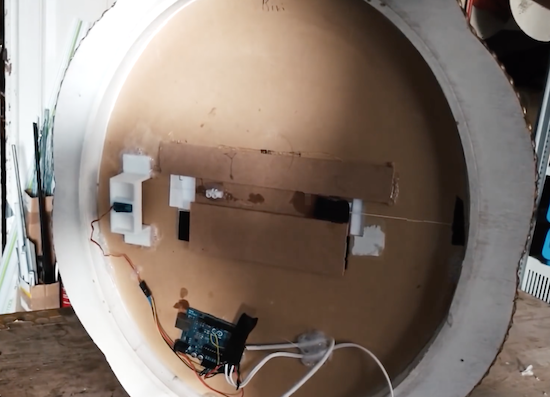
There are certainly many ways to generate an old-looking portrait with moving eyes, but this method from Sonic Robots is simple and seems quite effective. The basic formula is to buy a Victorian-like frame, get a picture of a loved/hated/random person (preferably tweaked to resemble an antique oil painting), then put a strip of paper with eyes printed on it behind the person’s eye sockets.

This eyeball strip is pulled by a servo via a fishing line, and importantly, a rubber band keeps tension on it from the other side. This allows it to quickly snap back into place, creating an effect where the eyes randomly move then stay in place for a while, hopefully causing someone to question his or her sanity.

Since everything is Arduino Uno-based, this could be expanded to include sensors for eye control, or even lighting effects as desired.

You can find more details on the project on SonicRobots.com and its code on GitHub.

Watch an Arduino Mega-based robot play the bagpipes

Using gigantic hands scaled up from a prosthetic design, “XenonJohn” can now hear the sweet sounds of Scotland whenever he wants.

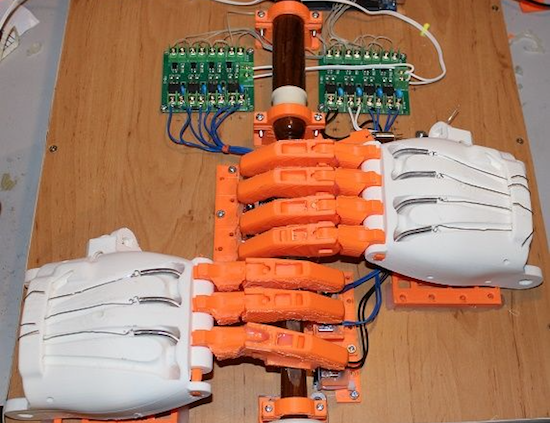
Seeing this invention, you might note to yourself that most instrument-playing robots don’t actually bother to have realistic—if huge, at 171% normal print size—hands attached. Then again, you probably haven’t seen a robot configured to play the bagpipes.

The robot named Ardu McDuino plays the bagpipes, or rather the chanter part that is manipulated with one’s fingers, using actual prosthetic fingers to cover the holes. It also has a less-realistic “thumb” to cover a hole on the back.

Everything is controlled using an Arduino Mega via a bank of opto-isolated MOSFETs, along with solenoids to let it grip the individual air holes for music generation. You can read more about this project on its Instructables page!

Ardu McDuino Plays the Bagpipes

To “pipe in” the new year, [John] decided to build a bagpipe-playing robot. Unlike other instrument-playing robots that we’ve seen before, this one is somewhat anatomically correct as well. John went the extra mile and 3D printed fingers and hands to play his set of pipes.

The brains of the robot are handled by an Arduino Mega 2560, which drives a set of solenoids through a driver board. The hands themselves are printed from the open source Enabling the Future project which is an organization that 3D prints prosthetic hands for matched recipients, especially people who can’t otherwise afford prosthetics. He had to scale up his hands by 171% to get them to play the pipes correctly, but from there it was a fairly straightforward matter of providing air to the bag (via a human being) and programming the Arduino to play a few songs.

The bagpipe isn’t a particularly common instrument (at least in parts of the world that aren’t Scottish) so it’s interesting to see a robot built to play one. Of course, your music-playing robot might be able to make music with something that’s not generally considered a musical instrument at all. And if none of these suit your needs, you can always build your own purpose-built semi-robotic instrument as well.


Filed under: musical hacks

Cozy Coupe toy car retrofitted with Arduino

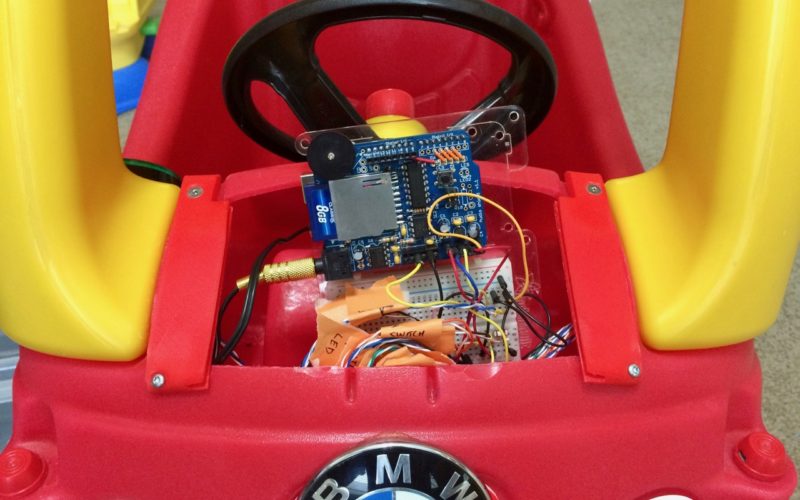
Using an Arduino Uno along with an Adafruit Wave Shield, Brent Chapman added more features to the Little Tikes Cozy Coupe including a push-to-start ignition and a sound system.

Although Chapman notes that the Coupe comes with some onboard entertainment options, he thought “his client” deserved something a bit more high-tech. This meant that he retrofitted the classic toy with several pushbuttons that allow him to select a fun song to play and replaced the key with a giant arcade button. He also 3D-printed a replacement hood for the car to cover the electronics, since the original was modified to fit them inside.

Per the second video on the project’s page, his little client seems to be hesitant at first, but eventually starts happily car-dancing along to Mickey Mouse Clubhouse’s  “Hot Dog Dance” tune that parents will probably be familiar with.

You can see the entire build, including videos and code, here or follow Chapman on Twitter to see what he’s up to next!

The Cozy Coupe gets a much needed upgrade thanks to @arduino and the wave shield from @adafruithttps://t.co/9Y4UE5Z4Vu #ArduinoMonday pic.twitter.com/U1xWwQF9Bx

— Brent Chapman (@brentmore) January 9, 2017

3D Print and Program This Adorable Bipedal Arduino Bot

Build an Arduino-powered, 3D-printed, moon-walking bot with preprogrammed and custom gaits.

Read more on MAKE

The post 3D Print and Program This Adorable Bipedal Arduino Bot appeared first on Make: DIY Projects and Ideas for Makers.

Recording Functioning Muscles to Rehab Spinal Cord Injury Patients

[Diego Marino] and his colleagues at the Politecnico di Torino (Polytechnic University of Turin, Italy) designed a prototype that allows for patients with motor deficits, such as spinal cord injury (SCI), to do rehabilitation via Functional Electrical Stimulation. They devised a system that records and interprets muscle signals from the physiotherapist and then stimulates specific muscles, in the patient, via an electro-stimulator.

The acquisition system is based on a BITalino board that records the Surface Electromyography (sEMG) signal from the muscles of the physiotherapist, while they perform a specific exercise designed for the patient’s rehabilitation plan. The BITalino uses Bluetooth to send the data to a PC where the data is properly crunched in Matlab in order to recognize and to isolate the muscular activity patterns.

After that, the signals are ‘replayed’ on the patient using a relay-board connected to a Globus Genesy 600 electro-stimulator. This relay board hack is mostly because the Globus Genesy is not programmable so this was a fast way for them to implement the stimulator. In their video we can see the muscle activation being replayed immediately after the ‘physiotherapist’ performs the movement. It’s clearly a prototype but it does show promising results.

It reminds us of the Myoelectric Hand, with humans instead. We featured an EMG tutorial a while back for those curious about this topic. Without taking the merit out of excellent and needed medical research, we all wait for the day that all our bio-signals can be easy read and translated to, let’s say, a huge avatar robot like METHOD-2. Right? Right?…


Filed under: Arduino Hacks, Medical hacks
Hack a Day 10 Jan 12:01

How to burn Arduino bootloader to atmega 328

In this post we will learn, how to burn hex file in avr microcontroller using programmer and burner software.

List of components/software:

1. USBasp programmer
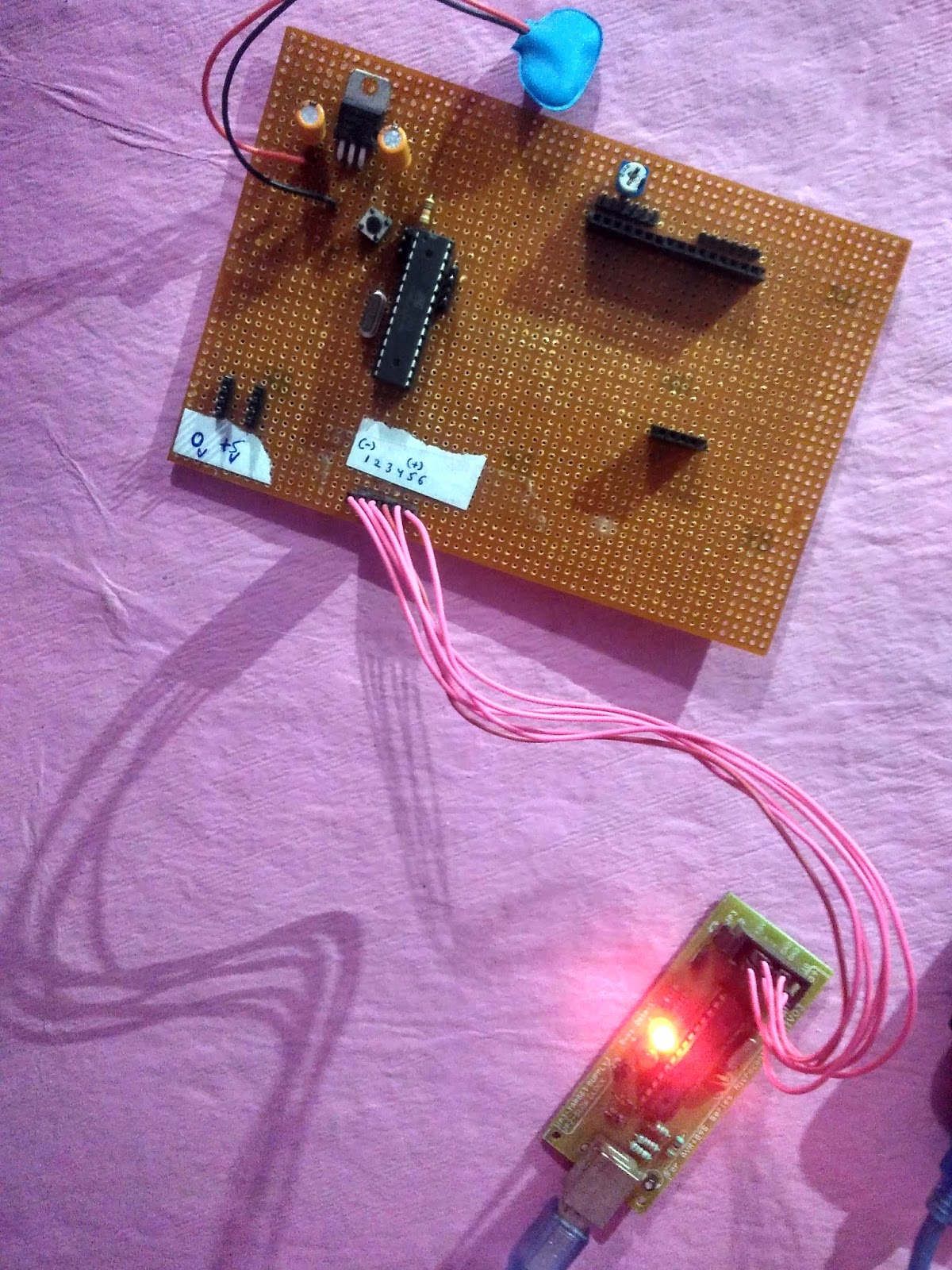
2. Target circuit board having microcontroller (mine have atmega328)
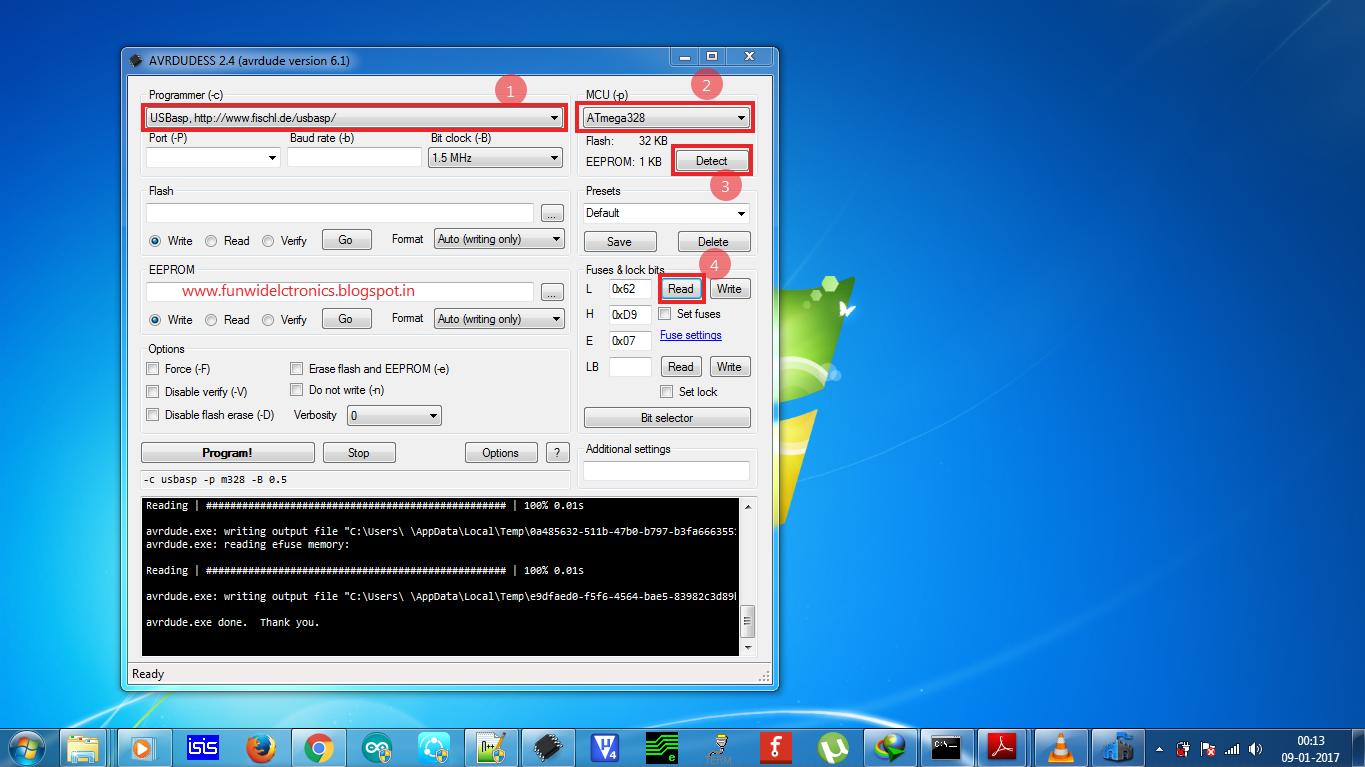
3. Avrdudes (Burner software)

Prerequisites:
USBasp driver installed in your system.
If it is not installed, then read instructions about installation from my previous post.
USBasp driver installation

Default fuse byte for atmega328 is: LFUSE = 0X62 and HFUSE = 0XD9. It might vary
This corresponds to internal rc oscillator

LFUSE = 0XFF and HFUSE = 0XDE
This corresponds to external oscillator having frequency 16 MHz

We can use internal as well as external oscillator. For the time being, we are using external crystal having 16 MHz frequency.


Connecting atmega328 to usbasp

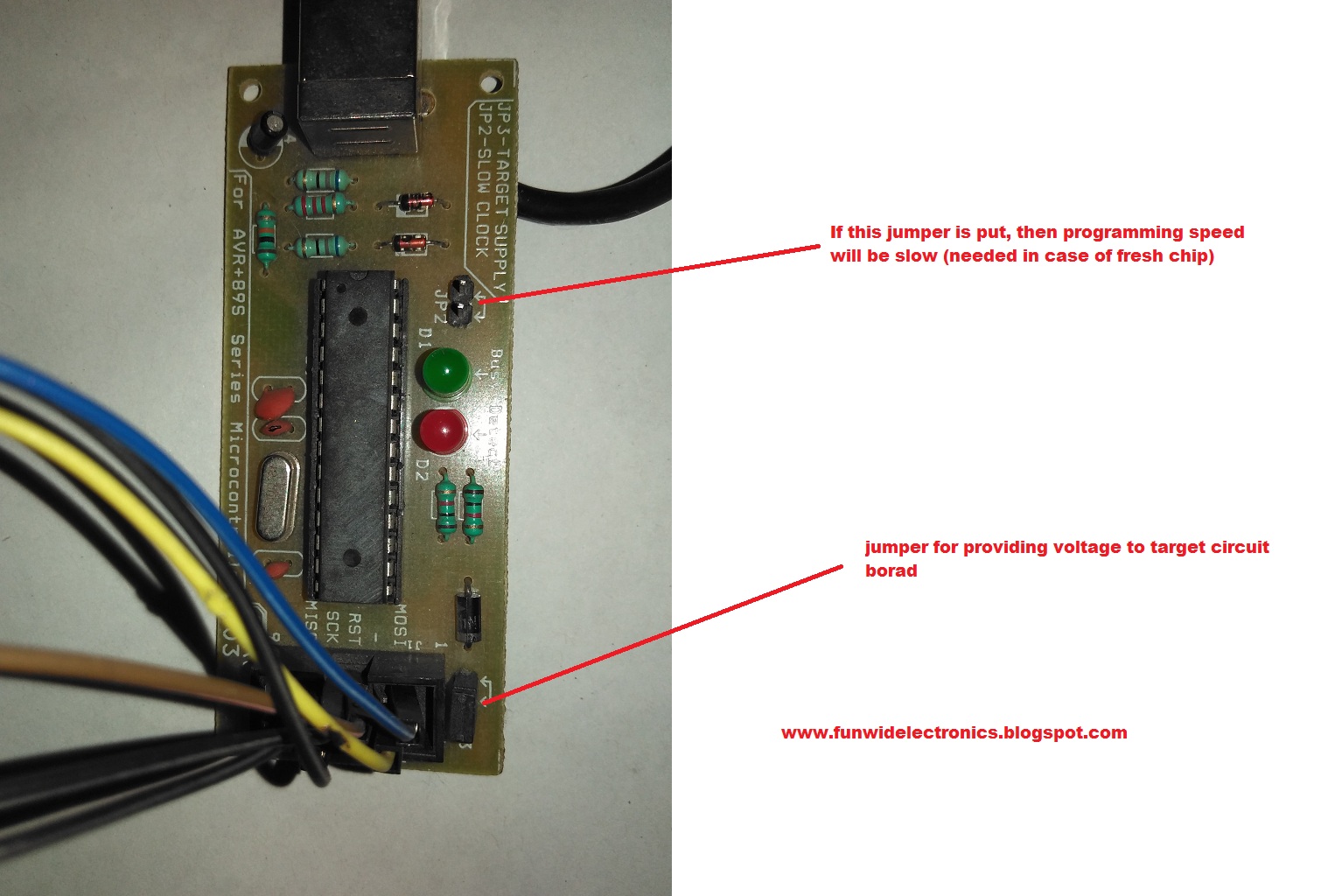
USBasp programmer


Using Usbasp programmer
Change the fuse bytes:


Check out the video:


The connections from USBasp programmer to target circuit board (atmega 8a is as follows):

USBASP                                    ATMEGA328
VCC                                           PIN NO. 7, 20, 21 (VCC, AREF, AVCC)
GND                                          PIN NO. 8, 22 (GND)
RST                                            PIN NO. 1 (RESET)
MOSI                                         PIN NO. 17 (MOSI)
MISO                                         PIN NO. 18 (MISO)
SCK                                           PIN NO. 19 (SCK)

The connection is same for any other microcontroller e.g. atmega 328, atmega 328P, atmega 168, etc.

Download avrdudes from the below link:

Thanks for visiting this blog.

Stay tuned for more tutorials

CES17: Arduino Unveils LoRa Modules For The Internet Of Things

WiFi and Bluetooth were never meant to be the radios used by a billion Internet of Things hats, umbrellas, irrigation systems, or any other device that makes a worldwide network of things interesting. The best radio for IoT is something lightweight which operates in the sub-Gigahertz range, doesn’t need a lot of bandwidth, and doesn’t suck down the power like WiFi. For the last few years, a new low-power wireless communication standard has been coming on the scene, and now this protocol — LoRa — will soon be available in an Arduino form factor.

The Primo, and NRF

It’s not LoRa, but the Arduino Primo line is based on the ESP8266 WiFi chip and a Nordic nRF52832 for Bluetooth. The Primo comes in the ever-familiar Arduino form factor, but it isn’t meant to be an ‘Internet of Things’ device. Instead, it’s a microcontroller for devices that need to be on the Internet.

Also on display at CES this year is the Primo Core which we first saw at BAMF back in May. It’s a board barely larger than a US quarter that has a few tricks up its sleeve. The Primo Core is built around the nRF52832, and adds humidity, temperature, 3-axis magnetometer and a 3-axis accelerometer to a square inch of fiberglass.

The Primo Core has a few mechanical tricks up its sleeve. Those castellated pins around the circumference can be soldered to the Alice Pad, a breakout board that adds a USB port and LiPo battery charger.

LoRa

Also on deck at the Arduino suite were two LoRa shields. In collobration with Semtech, Arduino will be releasing the pair of LoRa shields later this year. The first, the Node Shield, is about as simple as it can get — it’s simply a shield with a LoRa radio and a few connectors. The second, the Gateway Shield, does what it says on the tin: it’s designed to be a gateway from other Arduino devices (Ethernet or WiFi, for example) to a Node shield. The boards weren’t completely populated, but from what I could see, the Gateway shield is significantly more capable with support for a GPS chipset and antenna.

A partnership with Cayenne and MyDevices

Of course, the Internet of Things is worthless if you can’t manage it easily. Arduino has struck up a partnership with MyDevices to turn a bunch of low-bandwidth radio and serial connections into something easy to use. Already, we’ve seen a few builds and projects using MyDevices, but the demos I was shown were extremely easy to understand, even if there were far too many devices in the room.

All of this is great news if you’re working on the next great Internet of Things thing. The Primo Core is one of the smallest wireless microcontroller devices I’ve seen, and the addition of LoRa Arduino shields means we may actually see useful low-bandwidth networks in the very near future.


Filed under: Arduino Hacks, news

Arduino car alarm honks for help!

Sure, if you’re going to get a new ride, a model from the twenty-teens would be nice, but for hacking purposes, the simplicity of an older cars makes modification fairly simple. It also makes hot-wiring easy, and as they don’t generally have an alarm system, these vehicles are often targets for theft.

After his friend’s VW Beetle was stolen, Instructables user Ben Schroeder (aka “Pantopush”) decided that he needed to protect his 1966 Bug. So, as any Maker would do, he took matters into his own hands with a GPS-enabled Arduino Uno in a locked glove compartment.

Now, unless the unit is turned off, if it detects that the car is moving, it uses a relay to switch the horn on. Simple, effective (hopefully), and could be expanded to flash the lights or even text the owner with the location of the car.

Need a low-cost anti-theft system of your own? You can find the full writeup on Schroeder’s project page.

USB Arduino into AVR TPI Programmer

Turning an Arduino of virtually any sort into a simple AVR 6-pin ISP programmer is old hat. But when Atmel came out with a series of really tiny AVR chips, the ATtiny10 and friends with only six pins total, they needed a new programming standard. Enter TPI (tiny programming interface), and exit all of your previously useful DIY AVR programmers.

[Kimio Kosaka] wrote a dual-purpose TPI and ISP firmware for the ATmegaxxUn chips that are used as a USB-serial bridge on the Unos, and constitute the only chip on board a Leonardo or Micro. The catch? You’re going to have to do a little bit of fine-pitch soldering. Specifically, [Kosaka-san] wants you to get access to an otherwise obscured signal by drilling out a via. We’d do it just for that alone.

The rest of the procedure is to flash a DFU USB bootloader into the Arduino, then load up the flash-programmer code. Your former Arduino is now capable of flashing both old-school ISP AVR chips, as well as the tiny little ones that require TPI.

If you’re having deja vu, yes we have covered a DIY TPI programmer before, but it required a bespoke uploader software on your host computer. [Kosaka]’s version appears to the host as an Atmel programmer, and you can use any of the standard tools. And you get to try your hand at some fun fine-pitch solder work. That’s win-win!


Filed under: ATtiny Hacks
Hack a Day 06 Jan 09:01